

- Posts: 38
- Thank you received: 0
Inventory Tracking - Barcode Generator
15 years 7 months ago #11491
by joelstad
Inventory Tracking - Barcode Generator was created by joelstad
Hello -
So far the support has been amazing so I thought I would ask one more question. Hikashop is great for ordering but I still need another system for inventory management. Because I don't use Hikashop to sell products, I've heavily modified a few things to work best with what we're using it for.
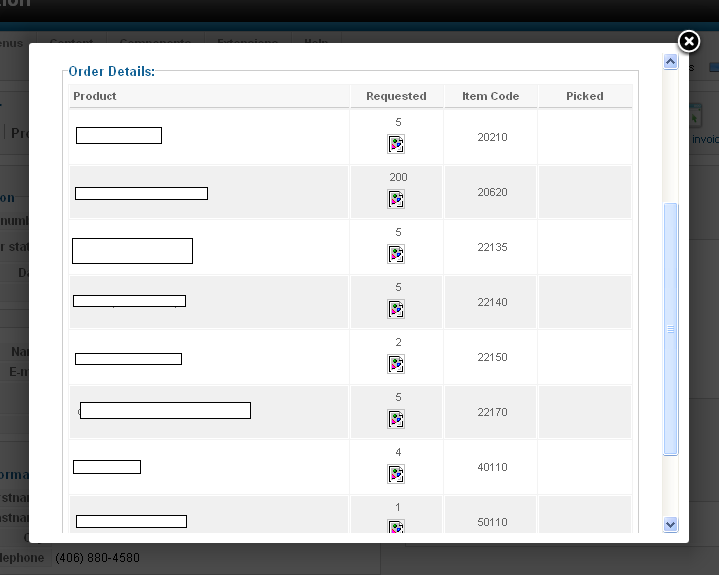
Attached is a screenshot of what my invoices look like. I need the item number and the quantity only so everything else was removed.
To enter this order into the inventory management system, I have to sit and 10 key it all in. It doesn't take long but if there were bar codes there instead, it would make entering the the orders really fast; they could just be scanned in. First the item and then the quantity; the inventory management system moves on automatically. The attached invoice only has 3 items on it but I could have some long lists to enter.
I'll start the project anyway but has anyone already tried adding bar codes to your invoices? Maybe it's an idea for future Hikashop releases?
I'll probably use this bar code generator and modify it: www.barcodephp.com/download.php

So far the support has been amazing so I thought I would ask one more question. Hikashop is great for ordering but I still need another system for inventory management. Because I don't use Hikashop to sell products, I've heavily modified a few things to work best with what we're using it for.
Attached is a screenshot of what my invoices look like. I need the item number and the quantity only so everything else was removed.
To enter this order into the inventory management system, I have to sit and 10 key it all in. It doesn't take long but if there were bar codes there instead, it would make entering the the orders really fast; they could just be scanned in. First the item and then the quantity; the inventory management system moves on automatically. The attached invoice only has 3 items on it but I could have some long lists to enter.
I'll start the project anyway but has anyone already tried adding bar codes to your invoices? Maybe it's an idea for future Hikashop releases?
I'll probably use this bar code generator and modify it: www.barcodephp.com/download.php
Please Log in or Create an account to join the conversation.

15 years 7 months ago #11504
by nicolas
Replied by nicolas on topic Re: Inventory Tracking - Barcode Generator
There is no such thing for now for hikashop. That could indeed be a nice addition. Maybe as a plugin ? We would need to trigger an event in that case when displaying the invoice.
Please Log in or Create an account to join the conversation.
15 years 7 months ago #11505
by joelstad
Replied by joelstad on topic Re: Inventory Tracking - Barcode Generator
It would be great! I'm a PHP novice so I'll likely destroy this project but it's worth a try. The item code is there already next to the product (well I moved it to its own column but whatever) and if we had an option to add a bar code under each product, the bar code could be the product ID and it could be scanned. I want to take it a step further and have a bar code for the quantity as well.
I think most could agree that it might help reduce order entering mistakes as I assume most users need to have an inventory management system of some kind.
I think most could agree that it might help reduce order entering mistakes as I assume most users need to have an inventory management system of some kind.
Please Log in or Create an account to join the conversation.
15 years 5 months ago - 15 years 5 months ago #15930
by joelstad
Replied by joelstad on topic Re: Inventory Tracking - Barcode Generator
I'm very close to getting this working but I need a hand.
What I have is a custom invoice with the item, the quantity requested and the item code. I want to generate a bar code under the quantity and under the item code.
Here is an example of the system working to generate one single bar code:
[Removed]
I need to dynamically create these bar codes. The image place holder is showing up but the image of the bar code itself is not.
Here is what I changed on invoice.php
Does anyone have any ideas?
What I have is a custom invoice with the item, the quantity requested and the item code. I want to generate a bar code under the quantity and under the item code.
Here is an example of the system working to generate one single bar code:
[Removed]
I need to dynamically create these bar codes. The image place holder is showing up but the image of the bar code itself is not.
Here is what I changed on invoice.php
Code:
<?php
$k=0;
foreach($this->order->products as $product){
?>
<tr class="row<?php echo $k;?>">
<td>
<?php echo $product->order_product_name;?>
</td>
<td>
<div align="center"><?php echo $product->order_product_quantity;?><br />
<?php
//session_start();
$_SESSION['bdata'] = $product->order_product_quantity;
echo "<img src='barcode.php?Genrate=Submit&file=&type=png'>";
?></div>
</td>
<?php if($this->invoice_type=='full'){?>
<td>
<div align="center"><?php echo $product->order_product_code;?></div>
</td>
<?php } ?>
<td align="center">
</td>
</tr>
<?php
$k=1-$k;
}
?>
Does anyone have any ideas?
Last edit: 15 years 5 months ago by joelstad.
Please Log in or Create an account to join the conversation.
15 years 5 months ago #15931
by joelstad
Replied by joelstad on topic Re: Inventory Tracking - Barcode Generator
It appears that the code I put in may not be showing up correctly. I tried three browsers and go three different results.
Attached is an image of the code I added to invoice.php.
Thanks!

Attached is an image of the code I added to invoice.php.
Thanks!
Please Log in or Create an account to join the conversation.
15 years 5 months ago #15932
by nicolas
Replied by nicolas on topic Re: Inventory Tracking - Barcode Generator
What is the code you have in the file barcode.php ?
Please Log in or Create an account to join the conversation.
15 years 5 months ago #15933
by joelstad
Replied by joelstad on topic Re: Inventory Tracking - Barcode Generator
I thought the file was uploaded, apologies.
mydtvhs.com/barcode.txt
There is the text version.
I didn't write it (find solutions before you build them) but I can explain some of the options.
Originally the variables for the bar code were gathered via a $_POST but I knew what I wanted all of them to be so I got rid of everything except what needed to be 'bar codeized' (the product code or quantity).
You can set the scale, the colors, etc but I manually set most of those. Because the image is built using the external file, I thought it was an issue with passing the contents of the variable on to barcode.php. I've tried a DB, session variable, $_POST and $_GET but I still don't know what's wrong.
I'm very new to PHP still so I usually struggle my way through things and manage to figure it out.
As you can see from my original post, I've been working on this for a month.
Anyhow, thanks again for taking a look.
mydtvhs.com/barcode.txt
There is the text version.
I didn't write it (find solutions before you build them) but I can explain some of the options.
Originally the variables for the bar code were gathered via a $_POST but I knew what I wanted all of them to be so I got rid of everything except what needed to be 'bar codeized' (the product code or quantity).
You can set the scale, the colors, etc but I manually set most of those. Because the image is built using the external file, I thought it was an issue with passing the contents of the variable on to barcode.php. I've tried a DB, session variable, $_POST and $_GET but I still don't know what's wrong.
I'm very new to PHP still so I usually struggle my way through things and manage to figure it out.
As you can see from my original post, I've been working on this for a month.
Anyhow, thanks again for taking a look.
Please Log in or Create an account to join the conversation.
15 years 5 months ago #15934
by nicolas
Replied by nicolas on topic Re: Inventory Tracking - Barcode Generator
I don't see where you set the header of the image: @header("Content-type: image/png");
It's only in the error function but you would have to put it for successful images as well, otherwise the browser will not display the image.
The coding to pass the variable is great but if you have several images on a page it won't work as it will only display the last image's code several time. You should use the $_REQUEST variable instead of $_SESSION and instead of setting it directly in the view, you should add the parameter in the URL of the image:
echo "<img src='barcode.php?Genrate=Submit&file=&type=png&bdata=".$product->order_product_quantity."'>";
and then:
$barnumber = $_REQUEST;
It's only in the error function but you would have to put it for successful images as well, otherwise the browser will not display the image.
The coding to pass the variable is great but if you have several images on a page it won't work as it will only display the last image's code several time. You should use the $_REQUEST variable instead of $_SESSION and instead of setting it directly in the view, you should add the parameter in the URL of the image:
echo "<img src='barcode.php?Genrate=Submit&file=&type=png&bdata=".$product->order_product_quantity."'>";
and then:
$barnumber = $_REQUEST;
Please Log in or Create an account to join the conversation.
15 years 5 months ago #15937
by joelstad
Replied by joelstad on topic Re: Inventory Tracking - Barcode Generator
Thanks so much for the help, I can't say it enough.
I made the changes and the index.php test page I'm using to make sure the code still works will still generate a bar code but the invoice is failing.
Any idea where @header("Content-type: image/png"); should be placed for successful images? I tried in the invoice.php file just above the echo but that didn't change anything. I also tried it above $im=@imagecreatetruecolor($total_x, $total_y); at about line 266 but that didn't work. I tried it above $return = $bar->genBarCode($barnumber,png,''); at line 338 and nothing changed.
Ultimately this isn't an issue with Hikashop so I understand if you don't have another suggestion. I'm grateful for what I got. :0)
--Joel
I made the changes and the index.php test page I'm using to make sure the code still works will still generate a bar code but the invoice is failing.
Any idea where @header("Content-type: image/png"); should be placed for successful images? I tried in the invoice.php file just above the echo but that didn't change anything. I also tried it above $im=@imagecreatetruecolor($total_x, $total_y); at about line 266 but that didn't work. I tried it above $return = $bar->genBarCode($barnumber,png,''); at line 338 and nothing changed.
Ultimately this isn't an issue with Hikashop so I understand if you don't have another suggestion. I'm grateful for what I got. :0)
--Joel
Please Log in or Create an account to join the conversation.
15 years 5 months ago #15938
by nicolas
Replied by nicolas on topic Re: Inventory Tracking - Barcode Generator
It should indeed be your barcode.php file. Before adding the barcode in an image in hikashop.
You should make sure that your library is generating the barcode correctly by using directly the link in your browser:
barcode.php?Genrate=Submit&file=&type=png&bdata=test
That should display directly the image in your browser. That will allow you to more easily put traces in the code and understand where it's failing.
You should make sure that your library is generating the barcode correctly by using directly the link in your browser:
barcode.php?Genrate=Submit&file=&type=png&bdata=test
That should display directly the image in your browser. That will allow you to more easily put traces in the code and understand where it's failing.
Please Log in or Create an account to join the conversation.
15 years 5 months ago - 15 years 5 months ago #15939
by joelstad
Replied by joelstad on topic Re: Inventory Tracking - Barcode Generator
The library appears to work correctly:
[Removed]
If I print this page and scan it to a text file, the scanner reads it ok.
I'll continue to look at it some more.
Thanks again! :0)
[Removed]
If I print this page and scan it to a text file, the scanner reads it ok.
I'll continue to look at it some more.
Thanks again! :0)
Last edit: 15 years 5 months ago by joelstad.
Please Log in or Create an account to join the conversation.
15 years 5 months ago #15940
by nicolas
Replied by nicolas on topic Re: Inventory Tracking - Barcode Generator
So, since the library is working, you should use that code:
echo '<img src=" mydtvhs.com/administrator/components/com...ng&bdata='.$product- >order_product_quantity.'">';
echo '<img src=" mydtvhs.com/administrator/components/com...ng&bdata='.$product- >order_product_quantity.'">';
Please Log in or Create an account to join the conversation.
15 years 5 months ago #15941
by joelstad
Replied by joelstad on topic Re: Inventory Tracking - Barcode Generator
And it worked and is now showing the bar codes on the invoices.
Thank you, thank you, thank you! I have to change the height and a few minor things but I'm sure I can manage that. I also need to make sure it's generating the bar code correctly so the scanner can read it but it's nearly there.
--Joel
Thank you, thank you, thank you! I have to change the height and a few minor things but I'm sure I can manage that. I also need to make sure it's generating the bar code correctly so the scanner can read it but it's nearly there.
--Joel
Please Log in or Create an account to join the conversation.

13 years 2 months ago - 13 years 2 months ago #118786
by lifemore
Replied by lifemore on topic Inventory Tracking - Barcode Generator
for inventory manegenment, barcode generator is a necessity when you want to enter number and quality of the product. it iwll make you save a lot of time. so i have been searching for such tool/. here is what i find about tutorial to bar
tutorial to barcode generator
. take a look.
Last edit: 13 years 2 months ago by lifemore.
Please Log in or Create an account to join the conversation.

13 years 2 months ago #118827
by Jerome
Jerome - Obsidev.com
HikaMarket & HikaSerial developer / HikaShop core dev team.
Replied by Jerome on topic Inventory Tracking - Barcode Generator
Hi,
Thanks for the link but unfortunately it couldn't help because it's a c# library, not a PHP one.
But, since the creation of this thread 2 years ago, we have made some improvements and some new tools.
HikaSerial embedded a barcode generator and a QRcode generator. His library could be use for the generation of such images with a little development.
Regards,
Thanks for the link but unfortunately it couldn't help because it's a c# library, not a PHP one.
But, since the creation of this thread 2 years ago, we have made some improvements and some new tools.
HikaSerial embedded a barcode generator and a QRcode generator. His library could be use for the generation of such images with a little development.
Regards,
Jerome - Obsidev.com
HikaMarket & HikaSerial developer / HikaShop core dev team.
Please Log in or Create an account to join the conversation.
12 years 11 months ago - 12 years 11 months ago #132526
by Donna111
Although i am not the common user of barcode,i've tried a free trial from a barcode generator.It turns out to be convenient to own a powerful barcode generator.Is it possible for HikaSerial to read a QRcode offline?
Thanks a lot.
Replied by Donna111 on topic Inventory Tracking - Barcode Generator
HI thereJerome wrote: Hi,
Thanks for the link but unfortunately it couldn't help because it's a c# library, not a PHP one.
But, since the creation of this thread 2 years ago, we have made some improvements and some new tools.
HikaSerial embedded a barcode generator and a QRcode generator. His library could be use for the generation of such images with a little development.
Regards,
Although i am not the common user of barcode,i've tried a free trial from a barcode generator.It turns out to be convenient to own a powerful barcode generator.Is it possible for HikaSerial to read a QRcode offline?
Thanks a lot.
Last edit: 12 years 11 months ago by Jerome.
Please Log in or Create an account to join the conversation.
12 years 11 months ago - 12 years 11 months ago #132569
by Jerome
Jerome - Obsidev.com
HikaMarket & HikaSerial developer / HikaShop core dev team.
Replied by Jerome on topic Inventory Tracking - Barcode Generator
Hi,
HikaSerial is a web software, it is not a computer software.
Like I said the last time : It is not a C/C++/C#/Java/Objective-C/... program.
HikaSerial can generate QRCode (already)
HikaSerial can't read QRCode (and it will never have such feature)
So you can stop posting C# code and posting your commercial links to some C# libraries here (each of your message contain links so...).
I prefer not to, but if you continue I will have to ban you permanently and ban automatically every user who post a link to your website.
Hope it is clear enough.
Regards,
HikaSerial is a web software, it is not a computer software.
Like I said the last time : It is not a C/C++/C#/Java/Objective-C/... program.
HikaSerial can generate QRCode (already)
HikaSerial can't read QRCode (and it will never have such feature)
So you can stop posting C# code and posting your commercial links to some C# libraries here (each of your message contain links so...).
I prefer not to, but if you continue I will have to ban you permanently and ban automatically every user who post a link to your website.
Hope it is clear enough.
Regards,
Jerome - Obsidev.com
HikaMarket & HikaSerial developer / HikaShop core dev team.
Last edit: 12 years 11 months ago by Jerome.
Please Log in or Create an account to join the conversation.
Time to create page: 0.151 seconds