
- Posts: 38
- Thank you received: 0
Hide Module on Checkout Page
15 years 6 months ago #11506
by joelstad
Hide Module on Checkout Page was created by joelstad
Attached is an image of my checkout page using one of the templates that came with 1.6. I love the order/cart on the right side throughout the ordering process but I'd like to hide it on the checkout screen only.
Is there anything I can add to hide this module on just the checkout screen? Users are pressing the 'Complete Order' button again instead of the 'Next' button at the bottom and it's a little confusing. I want to continue to use this template because it's very slim and only has three two basic colors; it will also never be seen by the public so it doesn't matter what it looks like.
I'm thinking I would have to add a check of some kind in the template itself; maybe to check to see what page we're on? *shrug* I don't know.
I appreciate the help! :0)
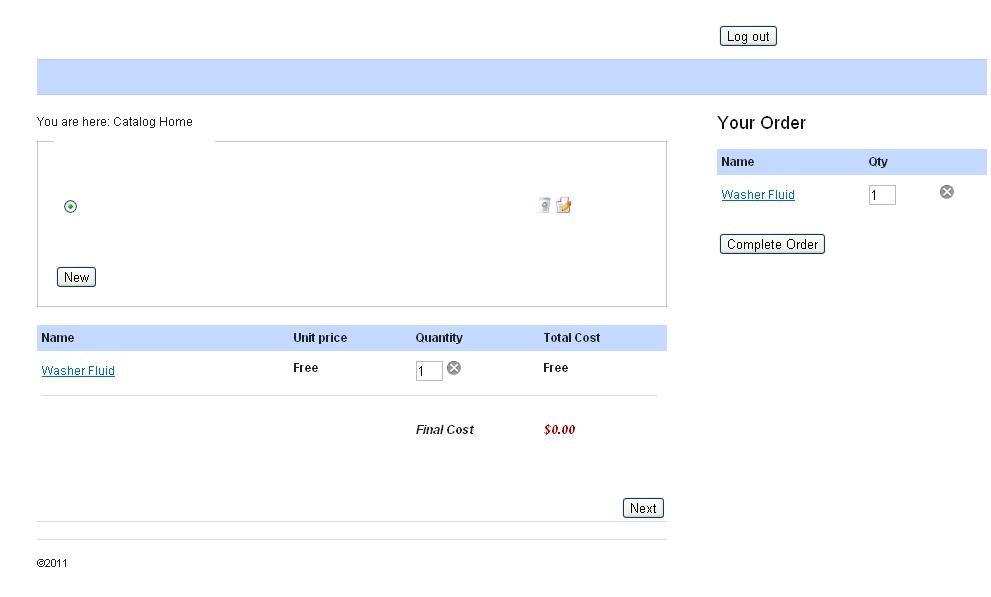
Is there anything I can add to hide this module on just the checkout screen? Users are pressing the 'Complete Order' button again instead of the 'Next' button at the bottom and it's a little confusing. I want to continue to use this template because it's very slim and only has three two basic colors; it will also never be seen by the public so it doesn't matter what it looks like.
I'm thinking I would have to add a check of some kind in the template itself; maybe to check to see what page we're on? *shrug* I don't know.
I appreciate the help! :0)
Please Log in or Create an account to join the conversation.

15 years 6 months ago #11508
by nicolas
Replied by nicolas on topic Re: Hide Module on Checkout Page
In the config, under the tab checkout, you have the option "force menu on the checkout". There you can set a special menu. Then, in the options of your hikashop cart module, you can restrict its display to all the pages except that menu and voilà.
Please Log in or Create an account to join the conversation.
15 years 6 months ago #11512
by joelstad
Replied by joelstad on topic Re: Hide Module on Checkout Page
This worked like a charm! Even with the new menu item unpublished, it appears to allow you to checkout fine without the extra cart on the side.
Now to edit the 'Next' button to something different and I'm in good shape.
Now to edit the 'Next' button to something different and I'm in good shape.
Please Log in or Create an account to join the conversation.
15 years 6 months ago #11527
by nicolas
Replied by nicolas on topic Re: Hide Module on Checkout Page
You can change all the texts in HikaShop by using the override area when editing your translation file via the interface in the config under the tab languages.
Please Log in or Create an account to join the conversation.

Less
More
- Posts: 9
- Thank you received: 0
14 years 3 weeks ago #65471
by KandicePieterse
Replied by KandicePieterse on topic Re: Hide Module on Checkout Page
Nicolas, this post is just what I've been looking for, but what do you mean by 'Special Menu'? What would I have to create?
Please Log in or Create an account to join the conversation.
14 years 3 weeks ago #65622
by nicolas
Replied by nicolas on topic Re: Hide Module on Checkout Page
I wanted to say "specific", not "special".
Basically whatever menu you want which is not a hikashop product/category listing menu.
Basically whatever menu you want which is not a hikashop product/category listing menu.
Please Log in or Create an account to join the conversation.
Time to create page: 0.180 seconds