

- Posts: 16
- Thank you received: 0
How to get the Category Description to Display
15 years 7 months ago #11515
by kinkeld
How to get the Category Description to Display was created by kinkeld
How do I get the description for a category to display. When a category is selected by a customer I would like to send them to the products page for that category, which it does. But I would like the category description to display above the products in that category. Website is
www.phoenixrbt.com
. Select UTM kits and Ammo in the top, right side menu to see an example. Once selected a page displays showing 4 categories. The Rifle Conversion kits has a description created but it doesn't display. Thank you. Dan
Please Log in or Create an account to join the conversation.

15 years 7 months ago #11530
by nicolas
Replied by nicolas on topic Re: How to get the Category Description to Display
In your menu, you need to go in the hikashop options and then turn on the "show description" option.
Please Log in or Create an account to join the conversation.
15 years 7 months ago #11578
by kinkeld
Replied by kinkeld on topic Re: How to get the Category Description to Display
I can't believe I didn't catch that. I feel like an idiot for wasting your time on that one. Thank you very much! Dan
Please Log in or Create an account to join the conversation.
15 years 7 months ago #12019
by jmilli
Replied by jmilli on topic Re: How to get the Category Description to Display
I'm sorry, but I could not find the options menu discussed.
Where do I find this?
Thanks.
Where do I find this?
Thanks.
Please Log in or Create an account to join the conversation.
15 years 7 months ago #12020
by nicolas
Replied by nicolas on topic Re: How to get the Category Description to Display
It's the menu Display->Content menus. Then click on your menu name and you will see the options of your menu
Please Log in or Create an account to join the conversation.

13 years 2 months ago #120939
by endpoint
I have done this but the content still will not display, the image will but no text.
Replied by endpoint on topic Re: How to get the Category Description to Display
nicolas wrote: It's the menu Display->Content menus. Then click on your menu name and you will see the options of your menu
I have done this but the content still will not display, the image will but no text.
Please Log in or Create an account to join the conversation.

13 years 2 months ago #120988
by Eliot
Replied by Eliot on topic Re: How to get the Category Description to Display
Are you sure the associated category has a description?
Could you post a screenshot of the menu configuration plus the category configuration?
Could you post a screenshot of the menu configuration plus the category configuration?
Please Log in or Create an account to join the conversation.
13 years 2 months ago - 13 years 2 months ago #121140
by endpoint
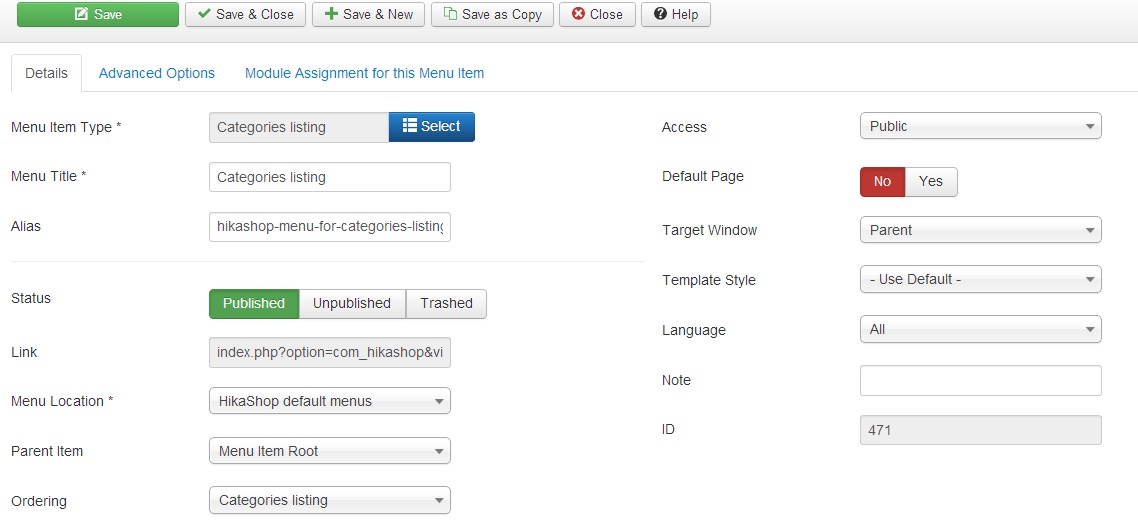
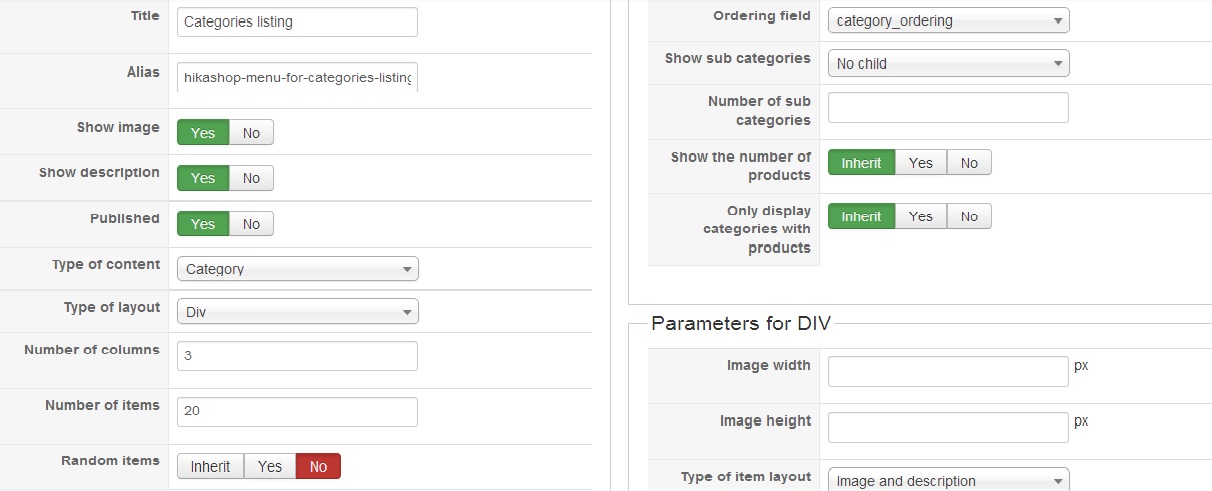
Hope this helps
Yes there is text in the description box.
Replied by endpoint on topic Re: How to get the Category Description to Display
Hope this helps
Yes there is text in the description box.
Last edit: 13 years 2 months ago by endpoint.
Please Log in or Create an account to join the conversation.

13 years 2 months ago #121207
by Xavier
Replied by Xavier on topic Re: How to get the Category Description to Display
Hi,
Have you edited any view related on the categories ?
Have you edited any view related on the categories ?
Please Log in or Create an account to join the conversation.
Time to create page: 0.093 seconds