

- Posts: 71
- Thank you received: 1
Menu Links & Taxes
15 years 6 months ago #12294
by jerrico
Menu Links & Taxes was created by jerrico
My website is:
wakeclothing.com/index.php/shop
I needed to add drop down menu links directly to each category. I created an external menu link to each category - is there a way to do it within hikashop?
By doing this - the taxes only for the state of TN are not working - everything is getting taxed.
What do I need to do to get the taxes working only in TN - or setting up a simple menu link to each category?
Thanks - I just purchased your extension today and posted a great review on joomla.org.
Jackie
I needed to add drop down menu links directly to each category. I created an external menu link to each category - is there a way to do it within hikashop?
By doing this - the taxes only for the state of TN are not working - everything is getting taxed.
What do I need to do to get the taxes working only in TN - or setting up a simple menu link to each category?
Thanks - I just purchased your extension today and posted a great review on joomla.org.
Jackie
Please Log in or Create an account to join the conversation.
15 years 6 months ago #12305
by jerrico
Replied by jerrico on topic Re: Menu Links & Taxes
To further clarify -
my links from the top drop down menu are now working and taxes are no longer showing up on these pages.
I am still having issues with taxes. I have added the zone TN (9.25% tax) for orders shipping within the state of TN. All other states should not have tax. Since I upgraded (and added the new drop down links), the cart is now adding taxes to all states. I have assigned the TN state tax category to each product. It is charging 9.25% tax regardless of if the buyer is in TN or other states.
Also - I have since added a menu in the left hand column using the content modules. The categories are showing on the home shoppping page: wakeclothing.com/index.php/shop
But if you click onto one of the pages - the subitems disappear: wakeclothing.com/index.php/shop/category...ing/cid-11/name-hats
And only the title appears. Any ideas on what I am doing wrong in setting up the menus?
my links from the top drop down menu are now working and taxes are no longer showing up on these pages.
I am still having issues with taxes. I have added the zone TN (9.25% tax) for orders shipping within the state of TN. All other states should not have tax. Since I upgraded (and added the new drop down links), the cart is now adding taxes to all states. I have assigned the TN state tax category to each product. It is charging 9.25% tax regardless of if the buyer is in TN or other states.
Also - I have since added a menu in the left hand column using the content modules. The categories are showing on the home shoppping page: wakeclothing.com/index.php/shop
But if you click onto one of the pages - the subitems disappear: wakeclothing.com/index.php/shop/category...ing/cid-11/name-hats
And only the title appears. Any ideas on what I am doing wrong in setting up the menus?
Please Log in or Create an account to join the conversation.
15 years 6 months ago #12324
by jerrico
Replied by jerrico on topic Re: Menu Links & Taxes
Actually - it sometimes is still showing tax on the product listing pages in the drop down menu, and other times it is showing simply the product total. I never want it to show taxes until checkout and have set the settings as such...
Please Log in or Create an account to join the conversation.

15 years 6 months ago #12325
by nicolas
Replied by nicolas on topic Re: Menu Links & Taxes
Hi,
Could you try the fix in that post: www.hikashop.com/en/support/forum/4-how-...ere-is-it.html#12323
We just found about that bug today in the latest version.
For your left module, please make sure that the content synchronization option in the hikashop options of your module is turned off.
Could you try the fix in that post: www.hikashop.com/en/support/forum/4-how-...ere-is-it.html#12323
We just found about that bug today in the latest version.
For your left module, please make sure that the content synchronization option in the hikashop options of your module is turned off.
Please Log in or Create an account to join the conversation.
15 years 6 months ago #12565
by jerrico
Replied by jerrico on topic Re: Menu Links & Taxes
I changed the code, and while the taxes seem to be working for nonTN states, I am unable to select the state of Tennessee in the new address selection (it no longer exists as a choice.).
It is still a published zone, and it is still a published tax category. (?)
What are my next steps?
Jackie
It is still a published zone, and it is still a published tax category. (?)
What are my next steps?
Jackie
Please Log in or Create an account to join the conversation.
15 years 6 months ago #12566
by jerrico
Replied by jerrico on topic Re: Menu Links & Taxes
Also - taxes still seem to be adding into product listing pages, even though I have checked to only show price (don't show tax until checkout).
Please Log in or Create an account to join the conversation.
15 years 6 months ago #12570
by nicolas
Replied by nicolas on topic Re: Menu Links & Taxes
You need to keep the tennessee zone as a state zone, not a tax zone. You can still use it in your tax rules.
Did you set the "price without tax" option in the hikashop options of your products listing menu ?
Did you set the "price without tax" option in the hikashop options of your products listing menu ?
Please Log in or Create an account to join the conversation.
15 years 6 months ago #12578
by jerrico
Replied by jerrico on topic Re: Menu Links & Taxes
OK - it is now billing the tax correctly, but I cannot get the pricing to show up with just the price (no tax until checkout).
Here are the settings I have selected:
Configuration > Main: My main tax tone is Tennessee - is this correct?
Configuration > Display: Default parameters for products; Show Tax Prices: No Tax
I am not seeing any tax selections in the content menu or content module areas.
Am I missing a selection?
Also - perhaps because of the way I have set up the menus: wakeclothing.com/
I have a drop down menu from the main menu, and then I also have a left hand column menu on the shop pages. Sometimes the pricing show up without tax, sometimes with tax. Lately - it seems to always include tax on my browser.
Here are the settings I have selected:
Configuration > Main: My main tax tone is Tennessee - is this correct?
Configuration > Display: Default parameters for products; Show Tax Prices: No Tax
I am not seeing any tax selections in the content menu or content module areas.
Am I missing a selection?
Also - perhaps because of the way I have set up the menus: wakeclothing.com/
I have a drop down menu from the main menu, and then I also have a left hand column menu on the shop pages. Sometimes the pricing show up without tax, sometimes with tax. Lately - it seems to always include tax on my browser.
Please Log in or Create an account to join the conversation.
15 years 6 months ago #12580
by nicolas
Replied by nicolas on topic Re: Menu Links & Taxes
It's not in the configuration but in the menu Display->content menus/modules that you can edit your menus/modules. There, you will have the same price options as in the configuration.
Please Log in or Create an account to join the conversation.
15 years 6 months ago #12583
by jerrico
Replied by jerrico on topic Re: Menu Links & Taxes
I must be going crazy - attached is the menu setup page (which looks identical to the module setup page).
Where is the tax setting?
I'm sorry - I'm sure it is right in front of me and I'm just missing the setting.
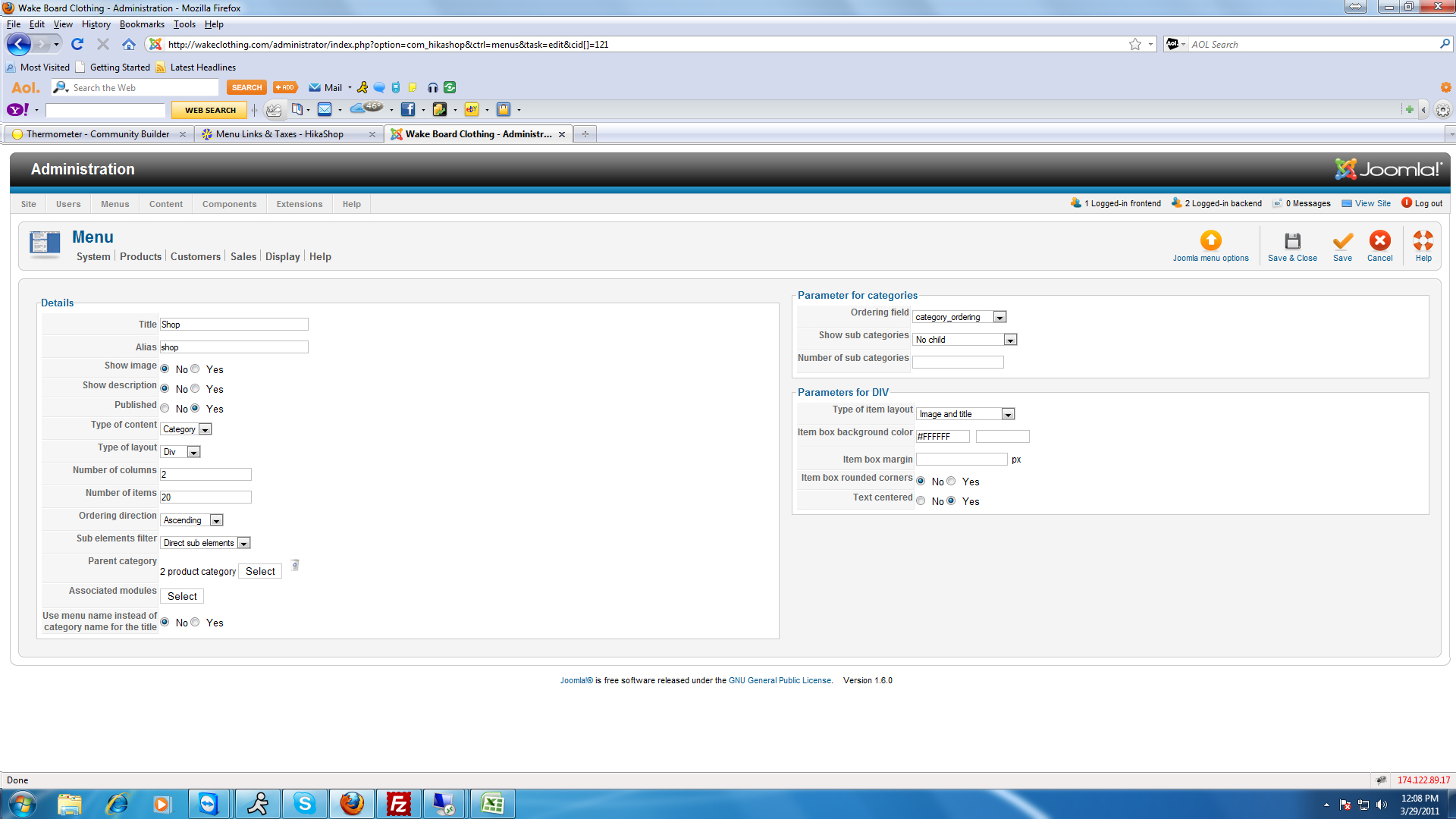
Where is the tax setting?
I'm sorry - I'm sure it is right in front of me and I'm just missing the setting.
Please Log in or Create an account to join the conversation.
15 years 6 months ago #12603
by nicolas
Replied by nicolas on topic Re: Menu Links & Taxes
Click the button select of the "associated modules" option. There, click on the published module. Then, click on the "hikashop options" link of that module and you will have the price options on the right.
Please Log in or Create an account to join the conversation.
15 years 6 months ago #12621
by jerrico
Replied by jerrico on topic Re: Menu Links & Taxes
OK - in order for me to see this "No Tax" setting - I have to change from category listing to "product". (When set as category - which is the setting I think I want - there is no option for "No Tax")
When I do this - the menu no longer shows up - it is blank.
wakeclothing.com/index.php/shop/product/.../category_pathway-10
Note - the top menu - Product Categories - lists each menu link - but taxes are showing in the price.
The 2nd menu - Categories - is not showing the links at all.
When I do this - the menu no longer shows up - it is blank.
wakeclothing.com/index.php/shop/product/.../category_pathway-10
Note - the top menu - Product Categories - lists each menu link - but taxes are showing in the price.
The 2nd menu - Categories - is not showing the links at all.
Please Log in or Create an account to join the conversation.
15 years 6 months ago #12634
by nicolas
Replied by nicolas on topic Re: Menu Links & Taxes
Please go in the menu Display->Content modules, edit the modules' options there and set the tax options there.
Please Log in or Create an account to join the conversation.
15 years 6 months ago #12644
by jerrico
Replied by jerrico on topic Re: Menu Links & Taxes
I think you missed my point. Let me take you step by step what I am doing...
1. Display > Content Module
Type of content: "Category"
No tax selections are available (see attached)
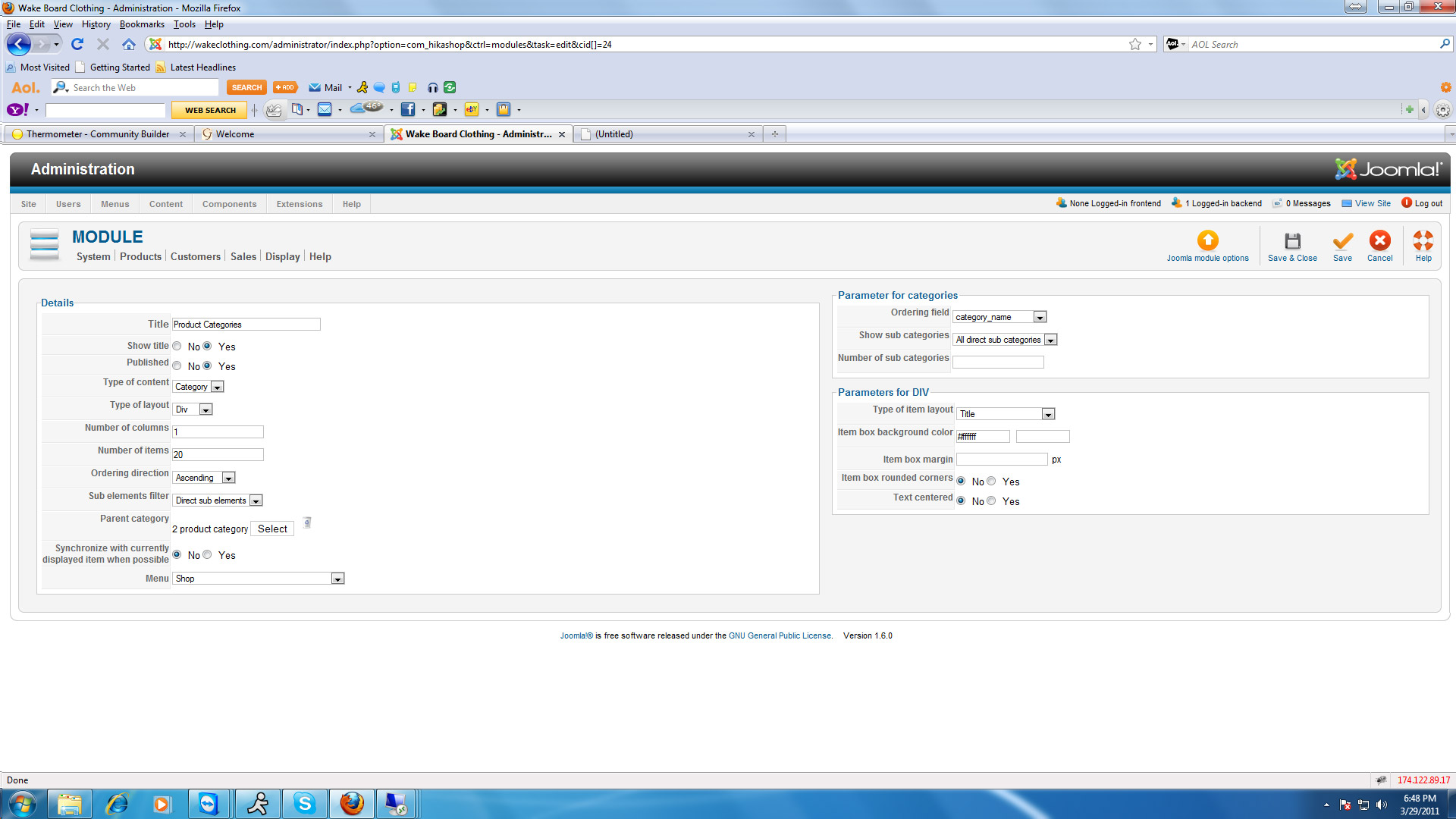
1. Display > Content Module
Type of content: "Category"
No tax selections are available (see attached)
Please Log in or Create an account to join the conversation.
15 years 6 months ago #12645
by jerrico
Replied by jerrico on topic Re: Menu Links & Taxes
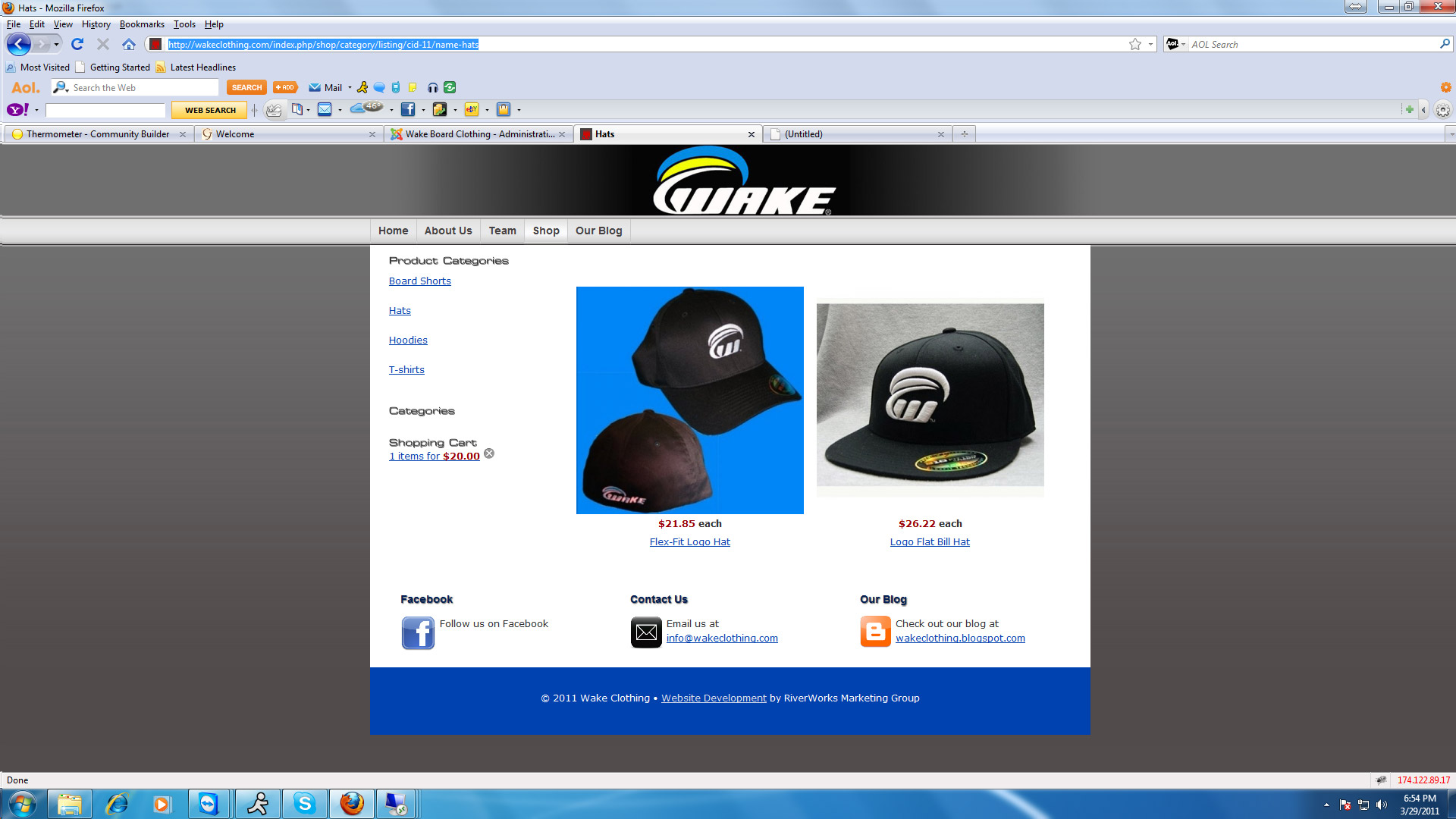
Per my previous post - The menu is showing up in the left hand column (Product Categories) with the categories correctly listed, but when you click on a category - taxes are being added. Again - you can see in the screen shot - NO TAX SELECTIONS.
Please Log in or Create an account to join the conversation.
15 years 6 months ago #12646
by jerrico
Replied by jerrico on topic Re: Menu Links & Taxes
Continued...
So, per your recommendations - I tested a new menu.
Display > Content Modules
Type of Product: Product
Here I was able to select the setting "No Tax" (you cannot choose this setting if you select category)
But - you will notice in this test menu - it is blank without any categories listed.
See the blank space below "Categories" in left hand column (under the product categories menu - above shopping cart)
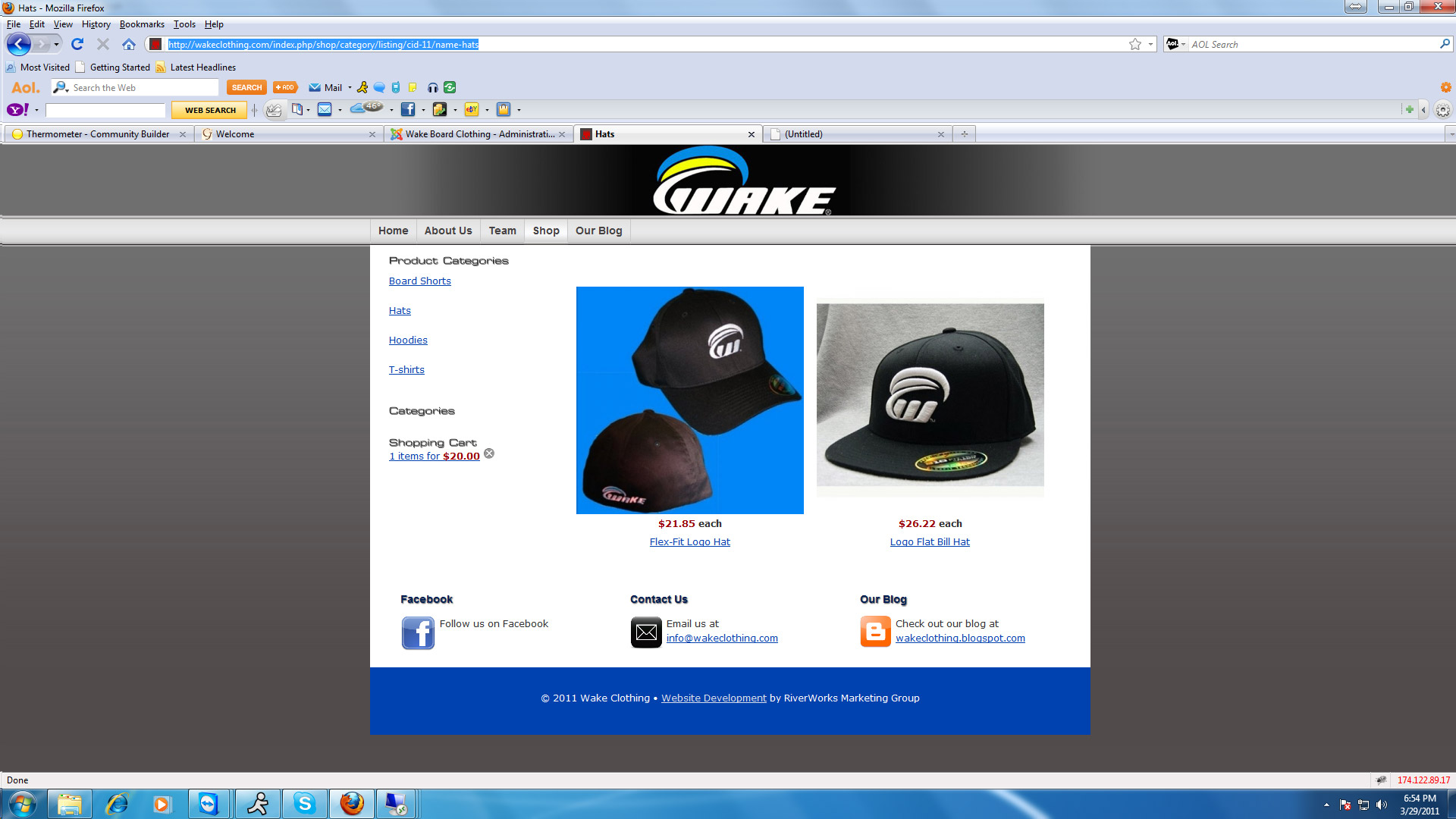
So, per your recommendations - I tested a new menu.
Display > Content Modules
Type of Product: Product
Here I was able to select the setting "No Tax" (you cannot choose this setting if you select category)
But - you will notice in this test menu - it is blank without any categories listed.
See the blank space below "Categories" in left hand column (under the product categories menu - above shopping cart)
Please Log in or Create an account to join the conversation.
15 years 6 months ago #12647
by jerrico
Replied by jerrico on topic Re: Menu Links & Taxes
So - my question is....
Which menu should I be using (Categories vs Product).
If I use Categories - how do I get the tax to not show up since it is NOT an option in this screen.
If I use Products - how do I get the categories to show up under my title in the left hand screen vs. blank white space?
Thanks -
Jackie
Which menu should I be using (Categories vs Product).
If I use Categories - how do I get the tax to not show up since it is NOT an option in this screen.
If I use Products - how do I get the categories to show up under my title in the left hand screen vs. blank white space?
Thanks -
Jackie
Please Log in or Create an account to join the conversation.
15 years 6 months ago #12661
by nicolas
Replied by nicolas on topic Re: Menu Links & Taxes
When you have a module of categories, when you click on one of the categories listed, you can see the category listing under that category thanks to a category listing menu. Then, for your category listing, there is an associated module which lists the products under the category listing automatically. So, in the Display->Content modules menu, you should edit the module used for your menu (and not the module you're using to display the category listing on the left). It should already have the option "type of content" to product and you should directly see the prices options when editing it. That's why I asked you to edit ALL of the modules in the menu Display->Content modules and check that all the ones displaying products have the "no tax" selected.
Please Log in or Create an account to join the conversation.
15 years 6 months ago #12771
by jerrico
Replied by jerrico on topic Re: Menu Links & Taxes
Nicholas -
Thank you so much for your patience with me. I changed ALL modules and it is now working. That was the trick.
I really appreciate your support.
I did purchase last weekend & posted a great review for you on joomla.org.
Jackie
Thank you so much for your patience with me. I changed ALL modules and it is now working. That was the trick.
I really appreciate your support.
I did purchase last weekend & posted a great review for you on joomla.org.
Jackie
Please Log in or Create an account to join the conversation.
15 years 6 months ago #12783
by nicolas
Replied by nicolas on topic Re: Menu Links & Taxes
Great !
Please Log in or Create an account to join the conversation.
Time to create page: 0.280 seconds