

- Posts: 21
- Thank you received: 0
Product images
15 years 7 months ago #12338
by Sub-R
Product images was created by Sub-R
Hopefully this will be the last time I bug you. I have come a long way in a short time thanks to your help. Right now, I have three image questions.
1. Could you tell me where to go to change the spacing between images on the main product listing page?
2. Along with spacing those images, how do I get the name and price centered for those images? Right now they are slightly to the left of center.
image missing http://www.hikashop.com/media/kunena/attachments/legacy/images/Screen_shot_2011_03_27_at_9.png
3. On the product pages, is there a way to code the SqueezeBox images so that you can move through each image without closing the pop-up?
The site is at subversiverobot.cloudaccess.net
Thanks.
1. Could you tell me where to go to change the spacing between images on the main product listing page?
2. Along with spacing those images, how do I get the name and price centered for those images? Right now they are slightly to the left of center.
image missing http://www.hikashop.com/media/kunena/attachments/legacy/images/Screen_shot_2011_03_27_at_9.png
3. On the product pages, is there a way to code the SqueezeBox images so that you can move through each image without closing the pop-up?
The site is at subversiverobot.cloudaccess.net
Thanks.
Please Log in or Create an account to join the conversation.

15 years 7 months ago #12350
by nicolas
Replied by nicolas on topic Re: Product images
Hi,
1 and 2. If you edit your products listing menu's hikashop options, you should be able to change the margin between each item box. The information should already be centered. The problem seems to come from the fact that your thumbnails are too big for the item box and they go over it. Reducing the thumbnails size in the config should greatly help...
3. In that case the easiest would be to integrate hikashop with the ninja shadowbox module: www.hikashop.com/en/support/forum/4-how-...n-product-pages.html
1 and 2. If you edit your products listing menu's hikashop options, you should be able to change the margin between each item box. The information should already be centered. The problem seems to come from the fact that your thumbnails are too big for the item box and they go over it. Reducing the thumbnails size in the config should greatly help...
3. In that case the easiest would be to integrate hikashop with the ninja shadowbox module: www.hikashop.com/en/support/forum/4-how-...n-product-pages.html
Please Log in or Create an account to join the conversation.
15 years 7 months ago #12408
by Sub-R
Replied by Sub-R on topic Re: Product images
Is there any way to change the box size? I would really like to keep the thumbnails at that size.
For the integration of ninja shadow box, do I do the following?
Load and activate the module, then switch the following code:
Change that to:
Is that correct?
For the integration of ninja shadow box, do I do the following?
Load and activate the module, then switch the following code:
Code:
echo $this->image->display($image->file_path,'hikashop_main_image_'.$variant_name,$image->file_name,'class="hikashop_child_image"');
Change that to:
Code:
echo '<a class="hikashop_image_small_link" href="'.$this->image->uploadFolder_url.$image->file_path.'" rel="shadowbox[GROUP1]"><img src="'.$this->image->uploadFolder_url.'thumbnail/'.$image->file_path.'" alt="'.$image->file_name.'" /></a>';
Is that correct?
Please Log in or Create an account to join the conversation.
15 years 7 months ago #12414
by nicolas
Replied by nicolas on topic Re: Product images
There is no size for the boxes. Their width is generated automatically based on the width of your content area and the number of columns you set in the hikashop options of your menu/module. If you reduce the number of columns, you will have each item box bigger.
Yes.
Yes.
Please Log in or Create an account to join the conversation.
15 years 7 months ago #12425
by Sub-R
Replied by Sub-R on topic Re: Product images
Thanks Nicolas.
Please Log in or Create an account to join the conversation.
15 years 7 months ago - 15 years 7 months ago #12657
by Sub-R
Replied by Sub-R on topic Re: Product images
I swapped the code and ninja shadowbox is working on the child images. The problem that I have now is that the layout of the images has changed. Rather than having the main image with the child images under, the child images have become the same size as the main image.
Also, the main image still uses SqeezeBox for the pop-up, which I understand because the code is targeting the child images. Could you let me know what to change for the main image?
After the code change:
image missing http://www.hikashop.com/media/kunena/attachments/legacy/images/image1.gif
How I want it:
image missing http://www.hikashop.com/media/kunena/attachments/legacy/images/image2.gif
Also, the main image still uses SqeezeBox for the pop-up, which I understand because the code is targeting the child images. Could you let me know what to change for the main image?
After the code change:
image missing http://www.hikashop.com/media/kunena/attachments/legacy/images/image1.gif
How I want it:
image missing http://www.hikashop.com/media/kunena/attachments/legacy/images/image2.gif
Last edit: 15 years 7 months ago by Sub-R.
Please Log in or Create an account to join the conversation.
15 years 7 months ago #12671
by nicolas
Replied by nicolas on topic Re: Product images
You need to do the same modification for the main image code:
echo $this->image->display($image->file_path,true,$image->file_name,'id="hikashop_main_image" style="margin-top:10px;margin-bottom:10px;display:inline-block;vertical-align:middle"','id="hikashop_main_image_link"');
Then, you just need to force a height on the small images in CSS so that they are reduced like you want.
echo $this->image->display($image->file_path,true,$image->file_name,'id="hikashop_main_image" style="margin-top:10px;margin-bottom:10px;display:inline-block;vertical-align:middle"','id="hikashop_main_image_link"');
Then, you just need to force a height on the small images in CSS so that they are reduced like you want.
Please Log in or Create an account to join the conversation.
14 years 8 months ago #39445
by PhilP
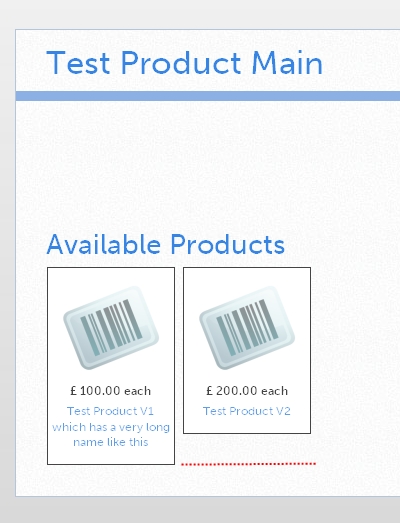
Hi Nicolas,
I just found this thread which seems to be touching on an area in which I am seeking a solution.
You respond to an earlier post with "There is no size for the boxes. Their width is generated automatically based on the width of your content area and the number of columns you set in the hikashop options of your menu/module. If you reduce the number of columns, you will have each item box bigger."
Has this situation changed? We have related products listed in our shop which use the same thumbnail image but which have a title of variable length depending on the exact part number.
See the attached image file. Is there any way I can make the item boxes the same size so that their lower edges will all be aligned? (That is, apart from trying to make the titles all the same length?)
Regards
PhilP.
Replied by PhilP on topic Re: Product images (item box sizes)
Hi Nicolas,
I just found this thread which seems to be touching on an area in which I am seeking a solution.
You respond to an earlier post with "There is no size for the boxes. Their width is generated automatically based on the width of your content area and the number of columns you set in the hikashop options of your menu/module. If you reduce the number of columns, you will have each item box bigger."
Has this situation changed? We have related products listed in our shop which use the same thumbnail image but which have a title of variable length depending on the exact part number.
See the attached image file. Is there any way I can make the item boxes the same size so that their lower edges will all be aligned? (That is, apart from trying to make the titles all the same length?)
Regards
PhilP.
Please Log in or Create an account to join the conversation.
14 years 8 months ago #39541
by nicolas
Replied by nicolas on topic Re: Product images (item box sizes)
Note that the question was for the width of the boxes.
For the height, there is no value set, but you can easily set it in CSS like that so that all the boxes have the same height :
.hikashop_subcontainer{
height: 350px;
}
For the height, there is no value set, but you can easily set it in CSS like that so that all the boxes have the same height :
.hikashop_subcontainer{
height: 350px;
}
Please Log in or Create an account to join the conversation.
14 years 8 months ago #39591
by PhilP
Replied by PhilP on topic Re: Product images (item box sizes)
Thanks Nicolas,
That works perfectly
Excellent support as usual.
PhilP
That works perfectly
Excellent support as usual.
PhilP
Please Log in or Create an account to join the conversation.
Time to create page: 0.334 seconds