

- Posts: 16
- Thank you received: 0
Display categories instead of menu
15 years 6 months ago #12457
by t@rrier
Display categories instead of menu was created by t@rrier
After rereading the documentation about the content display on the front end, I'm just about to give up and go back to joomla 1.5 and virtuemart.
The only thing I can fix is a menu on the left, and when you click on it the categories are displayed and then the products, which is good, except that I want ALL the categories displayed (as a list) on the left side, and when you click on them, the products in that categories should be displayed.
How do I get there, I'm obviously missing something :blush:
The only thing I can fix is a menu on the left, and when you click on it the categories are displayed and then the products, which is good, except that I want ALL the categories displayed (as a list) on the left side, and when you click on them, the products in that categories should be displayed.
How do I get there, I'm obviously missing something :blush:
Please Log in or Create an account to join the conversation.

15 years 6 months ago #12460
by nicolas
Replied by nicolas on topic Re: Display categories instead of menu
Then, instead of creating a menu of the type listing category, you should go in the menu Display->Content modules and click on new, then set it to display categories, as a list, all sub elements, published, not synchronized, on 1 column, and save. Then, you should check that it's set in a position which exists in your template via the module manager and normally it should display a list of all your categories and upon clicking on one it should display the list of products inside that category.
Please Log in or Create an account to join the conversation.
15 years 6 months ago #12462
by t@rrier
Replied by t@rrier on topic Re: Display categories instead of menu
That helps, but if I click on a product it says: An error has occurred.
The requested page cannot be found.
The requested page cannot be found.
Please Log in or Create an account to join the conversation.
15 years 6 months ago #12464
by nicolas
Replied by nicolas on topic Re: Display categories instead of menu
What link do you have for the product ?
We need more information to help you.
We need more information to help you.
Please Log in or Create an account to join the conversation.
15 years 6 months ago #12469
by t@rrier
Replied by t@rrier on topic Re: Display categories instead of menu
404Category not found, it says.
What do you exactly mean with link for the product? Do I need to create a new content module, and if so, could you tell me how?
What do you exactly mean with link for the product? Do I need to create a new content module, and if so, could you tell me how?
Please Log in or Create an account to join the conversation.
15 years 6 months ago #12471
by nicolas
Replied by nicolas on topic Re: Display categories instead of menu
I mean: what is the URL you have in your browser when you get that error ?
Please Log in or Create an account to join the conversation.
15 years 6 months ago #12474
by t@rrier
Replied by t@rrier on topic Re: Display categories instead of menu
:silly: sorry, the URL id http://<sitename>/index.php/category/listing/cid-11/name-mozaiek-artikelen
Please Log in or Create an account to join the conversation.
15 years 6 months ago #12475
by t@rrier
Replied by t@rrier on topic Re: Display categories instead of menu
Please Log in or Create an account to join the conversation.
15 years 6 months ago #12477
by nicolas
Replied by nicolas on topic Re: Display categories instead of menu
Could you give us the real link so that we can have a look directly ? (you can send the URL via our contact form if you don't want to put it here)
Please Log in or Create an account to join the conversation.
15 years 6 months ago #12515
by t@rrier
Replied by t@rrier on topic Re: Display categories instead of menu
Please Log in or Create an account to join the conversation.
15 years 6 months ago #12533
by nicolas
Replied by nicolas on topic Re: Display categories instead of menu
That's because there is no menu attached to your module in the hikashop options of your module.
Normally, it should be created automatically by HikaShop.Apparently it wasn't on your website for some reason.
What you should do is create a new main menu via the menu manager and in it, create a new menu item of the type hikashop category listing.
Then, go in the menu Display->Contents modules, edit your module's hikashop options and set the menu option to that menu.
Normally, it should be created automatically by HikaShop.Apparently it wasn't on your website for some reason.
What you should do is create a new main menu via the menu manager and in it, create a new menu item of the type hikashop category listing.
Then, go in the menu Display->Contents modules, edit your module's hikashop options and set the menu option to that menu.
Please Log in or Create an account to join the conversation.
15 years 6 months ago #12540
by t@rrier
Replied by t@rrier on topic Re: Display categories instead of menu
Thanks, both things were already there, but the menu was, and still is, a hikashop hidden menu. I can't change it. The according "Associated products listing for category listing menu 117" was unuplished, I published it but without result 
Please Log in or Create an account to join the conversation.
15 years 6 months ago #12544
by nicolas
Replied by nicolas on topic Re: Display categories instead of menu
Could you do a screenshot of the hikashop options of your "nwe cat list" module ? Looking at the URLs of the categories, the "menu" parameter is set to none which shouldn't be the case.
Please Log in or Create an account to join the conversation.
15 years 6 months ago #12546
by t@rrier
Replied by t@rrier on topic Re: Display categories instead of menu
Pls see the attachment
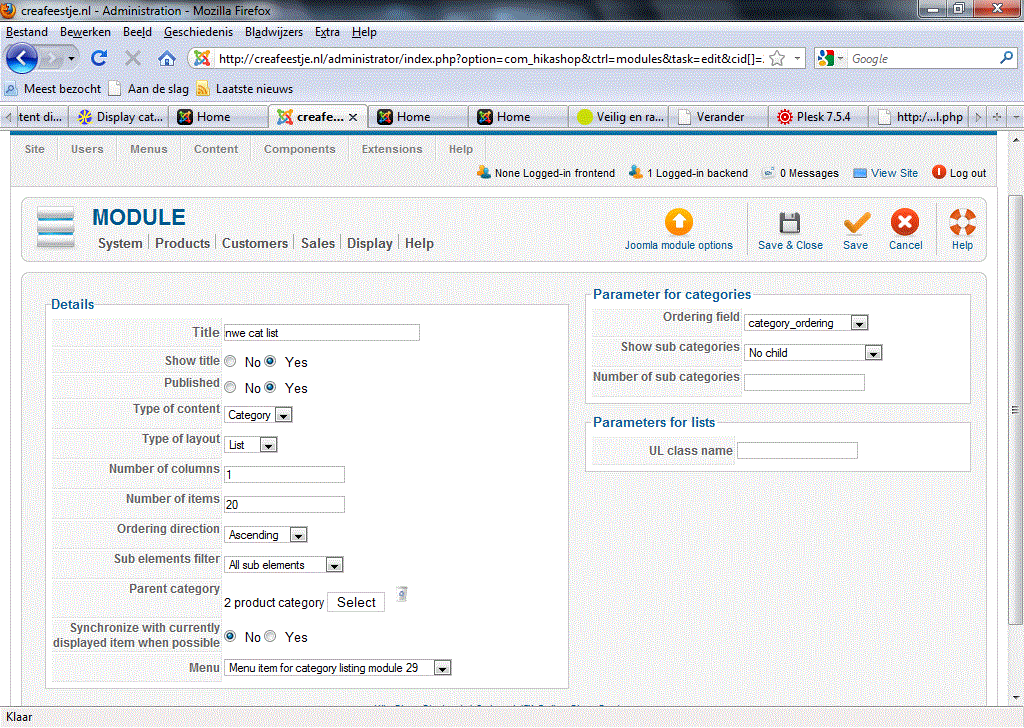
Please Log in or Create an account to join the conversation.
15 years 6 months ago #12553
by nicolas
Replied by nicolas on topic Re: Display categories instead of menu
That sounds good. Could you give a back end access to your website so that we can check the other parameters ?
Please Log in or Create an account to join the conversation.
15 years 6 months ago - 15 years 6 months ago #12585
by t@rrier
Replied by t@rrier on topic Re: Display categories instead of menu
Hi Nicolas, just curious if you received my login?
Last edit: 15 years 6 months ago by t@rrier.
Please Log in or Create an account to join the conversation.
15 years 6 months ago #12594
by nicolas
Replied by nicolas on topic Re: Display categories instead of menu
Hi,
Yes, we got your email. The problem seems to come from the SEF option in the joomla configuration on your website. After turning it off, it works properly...
Yes, we got your email. The problem seems to come from the SEF option in the joomla configuration on your website. After turning it off, it works properly...
Please Log in or Create an account to join the conversation.
15 years 6 months ago #12599
by t@rrier
Replied by t@rrier on topic Re: Display categories instead of menu
Hm, Interesting. I guess I have to contact my provider then.
thank you very much for your time and the solution/workaround...
Let me know if you discover anything new about this issue
thank you very much for your time and the solution/workaround...
Let me know if you discover anything new about this issue
Please Log in or Create an account to join the conversation.
Time to create page: 0.311 seconds