

- Posts: 45
- Thank you received: 0
Re: House Number and Street Name
15 years 7 months ago #12906
by spoOx
House Number and Street Name was created by spoOx
Hi,
hope you can help with the following:
I have many customers just entering the house number in the house no. street field and not entering the streetname. this is causing me to email them and get the street name from them. Is there a way to split this in to 2 separate required fields? and then pass these to paypal as: house no > address line 1 and street name > address line 2?
Thanks in advance.
hope you can help with the following:
I have many customers just entering the house number in the house no. street field and not entering the streetname. this is causing me to email them and get the street name from them. Is there a way to split this in to 2 separate required fields? and then pass these to paypal as: house no > address line 1 and street name > address line 2?
Thanks in advance.
Please Log in or Create an account to join the conversation.

15 years 7 months ago #12909
by nicolas
Replied by nicolas on topic Re: House Number and Street Name
You can of course create an additional field for the house number.
You will have to edit the address_template files in the menu Display->Views to add that new field.
Also, in the plugins/hikashoppayment/paypal.php you will have to edit the code to change the system to send the information as you said, by changing :
$vars["address2"]=$address2;
to:
$vars["address2"]=$order->cart->$address_type->NEW_FIELD_COLUMN_NAME;
You will have to edit the address_template files in the menu Display->Views to add that new field.
Also, in the plugins/hikashoppayment/paypal.php you will have to edit the code to change the system to send the information as you said, by changing :
$vars["address2"]=$address2;
to:
$vars["address2"]=$order->cart->$address_type->NEW_FIELD_COLUMN_NAME;
Please Log in or Create an account to join the conversation.
15 years 7 months ago #13017
by spoOx
Replied by spoOx on topic Re: House Number and Street Name
many thanks 
Please Log in or Create an account to join the conversation.
15 years 3 months ago #22524
by duponsa
Replied by duponsa on topic Re: House Number and Street Name
I'm also wanting to add a 2nd address field in the registration/checkout. I tried the above solution:
added:
{address_street} {address_street2}
in address_template files in the menu Display->Views
changed:
$vars["address2"]=$address2;
to: $vars["address2"]=$order->cart->$address_type->address_street2;
but nothing has changed on the registration form.
I'm sure I'm missing something silly please help me out.
thanks.
added:
{address_street} {address_street2}
in address_template files in the menu Display->Views
changed:
$vars["address2"]=$address2;
to: $vars["address2"]=$order->cart->$address_type->address_street2;
but nothing has changed on the registration form.
I'm sure I'm missing something silly please help me out.
thanks.
Please Log in or Create an account to join the conversation.
15 years 3 months ago #22539
by nicolas
Replied by nicolas on topic Re: House Number and Street Name
First, you need to create a custom field of the table "address" via the menu Display->Custom fields and have it published on the front end. That will already display the field on the address form. Only then, you can use the column name of your custom field as a tag in your address_template files.
Please Log in or Create an account to join the conversation.
3 years 8 months ago #349510
by Agabl123
Replied by Agabl123 on topic Re: House Number and Street Name
Dear all,
I would like to split address too and have one field adddress for the street and one field for the house number. I took address2 for this purpose. But unfortunately the house number field is not shown during the checkout process. please see images attached. What is missing? Anita
activating address2 field
 everything is fine during checkout step 1
 now the second field is missing
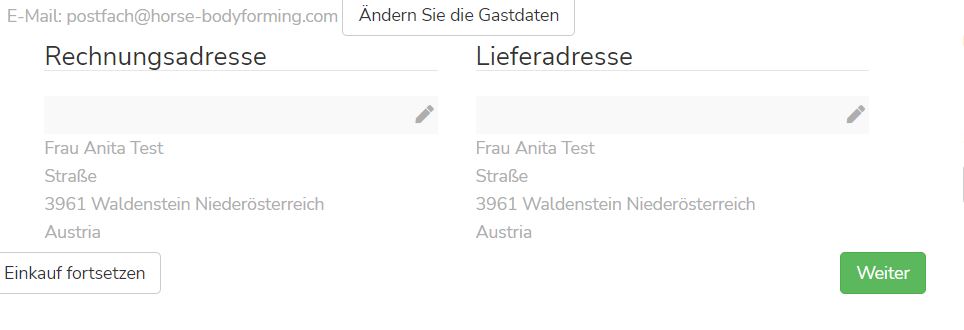
I would like to split address too and have one field adddress for the street and one field for the house number. I took address2 for this purpose. But unfortunately the house number field is not shown during the checkout process. please see images attached. What is missing? Anita
activating address2 field
Please Log in or Create an account to join the conversation.
3 years 8 months ago #349513
by nicolas
Replied by nicolas on topic Re: House Number and Street Name
Hi,
You need to add the {address_street2} tag to the "address format" setting of the HikaShop configuration:
www.hikashop.com/support/documentation/5...ml#checkout_shipping
You need to add the {address_street2} tag to the "address format" setting of the HikaShop configuration:
www.hikashop.com/support/documentation/5...ml#checkout_shipping
The following user(s) said Thank You: Agabl123
Please Log in or Create an account to join the conversation.
3 years 8 months ago #349534
by Agabl123
Replied by Agabl123 on topic Re: House Number and Street Name
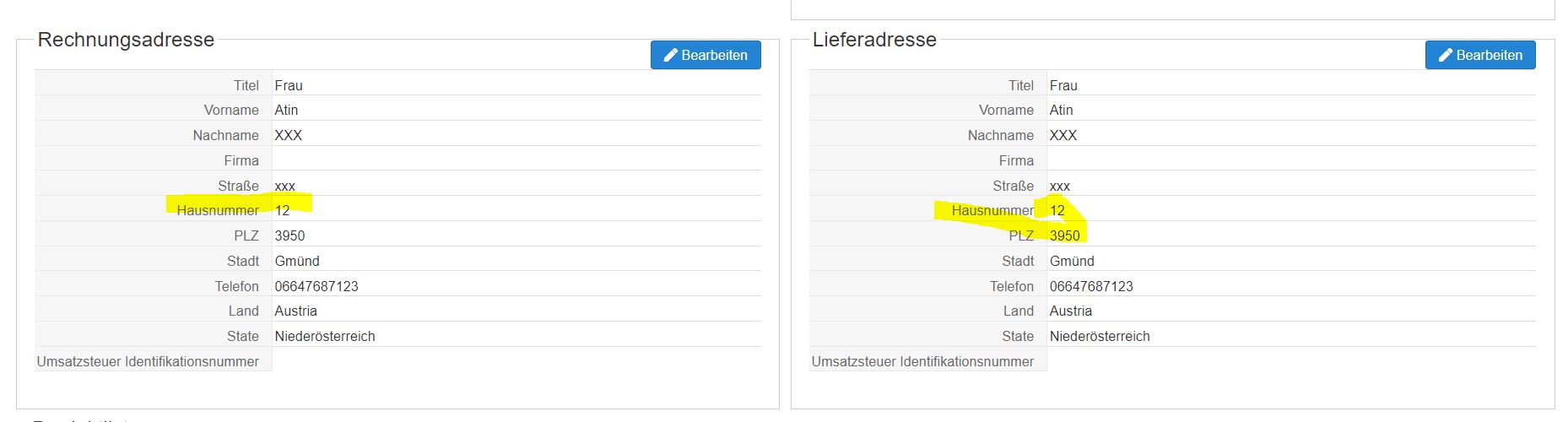
Thank you Nicolas, that works now. In the order address and house number are ok - see order in the back end
 But when I look at the invoice the house number is missing.
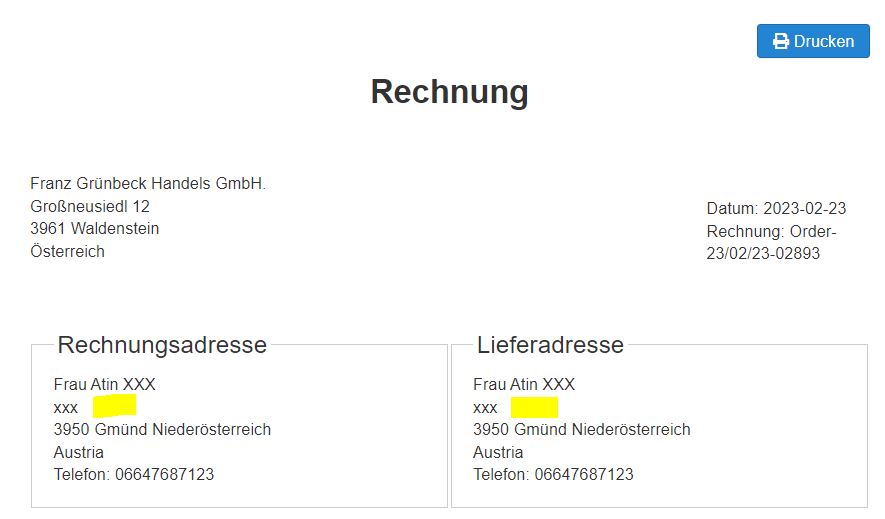 there must be another place where I have to put in house number. thanks a lot in advance Anita
Please Log in or Create an account to join the conversation.
3 years 8 months ago #349537
by nicolas
Replied by nicolas on topic Re: House Number and Street Name
Hi,
The invoice also uses the "address format" setting.
So you should be fine.
If that doesn't work only for the invoice, it means that the system wasn't able to add the view override for the address_template for your backend template.
So go in the menu Display>Views of HikaShop and search for address_template for your backend template. Then, edit the view and make sure you have the tag in it and save.
The invoice also uses the "address format" setting.
So you should be fine.
If that doesn't work only for the invoice, it means that the system wasn't able to add the view override for the address_template for your backend template.
So go in the menu Display>Views of HikaShop and search for address_template for your backend template. Then, edit the view and make sure you have the tag in it and save.
The following user(s) said Thank You: Agabl123
Please Log in or Create an account to join the conversation.
3 years 8 months ago #349590
by Agabl123
Replied by Agabl123 on topic Re: House Number and Street Name
Hi Nicolas, now I changed in all backend views the address - but it still doesn't work  Anita
Anita Please Log in or Create an account to join the conversation.
3 years 8 months ago #349591
by nicolas
Replied by nicolas on topic Re: House Number and Street Name
Hi,
Can you provide a screenshot of the view override ?
Can you provide a screenshot of the view override ?
Please Log in or Create an account to join the conversation.
3 years 8 months ago #349593
by Agabl123
Replied by Agabl123 on topic Re: House Number and Street Name
here the screenshot
Please Log in or Create an account to join the conversation.
3 years 8 months ago #349595
by nicolas
Replied by nicolas on topic Re: House Number and Street Name
Hi,
You've written adress with one d instead of address with 2 d.
You've written adress with one d instead of address with 2 d.
Please Log in or Create an account to join the conversation.
3 years 8 months ago #349603
by Agabl123
Replied by Agabl123 on topic Re: House Number and Street Name
oh my goodness ... you are totally right.....
Please Log in or Create an account to join the conversation.
3 years 3 months ago #353917
by Agabl123
Replied by Agabl123 on topic Re: House Number and Street Name
What must be done so that my new field address_house_number ist within the report "order to ship"
Unfortunately it is missing there
Unfortunately it is missing there
Please Log in or Create an account to join the conversation.

3 years 3 months ago - 3 years 3 months ago #353924
by Philip
Replied by Philip on topic Re: House Number and Street Name
Hello,
Can you provide your (or yours) relative custom field settings screenshot (Display dropdown => Custom fields).
AND your Address & Shipping part (from your HikaShop Configuration => Checkout tab)

Awaiting your elements
Regards
Can you provide your (or yours) relative custom field settings screenshot (Display dropdown => Custom fields).
AND your Address & Shipping part (from your HikaShop Configuration => Checkout tab)
Awaiting your elements
Regards
Last edit: 3 years 3 months ago by Philip.
Please Log in or Create an account to join the conversation.
3 years 3 months ago #353938
by Agabl123
Replied by Agabl123 on topic Re: House Number and Street Name
Thank you - attached please find the screenshots
Please Log in or Create an account to join the conversation.
3 years 3 months ago #353958
by nicolas
Replied by nicolas on topic Re: House Number and Street Name
Hi,
The custom field should appear automatically in the exported CSV. I do get it automatically on my end when I use the export button of the ready to ship report after having placed orders with that address field filled.
Can you double check ?
The custom field should appear automatically in the exported CSV. I do get it automatically on my end when I use the export button of the ready to ship report after having placed orders with that address field filled.
Can you double check ?
Please Log in or Create an account to join the conversation.
3 years 3 months ago #354046
by Agabl123
Replied by Agabl123 on topic Re: House Number and Street Name
I sent you access data via PN - would you please be so kind as to have a look - BR Anita
Please Log in or Create an account to join the conversation.
3 years 3 months ago #354068
by nicolas
Replied by nicolas on topic Re: House Number and Street Name
Hi,
I think that's because you have many orders without the custom field filled in. I've changed your report to only show the orders redy to ship from the past month. They all have the house number field filled in and the export does have the column for it.
So edit the ready to ship orders with the house number field empty and fill it properly and then try again and it should work.
I think that's because you have many orders without the custom field filled in. I've changed your report to only show the orders redy to ship from the past month. They all have the house number field filled in and the export does have the column for it.
So edit the ready to ship orders with the house number field empty and fill it properly and then try again and it should work.
The following user(s) said Thank You: Agabl123
Please Log in or Create an account to join the conversation.
Time to create page: 0.227 seconds