

- Posts: 1
- Thank you received: 0
Adding custom fields to products
15 years 6 months ago #12949
by dmsig85
Adding custom fields to products was created by dmsig85
Chart shows this is available in both Essential & Business but there is something "Coming Soon" related to it.
Please clarify...
I am attempting to add custom fields to products for a customer to type information in during the checkout process.
Perhaps I am missing something?
Please clarify...
I am attempting to add custom fields to products for a customer to type information in during the checkout process.
Perhaps I am missing something?
Please Log in or Create an account to join the conversation.

15 years 6 months ago #12959
by nicolas
Replied by nicolas on topic Re: Adding custom fields to products
The "coming soon" is related to custom product fields which you can only set from the back end. You will be able to create filters on listing of products in order to filter products displayed based on the values of the custom fields.
What you want to use is custom order fields which are only in the business edition and which will appear during the checkout process.
What you want to use is custom order fields which are only in the business edition and which will appear during the checkout process.
Please Log in or Create an account to join the conversation.
15 years 4 months ago #17852
by Clarke
Replied by Clarke on topic Re: Adding custom fields to products
Any idea on how long it will be before we see the custom product fields which can be set from the back end?
Please Log in or Create an account to join the conversation.
15 years 4 months ago #17866
by nicolas
Replied by nicolas on topic Re: Adding custom fields to products
You can already create custom fields of the table product or item based on whether you want to have the possibility to enter information on the back end and display it to the user on the product page, or you want to have your users enter information on the product page and have it attached to the product in the cart/order.
That's already possible.
What is not yet possible is to have filters on products listings on the front end based on the first type of custom fields.
That's already possible.
What is not yet possible is to have filters on products listings on the front end based on the first type of custom fields.
The following user(s) said Thank You: javed
Please Log in or Create an account to join the conversation.
15 years 4 months ago #17899
by Clarke
Replied by Clarke on topic Re: Adding custom fields to products
That's great - sorry I didn't realize that.
You couldn't just explain how could you?
I have added a characteristic, which I should think is where I should be, but I cannot stop it showing as a drop down choice on the front end page.
What I want is to be able to add a product, in this case a caravan, and add how many beds it has. I would like to add this in a separate custom field in the 'Add Product' page so that it will display on the front page, but it shouldn't be a drop down menu or a choice to the visitor.
Thanks very much for your help, I am nearly done with my questions - promise.
You couldn't just explain how could you?
I have added a characteristic, which I should think is where I should be, but I cannot stop it showing as a drop down choice on the front end page.
What I want is to be able to add a product, in this case a caravan, and add how many beds it has. I would like to add this in a separate custom field in the 'Add Product' page so that it will display on the front page, but it shouldn't be a drop down menu or a choice to the visitor.
Thanks very much for your help, I am nearly done with my questions - promise.
Please Log in or Create an account to join the conversation.
15 years 4 months ago #17906
by nicolas
Replied by nicolas on topic Re: Adding custom fields to products
Then, you want to create custom fields of the table "product". You can do that via the menu Display->Custom fields if you have a commercial version of HikaShop.
Please Log in or Create an account to join the conversation.
13 years 6 months ago #97014
by lionel75
Replied by lionel75 on topic Re: Adding custom fields to products
i try to edit a pre define item to see on wich "object" a custom field could be apply ( ll expect and html seelct option tag choice ) . by reading the forum there is product and user . IS there anothers ?
Please Log in or Create an account to join the conversation.

13 years 6 months ago #97276
by Xavier
Replied by Xavier on topic Re: Adding custom fields to products
Hi,
A custom field can be created for:
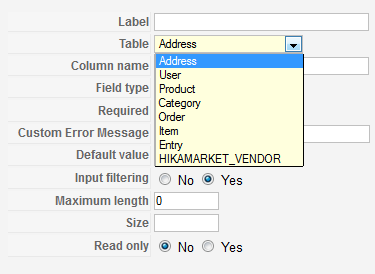
The "Display limited to" option allow you to restrict a custom field display depending on the value set for another one.
A custom field can be created for:
The "Display limited to" option allow you to restrict a custom field display depending on the value set for another one.
Please Log in or Create an account to join the conversation.
Less
More
- Posts: 5
- Thank you received: 0
12 years 10 months ago - 12 years 10 months ago #137677
by nabilazougagh
Replied by nabilazougagh on topic Adding custom fields to products listing
Hello,
i added a custom field and i want to display them into product listing
for exemple i add custom fieled "time" and "place" like a chekbox i want display
them into product listing like that:
but the problem i can't find any solution to display them like i want
sow if you can help me plz
i added a custom field and i want to display them into product listing
for exemple i add custom fieled "time" and "place" like a chekbox i want display
them into product listing like that:
| product | Vote | time | place | price |
| java | 6 | 3 days | newyork | 200$ |
| oracle | 12 | 12 days | paris | 500$ |
| PHP | 11 | 8 days | pikin | 300$ |
sow if you can help me plz
Last edit: 12 years 10 months ago by nabilazougagh.
Please Log in or Create an account to join the conversation.
12 years 10 months ago - 12 years 10 months ago #137678
by lionel75
Replied by lionel75 on topic Re: Adding custom fields to products
Hi
1 could you explain how a new field ( type name of fields like text / image and value related to the name fields( text/path image) are store in MYSQL ?
2 Does each field are attach to they respective table ?
3 How export ( backup) import from different hikashop website work refer to new fields ?
4 is there a way to add new tables rather only fields of predefine table name ?
5 Does hiskashop is bundle by default by using custom fields for table adress ?
@nicolas
when i go to custom field i have 4 items ( adress used product and category ) see my capture screeen .
So I have less items that your capture screen of "Field page " . Is there a way to add new table ? Is there a hikashop documentation that explain how to achieve this and why create new table could solve specific problem .
regard's
Regard's
1 could you explain how a new field ( type name of fields like text / image and value related to the name fields( text/path image) are store in MYSQL ?
2 Does each field are attach to they respective table ?
3 How export ( backup) import from different hikashop website work refer to new fields ?
4 is there a way to add new tables rather only fields of predefine table name ?
5 Does hiskashop is bundle by default by using custom fields for table adress ?
@nicolas
when i go to custom field i have 4 items ( adress used product and category ) see my capture screeen .
So I have less items that your capture screen of "Field page " . Is there a way to add new table ? Is there a hikashop documentation that explain how to achieve this and why create new table could solve specific problem .
regard's
Regard's
Last edit: 12 years 10 months ago by lionel75.
Please Log in or Create an account to join the conversation.
12 years 10 months ago #137688
by nicolas
Replied by nicolas on topic Re: Adding custom fields to products
@nabilazougagh
You can add such code in the file "listing_table" of the view "product" via the menu Display>Views:
www.hikashop.com/forum/4-how-to/861997-d...ds-in-lis-views.html
@lionel75
The other tables are available with the Business edition. It's indeed possible to add more tables with plugin triggers but there is no documentation for that yet. A good example is HikaMarket multivendor which adds a new "vendor" table there via its hikashop integration plugin so that you can create custom fields specific to vendors.
You can add such code in the file "listing_table" of the view "product" via the menu Display>Views:
www.hikashop.com/forum/4-how-to/861997-d...ds-in-lis-views.html
@lionel75
The other tables are available with the Business edition. It's indeed possible to add more tables with plugin triggers but there is no documentation for that yet. A good example is HikaMarket multivendor which adds a new "vendor" table there via its hikashop integration plugin so that you can create custom fields specific to vendors.
Please Log in or Create an account to join the conversation.

Less
More
- Posts: 12953
- Thank you received: 1778
12 years 10 months ago - 12 years 10 months ago #137691
by Mohamed Thelji
Replied by Mohamed Thelji on topic Adding custom fields to products
Hi
@nabilazougagh
The best solution will be to set the "Type of layout" option of your product listing content menu to table, and to edit the listing_table file of the product view of your front-end template.
@lionel75
1. When you create a custom field, regarding its type and table, a field will be created through one of Hikashop tables (product/address/..) in your database.
2.. yes
3. if you want to export custom fields, you'll have to export/copy your database
@nabilazougagh
The best solution will be to set the "Type of layout" option of your product listing content menu to table, and to edit the listing_table file of the product view of your front-end template.
@lionel75
1. When you create a custom field, regarding its type and table, a field will be created through one of Hikashop tables (product/address/..) in your database.
2.. yes
3. if you want to export custom fields, you'll have to export/copy your database
Last edit: 12 years 10 months ago by Mohamed Thelji.
Please Log in or Create an account to join the conversation.
Time to create page: 0.206 seconds