

- Posts: 202
- Thank you received: 2
Add custom user field to Order Number format
15 years 6 months ago #13407
by momentis
Add custom user field to Order Number format was created by momentis
Nicolas,
I have created a custom user field named "Customer Number". This number matches our internal tracking system. Is there a way to include this field in the Custom Order Number Format? Ideally, my order number would be:
{customer_no}-{full date of order}-{sequential ID}
I can get the date and ID just as I'd like them, but can't figure out how (if) I can include the customer number.
Thanks!!!
Rick
I have created a custom user field named "Customer Number". This number matches our internal tracking system. Is there a way to include this field in the Custom Order Number Format? Ideally, my order number would be:
{customer_no}-{full date of order}-{sequential ID}
I can get the date and ID just as I'd like them, but can't figure out how (if) I can include the customer number.
Thanks!!!
Rick
Please Log in or Create an account to join the conversation.

15 years 6 months ago #13465
by nicolas
Replied by nicolas on topic Re: Add custom user field to Order Number format
Hi,
If you add the code:
if(preg_match_all('#\{([a-z_0-9]+)\}#i',$format,$matches)){
foreach($matches[1] as $match){
if(isset($data->$match)){
$format = str_replace('{'.$match.'}',$data->$match,$format);
}else{
$format = str_replace('{'.$match.'}','',$format);
}
}
}
after the code:
if(strpos($format,'{automatic_code}')!==false){
$format = str_replace('{automatic_code}',hikashop::base($id),$format);
}
in the file administrator/components/com_hikashop/helpers/helper.php you will be able to add tags for your custom order fields: {custom_field_column_name}
We'll add that to next version.
If you add the code:
if(preg_match_all('#\{([a-z_0-9]+)\}#i',$format,$matches)){
foreach($matches[1] as $match){
if(isset($data->$match)){
$format = str_replace('{'.$match.'}',$data->$match,$format);
}else{
$format = str_replace('{'.$match.'}','',$format);
}
}
}
after the code:
if(strpos($format,'{automatic_code}')!==false){
$format = str_replace('{automatic_code}',hikashop::base($id),$format);
}
in the file administrator/components/com_hikashop/helpers/helper.php you will be able to add tags for your custom order fields: {custom_field_column_name}
We'll add that to next version.
Please Log in or Create an account to join the conversation.
15 years 6 months ago #13515
by momentis
Replied by momentis on topic Re: Add custom user field to Order Number format
Okay, I can now declare you to be a GENIUS!!! Thank you so, so much for this!
Because of this, we can now perfectly match the online order numbers with our internally-generated ones. What a help!!!
FYI - I posted a review on the JED (username: momentis) yesterday. I wish I could have written more. In nearly 5 years working within Joomla I have come across very, very few developers as responsive, polite and talented!
Rick
Because of this, we can now perfectly match the online order numbers with our internally-generated ones. What a help!!!
FYI - I posted a review on the JED (username: momentis) yesterday. I wish I could have written more. In nearly 5 years working within Joomla I have come across very, very few developers as responsive, polite and talented!
Rick
Please Log in or Create an account to join the conversation.
15 years 6 months ago #13516
by momentis
Replied by momentis on topic Re: Add custom user field to Order Number format
Nicolas,
Your code sets up the order number perfectly. However, the emails that are being generated do not include the custom field. Any way to add this?
Your code sets up the order number perfectly. However, the emails that are being generated do not include the custom field. Any way to add this?
Please Log in or Create an account to join the conversation.
15 years 6 months ago #13527
by momentis
Replied by momentis on topic Re: Add custom user field to Order Number format
Getting to understand this a little better. It seems, from looking at the database, that the order number is not stored in the "hikashop_order" table. When I change the configuration setting for generating the order number, all existing orders in the system will change to adopt the new structure. So it appears that the order number is really generated dynamically, based on the view, which would be why it did not appear in the emails.
Would there be a way, in future versions, to have the generated order number stored statically within the database whenever the order is created? That way the order number would be consistent across the application. Any changes made to the order number structure in the configuration settings would, therefore, only affect ongoing orders.
Just a suggestion!
Rick
Would there be a way, in future versions, to have the generated order number stored statically within the database whenever the order is created? That way the order number would be consistent across the application. Any changes made to the order number structure in the configuration settings would, therefore, only affect ongoing orders.
Just a suggestion!
Rick
Please Log in or Create an account to join the conversation.
15 years 6 months ago #13531
by nicolas
Replied by nicolas on topic Re: Add custom user field to Order Number format
The order numbers are indeed generated on the fly based on the order number format option. The goal was to avoid users asking why all their orders don't have the new format (yes...), and since you normally set the order number format before starting your shop, it doesn't matter to store the order number generated when the order was created.
So far, no one had a problem with that way of doing it... We'll see. If others have the same remark we might change the system in the future, we'll see
So far, no one had a problem with that way of doing it... We'll see. If others have the same remark we might change the system in the future, we'll see
Please Log in or Create an account to join the conversation.
15 years 6 months ago #13533
by momentis
Replied by momentis on topic Re: Add custom user field to Order Number format
I understand! My background is really in db development, so for me it seemed counter-intuitive to NOT store the order number. As a business, you run the risk of losing historical tracking of the order if someone changes the config setting. But I can certainly appreciate that you are providing what people want!!!
Anyway, is there a way to get the order number into the emails? It is not using the custom field.
Anyway, is there a way to get the order number into the emails? It is not using the custom field.
Please Log in or Create an account to join the conversation.
15 years 6 months ago #13539
by nicolas
Replied by nicolas on topic Re: Add custom user field to Order Number format
Looking at the emails on our end, the order number is correctly replaced in them. Did you customize your emails ?
Please Log in or Create an account to join the conversation.
15 years 6 months ago #13541
by momentis
Replied by momentis on topic Re: Add custom user field to Order Number format
I commented out the pricing fields (our products have no prices), but that's about it. Let me try to revert back to the installed version and I will let you know.
Please Log in or Create an account to join the conversation.
15 years 6 months ago #13544
by momentis
Replied by momentis on topic Re: Add custom user field to Order Number format
Nope. Still not seeing it, even after removing my changes to the email. Here's what the store admin is seeing:
The order number in the system is RLS-04072011-00022. Same in the email going to the person placing the order.
I am using the latest version of HikaShop on Joomla 1.6.1
The order is now created.
This notification was for the order -04072011-00022 on the website thegragroup.com/storefront/
Total : $0.00
You can access the order details directly by clicking on the link below after logging in your back end:
thegragroup.com/storefront/administrator...ask=edit&order_id=22
The order number in the system is RLS-04072011-00022. Same in the email going to the person placing the order.
I am using the latest version of HikaShop on Joomla 1.6.1
Please Log in or Create an account to join the conversation.
15 years 6 months ago #13545
by nicolas
Replied by nicolas on topic Re: Add custom user field to Order Number format
What order format are you using ?
Please Log in or Create an account to join the conversation.
15 years 6 months ago #13548
by momentis
Replied by momentis on topic Re: Add custom user field to Order Number format
Do you mean Order Number format? I am using:
{cust_code}-{date format="mdY"}-{id size="5"}
{cust_code}-{date format="mdY"}-{id size="5"}
Please Log in or Create an account to join the conversation.
15 years 6 months ago #13550
by nicolas
Replied by nicolas on topic Re: Add custom user field to Order Number format
We tried again but we correctly see the order number. When you say you removed your changes , do you mean that you removed the customization of your emails using the trash icon available on the listing of emails ? If you edit your emails, what is the version written at the top ? Maybe you're using a previous version email ?
Please Log in or Create an account to join the conversation.
15 years 6 months ago #13551
by momentis
Replied by momentis on topic Re: Add custom user field to Order Number format
Sorry, yes. I used the trashcan to remove the changes. The top of the email shows:
Code:
/**
* @package HikaShop for Joomla!
* @version 1.4.8
* @author hikashop.com
* @copyright (C) 2010 HIKARI SOFTWARE. All rights reserved.
* @license http://www.hikashop.com/commercial_license.php
*/
Please Log in or Create an account to join the conversation.
15 years 6 months ago #13555
by momentis
Replied by momentis on topic Re: Add custom user field to Order Number format
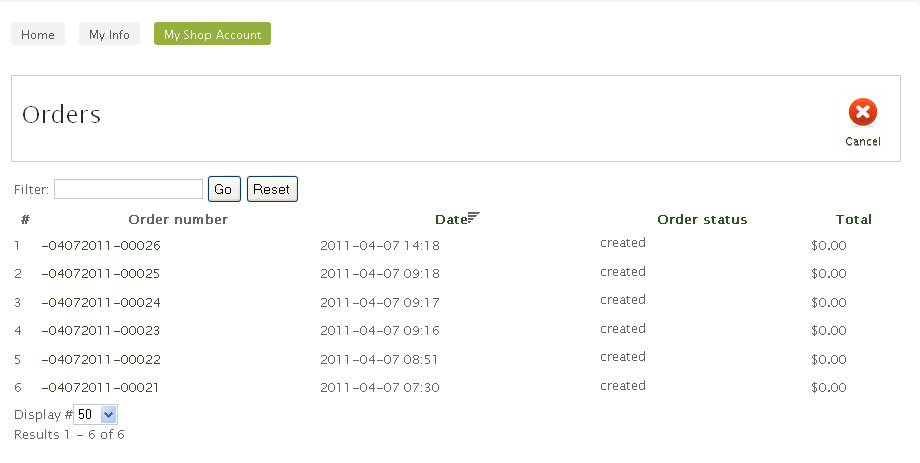
It is also not showing the order number correctly under CUSTOMER ACCOUNT > ORDERS on the front-end. I am attaching a screenshot.
Please Log in or Create an account to join the conversation.
15 years 6 months ago #13557
by nicolas
Replied by nicolas on topic Re: Add custom user field to Order Number format
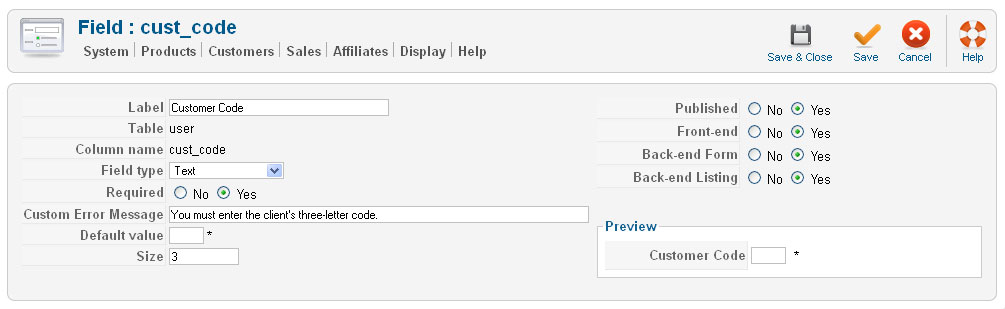
Could you do a screenshot of the options of your custom field because that's the only thing left I can see...
Please Log in or Create an account to join the conversation.
15 years 6 months ago #13559
by momentis
Replied by momentis on topic Re: Add custom user field to Order Number format
Sure! Here is the screenshot of the custom field.
Please Log in or Create an account to join the conversation.
15 years 6 months ago #13563
by nicolas
Replied by nicolas on topic Re: Add custom user field to Order Number format
Ah ! Something I overlooked in your message is that you're using a custom user field.
The modification I posted allows you to do it for custom order fields and not really for custom user fields. It's just that the information is loaded there in some places.
The modification I posted allows you to do it for custom order fields and not really for custom user fields. It's just that the information is loaded there in some places.
Please Log in or Create an account to join the conversation.
15 years 6 months ago #13564
by momentis
Replied by momentis on topic Re: Add custom user field to Order Number format
I set up a Super User account for you, and can get you the credentials if you want to get into the system. I don't mind.
Please Log in or Create an account to join the conversation.
15 years 6 months ago #13566
by momentis
Replied by momentis on topic Re: Add custom user field to Order Number format
So is there a way to accomplish this?
It would work just fine if the order number was stored in the database
It would work just fine if the order number was stored in the database
Please Log in or Create an account to join the conversation.
Time to create page: 0.650 seconds