

- Posts: 202
- Thank you received: 2
Change order of fields on Address form
15 years 5 months ago #13432
by momentis
Change order of fields on Address form was created by momentis
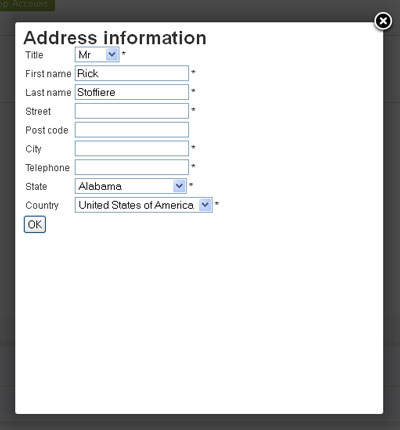
Is there a way to change the order of the fields on the popup form when a user Adds or Manages an address? (See image)
Specifically, I would like the order to be:
Title
First Name
Last Name
Address
Country
City
State
Zip
Telephone
How would I make this change?
Specifically, I would like the order to be:
Title
First Name
Last Name
Address
Country
City
State
Zip
Telephone
How would I make this change?
Please Log in or Create an account to join the conversation.
15 years 5 months ago #13433
by momentis
Replied by momentis on topic Re: Change order of fields on Address form
Sorry, forgot to attach the image :blush:
Please Log in or Create an account to join the conversation.

15 years 5 months ago #13455
by nicolas
Replied by nicolas on topic Re: Change order of fields on Address form
You can go in the menu Display->Custom fields and change the order of the fields there.
Please Log in or Create an account to join the conversation.
15 years 5 months ago #13512
by momentis
Replied by momentis on topic Re: Change order of fields on Address form
Geez, sorry to waste your time on that one!!!
Please Log in or Create an account to join the conversation.
Time to create page: 0.178 seconds