
- Posts: 10
- Thank you received: 0
Disable warning
- louis.jonker@gmail.com
-
 Topic Author
- Offline
Less
More
15 years 11 months ago - 15 years 11 months ago #1399
by louis.jonker@gmail.com
Disable warning was created by louis.jonker@gmail.com
Hello,
Is there an option to disable the (blue)warnings?
(See snapshot)
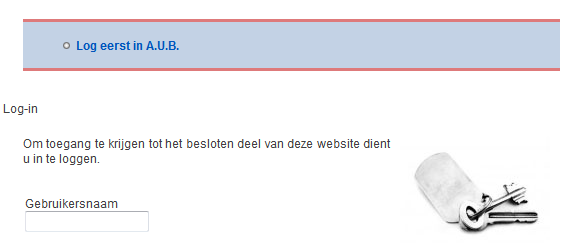
If not, is there a css file where i can change this?
Thanks!
Kind regards,
Louis
Is there an option to disable the (blue)warnings?
(See snapshot)
If not, is there a css file where i can change this?
Thanks!
Kind regards,
Louis
Last edit: 15 years 11 months ago by louis.jonker@gmail.com.
Please Log in or Create an account to join the conversation.

15 years 11 months ago #1401
by nicolas
Replied by nicolas on topic Re: Disable warning
Hi,
It would help if you could tell us how you got to that page. Because with just the screenshot, all I can say is that this is the joomla login page and not an HikaShop page.
It would help if you could tell us how you got to that page. Because with just the screenshot, all I can say is that this is the joomla login page and not an HikaShop page.
Please Log in or Create an account to join the conversation.
- louis.jonker@gmail.com
-
Topic Author
- Offline
Less
More
- Posts: 10
- Thank you received: 0
15 years 11 months ago - 15 years 11 months ago #1403
by louis.jonker@gmail.com
Replied by louis.jonker@gmail.com on topic Re: Disable warning
I think you're right.
This warning appear when i go to the "Customer account" while i'm still not logged in.
Is this also the same to modify the text (for example) "Customer Account"? (See snapshot)
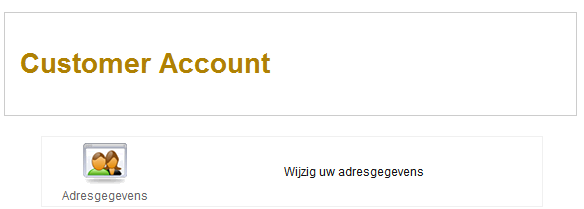
Or is this something i can modify in a HikaShop css file?
This warning appear when i go to the "Customer account" while i'm still not logged in.
Is this also the same to modify the text (for example) "Customer Account"? (See snapshot)
Or is this something i can modify in a HikaShop css file?
Last edit: 15 years 11 months ago by louis.jonker@gmail.com.
Please Log in or Create an account to join the conversation.
15 years 11 months ago #1405
by nicolas
Replied by nicolas on topic Re: Disable warning
You can modify the HikaShop texts in the translation file via the tab languages in the configuration of HikaShop.
Please Log in or Create an account to join the conversation.
- louis.jonker@gmail.com
-
Topic Author
- Offline
Less
More
- Posts: 10
- Thank you received: 0
15 years 11 months ago #1413
by louis.jonker@gmail.com
Replied by louis.jonker@gmail.com on topic Re: Disable warning
Thanks for your quick response!
Maybe i was not clear enough about this , but actually i mean that i want to change the font, color, height etc
Is that possible and in whitch file can i do this?
Louis
Maybe i was not clear enough about this
, but actually i mean that i want to change the font, color, height etcIs that possible and in whitch file can i do this?
Louis
Please Log in or Create an account to join the conversation.
15 years 11 months ago #1419
by nicolas
Replied by nicolas on topic Re: Disable warning
The CSS of HikaShop can be modified in the configuration under the tab "Display" in the zone CSS. There you will have a button to edit it. We have a lot of classes and ids everywhere in our code so that you can personalize it the way you want.
Please Log in or Create an account to join the conversation.
- louis.jonker@gmail.com
-
Topic Author
- Offline
Less
More
- Posts: 10
- Thank you received: 0
15 years 11 months ago #1501
by louis.jonker@gmail.com
Replied by louis.jonker@gmail.com on topic Re: Disable warning
Oké thank you,
But to help me to get started, for example, how can i edit "Customer account" (see example above)?
Which file under "display" -> "Views" must i edit? (and how)
Louis
But to help me to get started, for example, how can i edit "Customer account" (see example above)?
Which file under "display" -> "Views" must i edit? (and how)
Louis
Please Log in or Create an account to join the conversation.
15 years 11 months ago #1503
by nicolas
Replied by nicolas on topic Re: Disable warning
Sure but it depends how you want to modify it.
If you want to change the text, you should edit the translation file via the tab languages in the configuration of HikaShop.
If you want to change its style, you should modify the CSS of HikaShop which is in the configuration under the tab "Display" in the zone CSS.
If you want to change the HTML of that view, you should go to Display->Views and search for cpanel and edit the view file.
If you want to change the text, you should edit the translation file via the tab languages in the configuration of HikaShop.
If you want to change its style, you should modify the CSS of HikaShop which is in the configuration under the tab "Display" in the zone CSS.
If you want to change the HTML of that view, you should go to Display->Views and search for cpanel and edit the view file.
Please Log in or Create an account to join the conversation.
- louis.jonker@gmail.com
-
Topic Author
- Offline
Less
More
- Posts: 10
- Thank you received: 0
15 years 11 months ago - 15 years 11 months ago #1688
by louis.jonker@gmail.com
Replied by louis.jonker@gmail.com on topic Re: Disable warning
For example, I want to change the style of the category name "Toys" (see snapshot).
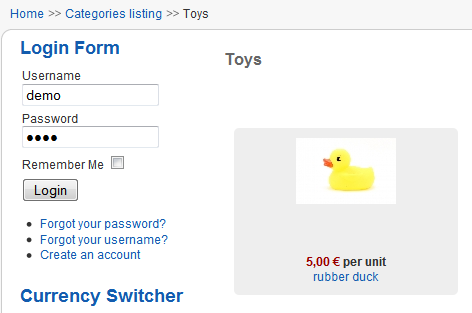
I was searching in de css file components -> com_hikashop -> css, filename "frontend_default.css", but i can't find where to change it.
Can you give me an example how to change this header?
I was searching in de css file components -> com_hikashop -> css, filename "frontend_default.css", but i can't find where to change it.
Can you give me an example how to change this header?
Last edit: 15 years 11 months ago by louis.jonker@gmail.com.
Please Log in or Create an account to join the conversation.
15 years 11 months ago #1692
by nicolas
Replied by nicolas on topic Re: Disable warning
you can add something like that:
.hikashop_category_information h1{
color: blue;
}
.hikashop_category_information h1{
color: blue;
}
Please Log in or Create an account to join the conversation.
Time to create page: 0.152 seconds