

- Posts: 202
- Thank you received: 2
Link product names from front end order view
15 years 5 months ago #14073
by momentis
Link product names from front end order view was created by momentis
Looking at the front-end view Order->Show:
The order displayed on the site shows each product from the order. Is there a way to make the product name a hyperlink to that product in the store? Would be extremely helpful for customers to link back to the products they had ordered.
Thanks!
Rick
The order displayed on the site shows each product from the order. Is there a way to make the product name a hyperlink to that product in the store? Would be extremely helpful for customers to link back to the products they had ordered.
Thanks!
Rick
Please Log in or Create an account to join the conversation.

15 years 5 months ago #14089
by nicolas
Replied by nicolas on topic Re: Link product names from front end order view
Yes, you can change the code:
<?php echo $product->order_product_name.' '.$product->order_product_code;
by:
<?php if($this->invoice_type=='order' && !empty($product->product_id)){ ?>
<a class="hikashop_order_product_link" href="<?php echo hikashop::completeLink('product&task=show&cid='.$product->product_id); ?>">
<?php } ?>
<p class="hikashop_order_product_name"><?php echo $product->order_product_name; ?></p>
<p class="hikashop_order_product_code"><?php echo $product->order_product_code; ?></p>
<?php if($this->invoice_type=='order' && !empty($product->product_id)){ ?>
</a>
<?php }
That's something we will add in HikaShop
<?php echo $product->order_product_name.' '.$product->order_product_code;
by:
<?php if($this->invoice_type=='order' && !empty($product->product_id)){ ?>
<a class="hikashop_order_product_link" href="<?php echo hikashop::completeLink('product&task=show&cid='.$product->product_id); ?>">
<?php } ?>
<p class="hikashop_order_product_name"><?php echo $product->order_product_name; ?></p>
<p class="hikashop_order_product_code"><?php echo $product->order_product_code; ?></p>
<?php if($this->invoice_type=='order' && !empty($product->product_id)){ ?>
</a>
<?php }
That's something we will add in HikaShop
Please Log in or Create an account to join the conversation.
15 years 5 months ago #14092
by momentis
Replied by momentis on topic Re: Link product names from front end order view
You are the BEST!!!
Please Log in or Create an account to join the conversation.
15 years 5 months ago - 15 years 5 months ago #14093
by momentis
Replied by momentis on topic Re: Link product names from front end order view
Sorry, but do I change just that part of the code, or the entire section:
<?php echo $product->order_product_name.' '.$product->order_product_code;
if($this->invoice_type=='order'){ ?>
<p class="hikashop_order_product_custom_item_fields">
<?php
If(hikashop::level(2) && !empty($this->fields)){
foreach($this->fields as $field){
$namekey = $field->field_namekey;
echo '<p class="hikashop_order_item_'.$namekey.'">'.$this->fieldsClass->getFieldName($field).': '.$this->fieldsClass->show($field,$product->$namekey).'</p>';
}
}?>
<?php echo $product->order_product_name.' '.$product->order_product_code;
if($this->invoice_type=='order'){ ?>
<p class="hikashop_order_product_custom_item_fields">
<?php
If(hikashop::level(2) && !empty($this->fields)){
foreach($this->fields as $field){
$namekey = $field->field_namekey;
echo '<p class="hikashop_order_item_'.$namekey.'">'.$this->fieldsClass->getFieldName($field).': '.$this->fieldsClass->show($field,$product->$namekey).'</p>';
}
}?>
Last edit: 15 years 5 months ago by momentis.
Please Log in or Create an account to join the conversation.
15 years 5 months ago #14097
by nicolas
Replied by nicolas on topic Re: Link product names from front end order view
Just the first line, as explained in my message.
Please Log in or Create an account to join the conversation.
15 years 5 months ago #14161
by momentis
Replied by momentis on topic Re: Link product names from front end order view
Thanks for this. It works perfectly!!!! The only thing I changed was that I commented out the line displaying the product code, because it was not necessary for me. Your level of support continues to amaze me.
Please Log in or Create an account to join the conversation.
15 years 5 months ago #14250
by momentis
Replied by momentis on topic Re: Link product names from front end order view
nicolas,
Related to this - when I view an order in the back end of the site (Sales), the order shows the products list. Is there a way I can adapt the code for this list to link the name to the actual product, displaying it in a pop-up?
Related to this - when I view an order in the back end of the site (Sales), the order shows the products list. Is there a way I can adapt the code for this list to link the name to the actual product, displaying it in a pop-up?
Please Log in or Create an account to join the conversation.
15 years 5 months ago #14254
by nicolas
Replied by nicolas on topic Re: Link product names from front end order view
Do you want to display the product options or the product page on the front end ?
Please Log in or Create an account to join the conversation.
15 years 5 months ago #14256
by momentis
Replied by momentis on topic Re: Link product names from front end order view
For my purposes, I am looking for this so that people processing orders internally can verify they have the correct product. Even if the pop-up just showed the main product image and name, that would be plenty for my needs. I only mention a pop-up so that I can keep my users within the order, without a lot of back and forth.
The other alternative, which may be easier, would be to display the product thumbnail in the list, especially if clicking on the image can open the full-size image in a pop-up. If that would be easier, that would work just fine for me.
The other alternative, which may be easier, would be to display the product thumbnail in the list, especially if clicking on the image can open the full-size image in a pop-up. If that would be easier, that would work just fine for me.
Please Log in or Create an account to join the conversation.
15 years 5 months ago #14258
by nicolas
Replied by nicolas on topic Re: Link product names from front end order view
You can edit the file form of the view order and change the line:
<p class="hikashop_order_item_name"><?php echo $product->order_product_name.' '.$product->order_product_code;?></p>
to:
<p class="hikashop_order_item_name">
<a class="modal" rel="{handler: 'iframe', size: {x: 760, y: 480}}" href="<?php echo hikashop::frontendLink('index.php?option=com_hikashop&ctrl=product&task=show&cid='.$product->product_id,true); ?>">
<?php echo $product->order_product_name.' '.$product->order_product_code;?>
</a>
</p>
and that will display a link with a popup of the product page on the front end
<p class="hikashop_order_item_name"><?php echo $product->order_product_name.' '.$product->order_product_code;?></p>
to:
<p class="hikashop_order_item_name">
<a class="modal" rel="{handler: 'iframe', size: {x: 760, y: 480}}" href="<?php echo hikashop::frontendLink('index.php?option=com_hikashop&ctrl=product&task=show&cid='.$product->product_id,true); ?>">
<?php echo $product->order_product_name.' '.$product->order_product_code;?>
</a>
</p>
and that will display a link with a popup of the product page on the front end
Please Log in or Create an account to join the conversation.
15 years 5 months ago #14260
by momentis
Replied by momentis on topic Re: Link product names from front end order view
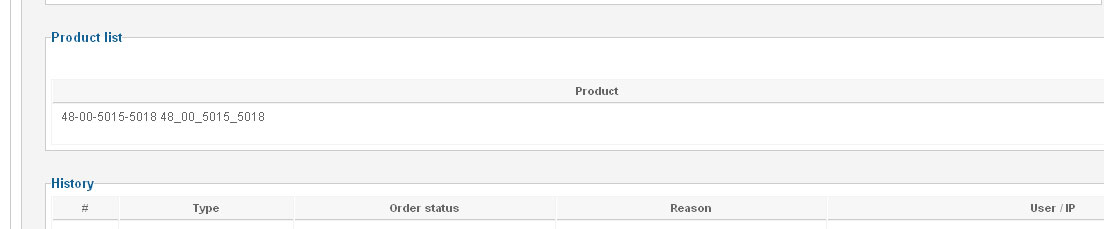
I made the change to Views->Back End->Order->Forms as indicated. However, there is no hyperlink. See image.
Please Log in or Create an account to join the conversation.
15 years 5 months ago #14261
by nicolas
Replied by nicolas on topic Re: Link product names from front end order view
Could you check that you made your change for the good template ?
Please Log in or Create an account to join the conversation.
15 years 5 months ago #14262
by momentis
Replied by momentis on topic Re: Link product names from front end order view
Ahh, that was it. I changed the correct file, but did it under my front end template instead of the admin template. Thanks!!
By the way, it works perfectly and will be a huge help. Thanks!!!!!!!!!!!!
By the way, it works perfectly and will be a huge help. Thanks!!!!!!!!!!!!
Please Log in or Create an account to join the conversation.
Time to create page: 0.259 seconds