

- Posts: 80
- Thank you received: 0
Shipping options text bullets formatting
15 years 5 months ago #14120
by jmilli
Shipping options text bullets formatting was created by jmilli
Greetings.
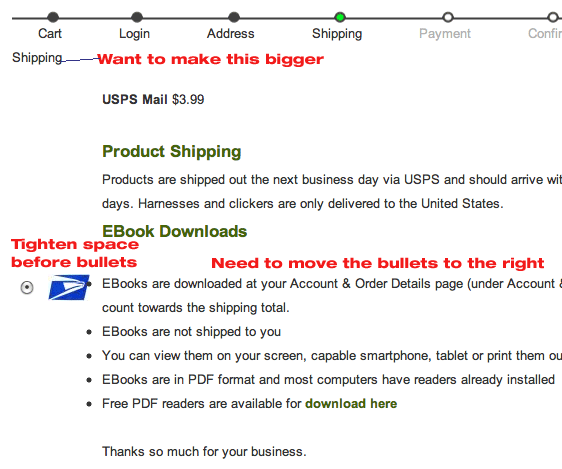
I am having formatting issues with bullets and other formatting on the shipping options.
See the enclosed image.
I would like to:
Thanks.
I am having formatting issues with bullets and other formatting on the shipping options.
See the enclosed image.
I would like to:
-
Make the titles bigger "Shipping"
-
Decrease space before bullets
-
Move bullets to the right
Thanks.
Please Log in or Create an account to join the conversation.

15 years 5 months ago #14131
by nicolas
Replied by nicolas on topic Re: Shipping options text bullets formatting
You can do the two first points by adding some CSS to the CSS of HikaShop in the tab display of the config. For example, for the title of the view:
.hikashop_shipping_methods legend{ font-size: 30px;}
For the last point, you will have to edit the file shipping of the view checkout via the menu Display->Views and move the code around to accomplish that.
.hikashop_shipping_methods legend{ font-size: 30px;}
For the last point, you will have to edit the file shipping of the view checkout via the menu Display->Views and move the code around to accomplish that.
Please Log in or Create an account to join the conversation.
15 years 5 months ago - 15 years 5 months ago #14183
by jmilli
Replied by jmilli on topic Re: Shipping options text bullets formatting
Thanks. I was able to do the first one, but am stuck on 2 and 3.
Isn't that CSS as well? My knowledge is limited, so I don't know if it is CSS or how to implement. Can I add something to the override on my template?
I just added bullets within the shipping options using the editor within Hika and this is how it showed up.
Any more suggestions?
Thanks.
Isn't that CSS as well? My knowledge is limited, so I don't know if it is CSS or how to implement. Can I add something to the override on my template?
I just added bullets within the shipping options using the editor within Hika and this is how it showed up.
Any more suggestions?
Thanks.
Last edit: 15 years 5 months ago by jmilli.
Please Log in or Create an account to join the conversation.
15 years 5 months ago #14187
by nicolas
Replied by nicolas on topic Re: Shipping options text bullets formatting
Ah indeed. Some CSS will do. I can't tel you what CSS to use but if you added your bullet points via the editor, you will be able to set the style directly in the editor. You need to edit the HTML of your description in the editor and add to the UL tag of your list the code: style="margin-left:30px;"
Please Log in or Create an account to join the conversation.
15 years 5 months ago #14192
by jmilli
Replied by jmilli on topic Re: Shipping options text bullets formatting
Thank you!
I need to learn CSS, Php . . . . the list gets longer every day.
Thanks. I really appreciate your help.
I need to learn CSS, Php . . . . the list gets longer every day.
Thanks. I really appreciate your help.
Please Log in or Create an account to join the conversation.
Time to create page: 0.190 seconds