

- Posts: 202
- Thank you received: 2
Custom fields by product in checkout
15 years 5 months ago #14363
by momentis
Custom fields by product in checkout was created by momentis
Okay, nicolas, here's a tough one!!
When users add a product into the shopping cart, I want to be able to give them 4 fields to enter in data, pertaining to that product, and submit with the order. To clarify, a user enters ProductA, ProductB and ProductC into the cart. I would like them to be able to enter, should they wish, information in four fields (FieldA, FieldB, FieldC, FieldD).
Is this possible? I can create custom product fields, but these are used for entry in the back-end. These fields would just be textboxes for my purposes. I cannot use the Characteristics, because this forces a drop-down, and I need free-entry textboxes.
Is this possible at all in the shop or checkout process?
When users add a product into the shopping cart, I want to be able to give them 4 fields to enter in data, pertaining to that product, and submit with the order. To clarify, a user enters ProductA, ProductB and ProductC into the cart. I would like them to be able to enter, should they wish, information in four fields (FieldA, FieldB, FieldC, FieldD).
Is this possible? I can create custom product fields, but these are used for entry in the back-end. These fields would just be textboxes for my purposes. I cannot use the Characteristics, because this forces a drop-down, and I need free-entry textboxes.
Is this possible at all in the shop or checkout process?
Please Log in or Create an account to join the conversation.
15 years 5 months ago #14365
by momentis
Replied by momentis on topic Re: Custom fields by product in checkout
If these fields could display right on the product page, like the Characteristics do, that would be the best!!
Please Log in or Create an account to join the conversation.

15 years 5 months ago #14371
by nicolas
Replied by nicolas on topic Re: Custom fields by product in checkout
You can create custom item (not product) fields. These are displayed on the product page.
The fields are displayed on all the product pages. If you want to only display some fields on some pages, you will have to edit the views' code:
www.hikashop.com/en/support/forum/4-how-...teristics-limit.html
The fields are displayed on all the product pages. If you want to only display some fields on some pages, you will have to edit the views' code:
www.hikashop.com/en/support/forum/4-how-...teristics-limit.html
Please Log in or Create an account to join the conversation.
15 years 5 months ago #14495
by momentis
Replied by momentis on topic Re: Custom fields by product in checkout
Man, nicolas, I have yet to ask a question you can't answer! 
Thank you for the reference to the views settings for display of the fields. If I create a custom product field called, say, "Display Extra Fields", can I use the value of this field to determine, in the product view, whether or not to show the Item fields? The "Display Extra Fields" would most likely be a "Yes/No" or "0/1" field. I could just populate this field when I do a mass product upload, so it would not be difficult to maintain.
Thanks!!
Thank you for the reference to the views settings for display of the fields. If I create a custom product field called, say, "Display Extra Fields", can I use the value of this field to determine, in the product view, whether or not to show the Item fields? The "Display Extra Fields" would most likely be a "Yes/No" or "0/1" field. I could just populate this field when I do a mass product upload, so it would not be difficult to maintain.
Thanks!!
Please Log in or Create an account to join the conversation.
15 years 5 months ago #14497
by nicolas
Replied by nicolas on topic Re: Custom fields by product in checkout
Yes, of course.
You will find the value of your custom product field in the variable $this->element->FIELD_COLUMN_NAME on the product view
You will find the value of your custom product field in the variable $this->element->FIELD_COLUMN_NAME on the product view
Please Log in or Create an account to join the conversation.
15 years 5 months ago #14498
by momentis
Replied by momentis on topic Re: Custom fields by product in checkout
WOW!!! Awesome! Nicolas - I must tell you that I am thoroughly impressed with this product. I wish I could write another review on the JED!!! Great, great job! 
You're probably tired of hearing that!
You're probably tired of hearing that!
Please Log in or Create an account to join the conversation.
15 years 5 months ago #14499
by nicolas
Replied by nicolas on topic Re: Custom fields by product in checkout
Thank you. We're never tired of that. That's what keeps us working hard
Please Log in or Create an account to join the conversation.
15 years 5 months ago #14509
by momentis
Replied by momentis on topic Re: Custom fields by product in checkout
I am editing the front-end view Product->Show. I have commented out the line:
if(!empty($this->itemFields)){
and replaced it with the following:
if($this->element->prod_display_fields==1){
with "prod_display_fields" being my custom Product field. The Item fields are still showing on the front end for every product. Cannot figure out what I am missing.
if(!empty($this->itemFields)){
and replaced it with the following:
if($this->element->prod_display_fields==1){
with "prod_display_fields" being my custom Product field. The Item fields are still showing on the front end for every product. Cannot figure out what I am missing.
Please Log in or Create an account to join the conversation.
15 years 5 months ago #14511
by momentis
Replied by momentis on topic Re: Custom fields by product in checkout
And this time I made sure I was working in the right template
Please Log in or Create an account to join the conversation.
15 years 5 months ago #14514
by nicolas
Replied by nicolas on topic Re: Custom fields by product in checkout
That should do it though.
The template would indeed have been my next question...
I don't see any other problem possible.
The template would indeed have been my next question...
I don't see any other problem possible.
Please Log in or Create an account to join the conversation.
15 years 5 months ago #14515
by momentis
Replied by momentis on topic Re: Custom fields by product in checkout
I do not have the field "prod_display_fields" showing on the front end. Would that make a difference?
Please Log in or Create an account to join the conversation.
15 years 5 months ago #14516
by momentis
Replied by momentis on topic Re: Custom fields by product in checkout
Weird - when I display the field on the front end, they are all showing as "1", even though the back-end shows them as set to "0". Let me play around with the custom field definition a bit...
Please Log in or Create an account to join the conversation.
15 years 5 months ago #14517
by momentis
Replied by momentis on topic Re: Custom fields by product in checkout
nicolas,
I set up the custom Product field "prod_display_fields" as a single drop-down, with options of YES or NO. Initially I had it storing the value as 1 (YES) or 0 (NO). I have changed it to save the value simply as YES or NO. I also set the default to YES. I updated the field in the database to reflect this change (updated all 0s to NO and all 1s to YES).
When I view the product in the back end list, the field is set as it should be. When I open a product to edit it, the field is showing the default YES, even if the list shows NO. On the site's front-end, when displaying the field, it shows as YES for every product, even if the back-end product list shows NO.
I set up the custom Product field "prod_display_fields" as a single drop-down, with options of YES or NO. Initially I had it storing the value as 1 (YES) or 0 (NO). I have changed it to save the value simply as YES or NO. I also set the default to YES. I updated the field in the database to reflect this change (updated all 0s to NO and all 1s to YES).
When I view the product in the back end list, the field is set as it should be. When I open a product to edit it, the field is showing the default YES, even if the list shows NO. On the site's front-end, when displaying the field, it shows as YES for every product, even if the back-end product list shows NO.
Please Log in or Create an account to join the conversation.
15 years 5 months ago #14518
by nicolas
Replied by nicolas on topic Re: Custom fields by product in checkout
No. All the custom products fields are loaded in the $this->element object.
But if you put the code:
if($this->element->prod_display_fields==1){
and that the fields are still displaying, that means one of the two things:
1. All your products have the value 1 in the custom field.
2. You didn't modify the good file and thus your check wasn't applied.
But if you put the code:
if($this->element->prod_display_fields==1){
and that the fields are still displaying, that means one of the two things:
1. All your products have the value 1 in the custom field.
2. You didn't modify the good file and thus your check wasn't applied.
Please Log in or Create an account to join the conversation.
15 years 5 months ago #14519
by nicolas
Replied by nicolas on topic Re: Custom fields by product in checkout
In PHP YES==1 and NO==1. In fact, any string will be the same.
You need to change your check:
if($this->element->prod_display_fields=='YES'){
You need to change your check:
if($this->element->prod_display_fields=='YES'){
Please Log in or Create an account to join the conversation.
15 years 5 months ago #14520
by momentis
Replied by momentis on topic Re: Custom fields by product in checkout
Our posts crossed. See my last...
Please Log in or Create an account to join the conversation.
15 years 5 months ago #14523
by momentis
Replied by momentis on topic Re: Custom fields by product in checkout
Perhaps this is a bug, I don't know, but here's what I have done and what I am seeing:
1) Deleted the original YES/No dropdown field I had created;
2) Created a new Product field called "show_fields", set to type TEXT, size 1. Set to display on front and back end;
3) Populated the field "show_fields" with a Y or N as appropriate;
4) Added the following code to the front-end Product->Show view:
if($this->element->show_fields == "Y") in place of if(!empty($this->itemFields))
The fields are showing on every product on the front end, regardless of the setting in the "show_fields" column. The weird thing is that, on the front end product page, the value of the field "show_fields" on EVERY product is displaying as a "Y". I know this should crazy, but I am attaching an image to show what I am seeing. I am confused!!
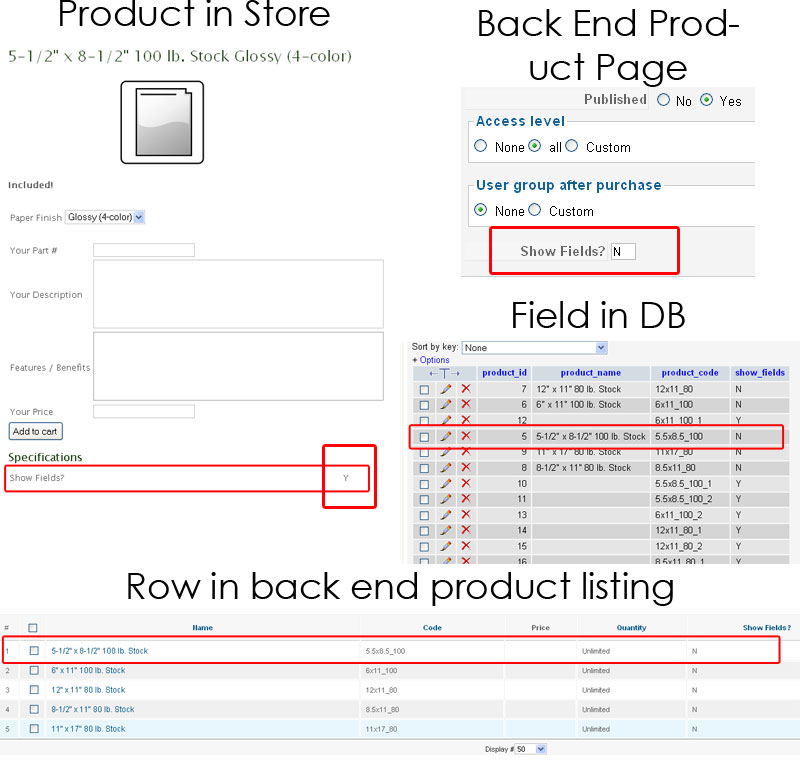
1) Deleted the original YES/No dropdown field I had created;
2) Created a new Product field called "show_fields", set to type TEXT, size 1. Set to display on front and back end;
3) Populated the field "show_fields" with a Y or N as appropriate;
4) Added the following code to the front-end Product->Show view:
if($this->element->show_fields == "Y") in place of if(!empty($this->itemFields))
The fields are showing on every product on the front end, regardless of the setting in the "show_fields" column. The weird thing is that, on the front end product page, the value of the field "show_fields" on EVERY product is displaying as a "Y". I know this should crazy, but I am attaching an image to show what I am seeing. I am confused!!
Please Log in or Create an account to join the conversation.
15 years 5 months ago #14524
by nicolas
Replied by nicolas on topic Re: Custom fields by product in checkout
I've just done the same on our demo website and it works properly:
www.demo.hikashop.com/index.php?option=c...ry_pathway=0&lang=en
It must be something else. What is the configuration of your custom field ? Could you do a full screenshot of your product edition page ?
It must be something else. What is the configuration of your custom field ? Could you do a full screenshot of your product edition page ?
Please Log in or Create an account to join the conversation.
15 years 5 months ago #14525
by momentis
Replied by momentis on topic Re: Custom fields by product in checkout
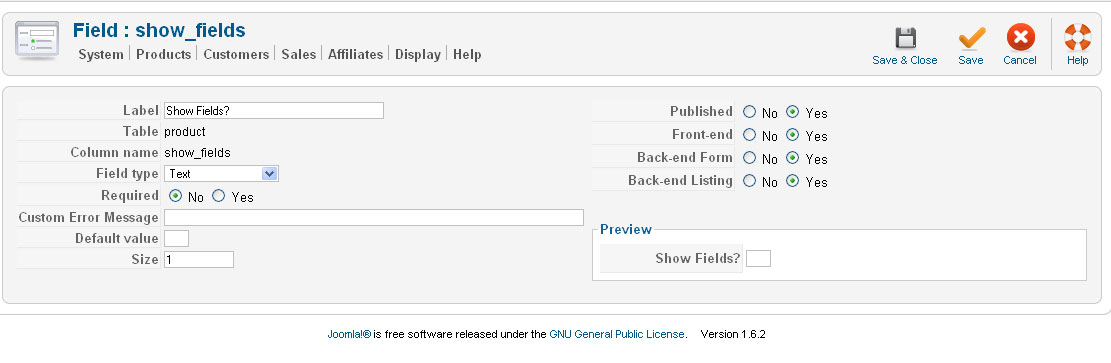
Here is a shot of the custom field config...
Please Log in or Create an account to join the conversation.
15 years 5 months ago #14526
by momentis
Replied by momentis on topic Re: Custom fields by product in checkout
What is the product edition page? Sorry!!!
Please Log in or Create an account to join the conversation.
Time to create page: 0.310 seconds