

- Posts: 74
- Thank you received: 1
Different image for thumbnail than product image
15 years 5 months ago #15893
by donzo
Different image for thumbnail than product image was created by donzo
I really need to be able to have a different image for the thumbnail of a product when viewing the product listing, to the image you see when you go into product detail.
Ill explain. On the product listing I want to use a cropped in version of the image for design reasons, but once you are in the product I want to show the full, uncropped image. Now I can almost achieve this by uploading 2 images for each product, ensuring I upload the cropped thumbnail first, then this is used by default as the listing image, but really, once in the product itself I only want to show the larger uncropped image.
I could use some jquery to remove the first thumbail in the mini previews, but the main shot would still be on the cropped thumbnail.
Any ideas ?
Thanks
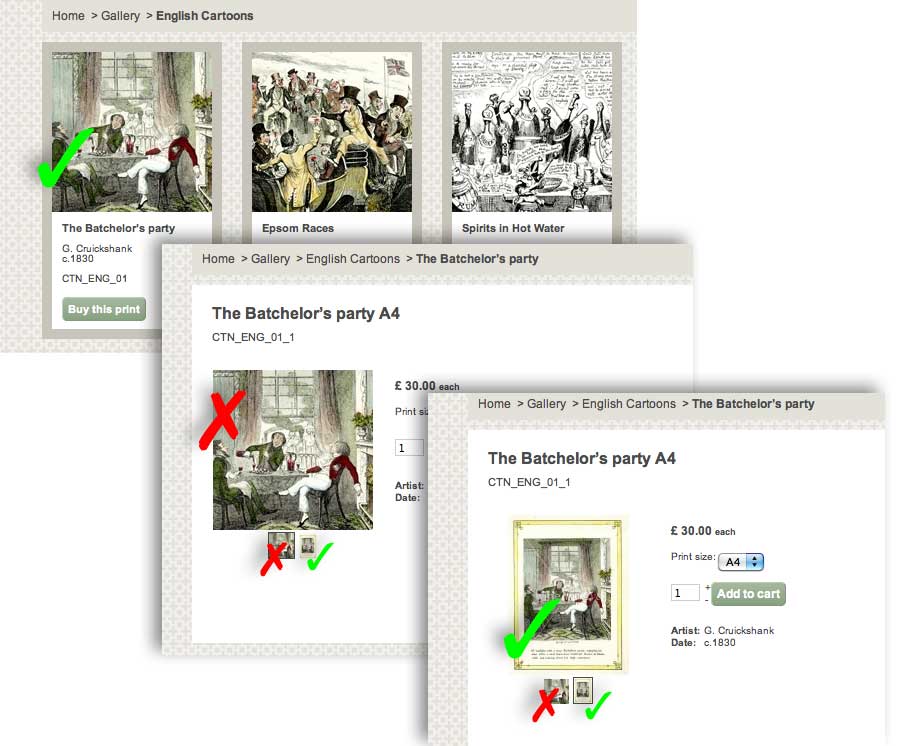
Ill explain. On the product listing I want to use a cropped in version of the image for design reasons, but once you are in the product I want to show the full, uncropped image. Now I can almost achieve this by uploading 2 images for each product, ensuring I upload the cropped thumbnail first, then this is used by default as the listing image, but really, once in the product itself I only want to show the larger uncropped image.
I could use some jquery to remove the first thumbail in the mini previews, but the main shot would still be on the cropped thumbnail.
Any ideas ?
Thanks
Please Log in or Create an account to join the conversation.

15 years 5 months ago #15896
by Jerome
Jerome - Obsidev.com
HikaMarket & HikaSerial developer / HikaShop core dev team.
Replied by Jerome on topic Re: Different image for thumbnail than product image
Hi,
In order to remove the first thumbnail in the product page, you have to edit the view via the menu Display->View.
The view is: product/show
Change:
To:
In order to select the second image as current thumbnail.
After that you have to modify the foreach which list all thumbnails
With:
And I think it will solve your problem.
Regards,
In order to remove the first thumbnail in the product page, you have to edit the view via the menu Display->View.
The view is: product/show
Change:
Code:
$image = reset($this->element->images);
Code:
reset($this->element->images);
$image = next($this->element->images);
After that you have to modify the foreach which list all thumbnails
Code:
if(count($this->element->images)>1){
foreach($this->element->images as $image){
Code:
if(count($this->element->images)>2){
$thumbs = $this->element->images;
array_shift($thumbs);
foreach($thumbs as $image){
And I think it will solve your problem.
Regards,
Jerome - Obsidev.com
HikaMarket & HikaSerial developer / HikaShop core dev team.
Please Log in or Create an account to join the conversation.
15 years 5 months ago #15898
by donzo
Replied by donzo on topic Re: Different image for thumbnail than product image
Really, really grateful.
Worked a treat, though I decided to remove all the mini thumbs in the end as it made no sense to have just one.
Brilliant, thanks.
Worked a treat, though I decided to remove all the mini thumbs in the end as it made no sense to have just one.
Brilliant, thanks.
Please Log in or Create an account to join the conversation.
15 years 5 months ago #15899
by donzo
Replied by donzo on topic Re: Different image for thumbnail than product image
Slight hitch...
As I have some variants, when one selects a different variant the image and thumbnails pop back to the default, ie first thumbnail visible and id="hikashop_small_image_div" showing all thumbs.
thanks
As I have some variants, when one selects a different variant the image and thumbnails pop back to the default, ie first thumbnail visible and id="hikashop_small_image_div" showing all thumbs.
thanks
Please Log in or Create an account to join the conversation.

15 years 5 months ago - 15 years 2 months ago #15900
by nicolas
Replied by nicolas on topic Re: Different image for thumbnail than product image
For the variants, you need to add the line:
array_shift($variant->images);
after the line:
foreach($this->element->variants as $variant){
array_shift($variant->images);
after the line:
foreach($this->element->variants as $variant){
Last edit: 15 years 2 months ago by nicolas.
Please Log in or Create an account to join the conversation.
15 years 5 months ago #15901
by donzo
Replied by donzo on topic Re: Different image for thumbnail than product image
That didnt work for me, just displayed nothing for the variants.
But I did just repeat the code from the primary product you gave me into the variants area and that worked.
Thanks
But I did just repeat the code from the primary product you gave me into the variants area and that worked.
Thanks
Please Log in or Create an account to join the conversation.
14 years 11 months ago #29493
by sdce
Replied by sdce on topic Re: Different image for thumbnail than product image
I modified the product/show file of my hikashop website, but I have a display issue with the main image on product pages.
The main image on the products page is not showing up. Could you please explain where I made an error.
I have made the following edits:
<div id="hikashop_main_image_div" class="hikashop_main_image_div">
<?php
if(!empty($this->element->images)){
reset($this->element->images);
$image = next($this);
if(!$this->config->get('images')){
echo '<img src="'.$this->image->uploadFolder_url.$image->file_path.'" alt="'.$image->file_name.'" id="hikashop_main_image" style="margin-top:10px;margin-bottom:10px;display:inline-block;vertical-align:middle" />';
}else{
$height = $this->config->get('images_y');
$style='';
if(count($this->element->images)>1){
if(!empty($height)){
$style=' style="height:'.($height+5).'px;"';
}
} ?>
<div class="hikashop_product_main_image_thumb" id="hikashop_main_image_thumb_div">
<?php echo $this->image->display($image->file_path,true,$image->file_name,'id="hikashop_main_image" style="margin-top:10px;margin-bottom:10px;display:inline-block;vertical-align:middle"','id="hikashop_main_image_link"'); ?>
</div>
<?php }
?>
</div><div id="hikashop_small_image_div" class="hikashop_small_image_div"><?php
if(count($this->element->images)>2){
$thumbs = $this->element->images;
array_shift($thumbs);
foreach($thumbs as $image){
echo $this->image->display($image->file_path,'hikashop_main_image',$image->file_name,'class="hikashop_child_image"','rel="SqueezeBox"');
}
The main image on the products page is not showing up. Could you please explain where I made an error.
I have made the following edits:
<div id="hikashop_main_image_div" class="hikashop_main_image_div">
<?php
if(!empty($this->element->images)){
reset($this->element->images);
$image = next($this);
if(!$this->config->get('images')){
echo '<img src="'.$this->image->uploadFolder_url.$image->file_path.'" alt="'.$image->file_name.'" id="hikashop_main_image" style="margin-top:10px;margin-bottom:10px;display:inline-block;vertical-align:middle" />';
}else{
$height = $this->config->get('images_y');
$style='';
if(count($this->element->images)>1){
if(!empty($height)){
$style=' style="height:'.($height+5).'px;"';
}
} ?>
<div class="hikashop_product_main_image_thumb" id="hikashop_main_image_thumb_div">
<?php echo $this->image->display($image->file_path,true,$image->file_name,'id="hikashop_main_image" style="margin-top:10px;margin-bottom:10px;display:inline-block;vertical-align:middle"','id="hikashop_main_image_link"'); ?>
</div>
<?php }
?>
</div><div id="hikashop_small_image_div" class="hikashop_small_image_div"><?php
if(count($this->element->images)>2){
$thumbs = $this->element->images;
array_shift($thumbs);
foreach($thumbs as $image){
echo $this->image->display($image->file_path,'hikashop_main_image',$image->file_name,'class="hikashop_child_image"','rel="SqueezeBox"');
}
Please Log in or Create an account to join the conversation.
14 years 11 months ago #29510
by nicolas
Replied by nicolas on topic Re: Different image for thumbnail than product image
This line is definitely not correct: $image = next($this);
You probably wanted to write: $image = next($this->element->images);
You probably wanted to write: $image = next($this->element->images);
Please Log in or Create an account to join the conversation.
14 years 11 months ago #29557
by sdce
Replied by sdce on topic Re: Different image for thumbnail than product image
Made the edits, but the thumbnail shows up a different size on load that actual. And when hover over gallery images the main image on the products page reverts to the original size. Could this be a CSS size error?
Please Log in or Create an account to join the conversation.
14 years 11 months ago - 14 years 11 months ago #29580
by sdce
Replied by sdce on topic Re: Different image for thumbnail than product image
I attempted to resolve the issue by making all images the assigned size. This resolves the different image size on load of page, but I need the images to be a larger size.
Last edit: 14 years 11 months ago by sdce.
Please Log in or Create an account to join the conversation.
14 years 11 months ago #29610
by nicolas
Replied by nicolas on topic Re: Different image for thumbnail than product image
There is no need to change any code for the thumbnails size. There are parameters for that in the Files tab of the configuration (for the product page) and in the hikashop options page of your menus/modules for your listings.
Please Log in or Create an account to join the conversation.
14 years 11 months ago #29932
by sdce
Replied by sdce on topic Re: Different image for thumbnail than product image
Thank you! Problem is fixed!
Please Log in or Create an account to join the conversation.
Less
More
- Posts: 158
- Thank you received: 6
14 years 5 months ago #49698
by artisanwebandprint
Replied by artisanwebandprint on topic Re: Different image for thumbnail than product image
Hello,
Since I have variants, my code looked different than the example code above.
It started with this:
<?php
$image = reset($variant->images);
$height = $this->config->get('product_image_y',$this->config->get('thumbnail_y'));
$width = $this->config->get('product_image_x',$this->config->get('thumbnail_x'));
if (!$this->config->get('thumbnail')) {
echo '<img src="' . $this->image->uploadFolder_url . $image->file_path . '" alt="' . $image->file_name . '" id="hikashop_main_image_' . $variant_name . '" style="margin-top:10px;margin-bottom:10px;display:inline-block;vertical-align:middle" />';
} else {
$style = '';
if (count($variant->images) > 1) {
if (!empty ($height)) {
$style = ' style="height:' . ($height +5) . 'px;"';
}
}
?>
And I've changed it to this:
<?php
$image = reset($variant->images);
$image = next($variant->images);
$height = $this->config->get('product_image_y',$this->config->get('thumbnail_y'));
$width = $this->config->get('product_image_x',$this->config->get('thumbnail_x'));
if (!$this->config->get('thumbnail')) {
echo '<img src="' . $this->image->uploadFolder_url . $image->file_path . '" alt="' . $image->file_name . '" id="hikashop_main_image_' . $variant_name . '" style="margin-top:10px;margin-bottom:10px;display:inline-block;vertical-align:middle" />';
} else {
$style = '';
if (count($variant->images) > 2) {
$variant = $this->element->images;
array_shift($variant->images);
foreach($this->element->variants as $variant);}{
if (!empty ($height)) {
$style = ' style="height:' . ($height +5) . 'px;"';
}
}
?>
Unfortunately, the preview image is still showing up in the product page.
Thanks,
Dawn
Since I have variants, my code looked different than the example code above.
It started with this:
<?php
$image = reset($variant->images);
$height = $this->config->get('product_image_y',$this->config->get('thumbnail_y'));
$width = $this->config->get('product_image_x',$this->config->get('thumbnail_x'));
if (!$this->config->get('thumbnail')) {
echo '<img src="' . $this->image->uploadFolder_url . $image->file_path . '" alt="' . $image->file_name . '" id="hikashop_main_image_' . $variant_name . '" style="margin-top:10px;margin-bottom:10px;display:inline-block;vertical-align:middle" />';
} else {
$style = '';
if (count($variant->images) > 1) {
if (!empty ($height)) {
$style = ' style="height:' . ($height +5) . 'px;"';
}
}
?>
And I've changed it to this:
<?php
$image = reset($variant->images);
$image = next($variant->images);
$height = $this->config->get('product_image_y',$this->config->get('thumbnail_y'));
$width = $this->config->get('product_image_x',$this->config->get('thumbnail_x'));
if (!$this->config->get('thumbnail')) {
echo '<img src="' . $this->image->uploadFolder_url . $image->file_path . '" alt="' . $image->file_name . '" id="hikashop_main_image_' . $variant_name . '" style="margin-top:10px;margin-bottom:10px;display:inline-block;vertical-align:middle" />';
} else {
$style = '';
if (count($variant->images) > 2) {
$variant = $this->element->images;
array_shift($variant->images);
foreach($this->element->variants as $variant);}{
if (!empty ($height)) {
$style = ' style="height:' . ($height +5) . 'px;"';
}
}
?>
Unfortunately, the preview image is still showing up in the product page.
Thanks,
Dawn
Please Log in or Create an account to join the conversation.
14 years 5 months ago #49810
by nicolas
Replied by nicolas on topic Re: Different image for thumbnail than product image
For the variants, you need to add the line:
array_shift($variant->images);
after the line:
foreach($this->element->variants as $variant){
Not before that line.
array_shift($variant->images);
after the line:
foreach($this->element->variants as $variant){
Not before that line.
Please Log in or Create an account to join the conversation.
Less
More
- Posts: 158
- Thank you received: 6
14 years 5 months ago - 14 years 5 months ago #49860
by artisanwebandprint
Replied by artisanwebandprint on topic Re: Different image for thumbnail than product image
Hello,
I've made the changes as you've noted and I still see the default thumbnail on the product page. The URL: king.artisanwebandprint.com/photography-...102-ancient-fig-tree
Here's the updated code:
<?php
$image = reset($variant->images);
$image = next($variant->images);
$height = $this->config->get('product_image_y',$this->config->get('thumbnail_y'));
$width = $this->config->get('product_image_x',$this->config->get('thumbnail_x'));
if (!$this->config->get('thumbnail')) {
echo '<img src="' . $this->image->uploadFolder_url . $image->file_path . '" alt="' . $image->file_name . '" id="hikashop_main_image_' . $variant_name . '" style="margin-top:10px;margin-bottom:10px;display:inline-block;vertical-align:middle" />';
} else {
$style = '';
if (count($variant->images) > 2) {
$variant = $this->element->images;
foreach($this->element->variants as $variant);{
array_shift($variant->images);}
if (!empty ($height)) {
$style = ' style="height:' . ($height +5) . 'px;"';
}
}
?>
I've made the changes as you've noted and I still see the default thumbnail on the product page. The URL: king.artisanwebandprint.com/photography-...102-ancient-fig-tree
Here's the updated code:
<?php
$image = reset($variant->images);
$image = next($variant->images);
$height = $this->config->get('product_image_y',$this->config->get('thumbnail_y'));
$width = $this->config->get('product_image_x',$this->config->get('thumbnail_x'));
if (!$this->config->get('thumbnail')) {
echo '<img src="' . $this->image->uploadFolder_url . $image->file_path . '" alt="' . $image->file_name . '" id="hikashop_main_image_' . $variant_name . '" style="margin-top:10px;margin-bottom:10px;display:inline-block;vertical-align:middle" />';
} else {
$style = '';
if (count($variant->images) > 2) {
$variant = $this->element->images;
foreach($this->element->variants as $variant);{
array_shift($variant->images);}
if (!empty ($height)) {
$style = ' style="height:' . ($height +5) . 'px;"';
}
}
?>
Last edit: 14 years 5 months ago by artisanwebandprint.
Please Log in or Create an account to join the conversation.
14 years 5 months ago #49929
by nicolas
Replied by nicolas on topic Re: Different image for thumbnail than product image
Please make sure that you're doing your modifications for the correct template on your website and not for another one which you don't use.
Please Log in or Create an account to join the conversation.
Less
More
- Posts: 158
- Thank you received: 6
14 years 5 months ago #50450
by artisanwebandprint
Replied by artisanwebandprint on topic Re: Different image for thumbnail than product image
Hi,
I've sent the private login to determine why the code isn't working to removing the default thumbnail from the product page. To answer your question, yes I did modify the php for the appropriate template.
Dawn
I've sent the private login to determine why the code isn't working to removing the default thumbnail from the product page. To answer your question, yes I did modify the php for the appropriate template.
Dawn
Please Log in or Create an account to join the conversation.
Less
More
- Posts: 158
- Thank you received: 6
14 years 5 months ago #51671
by artisanwebandprint
Replied by artisanwebandprint on topic Re: Different image for thumbnail than product image
Yes,
I ensured that I made the modifications to the right template. I sent a PM to Nicolas with the login information on May 20th, any luck?
king.artisanwebandprint.com
Thanks,
Dawn
I ensured that I made the modifications to the right template. I sent a PM to Nicolas with the login information on May 20th, any luck?
king.artisanwebandprint.com
Thanks,
Dawn
Please Log in or Create an account to join the conversation.
14 years 5 months ago #51742
by nicolas
Replied by nicolas on topic Re: Different image for thumbnail than product image
Your modifications were not correct. I've looked at them and fixed them.
Please Log in or Create an account to join the conversation.
Less
More
- Posts: 158
- Thank you received: 6
14 years 5 months ago #51776
by artisanwebandprint
Replied by artisanwebandprint on topic Re: Different image for thumbnail than product image
Thanks Nicolas!
I appreciate your assistance greatly. I haven't learned PHP so it's a bit confusing to know how to edit it when there are a number of different approaches (variable or not).
All the best,
Dawn
I appreciate your assistance greatly. I haven't learned PHP so it's a bit confusing to know how to edit it when there are a number of different approaches (variable or not).
All the best,
Dawn
Please Log in or Create an account to join the conversation.
Time to create page: 0.156 seconds