

- Posts: 138
- Thank you received: 0
Styling and adding text on checkout thank u
15 years 4 months ago #17182
by rsarpong
Styling and adding text on checkout thank u was created by rsarpong
How can I center the text and add text to the thank you page after the customer checks out? Also I would like to have the text include an option selected by the customer. For example, I have added a field that asks the customer to select the charity the a portion of their purchase to go to. I would like to have this charities name included in the text and to change per their selection.
Please Log in or Create an account to join the conversation.

15 years 4 months ago - 15 years 4 months ago #17194
by nicolas
Replied by nicolas on topic Re: Styling and adding text on checkout thank u
You can modify the thank you page by going in the menu Display->Views and editing the file after_end
Last edit: 15 years 4 months ago by nicolas.
Please Log in or Create an account to join the conversation.
15 years 4 months ago #17290
by rsarpong
Replied by rsarpong on topic Re: Styling and adding text on checkout thank u
What CSS would I use center the text on the Thank You page? Also how would I have certain text values change per customer input? I see this "s%" throughout the language edit function. Does this represent a variable if so how can I make it so that the name of the charity that the customer selects changes on the Thank You page?
Please Log in or Create an account to join the conversation.
15 years 4 months ago #17294
by nicolas
Replied by nicolas on topic Re: Styling and adding text on checkout thank u
The CSS of messages is handled by your template. You should modify your template's CSS. I can't tell what to change where since it depends on how your template is made.
%s is indeed used to pass variables.
You can do like that:
$orderClass = hikashop::get('class.order');
$order = $orderClass->get($order_id);
$app =& JFactory::getApplication();
$app->enqueueMessage( JText::sprintf('THANK_YOU_FOR_PURCHASE',$order->custom_field_column_name) );
And then in your translation file:
THANK_YOU_FOR_PURCHASE="thank you for your funding to %s"
You of course need to replace the custom_field_column_name by the actual field name of your custom field of the table "order".
%s is indeed used to pass variables.
You can do like that:
$orderClass = hikashop::get('class.order');
$order = $orderClass->get($order_id);
$app =& JFactory::getApplication();
$app->enqueueMessage( JText::sprintf('THANK_YOU_FOR_PURCHASE',$order->custom_field_column_name) );
And then in your translation file:
THANK_YOU_FOR_PURCHASE="thank you for your funding to %s"
You of course need to replace the custom_field_column_name by the actual field name of your custom field of the table "order".
Please Log in or Create an account to join the conversation.
15 years 4 months ago #17497
by rsarpong
Replied by rsarpong on topic Re: Styling and adding text on checkout thank u
It did not work for me. In place of the charity name I received the %s symbol. Here is the php code I used
?>
<?php
$orderClass = hikashop::get('class.order');
$order = $orderClass->get($order_id);
$app =& JFactory::getApplication();
$app->enqueueMessage( JText::sprintf('THANK_YOU_FOR_PURCHASE',$order->address_charity) );
Thanks
?>
<?php
$orderClass = hikashop::get('class.order');
$order = $orderClass->get($order_id);
$app =& JFactory::getApplication();
$app->enqueueMessage( JText::sprintf('THANK_YOU_FOR_PURCHASE',$order->address_charity) );
Thanks
Please Log in or Create an account to join the conversation.
15 years 4 months ago #17498
by nicolas
Replied by nicolas on topic Re: Styling and adding text on checkout thank u
Could you make a screenshot of the configuration of your custom field ?
Please Log in or Create an account to join the conversation.
15 years 4 months ago - 15 years 4 months ago #17500
by rsarpong
Replied by rsarpong on topic Re: Styling and adding text on checkout thank u
Here you go.
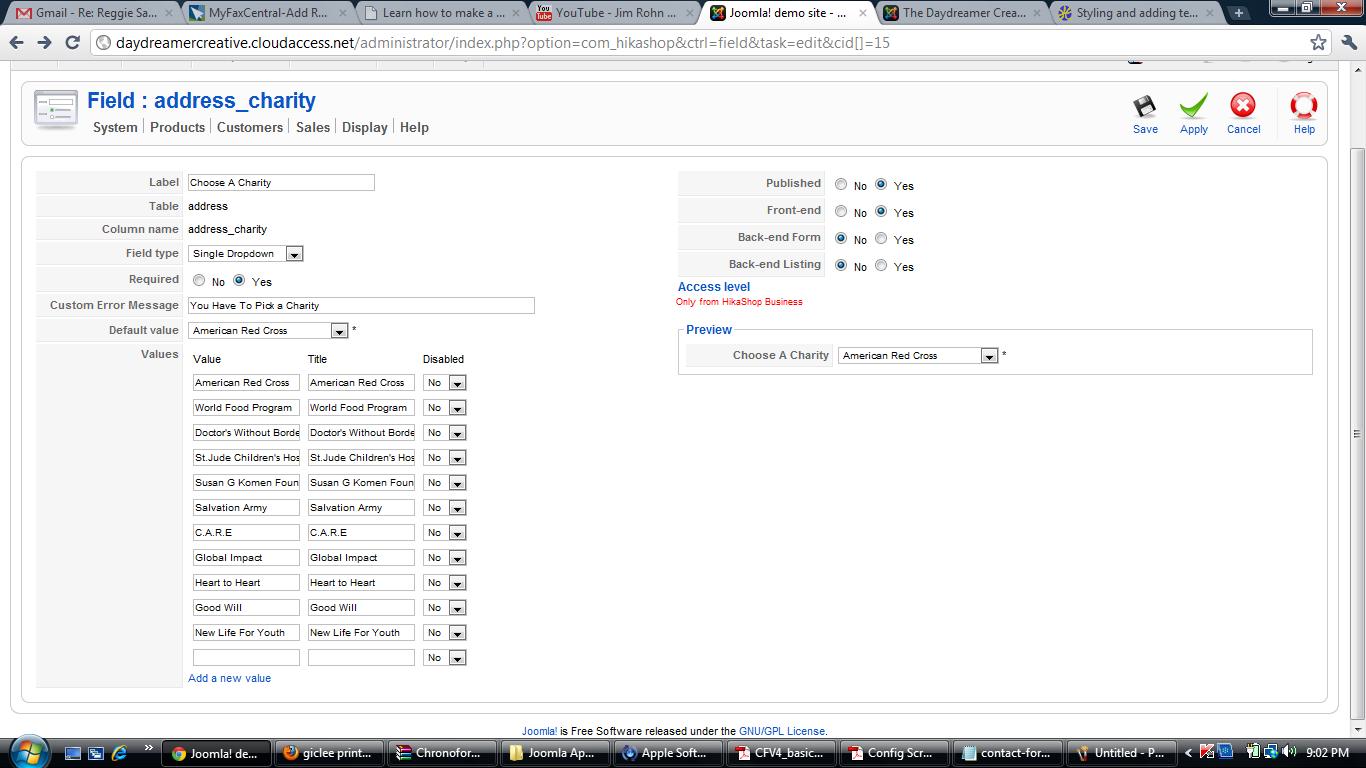
Last edit: 15 years 4 months ago by rsarpong.
Please Log in or Create an account to join the conversation.
15 years 4 months ago #17504
by rsarpong
Replied by rsarpong on topic Re: Styling and adding text on checkout thank u
So what is the good word Nicholas?
Please Log in or Create an account to join the conversation.
15 years 4 months ago #17511
by nicolas
Replied by nicolas on topic Re: Styling and adding text on checkout thank u
That is a custom field of the table "address".
You should create a custom field of the table "order" if you want to access it there.
You should create a custom field of the table "order" if you want to access it there.
Please Log in or Create an account to join the conversation.
15 years 4 months ago #17542
by rsarpong
Replied by rsarpong on topic Re: Styling and adding text on checkout thank u
The options I have for tables are address, user, product, and category. I do not have the option for "order".
Please Log in or Create an account to join the conversation.
15 years 4 months ago #17543
by nicolas
Replied by nicolas on topic Re: Styling and adding text on checkout thank u
That's probably because you're using the Essential version and not the Business edition. Custom fields of the tables item/order/entry are only available in the Business edition.
Please Log in or Create an account to join the conversation.
15 years 4 months ago #17544
by rsarpong
Replied by rsarpong on topic Re: Styling and adding text on checkout thank u
Ok. For future reference when I do upgrade to the Business Edition is there a discount since I'm upgrading from the Essential version?
Please Log in or Create an account to join the conversation.
15 years 4 months ago #17546
by nicolas
Replied by nicolas on topic Re: Styling and adding text on checkout thank u
When you want to update from Essential to Business, you can buy that product:
www.hikashop.com/en/component/hikashop/product/show/cid-3.html
It is the exact price difference between the Business edition and the Essential edition.
It is the exact price difference between the Business edition and the Essential edition.
Please Log in or Create an account to join the conversation.
15 years 4 months ago #17547
by rsarpong
Replied by rsarpong on topic Re: Styling and adding text on checkout thank u
Cool
Please Log in or Create an account to join the conversation.
Time to create page: 0.288 seconds