

- Posts: 156
- Thank you received: 0
how do i control the add to cart landing page?
15 years 3 months ago #18047
by Rickhavoc
how do i control the add to cart landing page? was created by Rickhavoc
how do i control the add to cart landing page?
i want to have 3 different pages where someone might land after adding a item to the cart different item different page they will be landing on. how can i make that happen with HikaShop?
example--
1)
normal add to cart page
2)
i just added a phone and the landing page is making sure i add a plan.
3)
i just added a plan to my cart and the landing page is asking me if i want a phone.
how can i make this happen?
thanks in advance your the best
i want to have 3 different pages where someone might land after adding a item to the cart different item different page they will be landing on. how can i make that happen with HikaShop?
example--
1)
normal add to cart page
2)
i just added a phone and the landing page is making sure i add a plan.
3)
i just added a plan to my cart and the landing page is asking me if i want a phone.
how can i make this happen?
thanks in advance your the best
Please Log in or Create an account to join the conversation.

15 years 3 months ago #18049
by nicolas
Replied by nicolas on topic Re: how do i control the add to cart landing page?
What I would do:
Edit the file cart of the view checkout via the menu Display->Views. There, add some code to check on the content of cart and if the cart has a phone and no plan redirect to where you want or if the cart has a plan and no phone, redirect where you want.
Edit the file cart of the view checkout via the menu Display->Views. There, add some code to check on the content of cart and if the cart has a phone and no plan redirect to where you want or if the cart has a plan and no phone, redirect where you want.
Please Log in or Create an account to join the conversation.
15 years 3 months ago #18052
by Rickhavoc
Replied by Rickhavoc on topic Re: how do i control the add to cart landing page?
oohh come on Nicolas i knew that much lol.. can i get a bit more of a hint? a few lines of code for this poor fellow.. 
Please Log in or Create an account to join the conversation.
15 years 3 months ago #18055
by nicolas
Replied by nicolas on topic Re: how do i control the add to cart landing page?
I don't know who knows what. Some things might seem obvious for some and not for others. I'm trying my best to content everyone...
If you knew that much, then, you could have figured the code... It's just 10 lines of code:
$phone = $plan = false;
foreach($this->rows as $i => $row){
if($row->type_of_product=='plan') $plan=true;
if($row->type_of_product=='phone') $plan=true;
}
$app =& JFactory::getApplication();
if($phone && !$plan){
$app->redirect('my_link_1');
}elseif(!$phone && $plan){
$app->redirect('my_link_2');
}
You need also to have a custom field of the table 'product' with the values 'plan' and 'phone' and the column name type_of_product so that you can select whether a product is a plan or a phone.
If you knew that much, then, you could have figured the code... It's just 10 lines of code:
$phone = $plan = false;
foreach($this->rows as $i => $row){
if($row->type_of_product=='plan') $plan=true;
if($row->type_of_product=='phone') $plan=true;
}
$app =& JFactory::getApplication();
if($phone && !$plan){
$app->redirect('my_link_1');
}elseif(!$phone && $plan){
$app->redirect('my_link_2');
}
You need also to have a custom field of the table 'product' with the values 'plan' and 'phone' and the column name type_of_product so that you can select whether a product is a plan or a phone.
Please Log in or Create an account to join the conversation.
15 years 3 months ago #18118
by Rickhavoc
Replied by Rickhavoc on topic Re: how do i control the add to cart landing page?
where would i add the custom fields of the table product? where would i find the table? if i go to display ---> custom field, and i try to create a field it automatically picks address as the table.
Please Log in or Create an account to join the conversation.

15 years 3 months ago #18124
by Jerome
Jerome - Obsidev.com
HikaMarket & HikaSerial developer / HikaShop core dev team.
Also helping the HikaShop support team when having some time or couldn't sleep.
By the way, do not send me private message, use the "contact us" form instead.
Replied by Jerome on topic Re: how do i control the add to cart landing page?
HikaShop Starter just allows custom fields on "address" table.
You need a commercial version of HikaShop in order to have more possibilities.
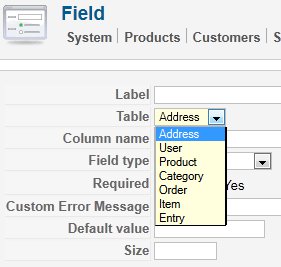
You need a commercial version of HikaShop in order to have more possibilities.
Jerome - Obsidev.com
HikaMarket & HikaSerial developer / HikaShop core dev team.
Also helping the HikaShop support team when having some time or couldn't sleep.
By the way, do not send me private message, use the "contact us" form instead.
Please Log in or Create an account to join the conversation.
15 years 3 months ago #18134
by Rickhavoc
Replied by Rickhavoc on topic Re: how do i control the add to cart landing page?
well i be buying hikashop in the new future, best shop for joomla hands down.
but is there any other way i can trigger this?
but is there any other way i can trigger this?
Please Log in or Create an account to join the conversation.
15 years 3 months ago #18137
by Jerome
Jerome - Obsidev.com
HikaMarket & HikaSerial developer / HikaShop core dev team.
Also helping the HikaShop support team when having some time or couldn't sleep.
By the way, do not send me private message, use the "contact us" form instead.
Replied by Jerome on topic Re: how do i control the add to cart landing page?
Well, if you want to add some other values to a product you can modify views in order to process some "hidden" text which would be added in the description.
It's quite weird, you have to parse description in several views in order to remove the "hidden" text and process it in the product page to display extra data.. But it could work !
It's quite weird, you have to parse description in several views in order to remove the "hidden" text and process it in the product page to display extra data.. But it could work !
Jerome - Obsidev.com
HikaMarket & HikaSerial developer / HikaShop core dev team.
Also helping the HikaShop support team when having some time or couldn't sleep.
By the way, do not send me private message, use the "contact us" form instead.
Please Log in or Create an account to join the conversation.
15 years 3 months ago #18223
by Rickhavoc
Replied by Rickhavoc on topic Re: how do i control the add to cart landing page?
Jerome i got to make this happen in the next 2 hours, or i might get fired , $20 bucks in it for you if you can help me get this done.. please!!
, $20 bucks in it for you if you can help me get this done.. please!! Please Log in or Create an account to join the conversation.
15 years 3 months ago #18232
by Jerome
Jerome - Obsidev.com
HikaMarket & HikaSerial developer / HikaShop core dev team.
Also helping the HikaShop support team when having some time or couldn't sleep.
By the way, do not send me private message, use the "contact us" form instead.
Replied by Jerome on topic Re: how do i control the add to cart landing page?
The only way to implement it in 2 hours is to use the commercial version (begins with the Essential version) and to use code that Nicolas posted.
Jerome - Obsidev.com
HikaMarket & HikaSerial developer / HikaShop core dev team.
Also helping the HikaShop support team when having some time or couldn't sleep.
By the way, do not send me private message, use the "contact us" form instead.
Please Log in or Create an account to join the conversation.
15 years 3 months ago #18254
by Rickhavoc
Replied by Rickhavoc on topic Re: how do i control the add to cart landing page?
ok i just purchased it, i have created the field in the table as a radio box with the values i want, now how do i connect this with the product, i don't see it anywhere.
Please Log in or Create an account to join the conversation.
15 years 3 months ago #18263
by nicolas
Replied by nicolas on topic Re: how do i control the add to cart landing page?
It should be displayed on the product edition screen.
If not, please do a screenshot of the custom field options.
If not, please do a screenshot of the custom field options.
Please Log in or Create an account to join the conversation.
15 years 3 months ago #18268
by Rickhavoc
Replied by Rickhavoc on topic Re: how do i control the add to cart landing page?
some of the options to view weren't set, got it to show now know. thanks.. i got a bug that needs to be addressed. i posted under the Bug report. check it out for me please. thank you HIKASHOP all the way!!
HIKASHOP all the way!! Please Log in or Create an account to join the conversation.
15 years 3 months ago #18272
by Rickhavoc
Replied by Rickhavoc on topic Re: how do i control the add to cart landing page?
I got it to go the the other page i wanted but now it stays there even after i click the add to cart link on the page it landed on check it.
206.217.193.31/~iqcell/index.php/phones/.../category_pathway-22
206.217.193.31/~iqcell/index.php/phones/.../category_pathway-22
Please Log in or Create an account to join the conversation.
15 years 3 months ago #18281
by Rickhavoc
Replied by Rickhavoc on topic Re: how do i control the add to cart landing page?
Nicolas I know your busy buddy, but I bought hika just to make this work. Can you help me out please..
Please Log in or Create an account to join the conversation.
15 years 3 months ago #18284
by nicolas
Replied by nicolas on topic Re: how do i control the add to cart landing page?
The problem is probably with the code you used for the redirects. Please copy/paste it here so that we can see what you did. and also do a screenshot of your custom fields options.
Posting several times won't make me answer faster. We're doing the best we can to answer everyone...
Posting several times won't make me answer faster. We're doing the best we can to answer everyone...
Please Log in or Create an account to join the conversation.
15 years 3 months ago #18292
by Rickhavoc
Replied by Rickhavoc on topic Re: how do i control the add to cart landing page?
i am using this code
$phone = $plan = false;
foreach($this->rows as $i => $row){
if($row->type_of_product=='plan') $plan=true;
if($row->type_of_product=='phone') $plan=true;
}
$app =& JFactory::getApplication();
if($phone && !$plan){
}elseif(!$phone && $plan){
$app->redirect(' 206.217.193.31/~iqcell/index.php?option=...t&view=article&id=18 ');
}
What i want to Happen is that if there is a Phone in the Cart, to take the user to a page offering to check out or select a plan. there will be links on that page to add a plan to the cart. not with the Add to Cart Button but using the hyperlink from the Add to cart Html of a Product.
As of now when i add the phone it takes me to the page where the plans are but after i click the link to add the plan to the cart. it stays on the same page.
Look forward for to the solution.
$phone = $plan = false;
foreach($this->rows as $i => $row){
if($row->type_of_product=='plan') $plan=true;
if($row->type_of_product=='phone') $plan=true;
}
$app =& JFactory::getApplication();
if($phone && !$plan){
}elseif(!$phone && $plan){
$app->redirect(' 206.217.193.31/~iqcell/index.php?option=...t&view=article&id=18 ');
}
What i want to Happen is that if there is a Phone in the Cart, to take the user to a page offering to check out or select a plan. there will be links on that page to add a plan to the cart. not with the Add to Cart Button but using the hyperlink from the Add to cart Html of a Product.
As of now when i add the phone it takes me to the page where the plans are but after i click the link to add the plan to the cart. it stays on the same page.
Look forward for to the solution.
Please Log in or Create an account to join the conversation.
15 years 3 months ago #18301
by nicolas
Replied by nicolas on topic Re: how do i control the add to cart landing page?
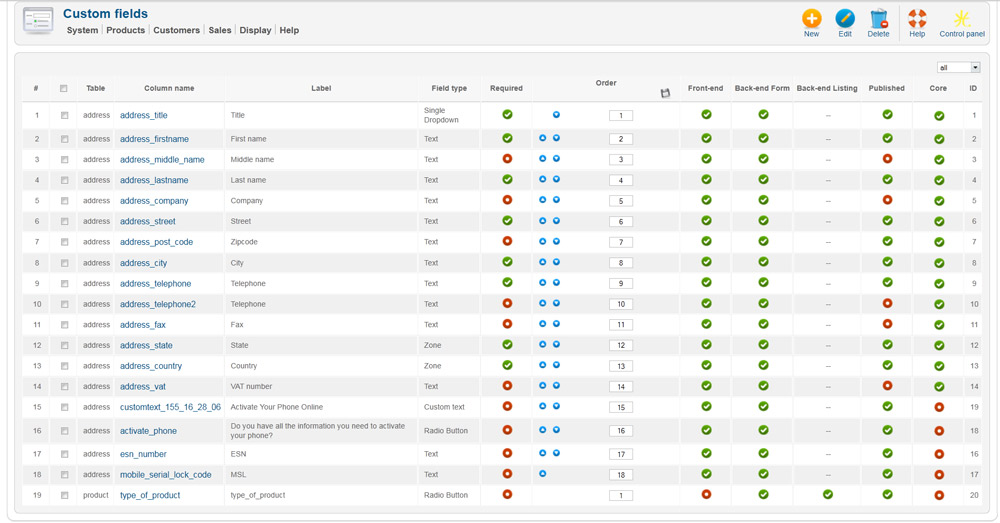
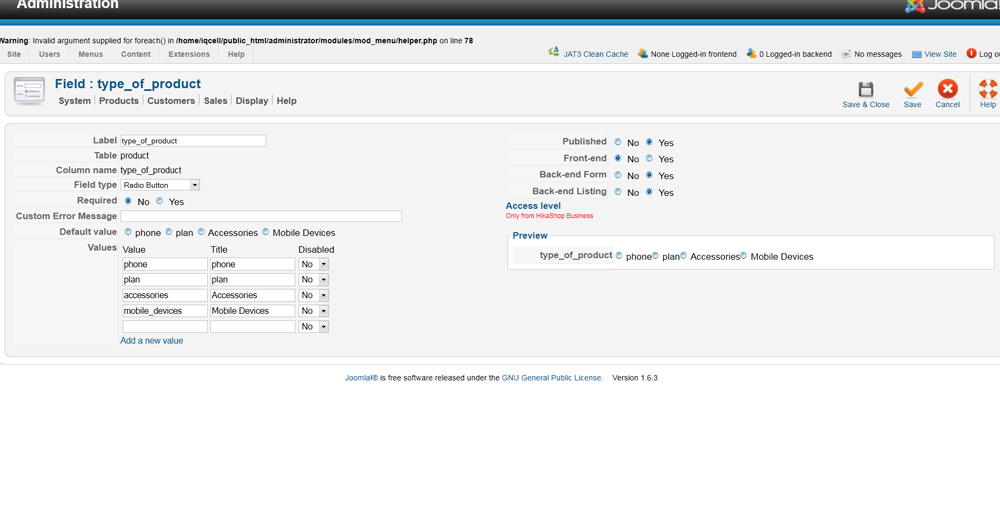
Please do a screenshot of your custom fields options.
Please Log in or Create an account to join the conversation.
15 years 3 months ago #18336
by Rickhavoc
Replied by Rickhavoc on topic Re: how do i control the add to cart landing page?
here they are.
Please Log in or Create an account to join the conversation.
15 years 3 months ago #18337
by Rickhavoc
Replied by Rickhavoc on topic Re: how do i control the add to cart landing page?
Here is inside the field.
Please Log in or Create an account to join the conversation.
Time to create page: 0.389 seconds