

- Posts: 112
- Thank you received: 0
States dropdown box are not shown
15 years 3 months ago #18792
by lrazov
Replied by lrazov on topic Re: States dropdown box are not shown
Last night I bought the hikashop essential package and will install it soon. If the issue persists, I will try and set up an access for you. I will let you know how it goes.
Please Log in or Create an account to join the conversation.

15 years 3 months ago #18828
by nicolas
Replied by nicolas on topic Re: States dropdown box are not shown
Ok. Thanks !
Please Log in or Create an account to join the conversation.
15 years 3 months ago #18917
by Webguy
Replied by Webguy on topic Re: States dropdown box are not shown
nicolas wrote:
Hi, thanks for the reply.
OK, I looked in this section just now, under country, Australia is set in both default value and "preview" country.
When I go into the state field, there are two drop down boxes in the same two positions, but they are empty.
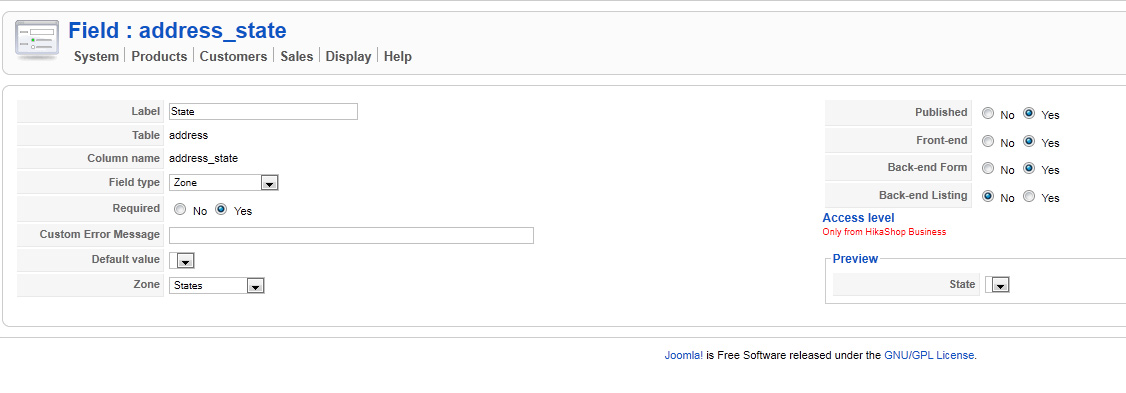
Did you change the default country and the default state in the custom fields address_country and address_state ? Because if that's not the same country as the one you have published, it might create such problem...
Hi, thanks for the reply.
OK, I looked in this section just now, under country, Australia is set in both default value and "preview" country.
When I go into the state field, there are two drop down boxes in the same two positions, but they are empty.
Please Log in or Create an account to join the conversation.
15 years 3 months ago #18922
by nicolas
Replied by nicolas on topic Re: States dropdown box are not shown
That means that HikaShop couldn't find any published state for australia. Do you have them published in the menu System->Zones ?
Please Log in or Create an account to join the conversation.
15 years 3 months ago #18929
by Webguy
Replied by Webguy on topic Re: States dropdown box are not shown
Hi, thanks for the reply.
Yes, sure are published...
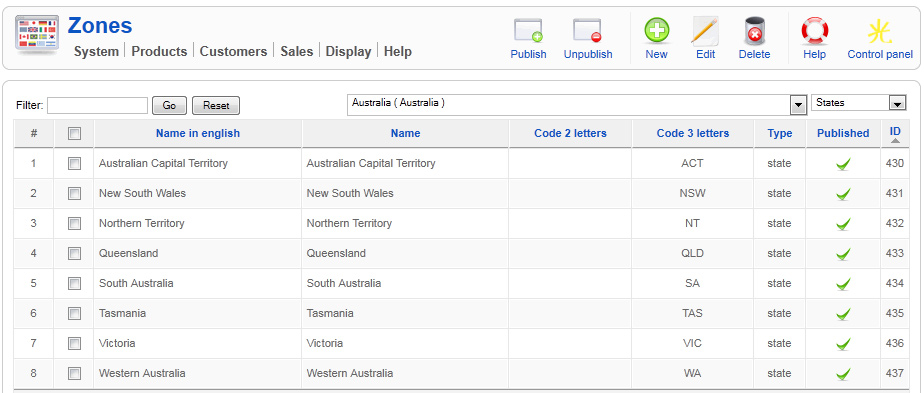
Yes, sure are published...
Please Log in or Create an account to join the conversation.
15 years 3 months ago #18936
by nicolas
Replied by nicolas on topic Re: States dropdown box are not shown
Edit your custom field address_country and SAVE it. Then, see if you see the australia states in the dropdown ?
If no, then it means that the states are not linked to the australia country and you should edit the australia country zone to check its subzones.
If no, then it means that the states are not linked to the australia country and you should edit the australia country zone to check its subzones.
Please Log in or Create an account to join the conversation.
15 years 3 months ago #18939
by Webguy
Replied by Webguy on topic Re: States dropdown box are not shown
Hi, ok, saving it allowed the state to appear in the custom state fields, I set those and saved those.
In the front end, when adding a new address, it says australia in the country, but nothing for state at all until I change to New Zealand as a country and switch back to Australia?
Appreciate the help!!
In the front end, when adding a new address, it says australia in the country, but nothing for state at all until I change to New Zealand as a country and switch back to Australia?
Appreciate the help!!
Please Log in or Create an account to join the conversation.
15 years 3 months ago #18941
by nicolas
Replied by nicolas on topic Re: States dropdown box are not shown
It must be a javascript error. Please give a link to your shop so that we can see that.
Please Log in or Create an account to join the conversation.
15 years 3 months ago #18943
by lrazov
Replied by lrazov on topic Re: States dropdown box are not shown
Hi,
Upgrading to the latest version 1.5.1 as of 9/06/11 seems to fix the states drop down box issue which I logged initially. The states box now appears with correct values on all pages where the address form is being used.
Thank you for your help!
Upgrading to the latest version 1.5.1 as of 9/06/11 seems to fix the states drop down box issue which I logged initially. The states box now appears with correct values on all pages where the address form is being used.
Thank you for your help!
Please Log in or Create an account to join the conversation.
Less
More
- Posts: 13
- Thank you received: 1
15 years 3 months ago #19892
by spindocbob
Replied by spindocbob on topic Re: States dropdown box are not shown
Here is the website that Webguy and I have been trying to get up and running.
www.geocachingnsw.asn.au/index.php/shop
It appears to be an issue when only one country is published (irrespective of which country). If more than one country is published, the behaviour is initially the same, but disappears (i.e. the states pulldown menu will appear) when the country selected is changed from the default. Reselecting the default country also works from this point on.
www.geocachingnsw.asn.au/index.php/shop
It appears to be an issue when only one country is published (irrespective of which country). If more than one country is published, the behaviour is initially the same, but disappears (i.e. the states pulldown menu will appear) when the country selected is changed from the default. Reselecting the default country also works from this point on.
Please Log in or Create an account to join the conversation.
15 years 3 months ago #19914
by nicolas
Replied by nicolas on topic Re: States dropdown box are not shown
You indeed have a javascript error on your website:
Uncaught TypeError: Object #<HTMLDivElement> has no method 'hide'
Because of that the javascript running on the loading of the page is stopped and the dropdown cannot be loaded. So the problem is outside HikaShop and breaks the javascript of HikaShop, resulting of that problem.
I see that you have a plugin rokbox and a module briaskISS and one of them might be the culprit here. Could you try to deactivate the two and try again ?
Uncaught TypeError: Object #<HTMLDivElement> has no method 'hide'
Because of that the javascript running on the loading of the page is stopped and the dropdown cannot be loaded. So the problem is outside HikaShop and breaks the javascript of HikaShop, resulting of that problem.
I see that you have a plugin rokbox and a module briaskISS and one of them might be the culprit here. Could you try to deactivate the two and try again ?
Please Log in or Create an account to join the conversation.
Less
More
- Posts: 13
- Thank you received: 1
15 years 3 months ago #19941
by spindocbob
Replied by spindocbob on topic Re: States dropdown box are not shown
Bingo! As you predicted, the rokbox plugin was the culprit. Will have to investigate further what that plugin is and why we use it. Thank you for you help with this issue.
BTW - No sign of briaskISS module in the backend. I see it in the source, but nowhere else. Another mystery for us to solve. Thank once again.
BTW - No sign of briaskISS module in the backend. I see it in the source, but nowhere else. Another mystery for us to solve. Thank once again.
Please Log in or Create an account to join the conversation.
15 years 1 month ago #23317
by Bugger101
Replied by Bugger101 on topic Re: States dropdown box are not shown
Hello,
I also have the same issue of the state box not showing up. I disabled all the rok components to see if that would work, but it didn't.
Could it have something to do with the custom "suburb" I added?
Thanks
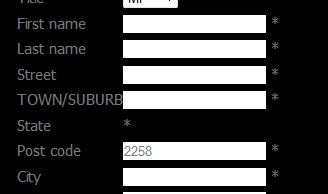
I also have the same issue of the state box not showing up. I disabled all the rok components to see if that would work, but it didn't.
Could it have something to do with the custom "suburb" I added?
Thanks
Please Log in or Create an account to join the conversation.
15 years 1 month ago #23339
by nicolas
Replied by nicolas on topic Re: States dropdown box are not shown
Hard to say. Please give a link to that page.
Please Log in or Create an account to join the conversation.
15 years 1 month ago - 15 years 1 month ago #23444
by Bugger101
Replied by Bugger101 on topic Re: States dropdown box are not shown
Yep:
Thanks
Thanks
Last edit: 15 years 1 month ago by Bugger101.
Please Log in or Create an account to join the conversation.
15 years 1 month ago #23449
by nicolas
Replied by nicolas on topic Re: States dropdown box are not shown
It indeed comes from the rok stuff. You have a javascript error in :
Uncaught ReferenceError: Native is not defined
(anonymous function):1
(anonymous function)fusion-mt1.2.js:12
So it comes from the file /modules/mod_roknavmenu/themes/fusion/js/fusion-mt1.2.js which is apparently added by the roknavmenu module.
Uncaught ReferenceError: Native is not defined
(anonymous function):1
(anonymous function)fusion-mt1.2.js:12
So it comes from the file /modules/mod_roknavmenu/themes/fusion/js/fusion-mt1.2.js which is apparently added by the roknavmenu module.
Please Log in or Create an account to join the conversation.
15 years 1 month ago #23453
by Bugger101
Replied by Bugger101 on topic Re: States dropdown box are not shown
THANK YOU!!!!!!!!!!!!!!!!!!!!!!!!!!!!
Please Log in or Create an account to join the conversation.
15 years 3 weeks ago #25096
by hika
Replied by hika on topic Re: States dropdown box are not shown
Hi,
All the states are listed good, even the default is fine too in my site.
What if I have to add up an option "Select State" and make it default. How do we do this?
Thanks
All the states are listed good, even the default is fine too in my site.
What if I have to add up an option "Select State" and make it default. How do we do this?
Thanks
Please Log in or Create an account to join the conversation.
15 years 3 weeks ago #25107
by nicolas
Replied by nicolas on topic Re: States dropdown box are not shown
I'm not following you hika? Could you elaborate on what you want to do ?
Please Log in or Create an account to join the conversation.
15 years 3 weeks ago #25174
by hika
Replied by hika on topic Re: States dropdown box are not shown
Ok,
Now when we choose a country we get list of states say for eg:
State A
State B
State C
and one of them is default which we can manage from backend. But I want to put it like this
Select State (this as default for every country)
State A
State B
State C
Hope you get a clear picture
Now when we choose a country we get list of states say for eg:
State A
State B
State C
and one of them is default which we can manage from backend. But I want to put it like this
Select State (this as default for every country)
State A
State B
State C
Hope you get a clear picture
Please Log in or Create an account to join the conversation.
Time to create page: 0.335 seconds