

- Posts: 53
- Thank you received: 0
Billing Address
15 years 4 months ago - 15 years 4 months ago #18648
by RBGoldie
Billing Address was created by RBGoldie
I notice that billing address required an extra click of a "new" button. Is there any way to display the "Billing Address" fields without requiring a click of the "New" button. Also, what do you recommend for controlling the css for this section. I notice that this frame is not pulling the css file selected in the configuration screen.
Also, I notice that after adding a billing address, it goes back a step to the cart. How do I avoid that?
And I'm not getting a confirmation page. The confirmation page is blank.
Also, I notice that after adding a billing address, it goes back a step to the cart. How do I avoid that?
And I'm not getting a confirmation page. The confirmation page is blank.
Last edit: 15 years 4 months ago by RBGoldie.
Please Log in or Create an account to join the conversation.

15 years 4 months ago #18660
by nicolas
Replied by nicolas on topic Re: Billing Address
Do you using the latest version of HikaShop ? If not, please update.
What are your settings in the Checkout tab of the config ? Could you do a screenshot ?
Could you give a link to your shop ?
What are your settings in the Checkout tab of the config ? Could you do a screenshot ?
Could you give a link to your shop ?
Please Log in or Create an account to join the conversation.
15 years 4 months ago - 15 years 4 months ago #18670
by RBGoldie
Replied by RBGoldie on topic Re: Billing Address
I downloaded Hika on 02 June 2011. Here is my configuration workflow: cart,login_address,shipping,payment,confirm,end
tacsbeta.com.previewdns.com/component/hi...ep/step-1?Itemid=101
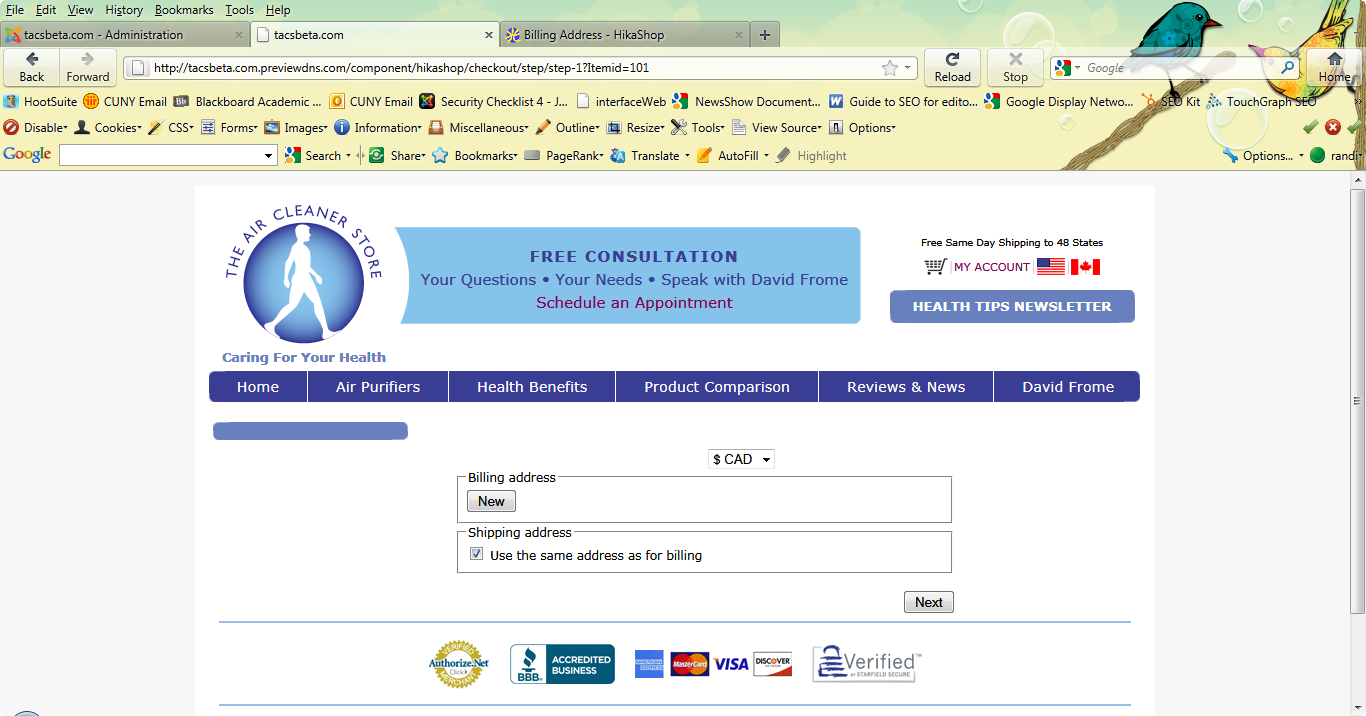
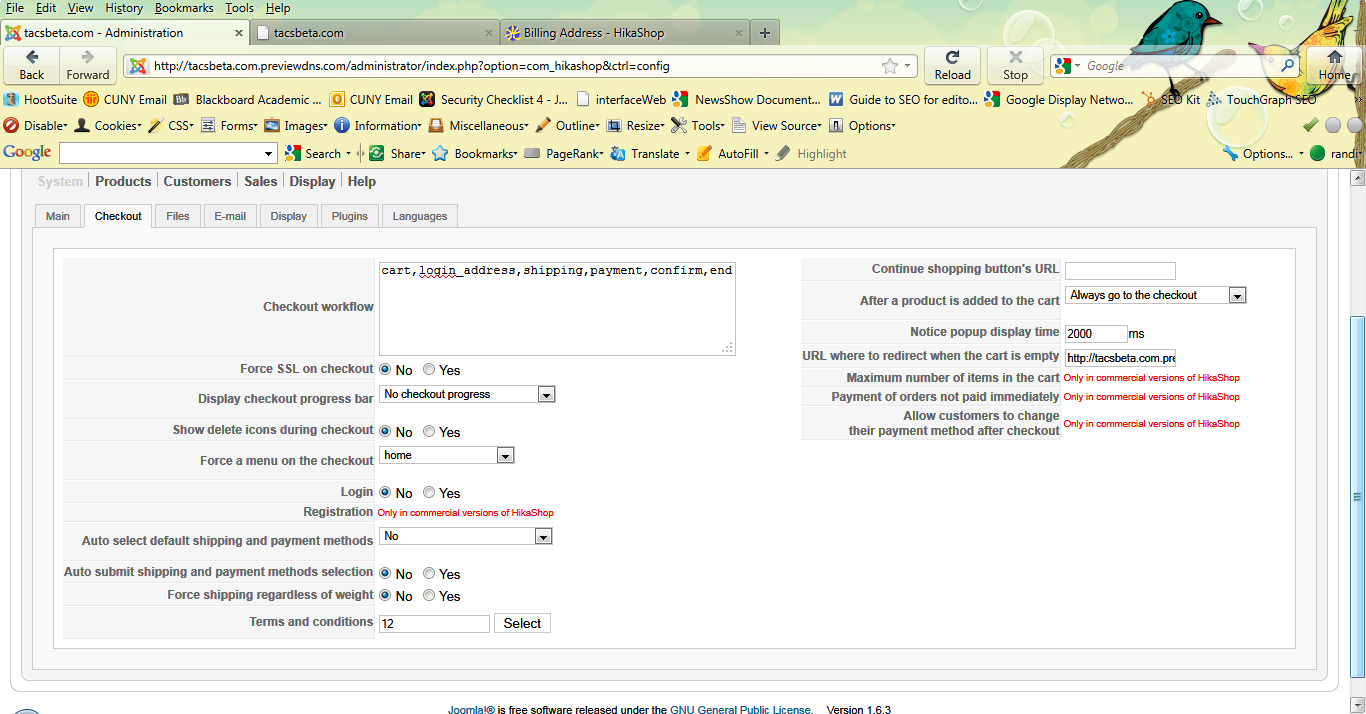
tacsbeta.com.previewdns.com/component/hi...ep/step-1?Itemid=101
Last edit: 15 years 4 months ago by RBGoldie.
Please Log in or Create an account to join the conversation.
15 years 4 months ago #18671
by nicolas
Replied by nicolas on topic Re: Billing Address
Please try that modification:
www.hikashop.com/en/support/forum/2-gene...irst-time.html#18495
Also, the confirm step is only a logical step which doesn't display anything. If you want to display something you need to add other views...for example, the step cart_status_confirm would display the cart and the selection of shipping and payment.
Also, the confirm step is only a logical step which doesn't display anything. If you want to display something you need to add other views...for example, the step cart_status_confirm would display the cart and the selection of shipping and payment.
Please Log in or Create an account to join the conversation.
15 years 4 months ago #19080
by RBGoldie
Replied by RBGoldie on topic Re: Billing Address
Thank you. Where can I find all appropriate steps that can be used in the configuration set-up?
Please Log in or Create an account to join the conversation.
15 years 4 months ago #19081
by nicolas
Replied by nicolas on topic Re: Billing Address
You each screen of HikaShop, you have a Help button which will display the corresponding help with lots of information about the current screen.
Please Log in or Create an account to join the conversation.
13 years 1 month ago - 13 years 1 month ago #124301
by senna
Replied by senna on topic Billing Address
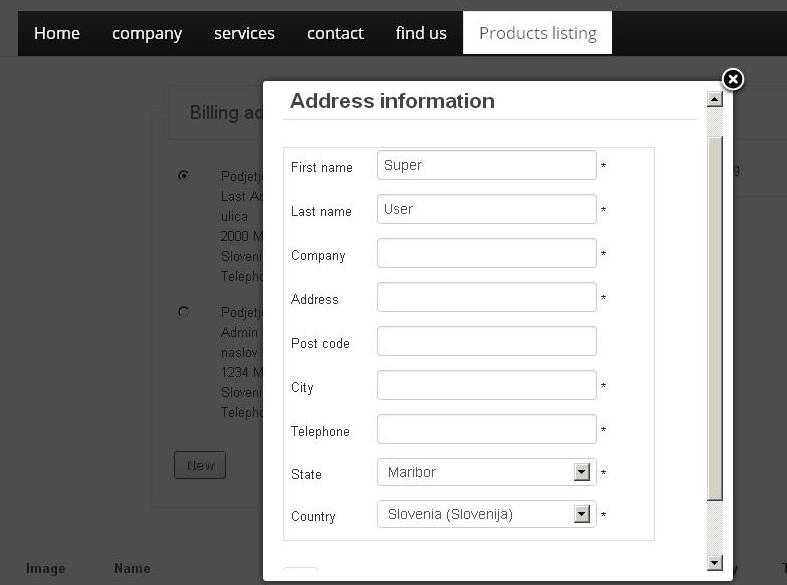
Hello, I have problems with Billing Addres. What must I do that the informations from one user that has put his billing address information is not visible when the proces is finished. Here is screenshot:
Last edit: 13 years 1 month ago by senna.
Please Log in or Create an account to join the conversation.
13 years 1 month ago - 13 years 1 month ago #124302
by senna
Replied by senna on topic Billing Address
How can I add e mail to billing address?
Last edit: 13 years 1 month ago by senna.
Please Log in or Create an account to join the conversation.
13 years 1 month ago - 13 years 1 month ago #124303
by senna
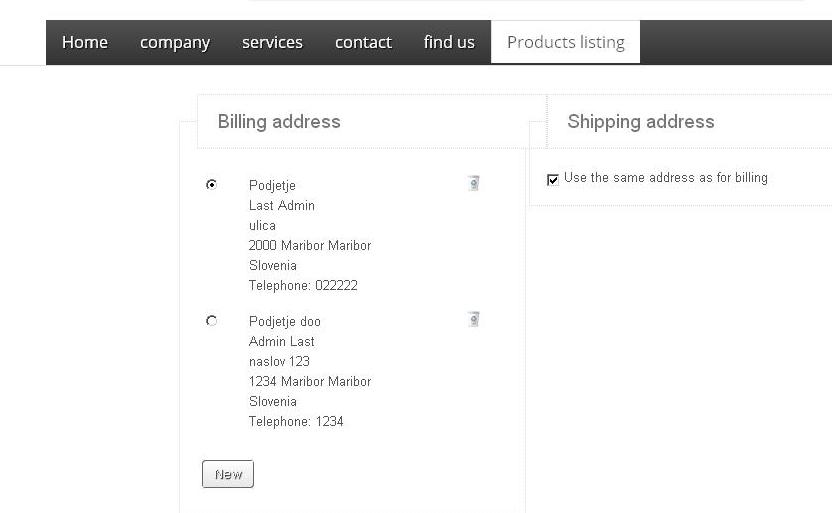
What must I do that the informations from one user that has put his billing address information is not visible when the proces is finished. Here is screenshot:
Replied by senna on topic Billing Address
What must I do that the informations from one user that has put his billing address information is not visible when the proces is finished. Here is screenshot:
Last edit: 13 years 1 month ago by senna.
Please Log in or Create an account to join the conversation.

13 years 1 month ago #124351
by Xavier
Replied by Xavier on topic Billing Address
Hi,
I don't really understand what you need, when the customer enter his address in the popup, then it's displayed on the page, by this way the customer can edit his address. To hide it, you can use some css properties.
Here is some documentation:
www.hikashop.com/support/documentation/1...ize-the-display.html
To add an email in the addresses, you can create a custom field in the table address via the menu Display > Custom fields.
I don't really understand what you need, when the customer enter his address in the popup, then it's displayed on the page, by this way the customer can edit his address. To hide it, you can use some css properties.
Here is some documentation:
www.hikashop.com/support/documentation/1...ize-the-display.html
To add an email in the addresses, you can create a custom field in the table address via the menu Display > Custom fields.
Please Log in or Create an account to join the conversation.
13 years 1 month ago #124364
by senna
Replied by senna on topic Billing Address
Thank you,
We have added e-mail field that user can now add e-mail address. But we have now another problem. When user finish the purchase process, confirmation e-mail is always sent to default Super User. This is our e-mail. How can we activate this function, that confirmation e-mail will actually go to customer's / user's e-mail address?
We have added e-mail field that user can now add e-mail address. But we have now another problem. When user finish the purchase process, confirmation e-mail is always sent to default Super User. This is our e-mail. How can we activate this function, that confirmation e-mail will actually go to customer's / user's e-mail address?
Please Log in or Create an account to join the conversation.
13 years 1 month ago #124395
by senna
Replied by senna on topic Billing Address
I meant this with hiding. We don't want that other users see what one user has added. We want that this automatically disappear.
Screenshot below
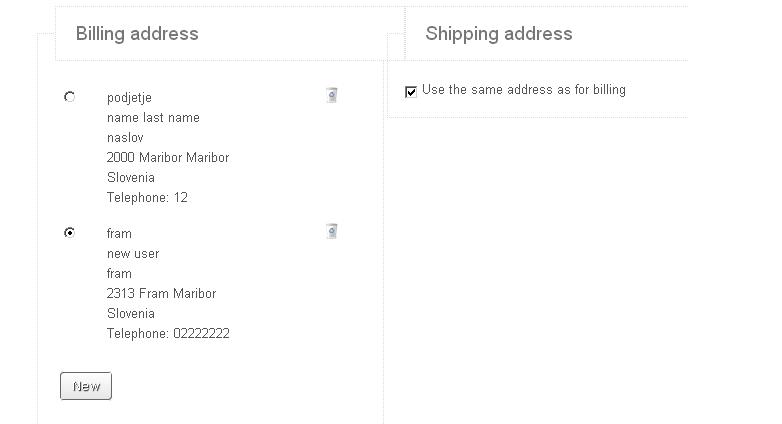
Screenshot below
Please Log in or Create an account to join the conversation.

13 years 1 month ago - 13 years 1 month ago #124491
by Jerome
Jerome - Obsidev.com
HikaMarket & HikaSerial developer / HikaShop core dev team.
Replied by Jerome on topic Billing Address
Hi,
The email is sent to the user which means, to the logged user.
If you are logged with your super user account so your super user account will receive this email
A user have addresses, that he can manage (create, modify, delete).
So, the email goes to the customer but if you want to change that, you have to modify the code in HikaShop emails in order to override some specific data. It requires PHP and development skills.
For most I understand, the "guest checkout" will be a good solution for you.
Regards,
The email is sent to the user which means, to the logged user.
If you are logged with your super user account so your super user account will receive this email
A user have addresses, that he can manage (create, modify, delete).
So, the email goes to the customer but if you want to change that, you have to modify the code in HikaShop emails in order to override some specific data. It requires PHP and development skills.
For most I understand, the "guest checkout" will be a good solution for you.
Regards,
Jerome - Obsidev.com
HikaMarket & HikaSerial developer / HikaShop core dev team.
Last edit: 13 years 1 month ago by Jerome.
Please Log in or Create an account to join the conversation.
13 years 1 month ago - 13 years 1 month ago #124665
by senna
Replied by senna on topic Billing Address
Thank you very much.
Last edit: 13 years 1 month ago by senna.
Please Log in or Create an account to join the conversation.
13 years 1 month ago - 13 years 1 month ago #124666
by senna
Replied by senna on topic Billing Address
We have solved this problem now with sending email to customer.
The problem was that we were logged as super user and we didn't know that because there was no option to log out. And now we have the problem that we don't have the option for LOG OUT. How can we solve this problem, that the user has option to log out. And also bothers us that when user closes web browser, he is not automatically loged out from the system.
Holw can we solve that?
The problem was that we were logged as super user and we didn't know that because there was no option to log out. And now we have the problem that we don't have the option for LOG OUT. How can we solve this problem, that the user has option to log out. And also bothers us that when user closes web browser, he is not automatically loged out from the system.
Holw can we solve that?
Last edit: 13 years 1 month ago by senna.
Please Log in or Create an account to join the conversation.
13 years 1 month ago #124708
by Jerome
Jerome - Obsidev.com
HikaMarket & HikaSerial developer / HikaShop core dev team.
Replied by Jerome on topic Billing Address
Hi,
The session manager and the login process are Joomla features.
You can change some options in the Joomla backend for the session timeout. You can install external plugins/extensions for adding new features or you can include a logout button in your website.
Regards,
The session manager and the login process are Joomla features.
You can change some options in the Joomla backend for the session timeout. You can install external plugins/extensions for adding new features or you can include a logout button in your website.
Regards,
Jerome - Obsidev.com
HikaMarket & HikaSerial developer / HikaShop core dev team.
Please Log in or Create an account to join the conversation.
Time to create page: 0.175 seconds