
- Posts: 55
- Thank you received: 0
**SOLVED**Hikashop/Joomla 1.6 titles problem
- skatercorpse
-
 Topic Author
- Offline
Less
More
15 years 3 months ago - 15 years 3 months ago #18715
by skatercorpse
**SOLVED**Hikashop/Joomla 1.6 titles problem was created by skatercorpse
First of all...Hikashop is great! Is enough to try out the options here and there and you can easly set up a shop!
Documentation is really helpfull and complete. Thanks to the forum other problems can be easly solved.
And the fact that you can use it also just as a catalog component make it even greater.
Not to mention that there is the free version!!
Really, thank you for this component!
Anyway...I have a problem with the titles.
I would like that a title is shown when I am in the front-end shop page(I used the category listing in my case).
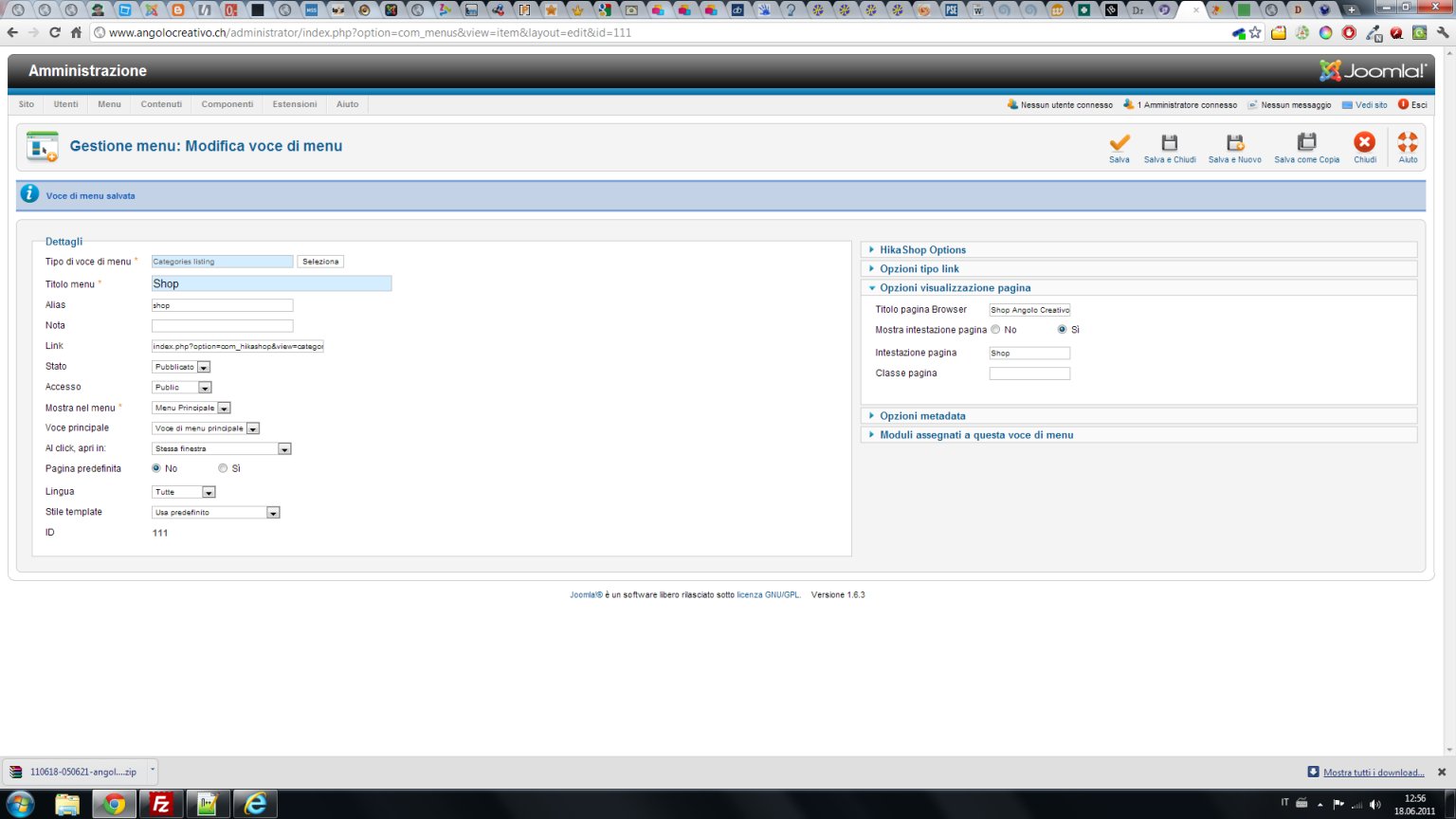
I checked the option to show the title in the Joomla menu's options.
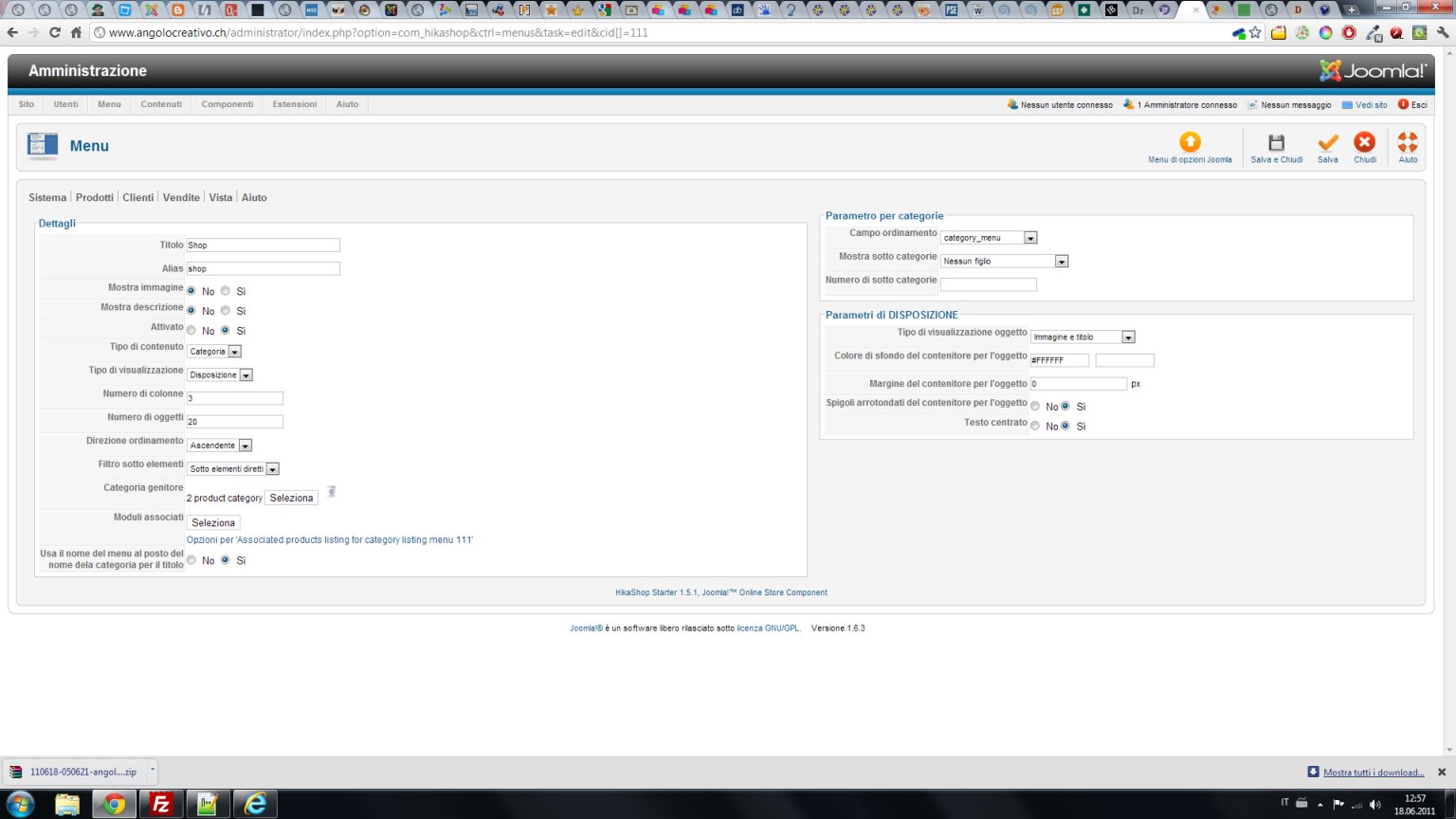
I tried to check "yes" and "no" in the Hikashop menu's options to see if anything changes ("Use menu name instead of category name for title"..I read other topics in the forum regarding to it...).
But the title never shows.
Weird thing is when the cart is empty and I click on the cart icon I get the message "Your cart is empty" and below there is a title "Product category".
When I add an item to the cart and then I delete it, I get the message "The cart is empty" and the title I set in Joomla menu's options ("Shop Angolo creativo" in my case) is displayed.
Any idea how to solve this?
ps:
In the CSS there is also a small error I think.
div.hikashop_user_regsitration_page
I think it should be div.hikashop_user_regIStration_page
Documentation is really helpfull and complete. Thanks to the forum other problems can be easly solved.
And the fact that you can use it also just as a catalog component make it even greater.
Not to mention that there is the free version!!
Really, thank you for this component!
Anyway...I have a problem with the titles.
I would like that a title is shown when I am in the front-end shop page(I used the category listing in my case).
I checked the option to show the title in the Joomla menu's options.
I tried to check "yes" and "no" in the Hikashop menu's options to see if anything changes ("Use menu name instead of category name for title"..I read other topics in the forum regarding to it...).
But the title never shows.
Weird thing is when the cart is empty and I click on the cart icon I get the message "Your cart is empty" and below there is a title "Product category".
When I add an item to the cart and then I delete it, I get the message "The cart is empty" and the title I set in Joomla menu's options ("Shop Angolo creativo" in my case) is displayed.
Any idea how to solve this?
ps:
In the CSS there is also a small error I think.
div.hikashop_user_regsitration_page
I think it should be div.hikashop_user_regIStration_page
Last edit: 15 years 3 months ago by skatercorpse.
Please Log in or Create an account to join the conversation.

15 years 3 months ago #18727
by nicolas
Replied by nicolas on topic Re: Hikashop/Joomla 1.6 titles problem
There was a problem with listing titles on previous versions of HikaShop. If you don't use the latest version, please update and try again to activate the title in your menu.
PS: Thanks, we'll change that for next release.
PS: Thanks, we'll change that for next release.
Please Log in or Create an account to join the conversation.
- skatercorpse
-
Topic Author
- Offline
Less
More
- Posts: 55
- Thank you received: 0
15 years 3 months ago #18734
by skatercorpse
Replied by skatercorpse on topic Re: Hikashop/Joomla 1.6 titles problem
Unfortunately I am using the latest verstion 1.5.1.... 
Please Log in or Create an account to join the conversation.
15 years 3 months ago #18740
by nicolas
Replied by nicolas on topic Re: Hikashop/Joomla 1.6 titles problem
Could you give a link to your page ?
Please Log in or Create an account to join the conversation.
- skatercorpse
-
Topic Author
- Offline
Less
More
- Posts: 55
- Thank you received: 0
15 years 3 months ago #18982
by skatercorpse
Replied by skatercorpse on topic Re: Hikashop/Joomla 1.6 titles problem
Please Log in or Create an account to join the conversation.
15 years 3 months ago #18994
by nicolas
Replied by nicolas on topic Re: Hikashop/Joomla 1.6 titles problem
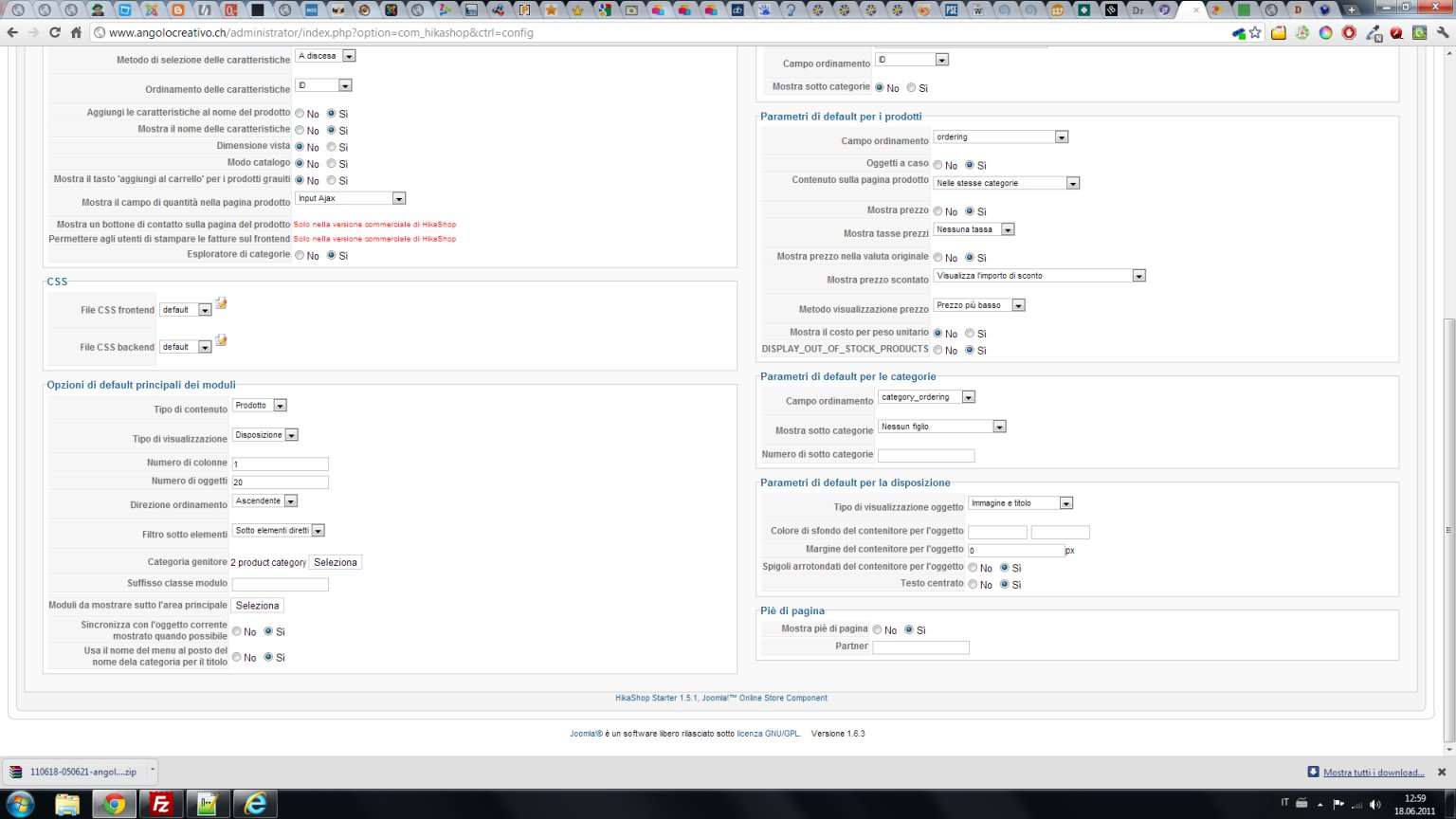
Could you do a screenshot of your shop menu options with the show title option activated ?
Please Log in or Create an account to join the conversation.
- skatercorpse
-
Topic Author
- Offline
Less
More
- Posts: 55
- Thank you received: 0
15 years 3 months ago #19242
by skatercorpse
Replied by skatercorpse on topic Re: Hikashop/Joomla 1.6 titles problem
Here you have the screenshots
Please Log in or Create an account to join the conversation.
- skatercorpse
-
Topic Author
- Offline
Less
More
- Posts: 55
- Thank you received: 0
15 years 3 months ago - 15 years 3 months ago #19243
by skatercorpse
Replied by skatercorpse on topic Re: Hikashop/Joomla 1.6 titles problem
.
Last edit: 15 years 3 months ago by skatercorpse.
Please Log in or Create an account to join the conversation.
- skatercorpse
-
Topic Author
- Offline
Less
More
- Posts: 55
- Thank you received: 0
15 years 3 months ago #19244
by skatercorpse
Replied by skatercorpse on topic Re: Hikashop/Joomla 1.6 titles problem
.
Please Log in or Create an account to join the conversation.
15 years 3 months ago #19251
by nicolas
Replied by nicolas on topic Re: Hikashop/Joomla 1.6 titles problem
Could you try to redownload and reinstall hikashop on your website just in case...You options are fine and it works with the same settings on our end...
Please Log in or Create an account to join the conversation.
- skatercorpse
-
Topic Author
- Offline
Less
More
- Posts: 55
- Thank you received: 0
15 years 3 months ago #19257
by skatercorpse
Replied by skatercorpse on topic Re: Hikashop/Joomla 1.6 titles problem
ok, I've just done it but it still doesn't work...
Please Log in or Create an account to join the conversation.
15 years 3 months ago #19275
by nicolas
Replied by nicolas on topic Re: Hikashop/Joomla 1.6 titles problem
Could you provide a back end access to your website so that we can check out the settings and try to find a solution ?
Please Log in or Create an account to join the conversation.
- skatercorpse
-
Topic Author
- Offline
Less
More
- Posts: 55
- Thank you received: 0
15 years 3 months ago #19373
by skatercorpse
Replied by skatercorpse on topic Re: Hikashop/Joomla 1.6 titles problem
Ok, I've just sent the data for the back end access.
Hope you can find a solution.
Thank you!
Hope you can find a solution.
Thank you!
Please Log in or Create an account to join the conversation.
15 years 3 months ago #19417
by nicolas
Replied by nicolas on topic Re: Hikashop/Joomla 1.6 titles problem
It's fixed. It was a problem in the code. It will also be added in next version of HikaShop.
Please Log in or Create an account to join the conversation.
- skatercorpse
-
Topic Author
- Offline
Less
More
- Posts: 55
- Thank you received: 0
15 years 3 months ago #19493
by skatercorpse
Replied by skatercorpse on topic Re: Hikashop/Joomla 1.6 titles problem
Perfect!
Thank you Nicolas!
When do you think a next version will be released?
It would be good if you can write what you had to do to solve the problem so other users can fix the problem themselves if they need (if it is not too much work or if soon a new released will be available).
Another question...what about when I click the cart icon when is empty? Is it right that it also shows the "Product category" title? I mean, why not showing anything at all or better the main shop page?
PS: did you notice my website loading slow? Because it seems to me that is really slow...just to have a confirmation from someone not living near to me...
Thank you!
Thank you Nicolas!
When do you think a next version will be released?
It would be good if you can write what you had to do to solve the problem so other users can fix the problem themselves if they need (if it is not too much work or if soon a new released will be available).
Another question...what about when I click the cart icon when is empty? Is it right that it also shows the "Product category" title? I mean, why not showing anything at all or better the main shop page?
PS: did you notice my website loading slow? Because it seems to me that is really slow...just to have a confirmation from someone not living near to me...
Thank you!
Please Log in or Create an account to join the conversation.
15 years 3 months ago #19494
by nicolas
Replied by nicolas on topic Re: Hikashop/Joomla 1.6 titles problem
Next version will be released this week.
The solution was easy. I edited the file listing of the view category via the menu Display->Views and change the line:
$title = 'show_page_title';
to:
if(version_compare(JVERSION,'1.6','<')){
$title = 'show_page_title';
}else{
$title = 'menu_text';
}
By default, when the cart is empty and that you click on the cart link, it redirects you to the listing of products of the main category. If you want it to go somewhere else, you can just enter the URL in the option "URL where to redirect when the cart is empty" in the tab Checkout of the config.
I didn't notice that your website was slow.
The solution was easy. I edited the file listing of the view category via the menu Display->Views and change the line:
$title = 'show_page_title';
to:
if(version_compare(JVERSION,'1.6','<')){
$title = 'show_page_title';
}else{
$title = 'menu_text';
}
By default, when the cart is empty and that you click on the cart link, it redirects you to the listing of products of the main category. If you want it to go somewhere else, you can just enter the URL in the option "URL where to redirect when the cart is empty" in the tab Checkout of the config.
I didn't notice that your website was slow.
Please Log in or Create an account to join the conversation.
Time to create page: 0.261 seconds