

- Posts: 117
- Thank you received: 0
products in alphabetical order?
15 years 3 months ago #19607
by sarsells
products in alphabetical order? was created by sarsells
Three more little questions please.
Firstly, is in possible to order products alphabetically? In some categories there will be about 1000 items. And my client thinks that even with a search facility, it would be easier for customers if items are listed this way.
Secondly, my menu (which is in fact a category module) is displayed as a list. I would like to get rid of the bullets so chose the option div. When I did this (with show title only selected,) I got large spaces between each title. I think this is where the image would go, but I just want the category titles with no spaces. I have set it back to list for now until I figure out what to do.
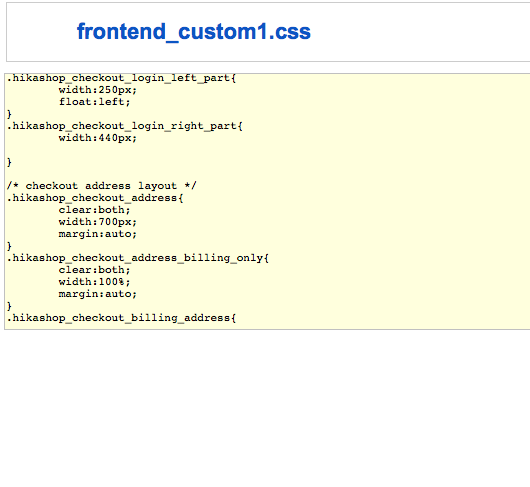
Thirdly, I tried to change the layout of the login and registration page. I read the document re the css and changed it accordingly. However, these two items still sit next to each other rather than the login on top of the registration. Can you please tell me what to do?
Oh, I just thought of something else. I do not appear to have a proceed to checkout button. Please can you tell me what to do about this.
Many many thanks
Sarah
Firstly, is in possible to order products alphabetically? In some categories there will be about 1000 items. And my client thinks that even with a search facility, it would be easier for customers if items are listed this way.
Secondly, my menu (which is in fact a category module) is displayed as a list. I would like to get rid of the bullets so chose the option div. When I did this (with show title only selected,) I got large spaces between each title. I think this is where the image would go, but I just want the category titles with no spaces. I have set it back to list for now until I figure out what to do.
Thirdly, I tried to change the layout of the login and registration page. I read the document re the css and changed it accordingly. However, these two items still sit next to each other rather than the login on top of the registration. Can you please tell me what to do?
Oh, I just thought of something else. I do not appear to have a proceed to checkout button. Please can you tell me what to do about this.
Many many thanks
Sarah
Please Log in or Create an account to join the conversation.

15 years 3 months ago #19610
by nicolas
Replied by nicolas on topic Re: products in alphabetical order?
1. In your menus/modules hikashop options, you can selecting the ordering column. By default it's the product_ordering column but you can change it to the product_name column so that the products are ordered alphabetically.
2. The bullet points on lists can be removed quite easily by adding some CSS to your template's CSS. If you give a link, we could tell you more precisely what CSS to use.
3. Then it's probably that the CSS file is cached on that you didn't save the CSS file seletion. You should check that and then try again.
4. The proceed to checkout button on the hikashop cart module can be displayed by activating the corresponding option in the cart module's hikashop options.
2. The bullet points on lists can be removed quite easily by adding some CSS to your template's CSS. If you give a link, we could tell you more precisely what CSS to use.
3. Then it's probably that the CSS file is cached on that you didn't save the CSS file seletion. You should check that and then try again.
4. The proceed to checkout button on the hikashop cart module can be displayed by activating the corresponding option in the cart module's hikashop options.
Please Log in or Create an account to join the conversation.
15 years 3 months ago - 15 years 3 months ago #19620
by sarsells
Replied by sarsells on topic Re: products in alphabetical order?
Thank you. I now have the products in alphabetical order, the proceed to checkout button activatedand have managed to get rid of the bullet points.
However, I have not been able to display the login/registration as described. the url is www.acrossthetracksrecords.com
Thanks so much.
Sarah
However, I have not been able to display the login/registration as described. the url is www.acrossthetracksrecords.com
Thanks so much.
Sarah
Last edit: 15 years 3 months ago by sarsells.
Please Log in or Create an account to join the conversation.
15 years 3 months ago #19626
by nicolas
Replied by nicolas on topic Re: products in alphabetical order?
I can see the login and registration one below the other on your checkout. Your CSS file is probably cached by your browser. Please clean the cache of your browser and try again.
I also don't see any bullet points on your page.
I also don't see any bullet points on your page.
Please Log in or Create an account to join the conversation.
15 years 3 months ago #19628
by sarsells
Replied by sarsells on topic Re: products in alphabetical order?
That is very strange! I have emptied the cache on firefox, but am still seeing the side by side view, but just looked at it on safari an there they were on top of each other! could it be a firefox issue?
Please Log in or Create an account to join the conversation.
15 years 3 months ago #19630
by nicolas
Replied by nicolas on topic Re: products in alphabetical order?
Please remove also the float: left; line of the code:
.hikashop_checkout_login_left_part {
float: left;
width: 250px;
}
and that will work as well on Firefox.
.hikashop_checkout_login_left_part {
float: left;
width: 250px;
}
and that will work as well on Firefox.
Please Log in or Create an account to join the conversation.
15 years 3 months ago #19631
by sarsells
Replied by sarsells on topic Re: products in alphabetical order?
Thank you. I will do that.
Can you please tell be how to split the registration part into 2 columns?
Can you please tell be how to split the registration part into 2 columns?
Please Log in or Create an account to join the conversation.
15 years 3 months ago #19632
by nicolas
Replied by nicolas on topic Re: products in alphabetical order?
That's not possible with the options. You would have to change the code of the file custom_fields of the view user via the menu Display->Views. That's out of the scope of this support forum.
Please Log in or Create an account to join the conversation.
15 years 3 months ago #19633
by sarsells
Replied by sarsells on topic Re: products in alphabetical order?
OK Thank you for that, I will leave it for now.
Please Log in or Create an account to join the conversation.
Time to create page: 0.256 seconds