

- Posts: 117
- Thank you received: 0
style for product page
15 years 3 months ago #20331
by sarsells
style for product page was created by sarsells
Hi
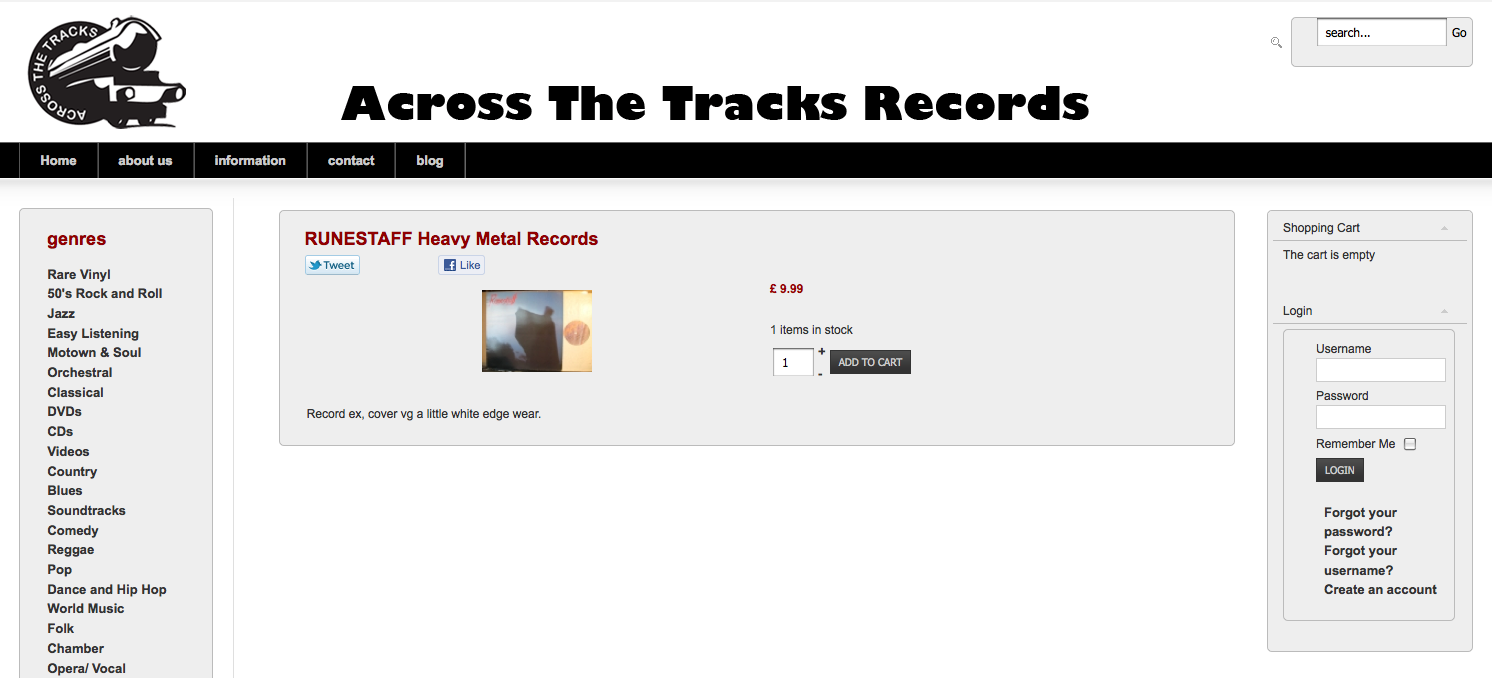
I hhave madea style for the product individual page. However I styled a form tag and it has affected all my form areas (I did realise it would) So, I guess I need to make a new style for the product page rather than the form. However I am not sure what element to style? would I create a class called .form?
Thanks for your help.
Sarah
I hhave madea style for the product individual page. However I styled a form tag and it has affected all my form areas (I did realise it would) So, I guess I need to make a new style for the product page rather than the form. However I am not sure what element to style? would I create a class called .form?
Thanks for your help.
Sarah
Please Log in or Create an account to join the conversation.

15 years 3 months ago #20344
by nicolas
Replied by nicolas on topic Re: style for product page
You could create a class and add it to your forms where you want the style. Otherwise, you could also override the display for just that form:
.hikashop_product_form{
background-color: #FFFFFF !important;
}
.hikashop_product_form{
background-color: #FFFFFF !important;
}
Please Log in or Create an account to join the conversation.
15 years 3 months ago #20361
by sarsells
Replied by sarsells on topic Re: style for product page
I have added the following to my main template
.hikashop_product_form{
background: none repeat scroll 0 0 #EEEEEE;
border-radius: 5px 5px 5px 5px;
margin: 0;
padding-bottom: 20px;
padding-left: 25px;
}
It does not seem to be adding a style to the product form. It is still taking its style from the form
form {
background: none repeat scroll 0 0 #EEEEEE;
border-radius: 5px 5px 5px 5px;
margin: 0;
padding-bottom: 20px;
}
Please can you advise?
.hikashop_product_form{
background: none repeat scroll 0 0 #EEEEEE;
border-radius: 5px 5px 5px 5px;
margin: 0;
padding-bottom: 20px;
padding-left: 25px;
}
It does not seem to be adding a style to the product form. It is still taking its style from the form
form {
background: none repeat scroll 0 0 #EEEEEE;
border-radius: 5px 5px 5px 5px;
margin: 0;
padding-bottom: 20px;
}
Please can you advise?
Please Log in or Create an account to join the conversation.
15 years 3 months ago #20385
by nicolas
Replied by nicolas on topic Re: style for product page
It's because your template must be overriding the style.
You should add a !important on each definition to force the override to your definition:
.hikashop_product_form{
background: none repeat scroll 0 0 #EEEEEE !important;
border-radius: 5px 5px 5px 5px !important;
margin: 0 !important;
padding-bottom: 20px !important;
padding-left: 25px !important;
}
You should add a !important on each definition to force the override to your definition:
.hikashop_product_form{
background: none repeat scroll 0 0 #EEEEEE !important;
border-radius: 5px 5px 5px 5px !important;
margin: 0 !important;
padding-bottom: 20px !important;
padding-left: 25px !important;
}
Please Log in or Create an account to join the conversation.
15 years 3 months ago - 15 years 3 months ago #20433
by sarsells
Replied by sarsells on topic Re: style for product page
Thank you for that and your patience. In fact, this did not work. I have had to style the elements as follows:
.hikashop_product_top_part{
background: none repeat scroll 0 0 #EEEEEE;
border-left: 1px solid #BBBBBB;
border-radius: 5px 5px 0 0;
border-right: 1px solid #BBBBBB;
border-top: 1px solid #BBBBBB;
padding-left: 25px;
width: 98%;}
.hikashop_product_left_part{
text-align:center;
float:left;
width:50%;
}
.hikashop_product_right_part{
background: none repeat scroll 0 0 #EEEEEE;
border-right: 1px solid #BBBBBB;
float: left;
padding-left: 25px;
}
.hikashop_product_bottom_part{
clear: both;
background: none repeat scroll 0 0 #EEEEEE;
border-bottom: 1px solid #BBBBBB;
border-left: 1px solid #BBBBBB;
border-radius: 0 0 5px 5px;
border-right: 1px solid #BBBBBB;
padding-bottom: 20px;
padding-right: 10px;
width: 100%;}
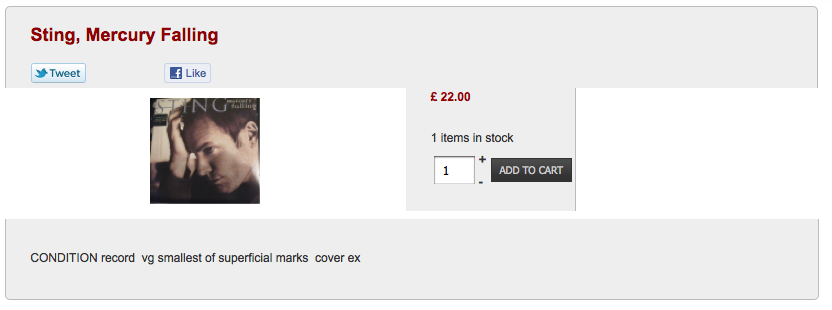
However, I am unable to ge the left and right elements to fit in with this style. Do I have to created a new div or subcontaner which all of these elements sit inside? I am not sure if I would do this. Is there a better way?
Thanks so much, I could not do this alone! My friend who I am doing the site for is here this morning, and I hope we can upgrade our version today.
.hikashop_product_top_part{
background: none repeat scroll 0 0 #EEEEEE;
border-left: 1px solid #BBBBBB;
border-radius: 5px 5px 0 0;
border-right: 1px solid #BBBBBB;
border-top: 1px solid #BBBBBB;
padding-left: 25px;
width: 98%;}
.hikashop_product_left_part{
text-align:center;
float:left;
width:50%;
}
.hikashop_product_right_part{
background: none repeat scroll 0 0 #EEEEEE;
border-right: 1px solid #BBBBBB;
float: left;
padding-left: 25px;
}
.hikashop_product_bottom_part{
clear: both;
background: none repeat scroll 0 0 #EEEEEE;
border-bottom: 1px solid #BBBBBB;
border-left: 1px solid #BBBBBB;
border-radius: 0 0 5px 5px;
border-right: 1px solid #BBBBBB;
padding-bottom: 20px;
padding-right: 10px;
width: 100%;}
However, I am unable to ge the left and right elements to fit in with this style. Do I have to created a new div or subcontaner which all of these elements sit inside? I am not sure if I would do this. Is there a better way?
Thanks so much, I could not do this alone! My friend who I am doing the site for is here this morning, and I hope we can upgrade our version today.
Last edit: 15 years 3 months ago by sarsells.
Please Log in or Create an account to join the conversation.
15 years 3 months ago #20451
by nicolas
Replied by nicolas on topic Re: style for product page
What I posted should work. It not, then it must be because of your browser which cached your previous CSS file. So you should flush it.
Please Log in or Create an account to join the conversation.
15 years 3 months ago #20459
by sarsells
Replied by sarsells on topic Re: style for product page
I have emptied the cache, and also liiked on Safari on another computer and it is the same. 
Please Log in or Create an account to join the conversation.
15 years 3 months ago - 15 years 2 months ago #20462
by nicolas
Replied by nicolas on topic Re: style for product page
Ah, I know why !
It's not a class by a name in the HTML so it can't be applied. You need to edit the file show of the view product via the menu Display->Views and add the code class="hikashop_product_form" after the code name="hikashop_product_form"
It's not a class by a name in the HTML so it can't be applied. You need to edit the file show of the view product via the menu Display->Views and add the code class="hikashop_product_form" after the code name="hikashop_product_form"
Last edit: 15 years 2 months ago by nicolas.
Please Log in or Create an account to join the conversation.
15 years 3 months ago - 15 years 3 months ago #20464
by sarsells
Replied by sarsells on topic Re: style for product page
Thank you.
I am looking at display> views, and there are lots of different files, but I do not see one that has hikashop_product_form
Please can you tell me which file. I have looked at some of the checkout files and also some of the product files.
I may need to send you a screen shot when I know where it is as I am a little daunted by php files and want to be sure I do not mess them up!
I am looking at display> views, and there are lots of different files, but I do not see one that has hikashop_product_form
Please can you tell me which file. I have looked at some of the checkout files and also some of the product files.
I may need to send you a screen shot when I know where it is as I am a little daunted by php files and want to be sure I do not mess them up!
Last edit: 15 years 3 months ago by sarsells.
Please Log in or Create an account to join the conversation.
15 years 2 months ago #20484
by nicolas
Replied by nicolas on topic Re: style for product page
You need to edit the file "step" of the view "checkout". You can search for the term "step" to filter the files.
Please Log in or Create an account to join the conversation.
15 years 2 months ago #20495
by sarsells
Replied by sarsells on topic Re: style for product page
Hi Nicolas
I have found the file
checkout / step.php which is pasted below. I cannot find hikashop_product_form
I will be upgrading soon, I tried to yesterday, but I need my clients VAT number to add to the form.
Many thanks
Sarah
<?php
/**
* @package HikaShop for Joomla!
* @version 1.5.2
* @author hikashop.com
* @copyright (C) 2010-2011 HIKARI SOFTWARE. All rights reserved.
* @license GNU/GPLv3 www.gnu.org/licenses/gpl-3.0.html
*/
defined('_JEXEC') or die('Restricted access');
?>
<div id="hikashop_checkout_page" class="hikashop_checkout_page">
<?php
if(hikashop_level(1)){
$open_hour = $this->config->get('store_open_hour',0);
$close_hour = $this->config->get('store_close_hour',0);
$open_minute = $this->config->get('store_open_minute',0);
$close_minute = $this->config->get('store_close_minute',0);
if($open_hour!=$close_hour || $open_minute!=$close_minute){
function getCurrentDate($format = '%H'){
if(version_compare(JVERSION,'1.6.0','>=')) $format = str_replace(array('%H','%M'),array('H','i'),$format);
return (int)JHTML::_('date',time()- date('Z'),$format,null);
}
$current_hour = getCurrentDate('%H');
$current_minute = getCurrentDate('%M');
$closed=false;
if($open_hour<$close_hour || ($open_hour==$close_hour && $open_minute<$close_minute)){
if($current_hour<$open_hour || ($current_hour==$open_hour && $current_minute<$open_minute)){
$closed=true;
}
if($close_hour<$current_hour || ($current_hour==$close_hour && $close_minute<$current_minute)){
$closed=true;
}
}else{
$closed=true;
if($current_hour<$close_hour || ($current_hour==$close_hour && $current_minute<$close_minute)){
$closed=false;
}
if($open_hour<$current_hour || ($current_hour==$open_hour && $open_minute<$current_minute)){
$closed=false;
}
}
if($closed){
$app=& JFactory::getApplication();
$app->enqueueMessage(JText::sprintf('THE_STORE_IS_ONLY_OPEN_FROM_X_TO_X',$open_hour.':'.sprintf('%02d', $open_minute),$close_hour.':'.sprintf('%02d', $close_minute)));
echo '</div>';
return;
}
}
}
global $Itemid;
$checkout_itemid = $this->config->get('checkout_itemid');
if(!empty($checkout_itemid )){
$Itemid = $checkout_itemid ;
}
$url_itemid='';
if(!empty($Itemid)){
$url_itemid='&Itemid='.$Itemid;
}
if($this->display_checkout_bar){
?>
<div id="hikashop_cart_bar" class="hikashop_cart_bar">
<?php
$already=true;
if (count($this->steps) > $this->step+1) $link=true;
foreach($this->steps as $k => $step){
$step=explode('_',trim($step));
$step_name = reset($step);
if($this->display_checkout_bar==2 && $step_name=='end'){
continue;
}
$class = '';
if($k==$this->step){
$already=false;
$class .= ' hikashop_cart_step_current';
}
if($already){
$class .= ' hikashop_cart_step_finished';
}
?> <div class="hikashop_cart_step<?php echo $class;?>">
<span>
<?php if($k==$this->step || empty($link)){ ?>
<?php echo JText::_('HIKASHOP_CHECKOUT_'.strtoupper($step_name));?>
<?php }else{ ?>
<a href="<?php echo hikashop_completeLink('checkout&task=step&step='.$k.$url_itemid);?>">
<?php echo JText::_('HIKASHOP_CHECKOUT_'.strtoupper($step_name));?>
</a>
<?php } ?>
</span>
</div><?php
}
?>
</div>
<?php
}
if(empty($this->noform)){
?>
<form action="<?php echo hikashop_completeLink('checkout&task=step&step='.($this->step+1).$url_itemid); ?>" method="post" name="hikashop_checkout_form" enctype="multipart/form-data">
<?php
}
$this->nextButton = true;
foreach($this->layouts as $layout){
$layout=trim($layout);
if($layout=='end'){
$this->continueShopping='';
}
$this->setLayout($layout);
echo $this->loadTemplate();
}
if(empty($this->noform)){
?>
<input type="hidden" name="Itemid" value="<?php echo $Itemid; ?>"/>
<input type="hidden" name="option" value="com_hikashop"/>
<input type="hidden" name="ctrl" value="checkout"/>
<input type="hidden" name="task" value="step"/>
<input type="hidden" name="previous" value="<?php echo $this->step; ?>"/>
<input type="hidden" name="step" value="<?php echo $this->step+1; ?>"/>
<?php echo JHTML::_( 'form.token' ); ?>
<br style="clear:both"/>
<?php
if($this->nextButton){
echo $this->cart->displayButton(JText::_('HIKA_NEXT'),'next',$this->params,hikashop_completeLink('checkout&task=step&step='.$this->step+1),'if(hikashopCheckChangeForm(\'order\',\'hikashop_checkout_form\'))document.forms[\'hikashop_checkout_form\'].submit(); return false;','id="hikashop_checkout_next_button"');
}
?>
</form>
<?php
if($this->continueShopping){
if(strpos($this->continueShopping,'Itemid')===false){
if(strpos($this->continueShopping,'index.php?')!==false){
$this->continueShopping.=$url_itemid;
}
}
if(!preg_match('#^https? /#',$this->continueShopping)) $this->continueShopping = JURI::base().ltrim($this->continueShopping,'/');
echo $this->cart->displayButton(JText::_('CONTINUE_SHOPPING'),'continue_shopping',$this->params,JRoute::_($this->continueShopping),'window.location=\''.JRoute::_($this->continueShopping).'\';return false;','id="hikashop_checkout_shopping_button"');
}
}
?>
</div>
<div class="clear_both"></div>
<?php
if(JRequest::getWord('tmpl','')=='component'){
exit;
}
I have found the file
checkout / step.php which is pasted below. I cannot find hikashop_product_form
I will be upgrading soon, I tried to yesterday, but I need my clients VAT number to add to the form.
Many thanks
Sarah
<?php
/**
* @package HikaShop for Joomla!
* @version 1.5.2
* @author hikashop.com
* @copyright (C) 2010-2011 HIKARI SOFTWARE. All rights reserved.
* @license GNU/GPLv3 www.gnu.org/licenses/gpl-3.0.html
*/
defined('_JEXEC') or die('Restricted access');
?>
<div id="hikashop_checkout_page" class="hikashop_checkout_page">
<?php
if(hikashop_level(1)){
$open_hour = $this->config->get('store_open_hour',0);
$close_hour = $this->config->get('store_close_hour',0);
$open_minute = $this->config->get('store_open_minute',0);
$close_minute = $this->config->get('store_close_minute',0);
if($open_hour!=$close_hour || $open_minute!=$close_minute){
function getCurrentDate($format = '%H'){
if(version_compare(JVERSION,'1.6.0','>=')) $format = str_replace(array('%H','%M'),array('H','i'),$format);
return (int)JHTML::_('date',time()- date('Z'),$format,null);
}
$current_hour = getCurrentDate('%H');
$current_minute = getCurrentDate('%M');
$closed=false;
if($open_hour<$close_hour || ($open_hour==$close_hour && $open_minute<$close_minute)){
if($current_hour<$open_hour || ($current_hour==$open_hour && $current_minute<$open_minute)){
$closed=true;
}
if($close_hour<$current_hour || ($current_hour==$close_hour && $close_minute<$current_minute)){
$closed=true;
}
}else{
$closed=true;
if($current_hour<$close_hour || ($current_hour==$close_hour && $current_minute<$close_minute)){
$closed=false;
}
if($open_hour<$current_hour || ($current_hour==$open_hour && $open_minute<$current_minute)){
$closed=false;
}
}
if($closed){
$app=& JFactory::getApplication();
$app->enqueueMessage(JText::sprintf('THE_STORE_IS_ONLY_OPEN_FROM_X_TO_X',$open_hour.':'.sprintf('%02d', $open_minute),$close_hour.':'.sprintf('%02d', $close_minute)));
echo '</div>';
return;
}
}
}
global $Itemid;
$checkout_itemid = $this->config->get('checkout_itemid');
if(!empty($checkout_itemid )){
$Itemid = $checkout_itemid ;
}
$url_itemid='';
if(!empty($Itemid)){
$url_itemid='&Itemid='.$Itemid;
}
if($this->display_checkout_bar){
?>
<div id="hikashop_cart_bar" class="hikashop_cart_bar">
<?php
$already=true;
if (count($this->steps) > $this->step+1) $link=true;
foreach($this->steps as $k => $step){
$step=explode('_',trim($step));
$step_name = reset($step);
if($this->display_checkout_bar==2 && $step_name=='end'){
continue;
}
$class = '';
if($k==$this->step){
$already=false;
$class .= ' hikashop_cart_step_current';
}
if($already){
$class .= ' hikashop_cart_step_finished';
}
?> <div class="hikashop_cart_step<?php echo $class;?>">
<span>
<?php if($k==$this->step || empty($link)){ ?>
<?php echo JText::_('HIKASHOP_CHECKOUT_'.strtoupper($step_name));?>
<?php }else{ ?>
<a href="<?php echo hikashop_completeLink('checkout&task=step&step='.$k.$url_itemid);?>">
<?php echo JText::_('HIKASHOP_CHECKOUT_'.strtoupper($step_name));?>
</a>
<?php } ?>
</span>
</div><?php
}
?>
</div>
<?php
}
if(empty($this->noform)){
?>
<form action="<?php echo hikashop_completeLink('checkout&task=step&step='.($this->step+1).$url_itemid); ?>" method="post" name="hikashop_checkout_form" enctype="multipart/form-data">
<?php
}
$this->nextButton = true;
foreach($this->layouts as $layout){
$layout=trim($layout);
if($layout=='end'){
$this->continueShopping='';
}
$this->setLayout($layout);
echo $this->loadTemplate();
}
if(empty($this->noform)){
?>
<input type="hidden" name="Itemid" value="<?php echo $Itemid; ?>"/>
<input type="hidden" name="option" value="com_hikashop"/>
<input type="hidden" name="ctrl" value="checkout"/>
<input type="hidden" name="task" value="step"/>
<input type="hidden" name="previous" value="<?php echo $this->step; ?>"/>
<input type="hidden" name="step" value="<?php echo $this->step+1; ?>"/>
<?php echo JHTML::_( 'form.token' ); ?>
<br style="clear:both"/>
<?php
if($this->nextButton){
echo $this->cart->displayButton(JText::_('HIKA_NEXT'),'next',$this->params,hikashop_completeLink('checkout&task=step&step='.$this->step+1),'if(hikashopCheckChangeForm(\'order\',\'hikashop_checkout_form\'))document.forms[\'hikashop_checkout_form\'].submit(); return false;','id="hikashop_checkout_next_button"');
}
?>
</form>
<?php
if($this->continueShopping){
if(strpos($this->continueShopping,'Itemid')===false){
if(strpos($this->continueShopping,'index.php?')!==false){
$this->continueShopping.=$url_itemid;
}
}
if(!preg_match('#^https?
/#',$this->continueShopping)) $this->continueShopping = JURI::base().ltrim($this->continueShopping,'/');echo $this->cart->displayButton(JText::_('CONTINUE_SHOPPING'),'continue_shopping',$this->params,JRoute::_($this->continueShopping),'window.location=\''.JRoute::_($this->continueShopping).'\';return false;','id="hikashop_checkout_shopping_button"');
}
}
?>
</div>
<div class="clear_both"></div>
<?php
if(JRequest::getWord('tmpl','')=='component'){
exit;
}
Please Log in or Create an account to join the conversation.
15 years 2 months ago #20526
by nicolas
Replied by nicolas on topic Re: style for product page
Sorry, it's the file show of the view product.
Please Log in or Create an account to join the conversation.
15 years 2 months ago #20546
by sarsells
Replied by sarsells on topic Re: style for product page
Thank you. That sorted it!!
Please Log in or Create an account to join the conversation.
Time to create page: 0.320 seconds