
Product display, parent changes, category layout

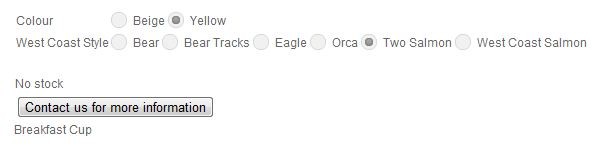
1. This might be a template issue, but in the table of characteristics on the product page the characteristic name is very close to the first radio button. Is there a way of adding some padding to the characteristic name to show some separation?
See attached image (sorry about the duplicate attachment - I could not remove the file attachment)
2. Remembering a quite different context, I found that I have access to the hikashop_product table in the Mysql database through PHPMyadmin. I have a couple of products where I made an error in specifying the correct produce_parent_id and I've been corrected those by deleting and re-importing the product. But it would be simpler, for the odd error, to use phpmyadmin to simply change the product_parent_ID to the correct ID number. Are there any problems with doing this.
3. When I change the content and "type of layout" settings in the "Modules main default options" or in the Content Menus, it does not affect the display of the "main" items on the category page js-ca.net/potluckcms/index.php/catalogue...g/11-solo-dinnerware . How do I change the display on that page?
Many thanks
Jim
Please Log in or Create an account to join the conversation.

.hikashop_product_characteristics_table td {margin: 5px;}
2. Yes can indeed change the information directly in the database. But you need to be careful.
3. In the associated module of your menu. You should have a link to it on your menu's hikashop options.
Please Log in or Create an account to join the conversation.
1. You need to add some CSS yes:
.hikashop_product_characteristics_table td {margin: 5px;}
Thanks, Nicolas
In which css file should I enter this? I put it in the front-end file but it did not seem to have any effect.
Jim
Please Log in or Create an account to join the conversation.
Please Log in or Create an account to join the conversation.
You need to put it in the front end css file. But you need to save the configuration the first time you do it, otherwise, the new css file is not automatically selected.
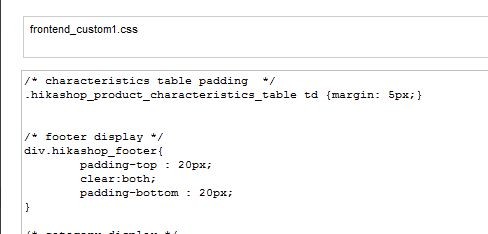
I did save the configuration, Nicolas. The edit created a custom1.css file (see attachment), and that is still in use when I log out and long in again. But the characteristics table does not seem to have changed?
Jim
Please Log in or Create an account to join the conversation.
Please Log in or Create an account to join the conversation.
js-ca.net/potluckcms/index.php/catalogue.../category_pathway-11
I did check the source file to see if the custom1.css was being loaded and it is.
Thanks
Jim
Please Log in or Create an account to join the conversation.
.hikashop_product_characteristics_table td {padding: 5px;}
instead.
Please Log in or Create an account to join the conversation.
Jim
Please Log in or Create an account to join the conversation.
Please try with:
.hikashop_product_characteristics_table td {padding: 10px;}
instead.
Further to this, Nicolas. I changed templates on the website and this addition to custom1.css no longer seems to be working:
js-ca.net/potluckcms/index.php/catalogue.../category_pathway-13
I saved the custom1.css again after changing templates but that did not work.
Also a question about the table layout for characteristics. I see the reason for switching to drop down if there are 3 or more characteristics, but why would you need to change to drop down when there is just one characteristic?
See js-ca.net/potluckcms/index.php/catalogue.../category_pathway-10
Thanks
Jim
Please Log in or Create an account to join the conversation.
But you should do that instead: .hikashop_product_characteristics{width:350px}
It's not possible to display a two dimensions matrix when you only have one characteristic. Thus, we switch back to dropdowns whenever you don't have two characteristics.
If you want to keep the table, just create one characteristic with one value and add it to the product. That will enable you to have the table display.
Please Log in or Create an account to join the conversation.
It just seemed to me to look more consistent if a single characteristic reverted to radio buttons rather than drop down, but I see the reasoning. I guess I'm used to thinking of a 1 x 6 array as a table also
 )
)Your work around will do fine.
Thanks
Jim
Please Log in or Create an account to join the conversation.