

- Posts: 50
- Thank you received: 0
Price with and without tax (moms)
15 years 10 months ago - 15 years 10 months ago #2048
by weting
Price with and without tax (moms) was created by weting
I think I have comfigured the tax correctly, see image
Still the price WITH tax will not show on fronend, image
How do I change this?
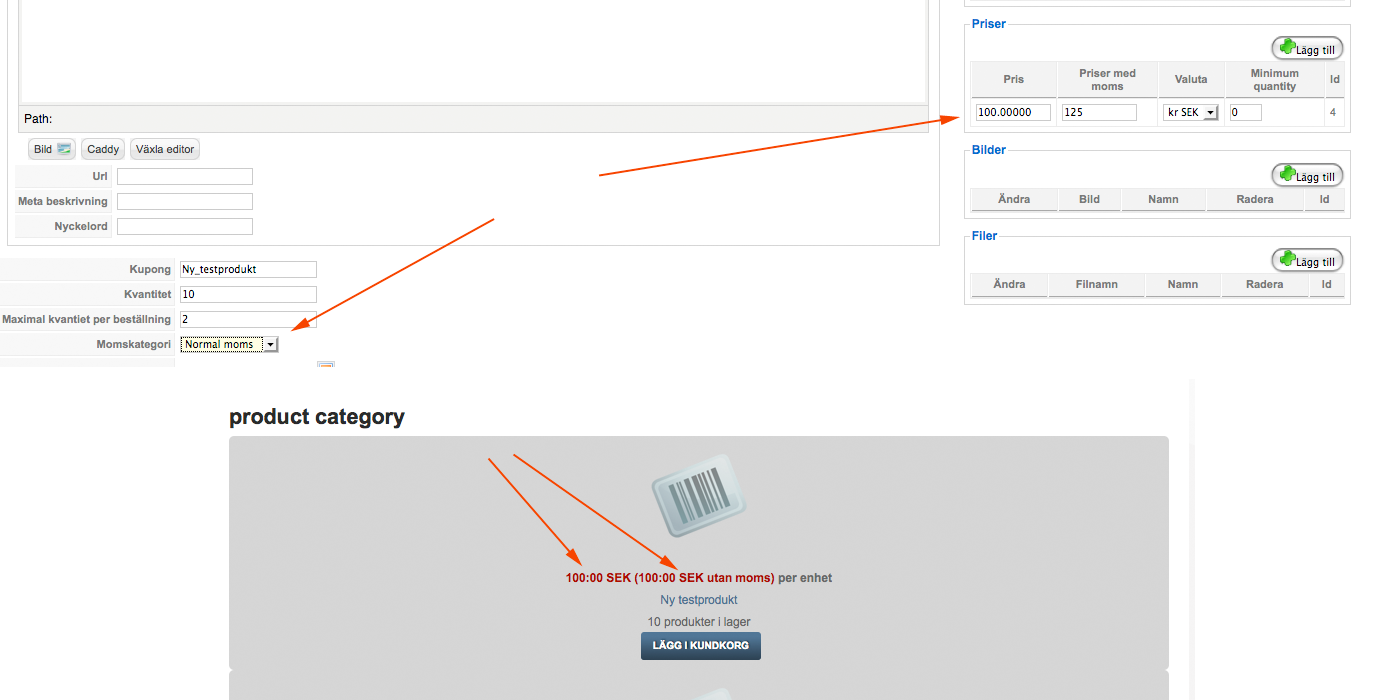
Still the price WITH tax will not show on fronend, image
How do I change this?
Last edit: 15 years 10 months ago by weting. Reason: wrong image added
Please Log in or Create an account to join the conversation.

15 years 10 months ago #2049
by goldriver
Replied by goldriver on topic Re: Price with and without tax (moms)
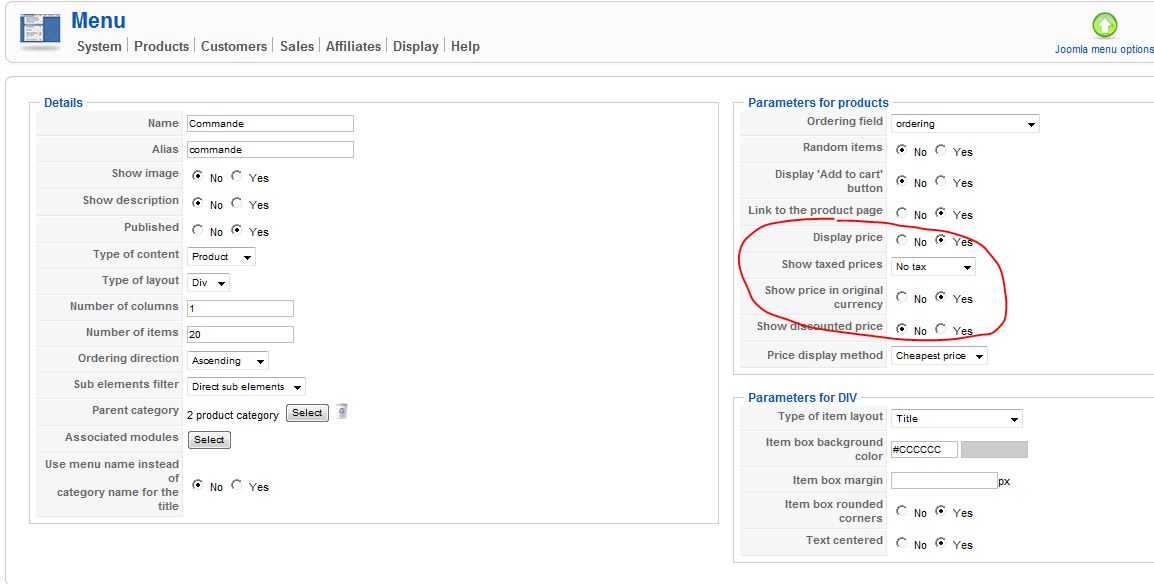
If you go in Hikashop menu ==> display ==> content menu you have an option to either :no tax, with tax and display both have you selected display both ?
Please Log in or Create an account to join the conversation.

15 years 10 months ago #2061
by nicolas
Replied by nicolas on topic Re: Price with and without tax (moms)
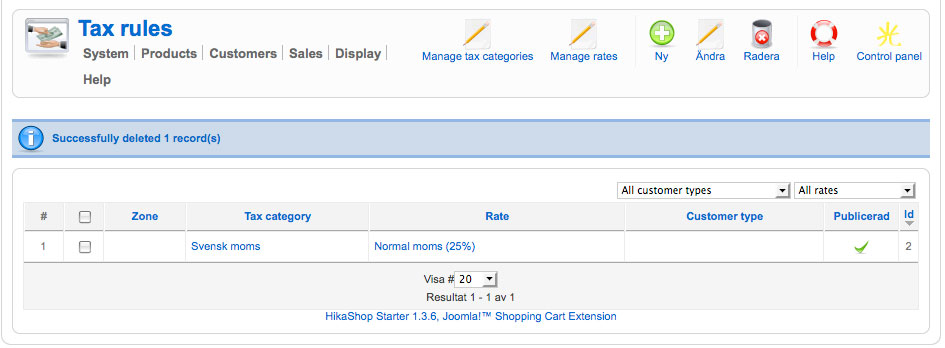
Could you post a screenshot of the listing of tax rules accessible via the menu System->Taxation ?
Maybe you have some restrictions on your taxes preventing them to be applicable to the product.
Maybe you have some restrictions on your taxes preventing them to be applicable to the product.
Please Log in or Create an account to join the conversation.
15 years 10 months ago #2098
by weting

Replied by weting on topic Re: Price with and without tax (moms)
Please Log in or Create an account to join the conversation.
15 years 10 months ago - 15 years 10 months ago #2099
by weting
Replied by weting on topic Re: Price with and without tax (moms)
@goldriver Show both chosen
Last edit: 15 years 10 months ago by weting.
Please Log in or Create an account to join the conversation.
15 years 10 months ago #2100
by nicolas
Replied by nicolas on topic Re: Price with and without tax (moms)
I see that you limited the tax to individuals and to the zone sverige. On the main tab of the configuration, do you have the "Default address type" option set to individual ? Do you have the option "Main tax zone" set to sverige ?
Please Log in or Create an account to join the conversation.
15 years 10 months ago #2101
by weting
Replied by weting on topic Re: Price with and without tax (moms)
Changes type of region and now it seams to work!
Please Log in or Create an account to join the conversation.
15 years 10 months ago #2102
by weting
Replied by weting on topic Re: Price with and without tax (moms)
@ nicolas: Yes, thats my settings.
Please Log in or Create an account to join the conversation.
15 years 10 months ago #2103
by nicolas
Replied by nicolas on topic Re: Price with and without tax (moms)
So, it's working now ?
Please Log in or Create an account to join the conversation.
15 years 10 months ago #2104
by weting
Replied by weting on topic Re: Price with and without tax (moms)
At the moment 
Please Log in or Create an account to join the conversation.
15 years 10 months ago #2105
by nicolas
Replied by nicolas on topic Re: Price with and without tax (moms)
Great 
Please Log in or Create an account to join the conversation.
15 years 10 months ago #2123
by weting
Replied by weting on topic Re: Price with and without tax (moms)
OK. Here I am again. Had a crash on my site and had to start all over again.
And now I have the same problem. Tried to copy what I did last time. Price still only show (twice) before tax.
There must be some part of the tax handeling that I do not get. In how many paces do you have to set the tax - to get it right...?
And now I have the same problem. Tried to copy what I did last time. Price still only show (twice) before tax.
There must be some part of the tax handeling that I do not get. In how many paces do you have to set the tax - to get it right...?
Please Log in or Create an account to join the conversation.
15 years 10 months ago #2125
by nicolas
Replied by nicolas on topic Re: Price with and without tax (moms)
The more you set restrictions on your tax rules the more you have to have your settings right.
If you have a tax rule limited to your country but that the main tax isn't your country, the tax won't be applied. It will only be applied to the cart once you register or login with an address in that country.
Same for the customer type restriction. If you have a tax rule limited to a customer type but that the default customer type isn't this one, the tax won't be applied. It will only be applied to the cart once you register or login and that the system can categorize your address as a company (you need to fill the company field) or an individual.
Then you have the tax category: if the product doesn't belong to the tax category of the rule, the rule won't be applied.
The tax rule also need to be published.
If you have a tax rule limited to your country but that the main tax isn't your country, the tax won't be applied. It will only be applied to the cart once you register or login with an address in that country.
Same for the customer type restriction. If you have a tax rule limited to a customer type but that the default customer type isn't this one, the tax won't be applied. It will only be applied to the cart once you register or login and that the system can categorize your address as a company (you need to fill the company field) or an individual.
Then you have the tax category: if the product doesn't belong to the tax category of the rule, the rule won't be applied.
The tax rule also need to be published.
Please Log in or Create an account to join the conversation.
15 years 10 months ago #2127
by weting
Replied by weting on topic Re: Price with and without tax (moms)
OK. So If I want to make it easy. The same tax for everyone. Where do I enter this?
Please Log in or Create an account to join the conversation.
15 years 10 months ago #2129
by nicolas
Replied by nicolas on topic Re: Price with and without tax (moms)
Create a new tax rule, select a tax rate and a tax category, and set it to published and leave the other fields to the default value and save it. There won't be any limitation on the zone nor on the customer type. You will just have to affect the tax category to the product for the rule to be applied to the product prices.
Please Log in or Create an account to join the conversation.
15 years 10 months ago #2132
by weting
Replied by weting on topic Re: Price with and without tax (moms)
Done the first part. But the product still look the same. I will try to delete it and enter it again...
Please Log in or Create an account to join the conversation.
15 years 10 months ago - 15 years 10 months ago #2134
by weting
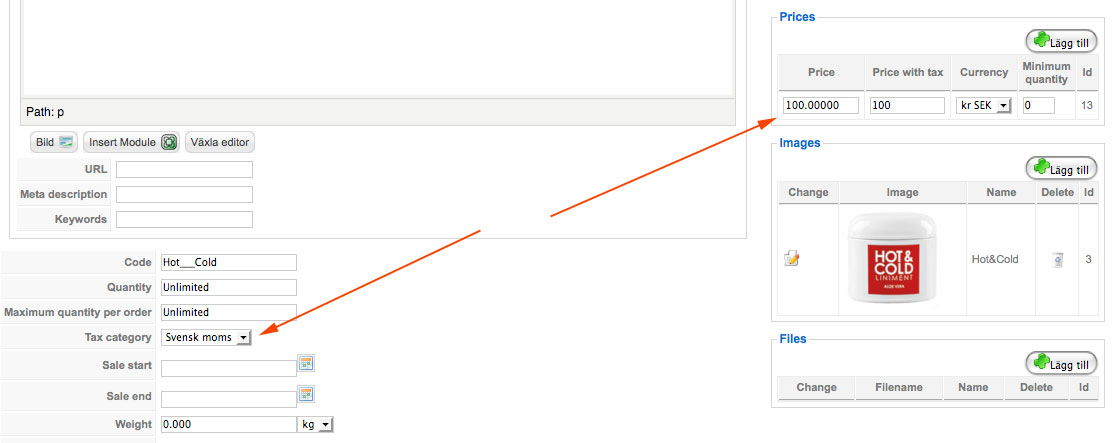
Tax not applied
Replied by weting on topic Re: Price with and without tax (moms)
Tax not applied
Last edit: 15 years 10 months ago by weting.
Please Log in or Create an account to join the conversation.
15 years 10 months ago #2136
by nicolas
Replied by nicolas on topic Re: Price with and without tax (moms)
There is indeed a bug in the system when no zone is set in the tax rule.
We were able to replicate the problem on our end and fix.
Around line 145 of the file administrator/components/com_hikashop/classes/currency.php, if you replace the code
by the code
that will fix the problem. We will add that correction to the next release we want to do today or tomorrow
We were able to replicate the problem on our end and fix.
Around line 145 of the file administrator/components/com_hikashop/classes/currency.php, if you replace the code
Code:
}
$calculated[$key]=$tax;
}
return $calculated[$key];
Code:
else{
foreach($taxPlans as $taxPlan){
if(empty($taxPlan->zone_namekey)){
$tax = floatval(@$taxPlan->tax_rate);
}
}
}
}
$calculated[$key]=$tax;
}
return $calculated[$key];
Please Log in or Create an account to join the conversation.
15 years 10 months ago #2224
by weting
Replied by weting on topic Re: Price with and without tax (moms)
Installed the new version and now it works! :woohoo:
Please Log in or Create an account to join the conversation.
Time to create page: 0.382 seconds