
- Posts: 7
- Thank you received: 0
Category Images
- marcos coelho
-
 Topic Author
- Offline
Less
More
15 years 4 months ago #20650
by marcos coelho
Category Images was created by marcos coelho
Hi. My main category images and product images are working great!
I only have one question.
As we are going trought the categories, it always show first the image of that category that we are at the moment and then the products. How do i remove/hide this image? image missing http://www.hikashop.com/media/kunena/attachments/legacy/images/wrong.PNG
I only have one question.
As we are going trought the categories, it always show first the image of that category that we are at the moment and then the products. How do i remove/hide this image? image missing http://www.hikashop.com/media/kunena/attachments/legacy/images/wrong.PNG
Please Log in or Create an account to join the conversation.

15 years 4 months ago #20662
by nicolas
Replied by nicolas on topic Re: Category Images
In your menu/module's hikashop options, you have the option "show image" to hide/display the category image.
Please Log in or Create an account to join the conversation.
13 years 11 months ago #76615
by patoushka
Replied by patoushka on topic Re: Category Images
I have the same issue.
I can see the "show image" options in the details section of the menu options (see attachment) but I can not see it in the "display options of the products listing (Associated products listing for category listing menu xxx)" (see attachment)
The reason is when I navigate my site through the menu items, everything is ok. But When I navigate through the Categories icons in the content, The image is still showing.
My question : How to make this image disappear?
Thanks!
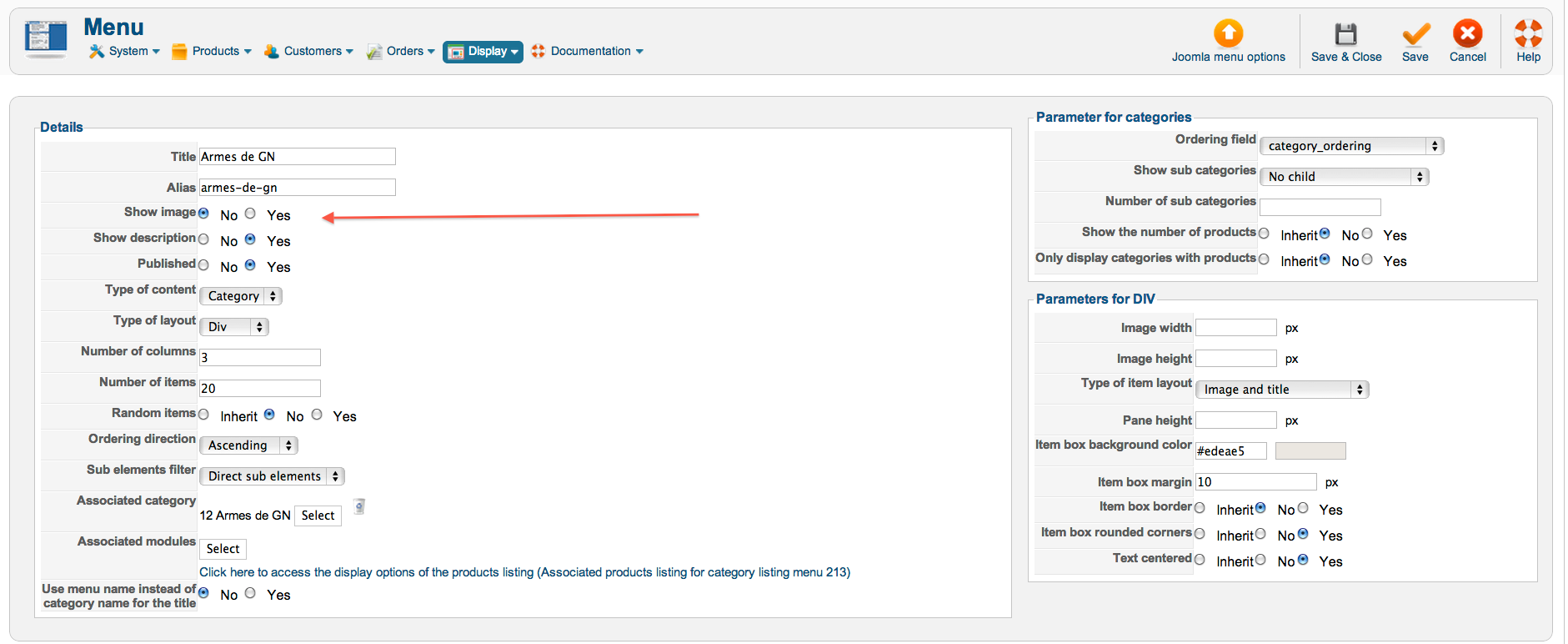
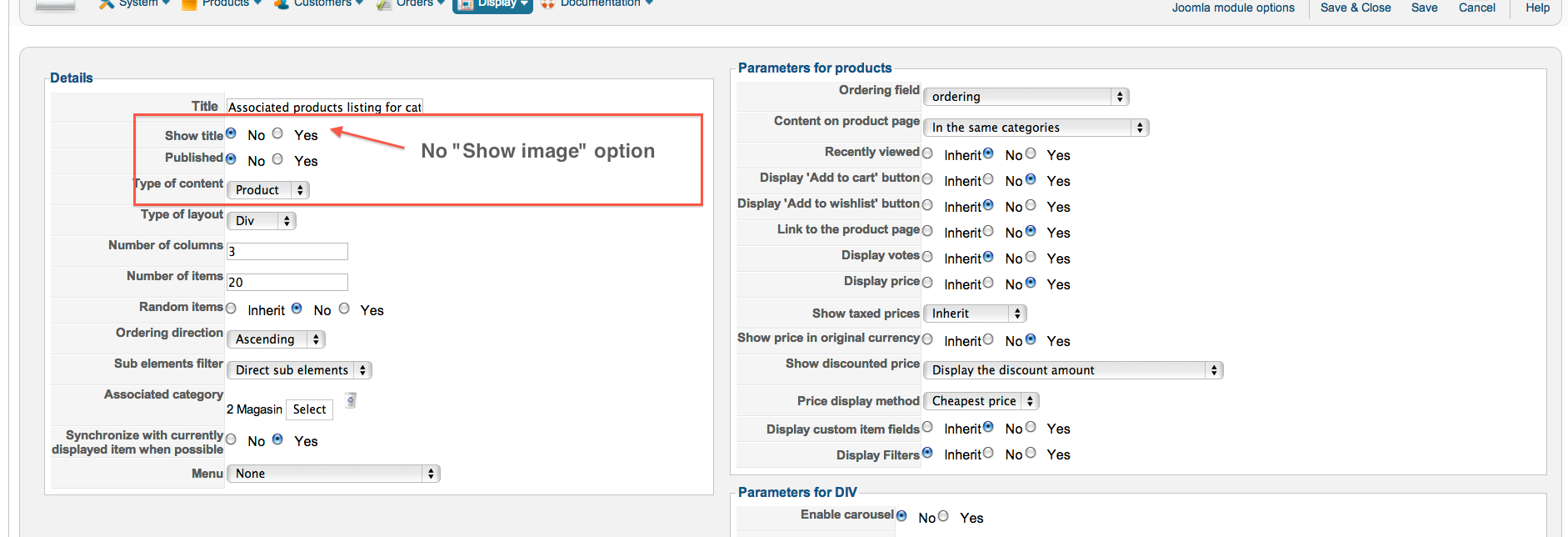
I can see the "show image" options in the details section of the menu options (see attachment) but I can not see it in the "display options of the products listing (Associated products listing for category listing menu xxx)" (see attachment)
The reason is when I navigate my site through the menu items, everything is ok. But When I navigate through the Categories icons in the content, The image is still showing.
My question : How to make this image disappear?
Thanks!
Please Log in or Create an account to join the conversation.

13 years 11 months ago #76829
by Jerome
Jerome - Obsidev.com
HikaMarket & HikaSerial developer / HikaShop core dev team.
Replied by Jerome on topic Category Images
Hi,
"Show image" option is just for menus.
In modules this option is not present but you can change the type of layout.
Regards,
"Show image" option is just for menus.
In modules this option is not present but you can change the type of layout.
Regards,
Jerome - Obsidev.com
HikaMarket & HikaSerial developer / HikaShop core dev team.
Please Log in or Create an account to join the conversation.
13 years 11 months ago #77003
by patoushka
Replied by patoushka on topic Category Images
Can you give me more infos about how to change this type of layout? Which file to change in the views options or something to configure ?
Thank you,
Thank you,
Please Log in or Create an account to join the conversation.
13 years 11 months ago #77158
by Jerome
Jerome - Obsidev.com
HikaMarket & HikaSerial developer / HikaShop core dev team.
Replied by Jerome on topic Category Images
Hi,
"Type of Layout" is an option, just below "type of content".
You're using "div" for the moment but another type of layout be better for your request.
Regards,
"Type of Layout" is an option, just below "type of content".
You're using "div" for the moment but another type of layout be better for your request.
Regards,
Jerome - Obsidev.com
HikaMarket & HikaSerial developer / HikaShop core dev team.
Please Log in or Create an account to join the conversation.
Time to create page: 0.161 seconds