
- Posts: 51
- Thank you received: 0
Categories not showing in menu (Joomla 1.6.4)
- squeakstar
-
 Topic Author
- Offline
Less
More
15 years 2 months ago #20939
by squeakstar
Categories not showing in menu (Joomla 1.6.4) was created by squeakstar
In Joomla 1.5 i could easily show a link in the main menu for categories that then also showed sub-categories following your instructions in the documentation on the main site. Thing is in Joomla 1.6 I just don't get what's happening and also the latest version of hikashop has changed a bit.
When i add a Hikashop category as a menu item it I also let it create the recommended module, as suggested. My site though shows only the newly created menu title but no categories I'm sure i'm doing something wrong but not sure what to do right. please help so all my sub categories show in the main menu... many thanks!
When i add a Hikashop category as a menu item it I also let it create the recommended module, as suggested. My site though shows only the newly created menu title but no categories
I'm sure i'm doing something wrong but not sure what to do right. please help so all my sub categories show in the main menu... many thanks! Please Log in or Create an account to join the conversation.

15 years 2 months ago #20942
by nicolas
Replied by nicolas on topic Re: Categories not showing in menu (Joomla 1.6.4)
You need to edit your menu's hikashop options and set the "parent category" option to your main category. That way, it will display your categories before displaying the subcategories once you select a category.
Please Log in or Create an account to join the conversation.
- squeakstar
-
Topic Author
- Offline
Less
More
- Posts: 51
- Thank you received: 0
15 years 2 months ago #20944
by squeakstar
Replied by squeakstar on topic Re: Categories not showing in menu (Joomla 1.6.4)
I've highlighted Root, then pressed + next to Product categories, the page seems to update, so i save the settings. Refreshing the page though i still just have the menu item name, in the menu with no sub-items branching off from it.
I am getting the categories in the main central column though, but was already anyway... ? thanks!
I am getting the categories in the main central column though, but was already anyway... ? thanks!
Please Log in or Create an account to join the conversation.
15 years 2 months ago #20945
by nicolas
Replied by nicolas on topic Re: Categories not showing in menu (Joomla 1.6.4)
Could you do a screenshot of the menu's hikashop options ?
Please Log in or Create an account to join the conversation.
- squeakstar
-
Topic Author
- Offline
Less
More
- Posts: 51
- Thank you received: 0
15 years 2 months ago #20947
by squeakstar
Replied by squeakstar on topic Re: Categories not showing in menu (Joomla 1.6.4)
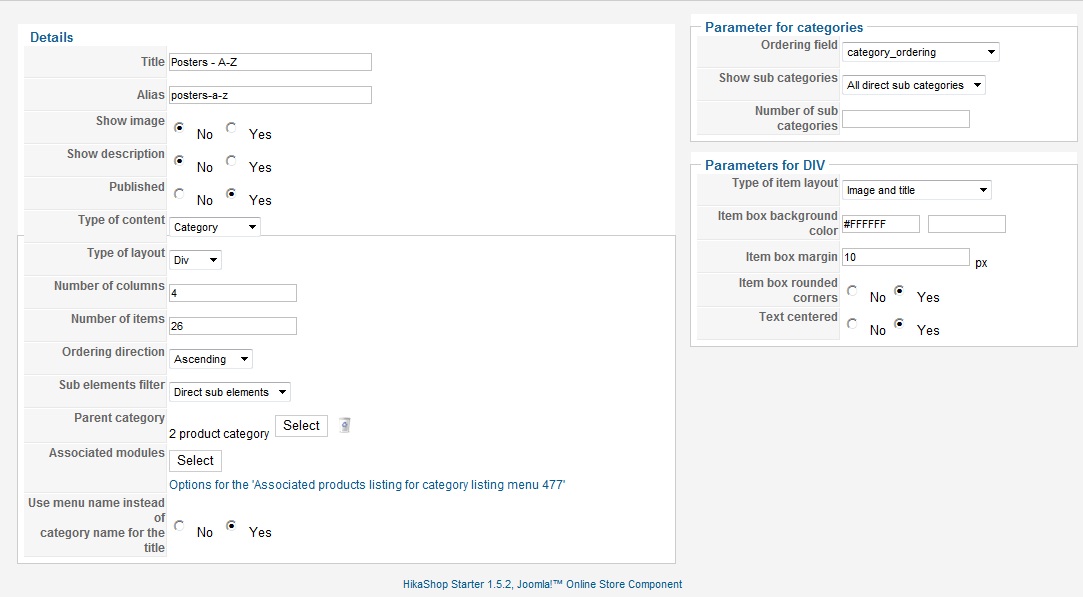
as requested...
Please Log in or Create an account to join the conversation.
15 years 2 months ago #20956
by nicolas
Replied by nicolas on topic Re: Categories not showing in menu (Joomla 1.6.4)
It seems to be setup properly.
Could you give a link to that page ? and a screenshot of the categories listing on the back end.
Could you give a link to that page ? and a screenshot of the categories listing on the back end.
Please Log in or Create an account to join the conversation.
- squeakstar
-
Topic Author
- Offline
Less
More
- Posts: 51
- Thank you received: 0
15 years 2 months ago #20959
by squeakstar
Replied by squeakstar on topic Re: Categories not showing in menu (Joomla 1.6.4)
I will PM you full front and back end details, and you can have a good sniff around. the site is access protected too.
Just to re-iterate, I'm hoping to see the categories listed in the menu structure, they're displayed on the main page fine.
We put an order for essentials in last night too but yet to upgrade with our new package. This is the dev site which we want to transfer to our official hosting once putting it together is complete.
Thanks for your assistance, details following very shortly!
Just to re-iterate, I'm hoping to see the categories listed in the menu structure, they're displayed on the main page fine.
We put an order for essentials in last night too but yet to upgrade with our new package. This is the dev site which we want to transfer to our official hosting once putting it together is complete.
Thanks for your assistance, details following very shortly!
Please Log in or Create an account to join the conversation.
- squeakstar
-
Topic Author
- Offline
Less
More
- Posts: 51
- Thank you received: 0
15 years 2 months ago #20960
by squeakstar
Replied by squeakstar on topic Re: Categories not showing in menu (Joomla 1.6.4)
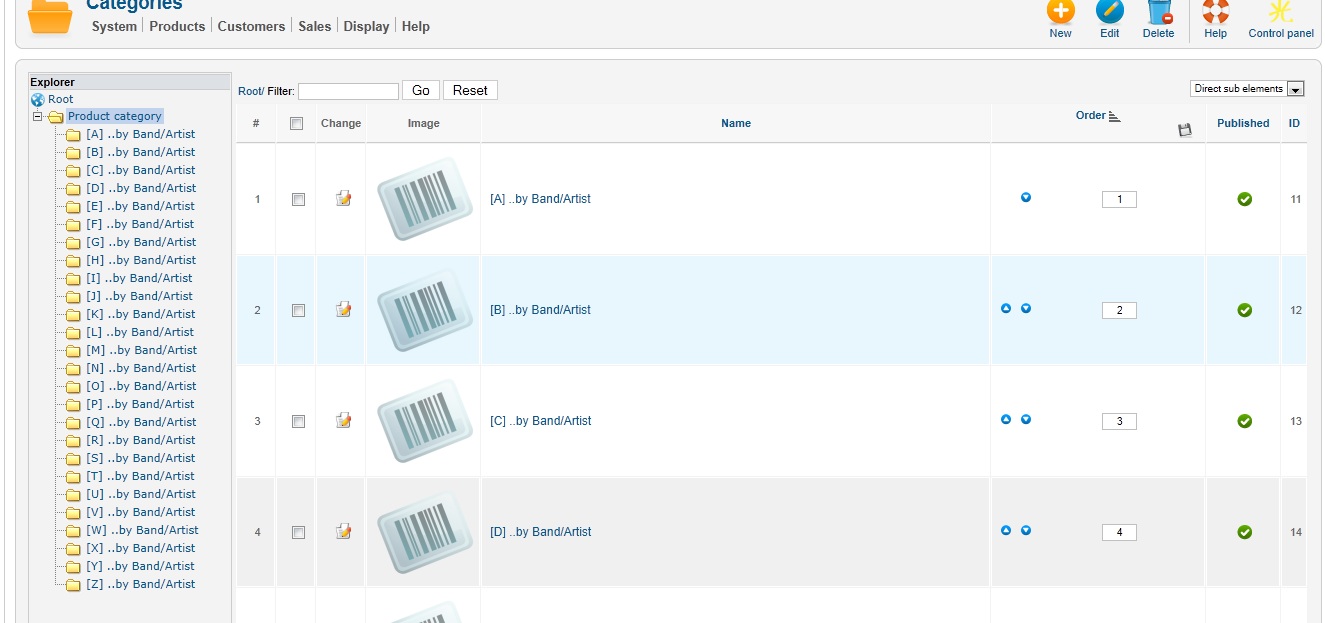
categories I'm trying to show...
Please Log in or Create an account to join the conversation.
- squeakstar
-
Topic Author
- Offline
Less
More
- Posts: 51
- Thank you received: 0
15 years 2 months ago #20963
by squeakstar
Replied by squeakstar on topic Re: Categories not showing in menu (Joomla 1.6.4)
Ooh, I've just seen the latest demo site too from reading through the forums and getting more info on a range of topics. It would be even more brilliant if i could get expanding sub-categories upon clicking any menu items like the demo, including my categories i'm having issues with, which aren't expanding at all.
Now obviously there's an issue with my whole site for this to occur at the moment as other sub-menus are on permanently but a pointer as to how to achieve expanding categories would be very useful too and would give us similar functionality to our exisiting OSCommerce site www.thepostermafia.com .
Thanks!!!
Now obviously there's an issue with my whole site for this to occur at the moment as other sub-menus are on permanently but a pointer as to how to achieve expanding categories would be very useful too and would give us similar functionality to our exisiting OSCommerce site www.thepostermafia.com .
Thanks!!!
Please Log in or Create an account to join the conversation.
15 years 2 months ago #20974
by nicolas
Replied by nicolas on topic Re: Categories not showing in menu (Joomla 1.6.4)
Ah ok. I didn't understood that you wanted to have the categories to display as menus.
The problem is that you created a menu and not a module.
A menu in joomla is only to display content once you click on it.
A menu can't generate itself other menus.
You should create a new module of the type hikashop content module: www.hikashop.com/support/documentation/6...ml#categories_module
Also, you can take for example the hikashop options of the categories module on our demo website (the back end is accessible).
Note that this module only allows for a two levels categories listing.
The problem is that you created a menu and not a module.
A menu in joomla is only to display content once you click on it.
A menu can't generate itself other menus.
You should create a new module of the type hikashop content module: www.hikashop.com/support/documentation/6...ml#categories_module
Also, you can take for example the hikashop options of the categories module on our demo website (the back end is accessible).
Note that this module only allows for a two levels categories listing.
Please Log in or Create an account to join the conversation.
- squeakstar
-
Topic Author
- Offline
Less
More
- Posts: 51
- Thank you received: 0
15 years 2 months ago - 15 years 2 months ago #20982
by squeakstar
Replied by squeakstar on topic Re: Categories not showing in menu (Joomla 1.6.4)
So it sounds like I can't achieve exactly what i'm trying to do (or I'm very confused) and must have a self contained module in the left column that displays a category list you can drill down through? It wouldn't actually be a menu per se but a module "list"?
Cumbersome but might be the way to go perhaps, but can i create a menu structure manually, layout the menu tree like my sub-categories (only two layers) and link directly to a level of my categories for each category menu item?
Sorry if this sounds totally daft but the differences between joomla 1.5 and 1.6 are throwing me for six, but i really need to get my head around it.
Whilst i looked at the demo backend i struggled to figure what's associating to what, can you direct me as to the module names that are displaying your expanding categories on the front page please?
thank you!!!
Cumbersome but might be the way to go perhaps, but can i create a menu structure manually, layout the menu tree like my sub-categories (only two layers) and link directly to a level of my categories for each category menu item?
Sorry if this sounds totally daft but the differences between joomla 1.5 and 1.6 are throwing me for six, but i really need to get my head around it.
Whilst i looked at the demo backend i struggled to figure what's associating to what, can you direct me as to the module names that are displaying your expanding categories on the front page please?
thank you!!!
Last edit: 15 years 2 months ago by squeakstar. Reason: amendment
Please Log in or Create an account to join the conversation.
15 years 2 months ago #20991
by nicolas
Replied by nicolas on topic Re: Categories not showing in menu (Joomla 1.6.4)
What you need to understand is that your menus "block" on your website is just a module which is displaying a list of menu items.
So if you use hikashop's content module to display the list of categories, you should be able to achieve the same display.
Another option would indeed be to create one menu item per category in joomla, but it's more work to create and maintain.
The module displaying the categories on the demo website is called "CATEGORIES OF PRODUCTS". You can see it on the module display on the front end...
You can access its options via the link www.demo.hikashop.com/administrator/inde...odules&task=edit&cid []=55 once you're logged in on the back end of the demo website.
So if you use hikashop's content module to display the list of categories, you should be able to achieve the same display.
Another option would indeed be to create one menu item per category in joomla, but it's more work to create and maintain.
The module displaying the categories on the demo website is called "CATEGORIES OF PRODUCTS". You can see it on the module display on the front end...
You can access its options via the link www.demo.hikashop.com/administrator/inde...odules&task=edit&cid []=55 once you're logged in on the back end of the demo website.
Please Log in or Create an account to join the conversation.
- squeakstar
-
Topic Author
- Offline
Less
More
- Posts: 51
- Thank you received: 0
15 years 2 months ago #21061
by squeakstar
Replied by squeakstar on topic Re: Categories not showing in menu (Joomla 1.6.4)
OK i'm getting the principle now. I've actually got myself a nice accordian type menu so i will be heading down the more cumbersome route of having a category listing manually placed for each category, and it's worked quite nice actually. Categories should never seem to be edited ever again anyway.
Please Log in or Create an account to join the conversation.
Time to create page: 0.269 seconds