

- Posts: 14
- Thank you received: 0
Paypal Showing Twice In Payment Method
15 years 3 months ago - 15 years 3 months ago #21470
by alilogins
Paypal Showing Twice In Payment Method was created by alilogins
I have set up pay pal as my payment method.
thing is, it is showing up twice in the payment method.
the plugin is active and has not been copied. It is the only active payment plugin
All i did was alter the text that gets displayed in the payment method.
Also the origional paypal option which has the origional text radio button cannot be clicked on.
Thanks
www.creativecharm.com.au/clearancecentre/
Also, i have a small css issue which i have not seen before unless i am using hikashop.
If you look at www.creativecharm.com.au/
and have a look at modules jewellery, jewellery components and clearance items you will see there is a divider line appesaring above the first product yet it is not doing it on the top module charms.
I am using artisteer.
Thx
thing is, it is showing up twice in the payment method.
the plugin is active and has not been copied. It is the only active payment plugin
All i did was alter the text that gets displayed in the payment method.
Also the origional paypal option which has the origional text radio button cannot be clicked on.
Thanks
www.creativecharm.com.au/clearancecentre/
Also, i have a small css issue which i have not seen before unless i am using hikashop.
If you look at www.creativecharm.com.au/
and have a look at modules jewellery, jewellery components and clearance items you will see there is a divider line appesaring above the first product yet it is not doing it on the top module charms.
I am using artisteer.
Thx
Last edit: 15 years 3 months ago by alilogins.
Please Log in or Create an account to join the conversation.

15 years 3 months ago #21480
by nicolas
Replied by nicolas on topic Re: Paypal Showing Twice In Payment Method
For the paypal payment plugin, you need to connect to your database using phpmyadmin and delete the paypal entry which is not working in the table hikashop_payment. We don't know how it happesn but sometimes such problem occurs. We were not able to reproduce it so far.
I didn't see any divider on your pages. Maybe it's a CSS problem related to your browser ? If you use another browser, do you still see it ? Could you do a screenshot ?
I didn't see any divider on your pages. Maybe it's a CSS problem related to your browser ? If you use another browser, do you still see it ? Could you do a screenshot ?
Please Log in or Create an account to join the conversation.
Less
More
- Posts: 14
- Thank you received: 0
15 years 3 months ago #21496
by warriorfullights
image missing http://imagicon.info/cat/5-47/bye.gif
Replied by warriorfullights on topic Re: Paypal Showing Twice In Payment Method
It seems like you have doubled your PayPal method entry. You can double check on this and see it for yourself. It is an easy fix for sure.
image missing http://imagicon.info/cat/5-47/bye.gif
Please Log in or Create an account to join the conversation.
10 years 4 months ago #242235
by rfonta
Replied by rfonta on topic Re: Paypal Showing Twice In Payment Method
Hello,
I have this issue; however I checked that there is only one row "paypal" in the hikashop_payment table.
I have just noticed by looking at the url that the payment page is displayed the first time in step 2 "/checkout/task-step/step-2" and then in step 3 : "/checkout/task-step/step-3"
can you help?
I have this issue; however I checked that there is only one row "paypal" in the hikashop_payment table.
I have just noticed by looking at the url that the payment page is displayed the first time in step 2 "/checkout/task-step/step-2" and then in step 3 : "/checkout/task-step/step-3"
can you help?
Please Log in or Create an account to join the conversation.

10 years 4 months ago #242239
by Philip
Replied by Philip on topic Re: Paypal Showing Twice In Payment Method
Hello,
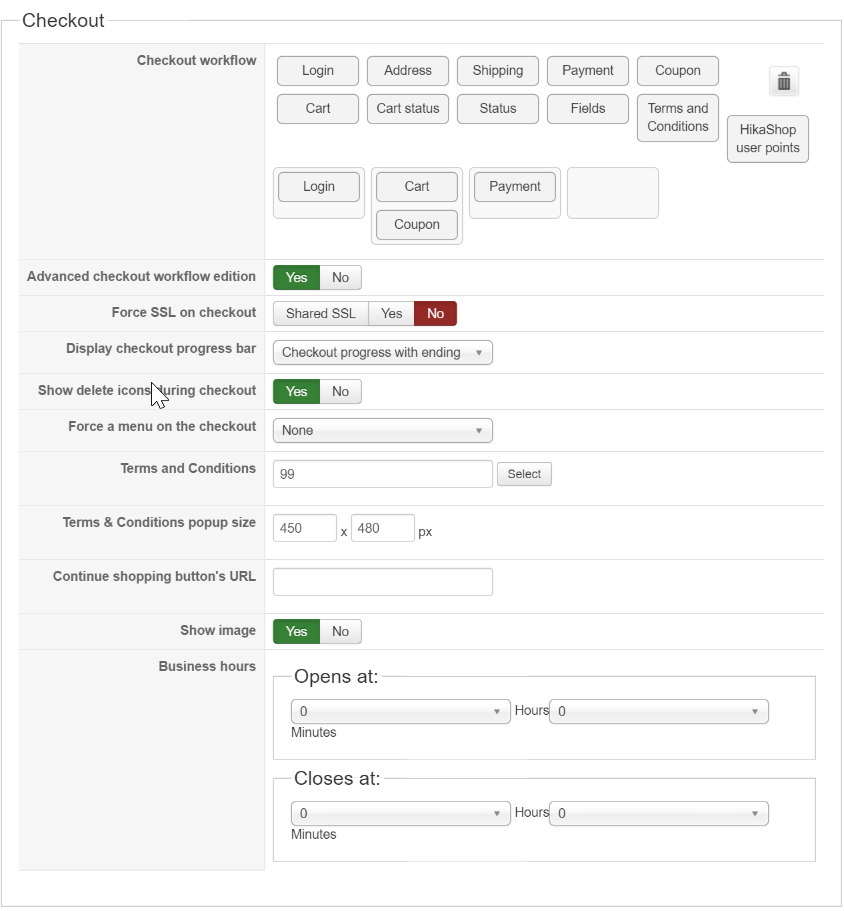
Please can you provide your Backend Checkout Configuration ?
Awaiting news from you.
Regards
Please can you provide your Backend Checkout Configuration ?
Awaiting news from you.
Regards
Please Log in or Create an account to join the conversation.
10 years 4 months ago #242472
by rfonta
Replied by rfonta on topic Re: Paypal Showing Twice In Payment Method
Here it is :
Please Log in or Create an account to join the conversation.
10 years 4 months ago #242473
by nicolas
Replied by nicolas on topic Re: Paypal Showing Twice In Payment Method
Can you also provide a link to your shop so that we can see the problem on your checkout ?
Please Log in or Create an account to join the conversation.
10 years 4 months ago - 10 years 4 months ago #242658
by rfonta
Replied by rfonta on topic Re: Paypal Showing Twice In Payment Method
Last edit: 10 years 4 months ago by Philip.
Please Log in or Create an account to join the conversation.
10 years 4 months ago #242679
by nicolas
Replied by nicolas on topic Re: Paypal Showing Twice In Payment Method
Please Log in or Create an account to join the conversation.
10 years 4 months ago #242899
by rfonta
Replied by rfonta on topic Re: Paypal Showing Twice In Payment Method
HI Nicolas,
it seems that when the payment has already being "checked" , if we leave the cart and come back, the issue does not happen.
however, if the payment has not been checked, then the problem happens.
if you go back now using this link : www.hivae.com/index.php/fr/performance-d...rganisation/checkout
you should see it because I haven't checked yet the payment.
Otherwise, you may empty the cart, go to menu"performance d'organisation/Catalogue des services orga and the add a product in the cart and proceed to payment.
I hope you will be able to see the problem.
it seems that when the payment has already being "checked" , if we leave the cart and come back, the issue does not happen.
however, if the payment has not been checked, then the problem happens.
if you go back now using this link : www.hivae.com/index.php/fr/performance-d...rganisation/checkout
you should see it because I haven't checked yet the payment.
Otherwise, you may empty the cart, go to menu"performance d'organisation/Catalogue des services orga and the add a product in the cart and proceed to payment.
I hope you will be able to see the problem.
Please Log in or Create an account to join the conversation.
10 years 4 months ago #242917
by nicolas
Replied by nicolas on topic Re: Paypal Showing Twice In Payment Method
Hi,
I still don't see the problem:
take.ms/yFqF9
Even if I empty my cart and add a product to it again, I only see one payment method on your website.
Do you have the problem if you try with my test user account ? Because I'm not able to reproduce it.
I still don't see the problem:
take.ms/yFqF9
Even if I empty my cart and add a product to it again, I only see one payment method on your website.
Do you have the problem if you try with my test user account ? Because I'm not able to reproduce it.
Please Log in or Create an account to join the conversation.
10 years 4 months ago #242966
by rfonta
Replied by rfonta on topic Re: Paypal Showing Twice In Payment Method
Hi Nicolas,
I realize that we may not be actually thinking of the same problem.
The payment method doesn't show up twice in the same screen (which I believe is the problem you are looking for) but it shows up a first in "step2" (when clicking on the payment method), then it goes to the next screen that is a duplication of the previous one (step3).
i can reproduce it each time using your test account credentials.
I hope that helps to clarify the issue
I realize that we may not be actually thinking of the same problem.
The payment method doesn't show up twice in the same screen (which I believe is the problem you are looking for) but it shows up a first in "step2" (when clicking on the payment method), then it goes to the next screen that is a duplication of the previous one (step3).
i can reproduce it each time using your test account credentials.
I hope that helps to clarify the issue
Please Log in or Create an account to join the conversation.
10 years 4 months ago - 10 years 4 months ago #242983
by Philip
Replied by Philip on topic Re: Paypal Showing Twice In Payment Method
Hello,
I'm really sorry but I tested it too and have the same result than Nicolas...
I mean with this payment method on step 2 and final process in step 3 without paypal displayed, I really don't know what I can told you...
Maybe the issue come from your navigator you use.
Awaiting news from you.
Regards.
I'm really sorry but I tested it too and have the same result than Nicolas...
I mean with this payment method on step 2 and final process in step 3 without paypal displayed, I really don't know what I can told you...
Maybe the issue come from your navigator you use.
Awaiting news from you.
Regards.
Last edit: 10 years 4 months ago by Philip.
Please Log in or Create an account to join the conversation.
10 years 4 months ago #243889
by rfonta
Replied by rfonta on topic Re: Paypal Showing Twice In Payment Method
Hi again,
I may have an explanation for why we don't see the same thing (I tested it again on 3 computers, both with chrome and edge and I can reproduce it 100% all the time.) :
case 1/ when we have been at least once to the final step ( where we are redirected to the paypal payment), then, if we click again to the cart link (without actually going to the payment), then click to "suivant" then we arrive at the step 2 with the paypal radio button ALREADY checked. in that situation we go to the "real" final step (step 3) redirecting to the paypal payment
BUT:
case 2/ if the paypal radio button is not yet clicked in step 2 (when we arrive there from the cart), then the step 3 is not the "real" final step 3, but is a duplication of the screen with paypal radio button (clicked this time) and we have to "valider" again to go to the real final step3.
Please note that once the radio button has been clicked, the only way to "unclik" it is to loggout and login in again.
So Maybe you were in situation 1, and unless you have logged out you could not reproduce it.
Can you please try again (sorry)?
I may have an explanation for why we don't see the same thing (I tested it again on 3 computers, both with chrome and edge and I can reproduce it 100% all the time.) :
case 1/ when we have been at least once to the final step ( where we are redirected to the paypal payment), then, if we click again to the cart link (without actually going to the payment), then click to "suivant" then we arrive at the step 2 with the paypal radio button ALREADY checked. in that situation we go to the "real" final step (step 3) redirecting to the paypal payment
BUT:
case 2/ if the paypal radio button is not yet clicked in step 2 (when we arrive there from the cart), then the step 3 is not the "real" final step 3, but is a duplication of the screen with paypal radio button (clicked this time) and we have to "valider" again to go to the real final step3.
Please note that once the radio button has been clicked, the only way to "unclik" it is to loggout and login in again.
So Maybe you were in situation 1, and unless you have logged out you could not reproduce it.
Can you please try again (sorry)?
Please Log in or Create an account to join the conversation.
10 years 4 months ago #243902
by nicolas
Replied by nicolas on topic Re: Paypal Showing Twice In Payment Method
Hi,
Mmm, I'm thinking we were talking about different things.
It now seems that your talking about seeing the payment view twice on the checkout, and not that you see the PayPal payment method twice in the payment view (which is what we thought you were talking about).
The fact that you would have that is because you must have turned off either the "auto select payment and shipping methods" and/or the "auto submit payment and shipping methods selection" settings of the HikaShop configuration. Activate them and you won't have that.
Mmm, I'm thinking we were talking about different things.
It now seems that your talking about seeing the payment view twice on the checkout, and not that you see the PayPal payment method twice in the payment view (which is what we thought you were talking about).
The fact that you would have that is because you must have turned off either the "auto select payment and shipping methods" and/or the "auto submit payment and shipping methods selection" settings of the HikaShop configuration. Activate them and you won't have that.
Please Log in or Create an account to join the conversation.
10 years 4 months ago #244538
by rfonta
Replied by rfonta on topic Re: Paypal Showing Twice In Payment Method
Hi,
that works. Thanks for your help.

Richard
that works. Thanks for your help.
Richard
Please Log in or Create an account to join the conversation.
Time to create page: 0.325 seconds