

- Posts: 11
- Thank you received: 0
how to insert image
15 years 10 months ago #2161
by gratef
how to insert image was created by gratef
hi there,
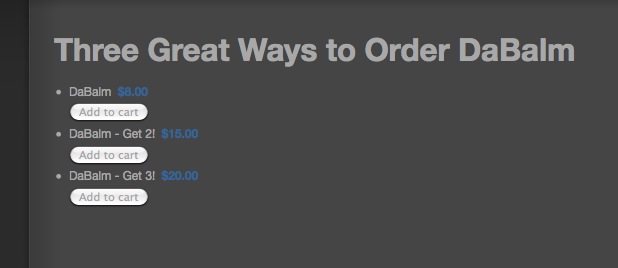
how can I insert a product image into a menu page with these parameters?
--- menu type: hikashop product listing; type of layout: list; show image; yes
I can do it when they type of layout is div, but not list. I'd like to insert the photo either to the left or right of the three choices as shown on screenshot.
:huh:
thanks for your help!
how can I insert a product image into a menu page with these parameters?
--- menu type: hikashop product listing; type of layout: list; show image; yes
I can do it when they type of layout is div, but not list. I'd like to insert the photo either to the left or right of the three choices as shown on screenshot.
:huh:
thanks for your help!
Please Log in or Create an account to join the conversation.

15 years 10 months ago #2170
by nicolas
Replied by nicolas on topic Re: how to insert image
The "show image" option will display the image of the parent category you can select in the options, not the image of each category listed.
If you want to have the images you would have to use the type of layout div indeed.
Alternately, you can edit the code of the view in order to add the images. Go to Display->Views and search for the file listing_list of the view product. There you can use the code
in order to display the image of each product. You can for example put it just before the code
which displays the name of your products.
If you want to have the images you would have to use the type of layout div indeed.
Alternately, you can edit the code of the view in order to add the images. Go to Display->Views and search for the file listing_list of the view product. There you can use the code
Code:
echo $this->image->display(@$row->file_path,false,$this->escape($row->product_name));
Code:
echo $row->product_name;
Please Log in or Create an account to join the conversation.
Time to create page: 0.168 seconds