

- Posts: 49
- Thank you received: 2
Display an image in Mini Cart
15 years 3 months ago #21694
by robjen
Display an image in Mini Cart was created by robjen
Hello,
I would like to display an image in the Mini-Cart above the "The cart is empty" line of text.
The image would need to be removed when an item is added to the cart.
Also, I would like to add a "Proceed to Checkout" line of text or button at the bottom of the Mini-Cart when an item is in the cart.
Your assistance would be appreciated.
Kind regards,
Robin
I would like to display an image in the Mini-Cart above the "The cart is empty" line of text.
The image would need to be removed when an item is added to the cart.
Also, I would like to add a "Proceed to Checkout" line of text or button at the bottom of the Mini-Cart when an item is in the cart.
Your assistance would be appreciated.
Kind regards,
Robin
Please Log in or Create an account to join the conversation.

15 years 3 months ago #21709
by nicolas
Replied by nicolas on topic Re: Display an image in Mini Cart
You could change the text "The cart is empty" by overriding the corresponding translation:
www.hikashop.com/en/download/languages.html#modify
That way, you could add an image and a <br/> between the image and the text like that:
CART_EMPTY="<img src=' www.mywebsite.com/my_image.jpg ' />
The cart is empty"
That way, you could add an image and a <br/> between the image and the text like that:
CART_EMPTY="<img src=' www.mywebsite.com/my_image.jpg ' />
The cart is empty"
Please Log in or Create an account to join the conversation.
15 years 3 months ago #21710
by nicolas
Replied by nicolas on topic Re: Display an image in Mini Cart
For the proceed to checkout, you will have to add it yourself in the file cart of the view product via the menu Display->Views by changing the code in the view.
Please Log in or Create an account to join the conversation.
15 years 3 months ago #21718
by robjen
Replied by robjen on topic Re: Display an image in Mini Cart
Hello Nicolas,
I was able to add the image for the mini-cart and the Proceed to checkout link in the mini-cart.
Thank you for your help.
Kind regards,
Robin
I was able to add the image for the mini-cart and the Proceed to checkout link in the mini-cart.
Thank you for your help.
Kind regards,
Robin
Please Log in or Create an account to join the conversation.

14 years 2 months ago - 14 years 2 months ago #59392
by Teto
Replied by Teto on topic Re: Display an image in Mini Cart
I used the overrides option to add an imege to the Minicart:
CART_EMPTY <img src=" www.madeinvino.com/images/varie/Carr02_A.png " /> Il carrello è vuoto
TOTAL_IN_CART_X <img src=" www.madeinvino.com/images/varie/Carr02_A.png " /> Totale : %s
it works but the image and the text are not alligned vertically.
Is there a way to allign image and text (like the green circle)?
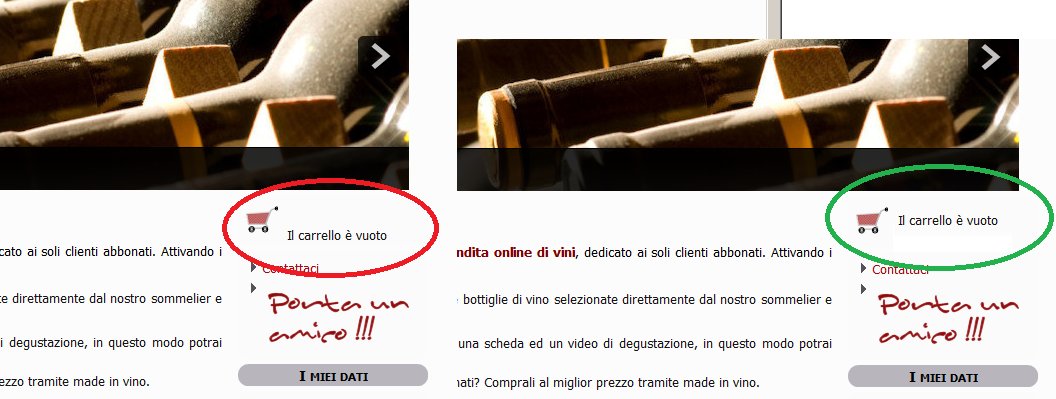
Many Thanks!
CART_EMPTY <img src=" www.madeinvino.com/images/varie/Carr02_A.png " /> Il carrello è vuoto
TOTAL_IN_CART_X <img src=" www.madeinvino.com/images/varie/Carr02_A.png " /> Totale : %s
it works but the image and the text are not alligned vertically.
Is there a way to allign image and text (like the green circle)?
Many Thanks!
Last edit: 14 years 2 months ago by Teto.
Please Log in or Create an account to join the conversation.
14 years 2 months ago #59446
by nicolas
Replied by nicolas on topic Re: Display an image in Mini Cart
You can adjust that with CSS.
If you could give a link to that page, we could have a look at the CSS of your website and tell you what CSS you need to add.
If you could give a link to that page, we could have a look at the CSS of your website and tell you what CSS you need to add.
Please Log in or Create an account to join the conversation.
14 years 2 months ago #59976
by Teto
Replied by Teto on topic Re: Display an image in Mini Cart
thank you nicolas! 
the link is www.madeinvino.com
(the hikashop part at the moment is hidden, you can anyway see the cart image and the relative text)
the link is www.madeinvino.com
(the hikashop part at the moment is hidden, you can anyway see the cart image and the relative text)
Please Log in or Create an account to join the conversation.
14 years 2 months ago #60042
by nicolas
Replied by nicolas on topic Re: Display an image in Mini Cart
I'm sorry but I don't see the cart either.
Please Log in or Create an account to join the conversation.
14 years 2 months ago #60056
by Teto
Replied by Teto on topic Re: Display an image in Mini Cart
Sorry, you are right. :blush:
I forgot it was visible only for the registered users
I changed the option, now you may see it.
Thanks.
I forgot it was visible only for the registered users
I changed the option, now you may see it.
Thanks.
Please Log in or Create an account to join the conversation.
14 years 2 months ago - 14 years 2 months ago #60062
by Teto
Replied by Teto on topic Display an image in Mini Cart - SOLVED
After many many tests i have found the solution....
this is the string to use in the override text
<img style="vertical-align: middle;" src=" www.madeinvino.com/images/varie/Carr02_A.png " /> Il carrello è vuoto
It seems to work!
Thank you so much for your help!
this is the string to use in the override text
<img style="vertical-align: middle;" src=" www.madeinvino.com/images/varie/Carr02_A.png " /> Il carrello è vuoto
It seems to work!
Thank you so much for your help!
Last edit: 14 years 2 months ago by Teto.
Please Log in or Create an account to join the conversation.
Time to create page: 0.276 seconds