

- Posts: 36
- Thank you received: 0
add Australia to billing drop down list
15 years 10 months ago #2253
by coober
add Australia to billing drop down list was created by coober
Hello all,
could somebody tell me where I can add Australia and all the states to the billing address drop down list (please see attachment).
thanks
David
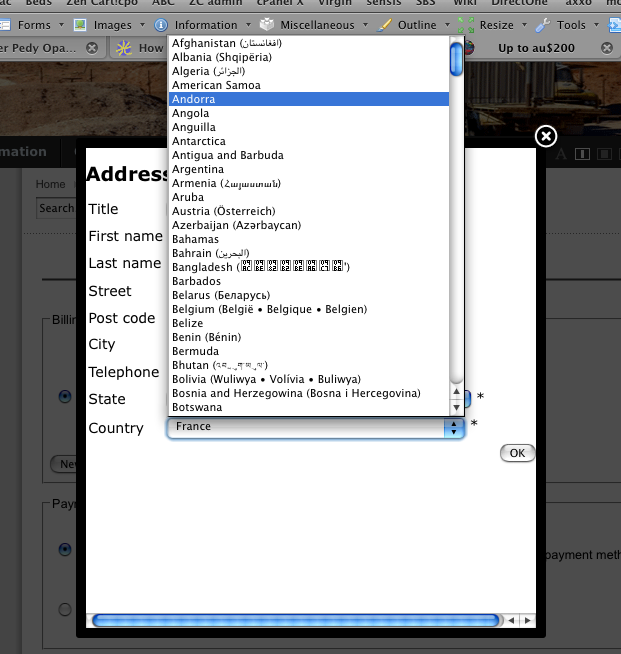
could somebody tell me where I can add Australia and all the states to the billing address drop down list (please see attachment).
thanks
David
Please Log in or Create an account to join the conversation.

15 years 10 months ago #2254
by nicolas
Replied by nicolas on topic Re: add Australia to billing drop down list
Hi,
Australia is added by default along with all the other countries. Maybe you unpublished it ?
You can manage countries and states via the zones management interface (HikaShop menu System->Zones). There, search for australia...Hopefully you will just have to republish it.
Otherwise, you can of course recreate it there...but in that case it should be easier to just install HikaShop on top of your current version, and that should put australia back.
Australia is added by default along with all the other countries. Maybe you unpublished it ?
You can manage countries and states via the zones management interface (HikaShop menu System->Zones). There, search for australia...Hopefully you will just have to republish it.
Otherwise, you can of course recreate it there...but in that case it should be easier to just install HikaShop on top of your current version, and that should put australia back.
Please Log in or Create an account to join the conversation.
15 years 10 months ago #2256
by coober
Replied by coober on topic Re: add Australia to billing drop down list
thanks for that I had Australia as a tax zone, changed it to country and all is OK.
David
David
Please Log in or Create an account to join the conversation.
Time to create page: 0.185 seconds