
- Posts: 606
- Thank you received: 13
No Address Identity in My Account
- mohairbears
-
 Topic Author
- Offline
Less
More
15 years 1 month ago #22762
by mohairbears
No Address Identity in My Account was created by mohairbears
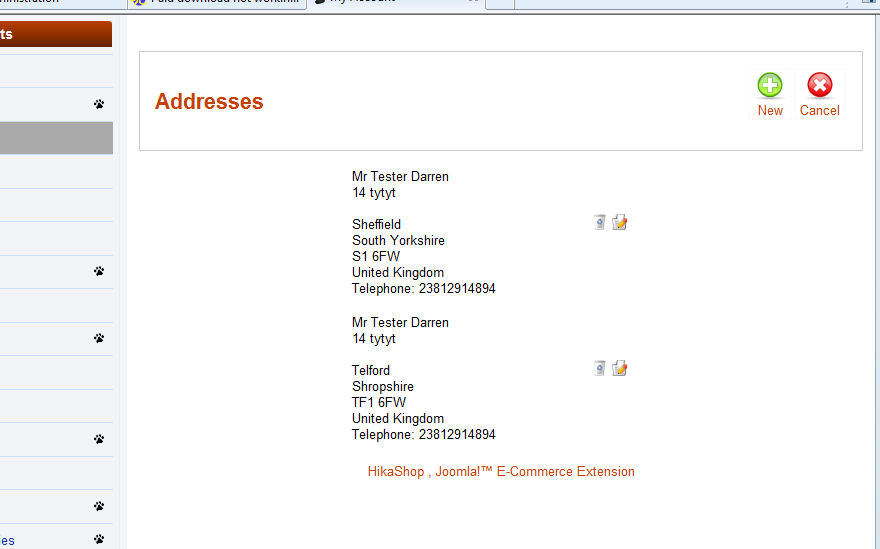
Hi, just a small question, there appears not to be an idendity title in My Account when there is a billing address & a shipping address? can they be included.
Please Log in or Create an account to join the conversation.

15 years 1 month ago #22764
by nicolas
Replied by nicolas on topic Re: No Address Identity in My Account
What do you mean by "idendity title" ? I can see the titles (Mr) on your screenshot.
Please Log in or Create an account to join the conversation.
- mohairbears
-
Topic Author
- Offline
Less
More
- Posts: 606
- Thank you received: 13
15 years 1 month ago #22766
by mohairbears
Replied by mohairbears on topic Re: No Address Identity in My Account
i.e. Address titles
Billing Address
Shipping Address
minor I know but I think it will look cleaner.
thanks
Billing Address
Shipping Address
minor I know but I think it will look cleaner.
thanks
Please Log in or Create an account to join the conversation.
15 years 1 month ago #22767
by nicolas
Replied by nicolas on topic Re: No Address Identity in My Account
Addresses can be used for billing or shipping. There is no type attached to them.
The billing address of my first order might be the shipping address of my second order...
The billing address of my first order might be the shipping address of my second order...
Please Log in or Create an account to join the conversation.
- mohairbears
-
Topic Author
- Offline
Less
More
- Posts: 606
- Thank you received: 13
15 years 1 month ago #22770
by mohairbears
Replied by mohairbears on topic Re: No Address Identity in My Account
Agree, ok
Another problem I have just found, you cannot select the county/state when registering, however you can select this from My Account once registered. (this is supposed to be a required field)
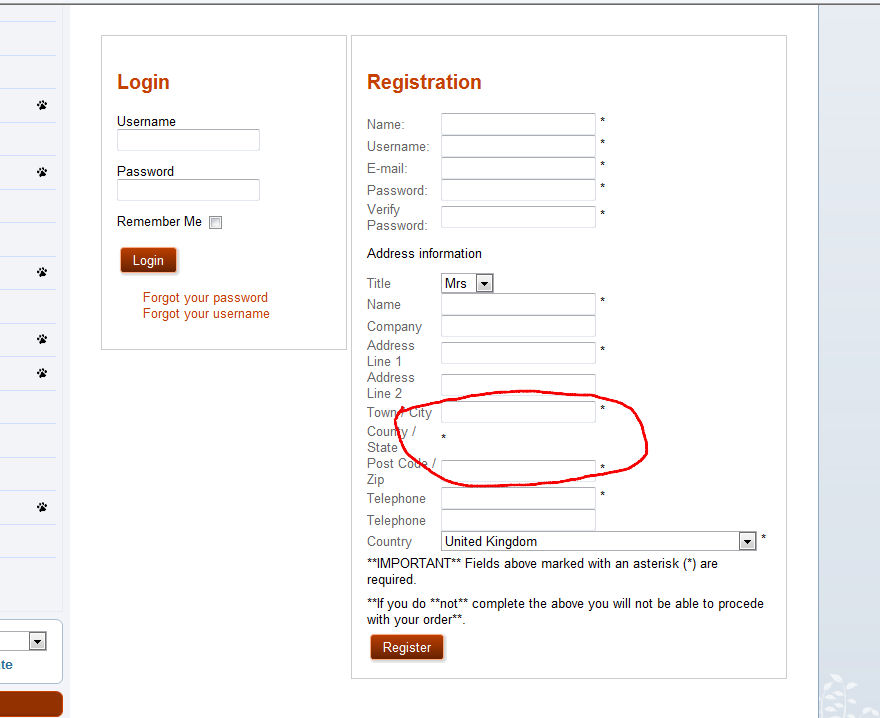
Another problem I have just found, you cannot select the county/state when registering, however you can select this from My Account once registered. (this is supposed to be a required field)
Please Log in or Create an account to join the conversation.
15 years 1 month ago #22771
by nicolas
Replied by nicolas on topic Re: No Address Identity in My Account
It's either because:
You have a javascript error on your page which prevent the system to load the states of your country
You unpbulished/deleted the states of the UK
You removed the states from the subzones listing of the UK country zone.
You have a javascript error on your page which prevent the system to load the states of your country
You unpbulished/deleted the states of the UK
You removed the states from the subzones listing of the UK country zone.
Please Log in or Create an account to join the conversation.
- mohairbears
-
Topic Author
- Offline
Less
More
- Posts: 606
- Thank you received: 13
15 years 1 month ago #22782
by mohairbears
Replied by mohairbears on topic Re: No Address Identity in My Account
Hi Again,
I have spent tried all of your suggestions and cannot find anything wrong except see the attached, there are a lot of blanks in the UK subzone that I cannot seem to delete? not sure if this is the problem?
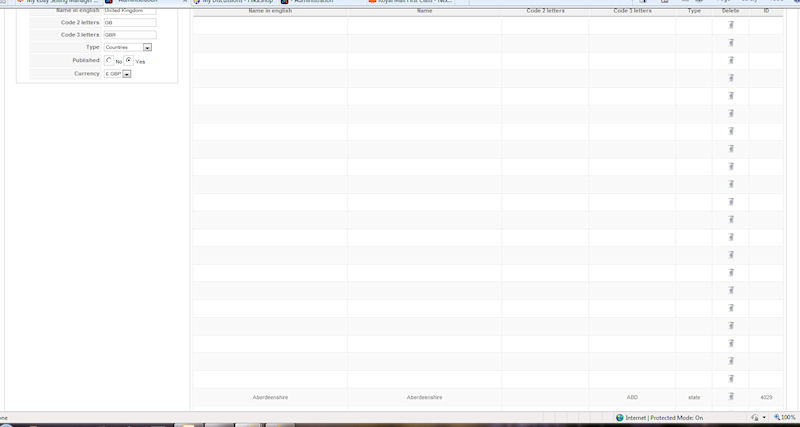
I have spent tried all of your suggestions and cannot find anything wrong except see the attached, there are a lot of blanks in the UK subzone that I cannot seem to delete? not sure if this is the problem?
Please Log in or Create an account to join the conversation.
15 years 1 month ago #22787
by nicolas
Replied by nicolas on topic Re: No Address Identity in My Account
That's indeed the problem. It means that you deleted the UK states from the database and the system cannot find them anymore.
To solve the problem, the easiest is to do like that:
Go in your PHPMyAdmin and empty the tables jos_hikashop_zone and jos_hikashop_zone_link.
Then, install HikaShop on top of your currently version.
That will put back all the zones with their default values and it should work again.
To solve the problem, the easiest is to do like that:
Go in your PHPMyAdmin and empty the tables jos_hikashop_zone and jos_hikashop_zone_link.
Then, install HikaShop on top of your currently version.
That will put back all the zones with their default values and it should work again.
Please Log in or Create an account to join the conversation.
- mohairbears
-
Topic Author
- Offline
Less
More
- Posts: 606
- Thank you received: 13
15 years 1 month ago #22788
by mohairbears
Replied by mohairbears on topic Re: No Address Identity in My Account
Ok I'll try that, yes I have deleted some states as they are not states but cities, is there a way I can remove these without this happening again?
Please Log in or Create an account to join the conversation.
15 years 1 month ago #22791
by nicolas
Replied by nicolas on topic Re: No Address Identity in My Account
The UK states have been fixed in a previous release so if you install a recent install package you won't have to delete any UK state.
Please Log in or Create an account to join the conversation.
- mohairbears
-
Topic Author
- Offline
Less
More
- Posts: 606
- Thank you received: 13
15 years 1 month ago #22887
by mohairbears
Replied by mohairbears on topic Re: No Address Identity in My Account
Hi again, still cannot fix this, have emptied the table as you said, updated to 1.5.3 but the blanks are still there, looks like nothing was changed?
Please Log in or Create an account to join the conversation.
15 years 1 month ago #22889
by nicolas
Replied by nicolas on topic Re: No Address Identity in My Account
Did you empty BOTH jos_hikashop_zone and jos_hikashop_zone_link tables ?
It's just not possible that the blanks are still there if you emptied both and then reinstalled.
It's just not possible that the blanks are still there if you emptied both and then reinstalled.
Please Log in or Create an account to join the conversation.
- mohairbears
-
Topic Author
- Offline
Less
More
- Posts: 606
- Thank you received: 13
15 years 1 month ago #22890
by mohairbears
Replied by mohairbears on topic Re: No Address Identity in My Account
re-done this and this time cleared the cache, the blacks have now gone the I still get the same problem, if you register and login you can change the field then, it's only on the new account form that this is happening.
Please Log in or Create an account to join the conversation.
15 years 1 month ago #22891
by nicolas
Replied by nicolas on topic Re: No Address Identity in My Account
Could you give a link to your shop ?
Please Log in or Create an account to join the conversation.
- mohairbears
-
Topic Author
- Offline
Less
More
- Posts: 606
- Thank you received: 13
15 years 1 month ago #22892
by mohairbears
Replied by mohairbears on topic Re: No Address Identity in My Account
Please Log in or Create an account to join the conversation.
15 years 1 month ago #22893
by nicolas
Replied by nicolas on topic Re: No Address Identity in My Account
So the dropdown of states works when you change the country. But the default dropdown does not display because you have a javascript error on your page:
Uncaught TypeError: Object #<Object> has no method 'getProperty'
That error is caused by the mod_superfish module you're using. If you remove that module it should work properly.
It's the problem described there: www.hikashop.com/en/support/documentatio...tibility-issues.html in the "problems with modal popups".
Uncaught TypeError: Object #<Object> has no method 'getProperty'
That error is caused by the mod_superfish module you're using. If you remove that module it should work properly.
It's the problem described there: www.hikashop.com/en/support/documentatio...tibility-issues.html in the "problems with modal popups".
Please Log in or Create an account to join the conversation.
- mohairbears
-
Topic Author
- Offline
Less
More
- Posts: 606
- Thank you received: 13
15 years 1 month ago #22894
by mohairbears
Replied by mohairbears on topic Re: No Address Identity in My Account
Thanks I would have never found that, there is an option to run it with no confict so it now works ok.
Another questions or two I have is, I am going to use PayPal pro as a hosted solution, what is the best way to procede with intregration with Hikashop?
thanks
Another questions or two I have is, I am going to use PayPal pro as a hosted solution, what is the best way to procede with intregration with Hikashop?
thanks
Please Log in or Create an account to join the conversation.
15 years 1 month ago #22895
by nicolas
Replied by nicolas on topic Re: No Address Identity in My Account
There is a documentation on how to configure the PayPal Pro plugin:
www.hikashop.com/en/support/documentatio...-paypalpro-form.html
www.hikashop.com/en/support/documentatio...-paypalpro-form.html
Please Log in or Create an account to join the conversation.
- mohairbears
-
Topic Author
- Offline
Less
More
- Posts: 606
- Thank you received: 13
15 years 1 month ago #22900
by mohairbears
Replied by mohairbears on topic Re: No Address Identity in My Account
Hi again, I am now having to put back missing states but when selected they are showing up like this (state_Eilean_Siar_4100)?
Please Log in or Create an account to join the conversation.
15 years 1 month ago #22902
by nicolas
Replied by nicolas on topic Re: No Address Identity in My Account
The problem you're talking about is that the previous states you created yourself and the states that we have now in hikashop by default don't have the same namekey. Thus, the system cannot find them.
You should look at the namekey of the states in the jos_hikashop_zone table and then run the query below to update the state namekey in the existing addresses that your users already had with such query (to run in phpmyadmin):
UPDATE jos_hikashop_address SET address_state = 'NEW_NAMEKEY' WHERE state = 'OLD_NAMEKEY';
If you don't find an equivalent to a state you previously had you should add it in the zone management screen and then do that procedure so that the old namekey in addresses is replaced with the new one.
You should look at the namekey of the states in the jos_hikashop_zone table and then run the query below to update the state namekey in the existing addresses that your users already had with such query (to run in phpmyadmin):
UPDATE jos_hikashop_address SET address_state = 'NEW_NAMEKEY' WHERE state = 'OLD_NAMEKEY';
If you don't find an equivalent to a state you previously had you should add it in the zone management screen and then do that procedure so that the old namekey in addresses is replaced with the new one.
Please Log in or Create an account to join the conversation.
Time to create page: 0.329 seconds