
- Posts: 606
- Thank you received: 13
No Address Identity in My Account
- mohairbears
-
 Topic Author
- Offline
Less
More
15 years 1 month ago - 15 years 1 month ago #22910
by mohairbears
Replied by mohairbears on topic Re: No Address Identity in My Account
Hi again, I cannot get this to connect to sandbox, can you advise what may be wrong from the error message? Pretty sure I have all the bit's in the right places passwords etc.
Last edit: 15 years 1 month ago by mohairbears. Reason: remove img
Please Log in or Create an account to join the conversation.

15 years 1 month ago #22912
by nicolas
Replied by nicolas on topic Re: No Address Identity in My Account
Looking at the 10501 error on google, I found that thread:
www.x.com/thread/39182
Apparently, when testing with the sandbox, you need to ask paypal support to activate the payment pro of the sandbox account and make sure that you're using the correct credentials. You should contact PayPal directly for help on that issue.
Apparently, when testing with the sandbox, you need to ask paypal support to activate the payment pro of the sandbox account and make sure that you're using the correct credentials. You should contact PayPal directly for help on that issue.
Please Log in or Create an account to join the conversation.
- mohairbears
-
Topic Author
- Offline
Less
More
- Posts: 606
- Thank you received: 13
15 years 1 month ago #22913
by mohairbears
Replied by mohairbears on topic Re: No Address Identity in My Account
ok thanks
Please Log in or Create an account to join the conversation.
- mohairbears
-
Topic Author
- Offline
Less
More
- Posts: 606
- Thank you received: 13
15 years 1 month ago #22923
by mohairbears
Replied by mohairbears on topic Re: No Address Identity in My Account
Got the plugin working but it takes 2 clicks of the HIKA_NEXT button to go through? is this expected?
Then when there is an error message it displays like this;
Error 15005: This%20transaction%20cannot%20be%20processed%2e
where do these messages originate from? PayPal or Hika?
I created this error deliberately.
Then when there is an error message it displays like this;
Error 15005: This%20transaction%20cannot%20be%20processed%2e
where do these messages originate from? PayPal or Hika?
I created this error deliberately.
Please Log in or Create an account to join the conversation.
15 years 1 month ago #22931
by nicolas
Replied by nicolas on topic Re: No Address Identity in My Account
You should not need two clicks unless you changed the default checkout configuration.
That error message is sent by paypal and displayed by HikaShop:
The transaction was declined by the issuing bank, not PayPal. The merchant should attempt another card.
That error message is sent by paypal and displayed by HikaShop:
The transaction was declined by the issuing bank, not PayPal. The merchant should attempt another card.
Please Log in or Create an account to join the conversation.
- mohairbears
-
Topic Author
- Offline
Less
More
- Posts: 606
- Thank you received: 13
15 years 1 month ago #22938
by mohairbears
Replied by mohairbears on topic Re: No Address Identity in My Account
Hi, No I have not changed anything, this is only with the Paypal pro, first click changes card details from 111111112222 to XXXXXXXX2222 then a second click is required to make payment.
Do you know how I can amend the error messages to get rid of the %20's?
thanks
Do you know how I can amend the error messages to get rid of the %20's?
thanks
Please Log in or Create an account to join the conversation.
15 years 1 month ago #22943
by nicolas
Replied by nicolas on topic Re: No Address Identity in My Account
For the %20, you need to edit the file plugins/hikashoppayment/paypalpro.php and change the line:
$app->enqueueMessage($message);
to:
$app->enqueueMessage(html_entity_decode($message));
We'll do that on our end for next release so that the messages will be displayed properly.
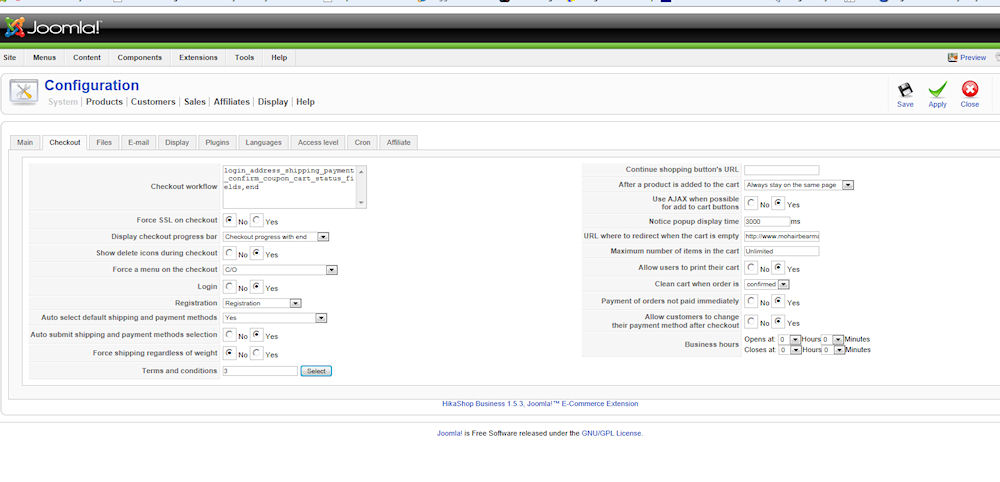
Concerning the two steps, it depends on how your configured your checkout options in the configuration. It's possible to have it in two steps like you have , but it's also possible to have it in one step. Could you do a screenshot of the checkout tab of the configuration ?
$app->enqueueMessage($message);
to:
$app->enqueueMessage(html_entity_decode($message));
We'll do that on our end for next release so that the messages will be displayed properly.
Concerning the two steps, it depends on how your configured your checkout options in the configuration. It's possible to have it in two steps like you have , but it's also possible to have it in one step. Could you do a screenshot of the checkout tab of the configuration ?
Please Log in or Create an account to join the conversation.
- mohairbears
-
Topic Author
- Offline
Less
More
- Posts: 606
- Thank you received: 13
15 years 1 month ago #22969
by mohairbears
Replied by mohairbears on topic Re: No Address Identity in My Account
checkout config.
Please Log in or Create an account to join the conversation.
15 years 1 month ago #22981
by nicolas
Replied by nicolas on topic Re: No Address Identity in My Account
your checkout options are fine. Did you edit any file of the view checkout via the menu Display->Views ?
Please Log in or Create an account to join the conversation.
- mohairbears
-
Topic Author
- Offline
Less
More
- Posts: 606
- Thank you received: 13
15 years 1 month ago #23016
by mohairbears
Replied by mohairbears on topic Re: No Address Identity in My Account
Hi, the only checkout fine edited is checout/cart, the added code is
<p class="hikashop_cart_product_custom_item_fields">
<?php
/*if(hikashop_level(2) && !empty($this->extraFields)){ */
if($row->product_code=="multi_pack" && hikashop::level(2) && !empty($this->extraFields)){
foreach($this->extraFields as $field){
$namekey = $field->field_namekey;
if(empty($row->$namekey)) continue;
<p class="hikashop_cart_product_custom_item_fields">
<?php
/*if(hikashop_level(2) && !empty($this->extraFields)){ */
if($row->product_code=="multi_pack" && hikashop::level(2) && !empty($this->extraFields)){
foreach($this->extraFields as $field){
$namekey = $field->field_namekey;
if(empty($row->$namekey)) continue;
Please Log in or Create an account to join the conversation.
15 years 1 month ago #23024
by nicolas
Replied by nicolas on topic Re: No Address Identity in My Account
It's not because of the credit card information. I don't need to click twice unless I enter something in the custom field of your checkout. And that's normal.
Please Log in or Create an account to join the conversation.
- mohairbears
-
Topic Author
- Offline
Less
More
- Posts: 606
- Thank you received: 13
15 years 1 month ago #23025
by mohairbears
Replied by mohairbears on topic Re: No Address Identity in My Account
That's weird from my end this (Paypal Pro)does not work with one click , I have just tried it again with Explorer & Firefox and with both browsers I have to select "Pay Now" twice otherwise the payment does not go through, the first click just XXXX's out the credit card details, the second sends the details. If you do not click twice the payment does not go through.
I lost some orders through this yesterday as I was at a show so was unable to assist customers. One even submitted the same order 8 times without working out that if you clicked a second time the payment would work, hence I have had to put a note on telling them to click twice.
I lost some orders through this yesterday as I was at a show so was unable to assist customers. One even submitted the same order 8 times without working out that if you clicked a second time the payment would work, hence I have had to put a note on telling them to click twice.
Please Log in or Create an account to join the conversation.
- mohairbears
-
Topic Author
- Offline
Less
More
- Posts: 606
- Thank you received: 13
15 years 1 month ago #23029
by mohairbears
Replied by mohairbears on topic Re: No Address Identity in My Account
Hi again, I am still getting the "Error 15005: This%20transaction%20cannot%20be%20processed%2e" with the %20 in even after I did your code change advice?
Please Log in or Create an account to join the conversation.
15 years 1 month ago #23032
by nicolas
Replied by nicolas on topic Re: No Address Identity in My Account
Could you try to remove the code
if(($old_payment_id!=$payment_id || $old_payment_method!=$payment) && $this->_getStep('cart',(int)$this->previous)===(int)$this->previous){
return false;
}
from the file components/com_hikashop/controllers/checkout.php and try again ?
For the message, could you try to change :
$app->enqueueMessage($message);
to:
$app->enqueueMessage(urldecode($message));
in the file plugins/hikashoppayment/paypalpro.php instead of the previous modification ?
if(($old_payment_id!=$payment_id || $old_payment_method!=$payment) && $this->_getStep('cart',(int)$this->previous)===(int)$this->previous){
return false;
}
from the file components/com_hikashop/controllers/checkout.php and try again ?
For the message, could you try to change :
$app->enqueueMessage($message);
to:
$app->enqueueMessage(urldecode($message));
in the file plugins/hikashoppayment/paypalpro.php instead of the previous modification ?
Please Log in or Create an account to join the conversation.
- mohairbears
-
Topic Author
- Offline
Less
More
- Posts: 606
- Thank you received: 13
15 years 1 month ago #23037
by mohairbears
Replied by mohairbears on topic Re: No Address Identity in My Account
You're the man Nicolas, that has sorted both issues.
thank you.
thank you.
Please Log in or Create an account to join the conversation.
- mohairbears
-
Topic Author
- Offline
Less
More
- Posts: 606
- Thank you received: 13
15 years 1 month ago #23045
by mohairbears
Replied by mohairbears on topic Re: No Address Identity in My Account
Oppps still got a small problem, I have been contacting the customers who's orders failed and telling them to go to 'My Account' to select the order and then pay from there, when selecting the 'pay by credit card' it does not ask for any card details and gives a 'thank you for you order' message but NO payment is taken@
sorry.....
sorry.....
Please Log in or Create an account to join the conversation.
15 years 1 month ago #23048
by nicolas
Replied by nicolas on topic Re: No Address Identity in My Account
The pay button does not work with paypal pro because the orders are not created before the order is confirmed when user pays with paypal pro. So that's normal that it does nothing since the payment should already have been made if the order was created.
Please Log in or Create an account to join the conversation.
- mohairbears
-
Topic Author
- Offline
Less
More
- Posts: 606
- Thank you received: 13
15 years 1 month ago #23049
by mohairbears
Replied by mohairbears on topic Re: No Address Identity in My Account
Ok got that it will be ok now, but the orders that were placed and not completed as the customer only clicked 'pay now' once are there in my account. Can I block the Paypal Pro option off in 'My Account'?
Please Log in or Create an account to join the conversation.
15 years 1 month ago #23062
by nicolas
Replied by nicolas on topic Re: No Address Identity in My Account
There is no option for that.
You need to edit the file listing of the view order of the front end via the menu Display->Views and change the line:
if(!empty($row->show_payment_button) && bccomp($row->order_full_price,0,5)>0){
to:
if(!empty($row->show_payment_button) && bccomp($row->order_full_price,0,5)>0 && $row->order_payment_method!='paypalpro'){
You need to edit the file listing of the view order of the front end via the menu Display->Views and change the line:
if(!empty($row->show_payment_button) && bccomp($row->order_full_price,0,5)>0){
to:
if(!empty($row->show_payment_button) && bccomp($row->order_full_price,0,5)>0 && $row->order_payment_method!='paypalpro'){
Please Log in or Create an account to join the conversation.
Time to create page: 0.284 seconds