

- Posts: 66
- Thank you received: 0
changing the product layout
15 years 1 month ago #25051
by luizarios
changing the product layout was created by luizarios
Hi,
I'd like to change the layout of my product view, this page, for example, has a field with the prodcut quantity, then + - then add to cart, ( www.gadgetgeeky.co.uk/index.php/componen...show/253-selfstirmug )
I've added a mock up of what I'd like the price area to look like.
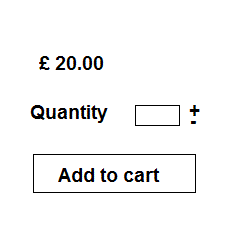
I'd like to add the word "quantity" before the field, then add a line break after the +- and add a much more stylish add to cart button.
Could someone help me ? Which file do I need to modify?
Any help will be much appreciated
Many thanks
I'd like to change the layout of my product view, this page, for example, has a field with the prodcut quantity, then + - then add to cart, ( www.gadgetgeeky.co.uk/index.php/componen...show/253-selfstirmug )
I've added a mock up of what I'd like the price area to look like.
I'd like to add the word "quantity" before the field, then add a line break after the +- and add a much more stylish add to cart button.
Could someone help me ? Which file do I need to modify?
Any help will be much appreciated
Many thanks
Please Log in or Create an account to join the conversation.

15 years 1 month ago #25055
by nicolas
Replied by nicolas on topic Re: changing the product layout
Hi,
You can do that by creating a quantity input template override as explained there:
www.hikashop.com/support/documentation/6...tation.html#override
You can do that by creating a quantity input template override as explained there:
www.hikashop.com/support/documentation/6...tation.html#override
Please Log in or Create an account to join the conversation.
15 years 1 month ago #25068
by luizarios
Replied by luizarios on topic Re: changing the product layout
thanks a lot, I've found the cart.php file but my PHP skills aren't up to scratch, any idea where I put the <br /> tag to break the quantity from the add to cart button? Please help
Thanks
Thanks
Please Log in or Create an account to join the conversation.
15 years 1 month ago #25087
by nicolas
Replied by nicolas on topic Re: changing the product layout
You can't use a br tag for that. The button is added into a table so you need to change the way it's added to add it outside the table in the function displayButton of that file.
Please Log in or Create an account to join the conversation.
15 years 1 month ago #25111
by luizarios
Replied by luizarios on topic Re: changing the product layout
thanks Nicola, now you pointed the function I found it and added <tr> rather than <br /> 
the documentation you sent me says "You need to create the file templates/YOUR_TEMPLATE/html/hikashop_button.php", I am not sure why, if I modify the cart.php does it cause any problem? I did and so far everything seems to work OK...
the documentation you sent me says "You need to create the file templates/YOUR_TEMPLATE/html/hikashop_button.php", I am not sure why, if I modify the cart.php does it cause any problem? I did and so far everything seems to work OK...
Please Log in or Create an account to join the conversation.
15 years 1 month ago #25113
by nicolas
Replied by nicolas on topic Re: changing the product layout
If you do the modification directly, when you update HikaShop, you will loose the modification. However, if you do it with a template override, you will be able to update and won't have your modifications reverted.
Please Log in or Create an account to join the conversation.
Time to create page: 0.153 seconds