

- Posts: 37
- Thank you received: 1
CSV Specification for External App
15 years 1 month ago - 15 years 1 month ago #25246
by Arathol
CSV Specification for External App was created by Arathol
Hi HikaShop Team
I have a client with a stock inventory system that is fairly flexible. Their developer is asking for a CSV specification of the import for Hikashop so that he can design their inventory system to create the CSV exactly as needed.
Where can I find this, or please could you supply one for me.
Your help would be greatly appreciated!
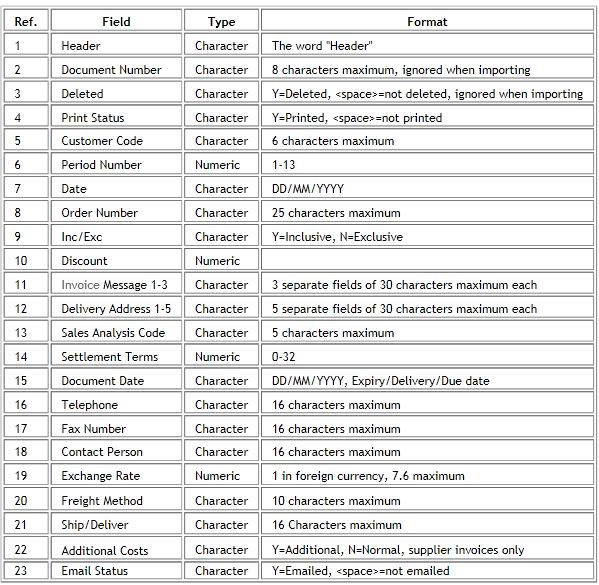
I have attached a doc that the developer sent me as an example
Thanks
I have a client with a stock inventory system that is fairly flexible. Their developer is asking for a CSV specification of the import for Hikashop so that he can design their inventory system to create the CSV exactly as needed.
Where can I find this, or please could you supply one for me.
Your help would be greatly appreciated!
I have attached a doc that the developer sent me as an example
Thanks
Last edit: 15 years 1 month ago by Arathol.
Please Log in or Create an account to join the conversation.

15 years 1 month ago #25250
by nicolas
Replied by nicolas on topic Re: CSV Specification for External App
Hi,
The CSV export/import of HikaShop is flexible and the list of all the possible columns will depend on your configuration. For example,if you add a characteristic "color" with some color values, you will be able to use that column in the CSV in order to create variants of products. If you create custom fields of the table "product", you will also be able to populate them with the CSV.
Regarding the specifications themselves it's pretty flexible. For example, in the price_currency_id column, you can put the id of the currency but you can also put the currency 3 letters code. That way it can accomodate with a wide range of CSVs. For dates, it can also be anything as long as the PHP strftime function can understand it.
The best is to just do an export of one product that you configured via the interface and reproduce the resulting CSV in the same way.
The CSV export/import of HikaShop is flexible and the list of all the possible columns will depend on your configuration. For example,if you add a characteristic "color" with some color values, you will be able to use that column in the CSV in order to create variants of products. If you create custom fields of the table "product", you will also be able to populate them with the CSV.
Regarding the specifications themselves it's pretty flexible. For example, in the price_currency_id column, you can put the id of the currency but you can also put the currency 3 letters code. That way it can accomodate with a wide range of CSVs. For dates, it can also be anything as long as the PHP strftime function can understand it.
The best is to just do an export of one product that you configured via the interface and reproduce the resulting CSV in the same way.
Please Log in or Create an account to join the conversation.
Time to create page: 0.107 seconds