

- Posts: 392
- Thank you received: 0
How to move social media buttons to far right
15 years 1 month ago - 15 years 1 month ago #25310
by Bugger101
How to move social media buttons to far right was created by Bugger101
Hello,
Is there a way to make the social media buttons align one on top the other on the far right of the page? I have messed around with the combinations in the plugin to no avail, and followed the instructions on another thread also.
I'm not sure why they are displaying in a strange way... I have attached a pic for you.
Could it have something to do with removing the product title from above the image as in this thread: www.hikashop.com/en/support/forum/4-how-...e-product-title.html
Thanks
Is there a way to make the social media buttons align one on top the other on the far right of the page? I have messed around with the combinations in the plugin to no avail, and followed the instructions on another thread also.
I'm not sure why they are displaying in a strange way... I have attached a pic for you.
Could it have something to do with removing the product title from above the image as in this thread: www.hikashop.com/en/support/forum/4-how-...e-product-title.html
Thanks
Last edit: 15 years 1 month ago by Bugger101.
Please Log in or Create an account to join the conversation.

15 years 1 month ago #25312
by nicolas
Replied by nicolas on topic Re: How to move social media buttons to far right
It might be because you updated HikaShop and you had the CSS customized which means that you didn't get the new CSS to handle the google +1 button, as explained there:
www.hikashop.com/en/support/forum/3-bug-...snt-align.html#23419
In that case, you should get the CSS from the default CSS for the social networks buttons and copy it over the social networks CSS of your modified CSS.
www.hikashop.com/en/support/forum/3-bug-...snt-align.html#23419
In that case, you should get the CSS from the default CSS for the social networks buttons and copy it over the social networks CSS of your modified CSS.
Please Log in or Create an account to join the conversation.
15 years 1 month ago #25314
by Bugger101
Replied by Bugger101 on topic Re: How to move social media buttons to far right
BINGO!
Thanks so much
Thanks so much
Please Log in or Create an account to join the conversation.
14 years 9 months ago #35375
by AZTacGear
Replied by AZTacGear on topic Re: How to move social media buttons to far right
Which CSS code in the moduals would I need to copy over? I need to do this too.
Please Log in or Create an account to join the conversation.
14 years 9 months ago #35403
by nicolas
Replied by nicolas on topic Re: How to move social media buttons to far right
In the options of the social network plugin, you can configure the position to the right. Then it should be automatic.
Please Log in or Create an account to join the conversation.
14 years 9 months ago #35410
by AZTacGear
Replied by AZTacGear on topic Re: How to move social media buttons to far right
I tried that and it only shows the facebook button. See attached screen shots.
This attachment is hidden for guests.
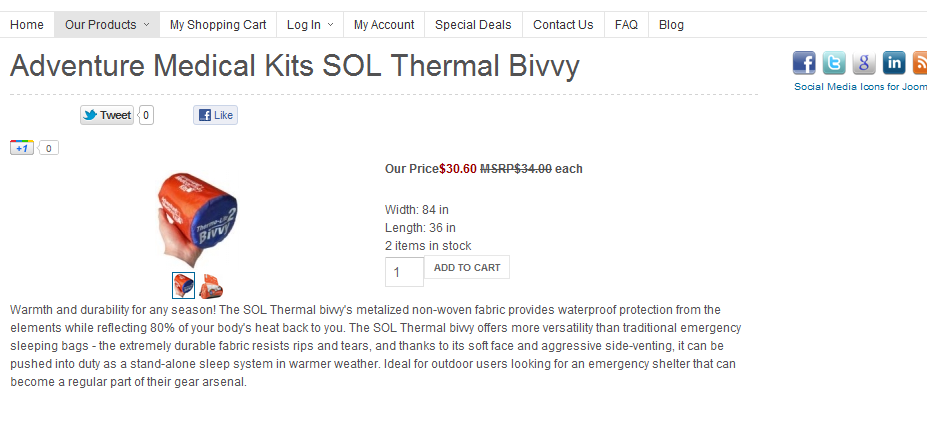
This attachment is hidden for guests.
Please log in or register to see it.
Please Log in or Create an account to join the conversation.
14 years 9 months ago #35411
by AZTacGear
Replied by AZTacGear on topic Re: How to move social media buttons to far right
Left
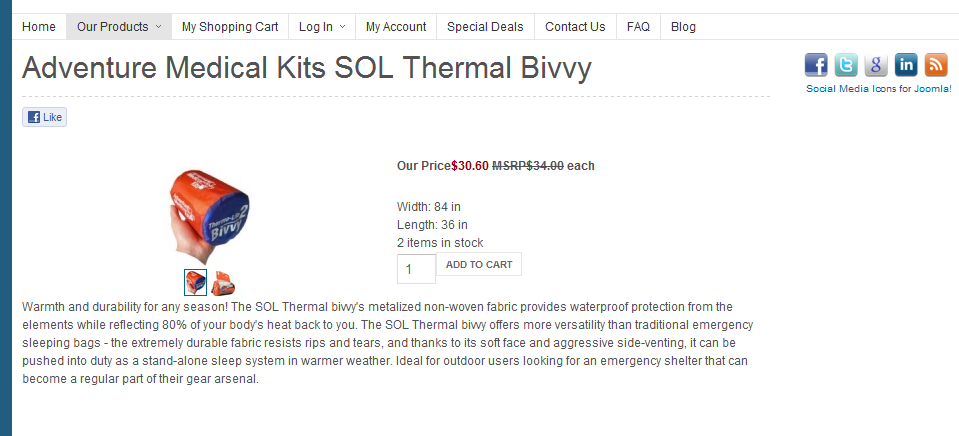
Please Log in or Create an account to join the conversation.
14 years 9 months ago #35449
by nicolas
Replied by nicolas on topic Re: How to move social media buttons to far right
Could you give a link to that page with the buttons aligned to the right so that we can look at the HMTL and CSS of that page ?
Please Log in or Create an account to join the conversation.
14 years 9 months ago #35469
by AZTacGear
Replied by AZTacGear on topic Re: How to move social media buttons to far right
Here's that link with the plug-in set up to the right.. It's on all my product pages.
arizonatacgear.com/webstore/index.php/pr...ts-sol-thermal-bivvy
arizonatacgear.com/webstore/index.php/pr...ts-sol-thermal-bivvy
Please Log in or Create an account to join the conversation.
14 years 9 months ago #35492
by nicolas
Replied by nicolas on topic Re: How to move social media buttons to far right
The problem is that you put a width of 5px in the options of the social networks plugin. Thus, it's displaying the buttons off the page on the left. If you set a proper width like 800px, it will display on the left.
The following user(s) said Thank You: Donzall
Please Log in or Create an account to join the conversation.
14 years 9 months ago #35495
by AZTacGear
Replied by AZTacGear on topic Re: How to move social media buttons to far right
That's a big difference.
My google + button and my twitter button are touching, and the facebook button is to far away. How do I get them evenly spaced?
arizonatacgear.com/webstore/index.php/pr...ts-sol-thermal-bivvy
My google + button and my twitter button are touching, and the facebook button is to far away. How do I get them evenly spaced?
arizonatacgear.com/webstore/index.php/pr...ts-sol-thermal-bivvy
Please Log in or Create an account to join the conversation.
14 years 9 months ago #35529
by nicolas
Replied by nicolas on topic Re: How to move social media buttons to far right
You can edit the front end CSS file of HikaShop via the Display tab of the configuration and change the code:
#hikashop_social span.hikashop_social_right_tw_horizontal {
position: absolute;
right: 130px;
}
to:
#hikashop_social span.hikashop_social_right_tw_horizontal {
position: absolute;
right: 110px;
}
#hikashop_social span.hikashop_social_right_tw_horizontal {
position: absolute;
right: 130px;
}
to:
#hikashop_social span.hikashop_social_right_tw_horizontal {
position: absolute;
right: 110px;
}
Please Log in or Create an account to join the conversation.
14 years 9 months ago #35544
by AZTacGear
Replied by AZTacGear on topic Re: How to move social media buttons to far right
Awesome. That worked.
I have so say, I'm glad I picked Hika Shop as my e-commerce solution for Joomla. Your support has been awesome!
I have so say, I'm glad I picked Hika Shop as my e-commerce solution for Joomla. Your support has been awesome!
Please Log in or Create an account to join the conversation.
Time to create page: 0.452 seconds