
- Posts: 11
- Thank you received: 0
Use Customer Email as Reply-To Email
- MarcusATWS
-
 Topic Author
- Offline
Less
More
15 years 1 month ago #25528
by MarcusATWS
Use Customer Email as Reply-To Email was created by MarcusATWS
We'd like to set the customer's email as the reply to email so our clients can quickly reply to the customer.
How can we do this?
How can we do this?
Please Log in or Create an account to join the conversation.

15 years 1 month ago #25536
by nicolas
Replied by nicolas on topic Re: Use Customer Email as Reply-To Email
In the config under the E-mail tab you can configure the reply to address for all the HikaShop emails.
Then, in the Business edition, you can configure a reply to address for each email via the menu System->Emails.
Then, in the Business edition, you can configure a reply to address for each email via the menu System->Emails.
Please Log in or Create an account to join the conversation.
- MarcusATWS
-
Topic Author
- Offline
Less
More
- Posts: 11
- Thank you received: 0
15 years 1 month ago #25859
by MarcusATWS
Replied by MarcusATWS on topic Re: Use Customer Email as Reply-To Email
Is there a variable or a string that if we enter into "Reply-to Address" on the "Sender Information" in System > Email?
Please Log in or Create an account to join the conversation.
15 years 1 month ago #25869
by nicolas
Replied by nicolas on topic Re: Use Customer Email as Reply-To Email
I don't understand your question. Could you explain more what you want ?
Please Log in or Create an account to join the conversation.

Less
More
- Posts: 218
- Thank you received: 6
14 years 9 months ago - 14 years 9 months ago #37635
by woonydanny
Replied by woonydanny on topic Re: Use Customer Email as Reply-To Email
I am after the same option. I used this with my Virtuemart site all the time.
When i get an admin notification to say that a new order has been created, it comes from my own email address to my own email address.
what i would like as the person above suggested was a way to be able to set a string to automatically have the admin notification sent to my email address from their email address. That way the webshop administrator if they want to email them can simply reply to this email and it conveniently then includes the notification email below it as well.
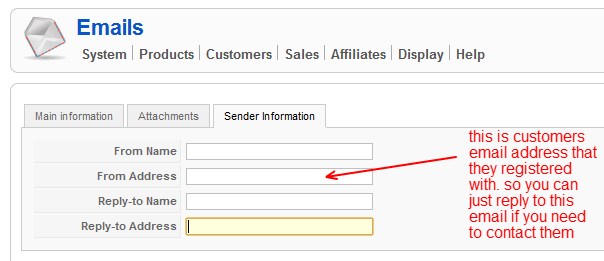
When i get an admin notification to say that a new order has been created, it comes from my own email address to my own email address.
what i would like as the person above suggested was a way to be able to set a string to automatically have the admin notification sent to my email address from their email address. That way the webshop administrator if they want to email them can simply reply to this email and it conveniently then includes the notification email below it as well.
Last edit: 14 years 9 months ago by woonydanny.
Please Log in or Create an account to join the conversation.
14 years 9 months ago #37728
by nicolas
Replied by nicolas on topic Re: Use Customer Email as Reply-To Email
You should try to add the line:
$mail->mailer->addReplyTo(array($user_email,$user_name));
after the line:
$this->loadOrderNotification($order,'order_admin_notification');
in the file administrator/components/com_hikashop/classes/order.php
$mail->mailer->addReplyTo(array($user_email,$user_name));
after the line:
$this->loadOrderNotification($order,'order_admin_notification');
in the file administrator/components/com_hikashop/classes/order.php
Please Log in or Create an account to join the conversation.
14 years 8 months ago #39385
by Jims
Replied by Jims on topic Re: Use Customer Email as Reply-To Email
I tried to implement that change, Nicolas, but got this error:
Call to a member function addReplyTo() on a non-object in .../administrator/components/com_hikashop/classes/order.php on line 150
Jim
Call to a member function addReplyTo() on a non-object in .../administrator/components/com_hikashop/classes/order.php on line 150
Jim
Please Log in or Create an account to join the conversation.
Time to create page: 0.078 seconds