
- Posts: 12
- Thank you received: 0
When SEFURLs & URL rewriting on getting 404 errors
- vander wiede
-
 Topic Author
- Offline
Less
More
15 years 2 weeks ago - 15 years 2 weeks ago #25533
by vander wiede
When SEFURLs & URL rewriting on getting 404 errors was created by vander wiede
When I enable the Search Engine Friendly URLs & URL rewriting in Joomla the menu links don't work, get a blank page or wrong page or 404 error
after double checking it is only with Search Engine Friendly URLs set to yes in Global Configuration of joomla
after double checking it is only with Search Engine Friendly URLs set to yes in Global Configuration of joomla
Last edit: 15 years 2 weeks ago by vander wiede.
Please Log in or Create an account to join the conversation.

15 years 2 weeks ago - 15 years 2 weeks ago #25543
by nicolas
Replied by nicolas on topic Re: When SEFURLs & URL rewriting on getting 404 errors
Yes, you need to change the name of the htaccess.txt file to .htaccess at the root of your website for it to work. It's not related to HikaShop but to joomla:
docs.joomla.org/Enabling_Search_Engine_Friendly_(SEF)_URLs_on_Apache
docs.joomla.org/Enabling_Search_Engine_Friendly_(SEF)_URLs_on_Apache
Last edit: 15 years 2 weeks ago by nicolas.
Please Log in or Create an account to join the conversation.
- vander wiede
-
Topic Author
- Offline
Less
More
- Posts: 12
- Thank you received: 0
15 years 2 weeks ago #25568
by vander wiede
Replied by vander wiede on topic Re: When SEFURLs & URL rewriting on getting 404 errors
yes I have already renamed the htaccess file but still not working
Please Log in or Create an account to join the conversation.
15 years 2 weeks ago #25569
by nicolas
Replied by nicolas on topic Re: When SEFURLs & URL rewriting on getting 404 errors
Please follow the instructions on the link I provided and eventually the other links there.
Please Log in or Create an account to join the conversation.
- vander wiede
-
Topic Author
- Offline
Less
More
- Posts: 12
- Thank you received: 0
15 years 2 weeks ago #25573
by vander wiede
Replied by vander wiede on topic Re: When SEFURLs & URL rewriting on getting 404 errors
that page is empty
Please Log in or Create an account to join the conversation.
15 years 2 weeks ago #25580
by nicolas
Replied by nicolas on topic Re: When SEFURLs & URL rewriting on getting 404 errors
Yes, the link was not generated properly by the forum. You had to copy/paste it in your browser.
I've modified my post to have the link correct working. So you can just click on it and it will work now.
I've modified my post to have the link correct working. So you can just click on it and it will work now.
Please Log in or Create an account to join the conversation.
- vander wiede
-
Topic Author
- Offline
Less
More
- Posts: 12
- Thank you received: 0
15 years 2 weeks ago #25657
by vander wiede
Replied by vander wiede on topic Re: When SEFURLs & URL rewriting on getting 404 errors
I tried this but still not working could I send you login info for you to check out
Please Log in or Create an account to join the conversation.
15 years 2 weeks ago #25662
by nicolas
Replied by nicolas on topic Re: When SEFURLs & URL rewriting on getting 404 errors
If SEF does not work on all your website, it means it's not a problem related to HikaShop. You should seek guidance on forum.joomla.org in that case.
This forum is only for HikaShop's support.
This forum is only for HikaShop's support.
Please Log in or Create an account to join the conversation.
- vander wiede
-
Topic Author
- Offline
Less
More
- Posts: 12
- Thank you received: 0
15 years 2 weeks ago #25667
by vander wiede
Replied by vander wiede on topic Re: When SEFURLs & URL rewriting on getting 404 errors
It works on all the rest of the site but it breaks the HikaShop menu giving 404 errors when click on a category link
Please Log in or Create an account to join the conversation.
15 years 2 weeks ago #25674
by nicolas
Replied by nicolas on topic Re: When SEFURLs & URL rewriting on getting 404 errors
Ok. Then, it's not linked to the way you configured your SEF but to the way you configured your category listing. Could you give a link to that page so that we can see what you did ?
Please Log in or Create an account to join the conversation.
- vander wiede
-
Topic Author
- Offline
Less
More
- Posts: 12
- Thank you received: 0
15 years 2 weeks ago #25754
by vander wiede
Replied by vander wiede on topic Re: When SEFURLs & URL rewriting on getting 404 errors
www.catcho-sea-d.com/index.php
menu is on the left side
Please Log in or Create an account to join the conversation.
15 years 2 weeks ago #25758
by nicolas
Replied by nicolas on topic Re: When SEFURLs & URL rewriting on getting 404 errors
The problem comes from the way you configured the hikashop options of the module with the id 146. Could you do a screenshot of the hikashop options of that module ?
Please Log in or Create an account to join the conversation.
- vander wiede
-
Topic Author
- Offline
Less
More
- Posts: 12
- Thank you received: 0
15 years 1 week ago #25796
by vander wiede
Replied by vander wiede on topic Re: When SEFURLs & URL rewriting on getting 404 errors
here it is
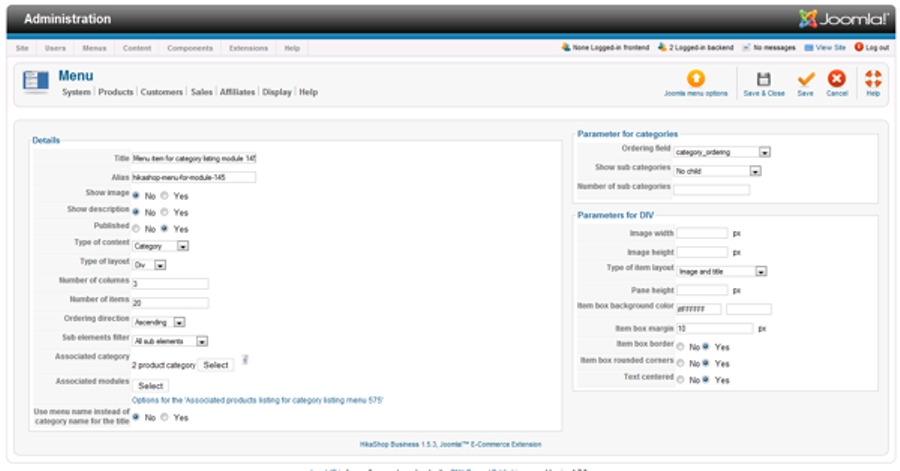
Please Log in or Create an account to join the conversation.
15 years 1 week ago #25798
by nicolas
Replied by nicolas on topic Re: When SEFURLs & URL rewriting on getting 404 errors
That's a menu's hikashop options, not the hikashop options of the module with the id 146
Please Log in or Create an account to join the conversation.
- vander wiede
-
Topic Author
- Offline
Less
More
- Posts: 12
- Thank you received: 0
15 years 1 week ago #25801
by vander wiede
Replied by vander wiede on topic Re: When SEFURLs & URL rewriting on getting 404 errors
i thinks this should do
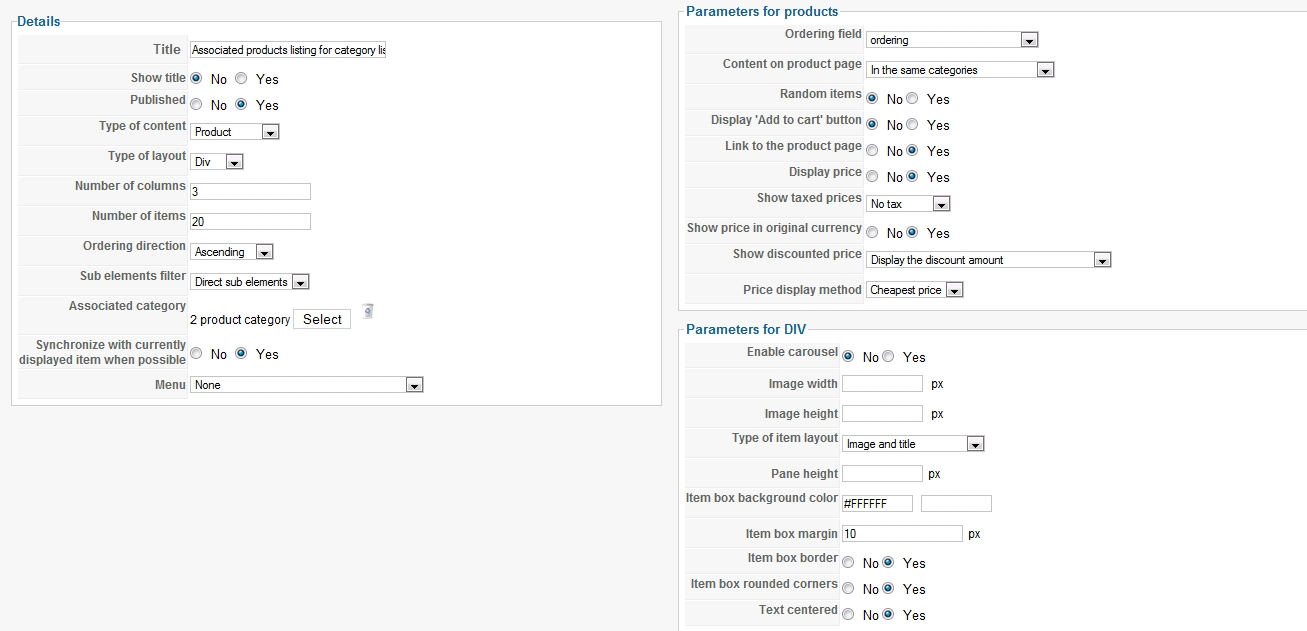
Please Log in or Create an account to join the conversation.
15 years 1 week ago #25803
by nicolas
Replied by nicolas on topic Re: When SEFURLs & URL rewriting on getting 404 errors
In the option "menu" of that page, you need to select a hikashop category listing menu so that it works properly with SEF.
Please Log in or Create an account to join the conversation.
- vander wiede
-
Topic Author
- Offline
Less
More
- Posts: 12
- Thank you received: 0
15 years 1 week ago #25804
by vander wiede
Replied by vander wiede on topic Re: When SEFURLs & URL rewriting on getting 404 errors
there is only one hikashop category listing menu "Menu item for category listing module 145" and that doesn't seem to work
Please Log in or Create an account to join the conversation.
15 years 1 week ago #25805
by nicolas
Replied by nicolas on topic Re: When SEFURLs & URL rewriting on getting 404 errors
Looking at your module, I don't see that the URLs changed. Could you make sure that the cache of joomla in the configuration and in the cache plugin is disabled and flush the cache ?
Please Log in or Create an account to join the conversation.
- vander wiede
-
Topic Author
- Offline
Less
More
- Posts: 12
- Thank you received: 0
15 years 1 week ago #25806
by vander wiede
Replied by vander wiede on topic Re: When SEFURLs & URL rewriting on getting 404 errors
yes it is disabled, I really don't understand the creation of the menus?? I tried to look at the docs but just can't seem to wrap my head around the concept
Please Log in or Create an account to join the conversation.
15 years 1 week ago #25811
by nicolas
Replied by nicolas on topic Re: When SEFURLs & URL rewriting on getting 404 errors
Let's do it differently then. First, make sure that you use the latest version. Then, create a new category listing module. Then, go look on your front end. By default, HikaShop should automatically create the category listing menu, its associated products listing module and link everything together, without you doing nothing and it should also work with SEF.
Then, you can just style the modules and the menu.
Then, you can just style the modules and the menu.
Please Log in or Create an account to join the conversation.
Time to create page: 0.302 seconds