
- Posts: 13
- Thank you received: 0
How to modify the add to cart popup
- LiveSource
-
 Topic Author
- Offline
Less
More
15 years 11 months ago #2584
by LiveSource
How to modify the add to cart popup was created by LiveSource
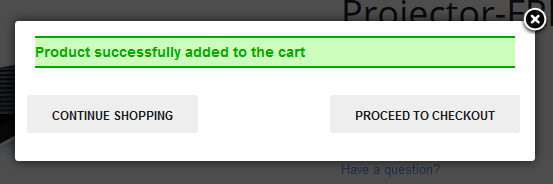
I would like to modify the look of the "Product successfully added to the cart" popup. The look of it doesn't fit into my template very well and I would really like to get rid of that horizontal scroll that appears at the bottom.
Thanks for any insights
Thanks for any insights
Please Log in or Create an account to join the conversation.

15 years 11 months ago #2585
by nicolas
Replied by nicolas on topic Re: How to modify the add to cart popup
You can change the code which generates it in the file administrator/components/com_hikashop/helpers/cart.php in the function getJS
Beware that any modification of that file will be erased when you update HikaShop. As much as possible, you should try to tweak it using CSS modifications.
The size of the popup is defined twice (one for mootools 1.1 and one for mootools 1.2) with that code:
Beware that any modification of that file will be erased when you update HikaShop. As much as possible, you should try to tweak it using CSS modifications.
The size of the popup is defined twice (one for mootools 1.1 and one for mootools 1.2) with that code:
Code:
size: {x: 480, y: 120}
Please Log in or Create an account to join the conversation.
- LiveSource
-
Topic Author
- Offline
Less
More
- Posts: 13
- Thank you received: 0
15 years 11 months ago #2658
by LiveSource
Replied by LiveSource on topic Re: How to modify the add to cart popup
Great thank you Nicolas.
If anyone else is reading, I managed to tidy this popup up nicely with just CSS:
These 2 style declarations will fix the horizontal scroll and tidy up the button positioning.
You can modify the error message color too here:
If anyone else is reading, I managed to tidy this popup up nicely with just CSS:
These 2 style declarations will fix the horizontal scroll and tidy up the button positioning.
Code:
#hikashop_add_to_cart_continue_div{
float:left;
margin: 0 20px 0 110px;
}
#hikashop_add_to_cart_checkout_div{
float:left;
}
You can modify the error message color too here:
Code:
#hikashop_notice_box_message div.hikashop_success{
background-color:#427060;
border-bottom-color: #182E32;
border-top-color: #182E32;
color: #FFF;
}
Please Log in or Create an account to join the conversation.
15 years 7 months ago #11103
by moonleaf
Replied by moonleaf on topic Re: How to modify the add to cart popup
I'd like to change the size of the add to cart popup but I can't find the file administrator/components/com_hikashop/helpers/cart.php. The folder "helpers" doesn't exist. Are the instructions here different in version 1.4.7?
Please Log in or Create an account to join the conversation.
15 years 7 months ago #11104
by nicolas
Replied by nicolas on topic Re: How to modify the add to cart popup
The folder helpers exists on 1.4.7. If you don't have it then, all HikaShop should be broken. Are you sure that you're looking into the good folder ?
Please Log in or Create an account to join the conversation.
15 years 7 months ago #11108
by moonleaf
Replied by moonleaf on topic Re: How to modify the add to cart popup
Oh, right. It is there, I was looking in components, not administration. Sorry! Thank you!
Please Log in or Create an account to join the conversation.
13 years 3 months ago #117090
by ximbo
Replied by ximbo on topic How to modify the add to cart popup
Just in case someone came to this thread - the above styling won't work (or at least didn't for me) - however, I figured out that the iframe size needs to be changed along with the height of the sbox-window, reference to this thread may help:
www.hikashop.com/forum/2-general-talk-ab...dow-cutting-off.html
Works on Joomla 3.1, hikashop v2.2
Works on Joomla 3.1, hikashop v2.2
Please Log in or Create an account to join the conversation.

Less
More
- Posts: 158
- Thank you received: 5
10 years 8 months ago #231393
by serbofleconcepts
Replied by serbofleconcepts on topic How to modify the add to cart popup
I've been reading through this thread, trying to figure out where to find the css for the added to cart popup but the locations that are mentioned don't seem to exist on the latest version of hikashop.
Can someone point me in the right direction to change the hover colors of the 2 buttons please, either directly in the css file or in my override.css?
I'm unable to view it in my css inspector in Chrome as it's a popup.
Can someone point me in the right direction to change the hover colors of the 2 buttons please, either directly in the css file or in my override.css?
I'm unable to view it in my css inspector in Chrome as it's a popup.
Please Log in or Create an account to join the conversation.
10 years 8 months ago #231408
by nicolas
Replied by nicolas on topic How to modify the add to cart popup
Hi,
Either the CSS file of HikaShop or the override.css is fine to add your custom CSS.
The CSS inspector of Chrome can also check the elements in popups. So that should not be a problem. Why do you think that it's not possible ?
Either the CSS file of HikaShop or the override.css is fine to add your custom CSS.
The CSS inspector of Chrome can also check the elements in popups. So that should not be a problem. Why do you think that it's not possible ?
Please Log in or Create an account to join the conversation.
Less
More
- Posts: 158
- Thank you received: 5
10 years 8 months ago #231438
by serbofleconcepts
Replied by serbofleconcepts on topic How to modify the add to cart popup
Thanks for the reply nicolas. The chrome css inspector doesn't seem to show the popup details for me? Can you tell me what the names of the buttons are so I can search for them in the hikashop.css file please.
Please Log in or Create an account to join the conversation.
10 years 8 months ago #231450
by nicolas
Replied by nicolas on topic How to modify the add to cart popup
Here is a screenshot with all the HTML of the elements in the add to cart notice popup:
take.ms/Ugz85
take.ms/Ugz85
The following user(s) said Thank You: serbofleconcepts
Please Log in or Create an account to join the conversation.
Less
More
- Posts: 158
- Thank you received: 5
10 years 8 months ago #231516
by serbofleconcepts
Replied by serbofleconcepts on topic How to modify the add to cart popup
Thanks but I'm still having problems locating the hover colour for both buttons - that's all I need to change (from red to grey)
I found these lines in the hikashop.css file;
#hikashop_add_to_cart_continue_div { float: left }
and
div.hikashop_success {
background-color: #CCFFBB;
border-bottom-color: #00AA00;
border-top-color: #00AA00;
color: #00AA00;
}
But changing the colours doesn't have any impact (but other changes in that file work ok)
I found these lines in the hikashop.css file;
#hikashop_add_to_cart_continue_div { float: left }
and
div.hikashop_success {
background-color: #CCFFBB;
border-bottom-color: #00AA00;
border-top-color: #00AA00;
color: #00AA00;
}
But changing the colours doesn't have any impact (but other changes in that file work ok)
Please Log in or Create an account to join the conversation.
10 years 8 months ago #231520
by EnerW
Replied by EnerW on topic How to modify the add to cart popup
@serbofleconcepts
I think you find it arround line 311 in the frontend.css file
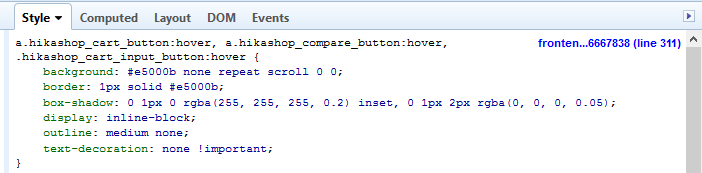
I think you find it arround line 311 in the frontend.css file
Please Log in or Create an account to join the conversation.
Less
More
- Posts: 158
- Thank you received: 5
10 years 3 weeks ago #252473
by serbofleconcepts
Replied by serbofleconcepts on topic How to modify the add to cart popup
OK, I disabled the pop notice for a while but now I want to add it back, so I'm back on the case with this. I've tried changing a lot of fields in the hikashop.css file (I'd prefer to edit this file via FTP as it allows me to store backups of different versions).
All I'm trying to do it to change the current red background (on hover) on the 2 lower fields to blue (#ccc)
This is the part of the hikashop.css file I've been editing;
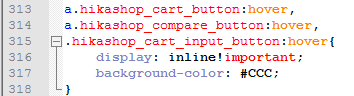
I added the background-colour css - is this correct as it's not working for me.
All I'm trying to do it to change the current red background (on hover) on the 2 lower fields to blue (#ccc)
This is the part of the hikashop.css file I've been editing;
I added the background-colour css - is this correct as it's not working for me.
Please Log in or Create an account to join the conversation.
10 years 3 weeks ago #252478
by nicolas
Replied by nicolas on topic How to modify the add to cart popup
Hi,
The CSS of the buttons usually comes from the Joomla template.
So it might be something to change in the template.
Could you provide a link to that page ?
The CSS of the buttons usually comes from the Joomla template.
So it might be something to change in the template.
Could you provide a link to that page ?
Please Log in or Create an account to join the conversation.
Less
More
- Posts: 158
- Thank you received: 5
10 years 2 weeks ago #252644
by serbofleconcepts
Replied by serbofleconcepts on topic How to modify the add to cart popup
Just buy any product on leconcepts.com and the popup will appear.
Thank you.
Thank you.
Please Log in or Create an account to join the conversation.

Less
More
- Posts: 12953
- Thank you received: 1778
10 years 2 weeks ago #252652
by Mohamed Thelji
Replied by Mohamed Thelji on topic How to modify the add to cart popup
Hello,
Note that we won't be able to correctly check your popup code if you don't increase the value of the "Notice popup display time" option via "Hikashop->System->Configuration->Main".
Note that we won't be able to correctly check your popup code if you don't increase the value of the "Notice popup display time" option via "Hikashop->System->Configuration->Main".
Please Log in or Create an account to join the conversation.
Less
More
- Posts: 158
- Thank you received: 5
10 years 2 weeks ago #252763
by serbofleconcepts
Replied by serbofleconcepts on topic How to modify the add to cart popup
OK, I have extended the poup time to 13s.
Thank you.
Thank you.
Please Log in or Create an account to join the conversation.
10 years 2 weeks ago #252770
by nicolas
Replied by nicolas on topic How to modify the add to cart popup
Hi,
As expected, the red color on the buttons when you hover on them comes from the file www.leconcepts.com/templates/gk_storefro...s/hikashop_frame.css of your template.
I would suggest to contact your template provider so that they can provide their recommended solution to change that color.
As expected, the red color on the buttons when you hover on them comes from the file www.leconcepts.com/templates/gk_storefro...s/hikashop_frame.css of your template.
I would suggest to contact your template provider so that they can provide their recommended solution to change that color.
Please Log in or Create an account to join the conversation.
Less
More
- Posts: 158
- Thank you received: 5
10 years 2 weeks ago #252938
by serbofleconcepts
Replied by serbofleconcepts on topic How to modify the add to cart popup
Thank you for your help Nicolas, I think I can find the solution now that I know where to look!
Please Log in or Create an account to join the conversation.
Time to create page: 0.214 seconds