

- Posts: 5
- Thank you received: 0
How to change product order
14 years 11 months ago #26788
by Yahorau
How to change product order was created by Yahorau
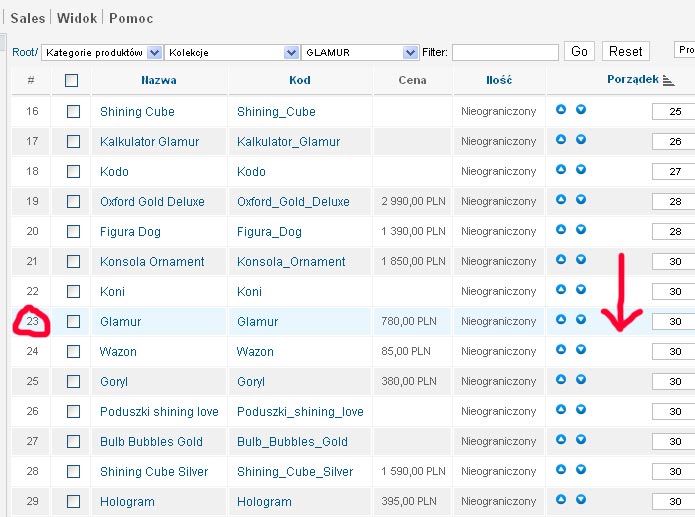
When i trying to change order of a product by clicking 'move up' or 'move down', sometimes it doesnt work! Look the screenshot for example: on the first I am clicking move up, and the the second screenshot you can see that it goes down, not up!
[img][img]http://www.hikashop.com/media/kunena/attachments/legacy/images/order1.jpg[/img]
[img][img]http://www.hikashop.com/media/kunena/attachments/legacy/images/order1.jpg[/img]
Please Log in or Create an account to join the conversation.
14 years 11 months ago - 14 years 11 months ago #26789
by Yahorau
Replied by Yahorau on topic Re: How to change product order
second
Last edit: 14 years 11 months ago by Yahorau.
Please Log in or Create an account to join the conversation.

14 years 11 months ago #26814
by nicolas
Replied by nicolas on topic Re: How to change product order
That sounds normal.
As you can see all the products after the ordering 28 have the ordering number 30. Which means that they are not ordered between them.
When you move up the ordering number from 29 to 30, the product goes with all the other products with the same ordering number, and since your listing is ordered by ascending ordering, it goes down the list.
As you can see all the products after the ordering 28 have the ordering number 30. Which means that they are not ordered between them.
When you move up the ordering number from 29 to 30, the product goes with all the other products with the same ordering number, and since your listing is ordered by ascending ordering, it goes down the list.
Please Log in or Create an account to join the conversation.
14 years 11 months ago #27228
by Yahorau
Replied by Yahorau on topic Re: How to change product order
But then i tryed to put other ordering number, 4 example i changed 30 to 31 - it was the same! How could i make my own order?
Please Log in or Create an account to join the conversation.
14 years 11 months ago #27237
by nicolas
Replied by nicolas on topic Re: How to change product order
What do you mean by it was the same ?
Just put the numbers you want for each product and click on save.
Just put the numbers you want for each product and click on save.
Please Log in or Create an account to join the conversation.
Time to create page: 0.167 seconds