

- Posts: 11
- Thank you received: 0
Move OK button to left
15 years 9 months ago #2706
by gratef
Move OK button to left was created by gratef
Hi there,
On the 'fill in address' popup, the OK button is so far to the right that one must scroll to the right to see it. see screenshot.
Is there a way to make it justify left?
thanks,
gratef
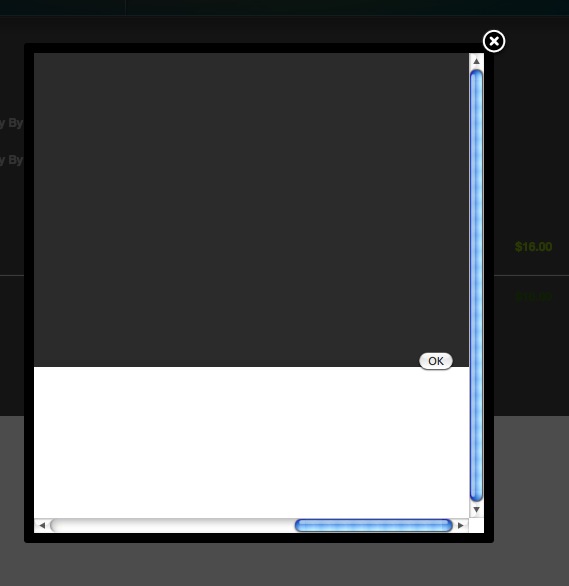
On the 'fill in address' popup, the OK button is so far to the right that one must scroll to the right to see it. see screenshot.
Is there a way to make it justify left?
thanks,
gratef
Please Log in or Create an account to join the conversation.

15 years 9 months ago #2711
by nicolas
Replied by nicolas on topic Re: Move OK button to left
Hi,
It strange that the popup content streches that much. That doesn't happen on our end.
Anyway, you can easily do that by editing the view. Go to the menu Display->Views and search for the file form of the view address and edit it.
There, near the bottom you have the line
that you can replace by
In next version of HikaShop, we are going to change that to use CSS so that you can more easily edit it.
It strange that the popup content streches that much. That doesn't happen on our end.
Anyway, you can easily do that by editing the view. Go to the menu Display->Views and search for the file form of the view address and edit it.
There, near the bottom you have the line
Code:
echo $this->cart->displayButton(JText::_('OK'),'ok',$this->params,hikashop::completeLink('address&task=save'),'if(hikashopCheckChangeForm(\'address\',\'hikashop_address_form\')) document.forms[\'hikashop_address_form\'].submit(); return false;','style="float:right"');
Code:
echo $this->cart->displayButton(JText::_('OK'),'ok',$this->params,hikashop::completeLink('address&task=save'),'if(hikashopCheckChangeForm(\'address\',\'hikashop_address_form\')) document.forms[\'hikashop_address_form\'].submit(); return false;','style="float:left"');
In next version of HikaShop, we are going to change that to use CSS so that you can more easily edit it.
Please Log in or Create an account to join the conversation.
Time to create page: 0.163 seconds