

- Posts: 209
- Thank you received: 18
Show price of variant
14 years 11 months ago #27065
by JIK
Show price of variant was created by JIK
Hi Nicolas,
Is it possible to show the price of a product's variants along with the variant name?
I have a product that has many variants which are sizes. Each size has it's own price.
I have set the variants to show as a dropdown box but only the variant name shows in the box so the user does not know the price of each variant until it is selected.
I don't particularly want to set all the variants up as products.
I have tried displaying the variants as a "table" but this does not seem to change anything.
Just wondering if there is any quick way of showing the variant prices?
cheers!
Is it possible to show the price of a product's variants along with the variant name?
I have a product that has many variants which are sizes. Each size has it's own price.
I have set the variants to show as a dropdown box but only the variant name shows in the box so the user does not know the price of each variant until it is selected.
I don't particularly want to set all the variants up as products.
I have tried displaying the variants as a "table" but this does not seem to change anything.
Just wondering if there is any quick way of showing the variant prices?
cheers!
Please Log in or Create an account to join the conversation.

14 years 11 months ago #27067
by nicolas
Replied by nicolas on topic Re: Show price of variant
Hi,
There is no option for that.
That would require to do a characteristic display override:
www.hikashop.com/en/support/documentatio...tation.html#override
There is no option for that.
That would require to do a characteristic display override:
www.hikashop.com/en/support/documentatio...tation.html#override
Please Log in or Create an account to join the conversation.
14 years 10 months ago #28774
by JIK
Replied by JIK on topic Re: Show price of variant
Okay, this is a bit of a showstopper for me!
I have a store with many thousand of products in it and each product has set quantity/price variations.
Example:
Product "A"
Box of 100 - $50.00
Box of 1000 - $80.00
Carton of 5000 - $120.00
Product "B"
Box of 100 - $30.00
Box of 1000 - $40.00
Carton of 5000 - $80.00
From the above, you can see that I have 3 characteristics - "Box of 100", "Box of 1000", "Carton of 5000" - but in order to show the variant prices on the product listing I actually have to add the price to the characteristic's value text, thus I end up with 6 characteristics.
This is the only way I can see to acheive the display of the variant prices so the buyer knows what they are buying. Doing this I can see that I will end up with hundreds of thousands of characteristics and if I ever need to do a price change I'll need to find each charateristic, ensure that it is only attached to one product and then change the text, and then change the variant price in the product. Alternatively, I guess I could put a quantity/price table in each product description. Either way it sounds like a maintenance headache for a store with thousands of products.
I can't use the price variations on the actual main product as this allows the customer to type in a quantity between the three values, which won't work and I can't tell the customer what the configuration is (packet or box or carton etc).
I had a look at the instructions for doing the display override but I can't work out where to put what. The variant text info is in the jos_hikashop_product table but the variant price is in the jos_hikashop_price table. I don't know how to configure the PHP to join the two. Also, I can't find any of the product display views that seem to configure this.
Unless, I'm missing something fundamental here, I think that what's missing is the possibility to have set product/price variations (and I think this would be a great enhancement for Hikashop future versions). Until then I probably need to find an alternative unless there are any better suggestions.
These posts seems to describe similar issues - I'm wondering how they overcame the display of the variant prices?
www.hikashop.com/en/support/forum/2-gene...f-measure.html#21479
www.hikashop.com/en/support/forum/4-how-...r-options.html#21424
www.hikashop.com/en/support/forum/4-how-...each-size.html#21136
Cheers!
I have a store with many thousand of products in it and each product has set quantity/price variations.
Example:
Product "A"
Box of 100 - $50.00
Box of 1000 - $80.00
Carton of 5000 - $120.00
Product "B"
Box of 100 - $30.00
Box of 1000 - $40.00
Carton of 5000 - $80.00
From the above, you can see that I have 3 characteristics - "Box of 100", "Box of 1000", "Carton of 5000" - but in order to show the variant prices on the product listing I actually have to add the price to the characteristic's value text, thus I end up with 6 characteristics.
This is the only way I can see to acheive the display of the variant prices so the buyer knows what they are buying. Doing this I can see that I will end up with hundreds of thousands of characteristics and if I ever need to do a price change I'll need to find each charateristic, ensure that it is only attached to one product and then change the text, and then change the variant price in the product. Alternatively, I guess I could put a quantity/price table in each product description. Either way it sounds like a maintenance headache for a store with thousands of products.
I can't use the price variations on the actual main product as this allows the customer to type in a quantity between the three values, which won't work and I can't tell the customer what the configuration is (packet or box or carton etc).
I had a look at the instructions for doing the display override but I can't work out where to put what. The variant text info is in the jos_hikashop_product table but the variant price is in the jos_hikashop_price table. I don't know how to configure the PHP to join the two. Also, I can't find any of the product display views that seem to configure this.
Unless, I'm missing something fundamental here, I think that what's missing is the possibility to have set product/price variations (and I think this would be a great enhancement for Hikashop future versions). Until then I probably need to find an alternative unless there are any better suggestions.
These posts seems to describe similar issues - I'm wondering how they overcame the display of the variant prices?
www.hikashop.com/en/support/forum/2-gene...f-measure.html#21479
www.hikashop.com/en/support/forum/4-how-...r-options.html#21424
www.hikashop.com/en/support/forum/4-how-...each-size.html#21136
Cheers!
Please Log in or Create an account to join the conversation.
14 years 10 months ago #28784
by nicolas
Replied by nicolas on topic Re: Show price of variant
When you have variants of a product, if you click on the "manage variants" button on the product edition page, you will see all the variants of the product.
There, you can enter your price scheme for your variants and thus you can have one price per variant.
There is no problem on that. It's actually built into HikaShop.
You can actually see the price update on the product page based on the variant selected.
Now, to display the price inside the dropdown with the characteristic name, you will have to change the way it's displaying by creating a characteristic display override. You don't have to join any table data, or load any data, the data you need is already loaded and given to you by the override system. You just need to write the PHP of the override. Now that requires that you know PHP quite well as it's not simple I agree, but it's totally possible to do.
There, you can enter your price scheme for your variants and thus you can have one price per variant.
There is no problem on that. It's actually built into HikaShop.
You can actually see the price update on the product page based on the variant selected.
Now, to display the price inside the dropdown with the characteristic name, you will have to change the way it's displaying by creating a characteristic display override. You don't have to join any table data, or load any data, the data you need is already loaded and given to you by the override system. You just need to write the PHP of the override. Now that requires that you know PHP quite well as it's not simple I agree, but it's totally possible to do.
Please Log in or Create an account to join the conversation.
14 years 10 months ago #28859
by JIK
Replied by JIK on topic Re: Show price of variant
Yes, Nicolas, I do know how to manage variants - my issue was ending up with thousands of them in order to simply show the customer the price of each variant (which seems logical for an online store!). It appears to be a pretty massive override you suggest with the characteristic.php file, which then makes me nervous with upgrades down the track - I have been caught with this before. Besides, having looked at the file, it's not obvious to me where the code to display the price should go.
Back to Zen Cart on this one I guess!
thanks anyway.
Back to Zen Cart on this one I guess!
thanks anyway.
Please Log in or Create an account to join the conversation.
14 years 10 months ago #29719
by JIK
Replied by JIK on topic Re: Show price of variant
Hi Nicolas, giving this one last go before giving up!
I have added the following code to characteristic.php:
and I have now got variant dropdown boxes that have the price appended to the vairant text. Problem is, all the prices are zero (ie: Red - $0.00)
See attached pic.
Any help on what I'm doing wrong appreciated!
Tks
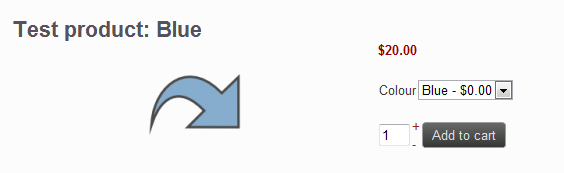
I have added the following code to characteristic.php:
foreach($characteristic->values as $k => $value){
$price=$element->variants[$k]->prices[0]->price_value;
$price=sprintf("%01.2f", $price);
$values[$k]=$value->characteristic_value." - $".$price;
and I have now got variant dropdown boxes that have the price appended to the vairant text. Problem is, all the prices are zero (ie: Red - $0.00)
See attached pic.
Any help on what I'm doing wrong appreciated!
Tks
Please Log in or Create an account to join the conversation.
14 years 10 months ago #29737
by nicolas
Replied by nicolas on topic Re: Show price of variant
that's because the $k is the id of the value of the characteristic, not the id of the variant.
So $element->variants[$k] is not correct.
You should loop on $element->variants to check on whether the variant is linked to that characteristic id and then get the price of the variant if it's a match.
So $element->variants[$k] is not correct.
You should loop on $element->variants to check on whether the variant is linked to that characteristic id and then get the price of the variant if it's a match.
Please Log in or Create an account to join the conversation.
14 years 10 months ago #29975
by JIK
Replied by JIK on topic Re: Show price of variant
Thanks Nicolas, with the help of a freelancer I got my problem sorted. This has reduced my need for characteristics from hundreds to about 10 and made my store way less complicated! Putting it in as an override did not work, so I just replaced the main charateristic.php file (I know this will cause upgrade issues in the future but at least it works now).
IMHO, being able to show the price of the variant in the dropdown box would be a very good addition to future Hikashop versions.
IMHO, being able to show the price of the variant in the dropdown box would be a very good addition to future Hikashop versions.
Please Log in or Create an account to join the conversation.
14 years 10 months ago #29990
by nicolas
Replied by nicolas on topic Re: Show price of variant
Hi,
Yes, you're right.
Actually, I think that we should move the characteristic file to a view, like we did for options.
That way, it can easily be overridden and such display modifications can be more easily done.
Yes, you're right.
Actually, I think that we should move the characteristic file to a view, like we did for options.
That way, it can easily be overridden and such display modifications can be more easily done.
Please Log in or Create an account to join the conversation.
14 years 9 months ago #32668
by JIK
Replied by JIK on topic Re: Show price of variant
Hi Nicolas, just about to upgrade a business licence and was wondering if the ability to show the variant price, or characteristic "view" made it into 1.5.5?
cheers!
(Up to shop number 15 using Hikashop and loving it!)
cheers!
(Up to shop number 15 using Hikashop and loving it!)
Please Log in or Create an account to join the conversation.
14 years 9 months ago #32685
by nicolas
Replied by nicolas on topic Re: Show price of variant
Hi,
We didn't change that yet.
We didn't change that yet.
Please Log in or Create an account to join the conversation.
14 years 6 months ago #43833
by higgoboss
Replied by higgoboss on topic Re: Show price of variant
I also need to have the price of the variant come after the radio button option name
Do you have the correct code that I can copy into characteristic.php?
Many thanks
Do you have the correct code that I can copy into characteristic.php?
Many thanks
Please Log in or Create an account to join the conversation.

13 years 4 months ago - 13 years 4 months ago #105043
by Foxworks
Replied by Foxworks on topic Re: Show price of variant
Hi Nicolas,
Is the option to edit the display of product characteristics inclued in the current version? If so, which view controls the way the characteristics are displayed?
I would also like to be able to show the price of the different variants of a product behind the variant name. Ideally this would be the additional price of a characteristic (so price of variant - price of basic item) much the same as is done with product options.
Kind regards,
Chris
Is the option to edit the display of product characteristics inclued in the current version? If so, which view controls the way the characteristics are displayed?
I would also like to be able to show the price of the different variants of a product behind the variant name. Ideally this would be the additional price of a characteristic (so price of variant - price of basic item) much the same as is done with product options.
Kind regards,
Chris
Last edit: 13 years 4 months ago by Foxworks.
Please Log in or Create an account to join the conversation.
13 years 4 months ago #105142
by nicolas
Replied by nicolas on topic Re: Show price of variant
Hi,
No it's not. You need to do it via a template override as explained in the developer documentation:
www.hikashop.com/en/support/documentatio...tation.html#override
No it's not. You need to do it via a template override as explained in the developer documentation:
www.hikashop.com/en/support/documentatio...tation.html#override
Please Log in or Create an account to join the conversation.
12 years 10 months ago #131347
by arnask
Replied by arnask on topic Show price of variant
I now see in demo site, that there is price displayed near variant name - "2GB ( + 40$ )"
But i cant find the way to do that. The only name is dispayed.
But i cant find the way to do that. The only name is dispayed.
Please Log in or Create an account to join the conversation.

12 years 10 months ago #131367
by Xavier
Replied by Xavier on topic Show price of variant
Hi,
That's not variants, but product options.
In your product page you have to select another product as option, and then the customer will be able to use the option or not, and this option has a price displayed.
That's not variants, but product options.
In your product page you have to select another product as option, and then the customer will be able to use the option or not, and this option has a price displayed.
Please Log in or Create an account to join the conversation.
12 years 10 months ago #131408
by arnask
Replied by arnask on topic Show price of variant
well, i'm using characteristics. i don't want to create more prodocts. Is there a possibility to add price to characteristics dropdown?
Please Log in or Create an account to join the conversation.

Less
More
- Posts: 12953
- Thank you received: 1778
12 years 10 months ago #131429
by Mohamed Thelji
Replied by Mohamed Thelji on topic Show price of variant
Hi,
There is no option to do that if you really want to do it you'll have to directly edit some hikashop files, but some development skills will be required.
There is no option to do that if you really want to do it you'll have to directly edit some hikashop files, but some development skills will be required.
Please Log in or Create an account to join the conversation.
12 years 10 months ago #131433
by arnask
Replied by arnask on topic Show price of variant
i don't like editing files, there will be problems with updated, etc. thanks anyway
Please Log in or Create an account to join the conversation.

12 years 10 months ago #131852
by Jerome
Jerome - Obsidev.com
HikaMarket & HikaSerial developer / HikaShop core dev team.
Also helping the HikaShop support team when having some time or couldn't sleep.
By the way, do not send me private message, use the "contact us" form instead.
Replied by Jerome on topic Show price of variant
Hi,
In HikaShop, we use "view overrides". It means that you create a file in your template folder which will override the original view content.
It is totally safe ; you won't loose your modification with updates etc.
For customization it is often the best way to have your specific result.
Regards,
In HikaShop, we use "view overrides". It means that you create a file in your template folder which will override the original view content.
It is totally safe ; you won't loose your modification with updates etc.
For customization it is often the best way to have your specific result.
Regards,
Jerome - Obsidev.com
HikaMarket & HikaSerial developer / HikaShop core dev team.
Also helping the HikaShop support team when having some time or couldn't sleep.
By the way, do not send me private message, use the "contact us" form instead.
The following user(s) said Thank You: arnask
Please Log in or Create an account to join the conversation.
Time to create page: 0.332 seconds