

- Posts: 17
- Thank you received: 0
UK Postcode shipping range
15 years 2 weeks ago - 15 years 2 weeks ago #27423
by castus
UK Postcode shipping range was created by castus
Hi
I'm trying to set up specific postage for some Scottish Islands.
One for example has postcodes beginning PA37 - PA39
However, if I try to ship to a test address with postcode PA37 1SE, it doesn't work. I already have a general United Kingdom shipping method at £3 and anything I try to get from the PA37 address defaults to that.
This is my settings, am I doing anything wrong?
image missing http://www.hikashop.com/media/kunena/attachments/legacy/images/Capture-20111017.PNG
I'm trying to set up specific postage for some Scottish Islands.
One for example has postcodes beginning PA37 - PA39
However, if I try to ship to a test address with postcode PA37 1SE, it doesn't work. I already have a general United Kingdom shipping method at £3 and anything I try to get from the PA37 address defaults to that.
This is my settings, am I doing anything wrong?
image missing http://www.hikashop.com/media/kunena/attachments/legacy/images/Capture-20111017.PNG
Last edit: 15 years 2 weeks ago by castus.
Please Log in or Create an account to join the conversation.

15 years 2 weeks ago #27437
by nicolas
Replied by nicolas on topic Re: UK Postcode shipping range
Hi,
The first character of the second part of your post codes is also a number. Because of that, the system does the comparison with 371 and the range 37-39 which means that the post code is outside the range.
You should try with a minimum post code of 370 and a maximum post code of 399.
The first character of the second part of your post codes is also a number. Because of that, the system does the comparison with 371 and the range 37-39 which means that the post code is outside the range.
You should try with a minimum post code of 370 and a maximum post code of 399.
Please Log in or Create an account to join the conversation.
15 years 2 weeks ago #27507
by castus
Replied by castus on topic Re: UK Postcode shipping range
Thanks, that was definitely part of the problem but it has still left me with an issue.
If I unpublish the postage rate to the whole UK (£3), the fix you gave me works. But if that postage rate is enabled, it takes priority.
If I unpublish the postage rate to the whole UK (£3), the fix you gave me works. But if that postage rate is enabled, it takes priority.
Please Log in or Create an account to join the conversation.
15 years 2 weeks ago #27513
by nicolas
Replied by nicolas on topic Re: UK Postcode shipping range
Yes, that's normal I guess.
Your UK shipping method does not have any post code restriction, so it's possible for any post code.
You should split it into 2 shipping methods:
one for the range 0-369
one for the range 400-999
That way, you will have one or the other displayed on the checkout but never both at the same time.
Your UK shipping method does not have any post code restriction, so it's possible for any post code.
You should split it into 2 shipping methods:
one for the range 0-369
one for the range 400-999
That way, you will have one or the other displayed on the checkout but never both at the same time.
Please Log in or Create an account to join the conversation.
15 years 2 weeks ago #27526
by castus
Replied by castus on topic Re: UK Postcode shipping range
OK, thanks.
Unfortunately it's going to be more complicated than that, the prefix letters determine the city/county and the number determines the district. So LA is for one Scottish island, every other city in the UK has a different letter.
en.wikipedia.org/wiki/List_of_postcode_a...n_the_United_Kingdom
So I guess I must make a postage option for every prefix individually.
Can I put multiple prefixes in, comma separated?
Unfortunately it's going to be more complicated than that, the prefix letters determine the city/county and the number determines the district. So LA is for one Scottish island, every other city in the UK has a different letter.
en.wikipedia.org/wiki/List_of_postcode_a...n_the_United_Kingdom
So I guess I must make a postage option for every prefix individually.
Can I put multiple prefixes in, comma separated?
Please Log in or Create an account to join the conversation.
15 years 2 weeks ago #27532
by nicolas
Replied by nicolas on topic Re: UK Postcode shipping range
That's not possible.
That complicates indeed the things.
If I understand correctly, you don't display the shipping methods selection as there is only one method.
What the system does though is that it loads all the possible methods and selects the first one by default.
So you could use that at your advantage:
Do not set any post code restrictions for the global UK shipping method.
order it so that it is the last one.
That way, when both the UK and the island specific method are possible, the island specific one will be selected. And when only the UK one is possible, it will be selected.
That should solve the problem for you without having to enter hundreds of shipping methods...
That complicates indeed the things.
If I understand correctly, you don't display the shipping methods selection as there is only one method.
What the system does though is that it loads all the possible methods and selects the first one by default.
So you could use that at your advantage:
Do not set any post code restrictions for the global UK shipping method.
order it so that it is the last one.
That way, when both the UK and the island specific method are possible, the island specific one will be selected. And when only the UK one is possible, it will be selected.
That should solve the problem for you without having to enter hundreds of shipping methods...
Please Log in or Create an account to join the conversation.
15 years 2 weeks ago #27538
by castus
Replied by castus on topic Re: UK Postcode shipping range
That has worked for me. Should be fine as long as the client does not decide to offer two postage types to Scottish Highlands!
Thanks for your help.
Thanks for your help.
Please Log in or Create an account to join the conversation.
15 years 1 week ago #27599
by castus
Replied by castus on topic Re: UK Postcode shipping range
Got a bit of a problem actually :side:
If you use a UK address, it will give you the £3 amount.
If you then go back, begin the checkout process again and change to Scotland, it stays at £3.
It's not too likely that somebody will have two addresses in different regions and also find this issue, so it's not an urgent problem, but it is definitely a bug.
If you use a UK address, it will give you the £3 amount.
If you then go back, begin the checkout process again and change to Scotland, it stays at £3.
It's not too likely that somebody will have two addresses in different regions and also find this issue, so it's not an urgent problem, but it is definitely a bug.
Please Log in or Create an account to join the conversation.
15 years 1 week ago #27604
by nicolas
Replied by nicolas on topic Re: UK Postcode shipping range
Do you use the latest version of HikaShop ? Because that's something we improved lately.
Please Log in or Create an account to join the conversation.
15 years 1 week ago #27605
by castus
Replied by castus on topic Re: UK Postcode shipping range
I am using 1.5.4
Please Log in or Create an account to join the conversation.
15 years 1 week ago #27606
by nicolas
Replied by nicolas on topic Re: UK Postcode shipping range
that's strange then as we added a case for that specifically to reset the shipping selection when an address is changed.
We can't reproduce that on our end.
We can't reproduce that on our end.
Please Log in or Create an account to join the conversation.
15 years 1 week ago - 15 years 1 week ago #27650
by castus
Replied by castus on topic Re: UK Postcode shipping range
When I first go to checkout, there is a shipping cost included in the total before I've chosen my address, is this normal? It's the cheaper one, which is last on the list of shipping methods. I don't think this was happening at first.
In fact it seems my £3 shipping option often seems to take priority no matter what. For example I gave it a maximum price of £99.99, and made a separate option with a minimum price of £100 and free delivery. If I add £150 worth of goods, it still selects the £3 option.
I started on an earlier version and updated if that makes any difference? I also started on the free version and upgraded to Essential.
In fact it seems my £3 shipping option often seems to take priority no matter what. For example I gave it a maximum price of £99.99, and made a separate option with a minimum price of £100 and free delivery. If I add £150 worth of goods, it still selects the £3 option.
I started on an earlier version and updated if that makes any difference? I also started on the free version and upgraded to Essential.
Last edit: 15 years 1 week ago by castus.
Please Log in or Create an account to join the conversation.
15 years 1 week ago #27666
by nicolas
Replied by nicolas on topic Re: UK Postcode shipping range
It doesn't make any difference.
We need need to look at your settings to see what could be the problem. It's definitely not normal that you still see the 3£ shipping methods after you went over £100 if you set that as a maximum in the shipping method configuration.
We need need to look at your settings to see what could be the problem. It's definitely not normal that you still see the 3£ shipping methods after you went over £100 if you set that as a maximum in the shipping method configuration.
Please Log in or Create an account to join the conversation.
15 years 1 week ago #28032
by castus
Replied by castus on topic Re: UK Postcode shipping range
Thanks for your help so far
Could I PM you access to the CMS, would that be enough to see what's wrong?
Could I PM you access to the CMS, would that be enough to see what's wrong?
Please Log in or Create an account to join the conversation.
15 years 1 week ago #28092
by nicolas
Replied by nicolas on topic Re: UK Postcode shipping range
Yes.
Please Log in or Create an account to join the conversation.
15 years 1 week ago #28193
by nicolas
Replied by nicolas on topic Re: UK Postcode shipping range
The problem is that you have the option "Force shipping regardless of weight" activated in the configuration and no weight in your products and that the option "Include virtual products price" is turned off in your shipping methods.
Since the products don't have a weight, they are considered as virtual, and since the option "Include virtual products price" is turned off in your shipping methods, the products are not taken into account in the price restrictions.
So you should either set a weight in your products or turn on that "Include virtual products price" option in your shipping methods.
Since the products don't have a weight, they are considered as virtual, and since the option "Include virtual products price" is turned off in your shipping methods, the products are not taken into account in the price restrictions.
So you should either set a weight in your products or turn on that "Include virtual products price" option in your shipping methods.
Please Log in or Create an account to join the conversation.
15 years 2 days ago - 15 years 2 days ago #28683
by castus
Replied by castus on topic Re: UK Postcode shipping range
Thanks, that solved the issue where the Free Shipping was not taking priority.
However I still have the problem where if you change address after creating your basket, the shipping method does not change. This also means that the Free Shipping is applied before the address is selected, and then takes priority even when you choose an address which should override the free option.
To summarise, this is what we're trying to do:
Shipping Options 1-12 - £27.98
Various specific postcodes within UK
Shipping Option 13 - Free on orders over £100
Does not apply to above postcodes
Shipping Option 14 - £6.99
Anywhere else in the UK
If you spend over £100, you get option 13, regardless of which address you select, but we need any address from options 1-12 to override this.
If you select a UK address, you get option 14. If you then go back and change address to NI, Channel Islands, Scottish Highlands etc. it doesn't update to reflect options 1-12. This means you could trick the system into giving you cheaper postage.
However I still have the problem where if you change address after creating your basket, the shipping method does not change. This also means that the Free Shipping is applied before the address is selected, and then takes priority even when you choose an address which should override the free option.
To summarise, this is what we're trying to do:
Shipping Options 1-12 - £27.98
Various specific postcodes within UK
Shipping Option 13 - Free on orders over £100
Does not apply to above postcodes
Shipping Option 14 - £6.99
Anywhere else in the UK
If you spend over £100, you get option 13, regardless of which address you select, but we need any address from options 1-12 to override this.
If you select a UK address, you get option 14. If you then go back and change address to NI, Channel Islands, Scottish Highlands etc. it doesn't update to reflect options 1-12. This means you could trick the system into giving you cheaper postage.
Last edit: 15 years 2 days ago by castus.
Please Log in or Create an account to join the conversation.
15 years 2 days ago #28711
by nicolas
Replied by nicolas on topic Re: UK Postcode shipping range
I just check on your website and it's actually working like you want.
I've made a cart with more than £100 of goods and set my address in UK and I got the free shipping.
Then, I went back and change the address with the post code PA380 and the shipping fees were applied automatically.
I've made a cart with more than £100 of goods and set my address in UK and I got the free shipping.
Then, I went back and change the address with the post code PA380 and the shipping fees were applied automatically.
Please Log in or Create an account to join the conversation.
12 years 11 months ago #132870
by matps
Replied by matps on topic Re: UK Postcode shipping range
Hi There,
I'm having similar issues, but I imagine things have changed since the 2 years this topic was created!
I've already got a Shipping Method for the UK setup with free posting which is pointing to my United Kingdom zone. Now I've created another shipping method with the cost of £17.50 for Zone 2 deliveries, also pointed to my United Kingdom zone, so I'm guessing if I've configured the Minimum and Maximum post codes right it should add the extra costs?
Mines slightly more complicated as I've been given a list of post codes for Zone 2 which I'm attaching in this message. I tried G83 7 as the Minimum and PH50 4 as the Maximum but I'm guessing that's not how it works as it just has the free delivery option.
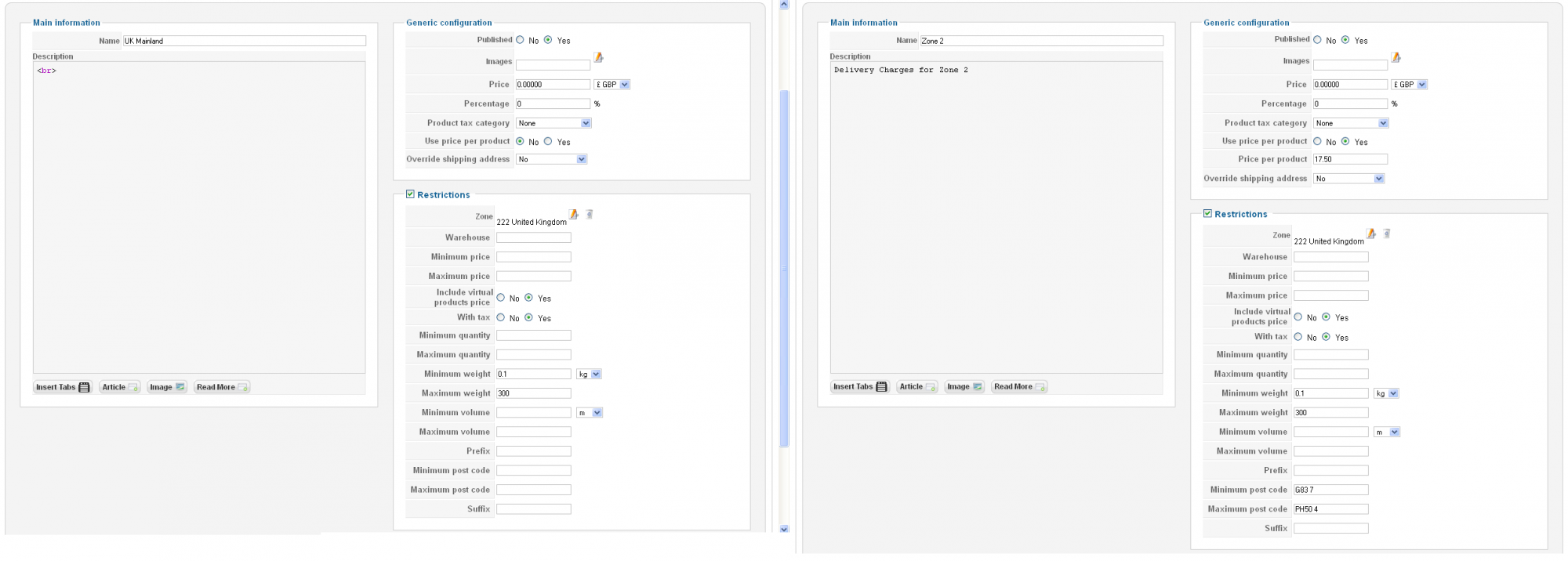
I've already got a Shipping Method for the UK setup with free posting which is pointing to my United Kingdom zone. Now I've created another shipping method with the cost of £17.50 for Zone 2 deliveries, also pointed to my United Kingdom zone
I'm having similar issues, but I imagine things have changed since the 2 years this topic was created!
I've already got a Shipping Method for the UK setup with free posting which is pointing to my United Kingdom zone. Now I've created another shipping method with the cost of £17.50 for Zone 2 deliveries, also pointed to my United Kingdom zone, so I'm guessing if I've configured the Minimum and Maximum post codes right it should add the extra costs?
Mines slightly more complicated as I've been given a list of post codes for Zone 2 which I'm attaching in this message. I tried G83 7 as the Minimum and PH50 4 as the Maximum but I'm guessing that's not how it works as it just has the free delivery option.
This attachment is hidden for guests.
Please log in or register to see it.
Please log in or register to see it.
I've already got a Shipping Method for the UK setup with free posting which is pointing to my United Kingdom zone. Now I've created another shipping method with the cost of £17.50 for Zone 2 deliveries, also pointed to my United Kingdom zone
Please Log in or Create an account to join the conversation.

Less
More
- Posts: 12953
- Thank you received: 1778
12 years 11 months ago #132904
by Mohamed Thelji
Replied by Mohamed Thelji on topic UK Postcode shipping range
Hi,
For example, for the post code within this range : IV10 8 - IV9 8 you'll have to set the :
- Prefix option to IV
- Minimum post code option to 26
- Maximum post code option to 637
So, you'll have to create 1 shipping method per prefix.
For example, for the post code within this range : IV10 8 - IV9 8 you'll have to set the :
- Prefix option to IV
- Minimum post code option to 26
- Maximum post code option to 637
So, you'll have to create 1 shipping method per prefix.
Please Log in or Create an account to join the conversation.
Time to create page: 0.243 seconds