

- Posts: 45
- Thank you received: 0
Error while sending XML to UPS. Error code: 111030
15 years 1 week ago #27617
by davids
Error while sending XML to UPS. Error code: 111030 was created by davids
Sirs,
I am trying to get UPS to work and all I get is the following error message: Error while sending XML to UPS. Error code: 111030. Message: Packages must weigh more than zero pounds.
I have set the dimensions and the weight to 1.5 lbs
AM I doing something wrong?
I am trying to get UPS to work and all I get is the following error message: Error while sending XML to UPS. Error code: 111030. Message: Packages must weigh more than zero pounds.
I have set the dimensions and the weight to 1.5 lbs
AM I doing something wrong?
Please Log in or Create an account to join the conversation.

15 years 1 week ago #27624
by nicolas
Replied by nicolas on topic Re: Error while sending XML to UPS. Error code: 111030
Hi,
No one had such error so far. It must come from the way you setup the plugin or your products. Could you do screenshots of these so that we can see how you set them up ?
No one had such error so far. It must come from the way you setup the plugin or your products. Could you do screenshots of these so that we can see how you set them up ?
Please Log in or Create an account to join the conversation.
15 years 1 week ago #27629
by davids
Replied by davids on topic Re: Error while sending XML to UPS. Error code: 111030
Here are some images.
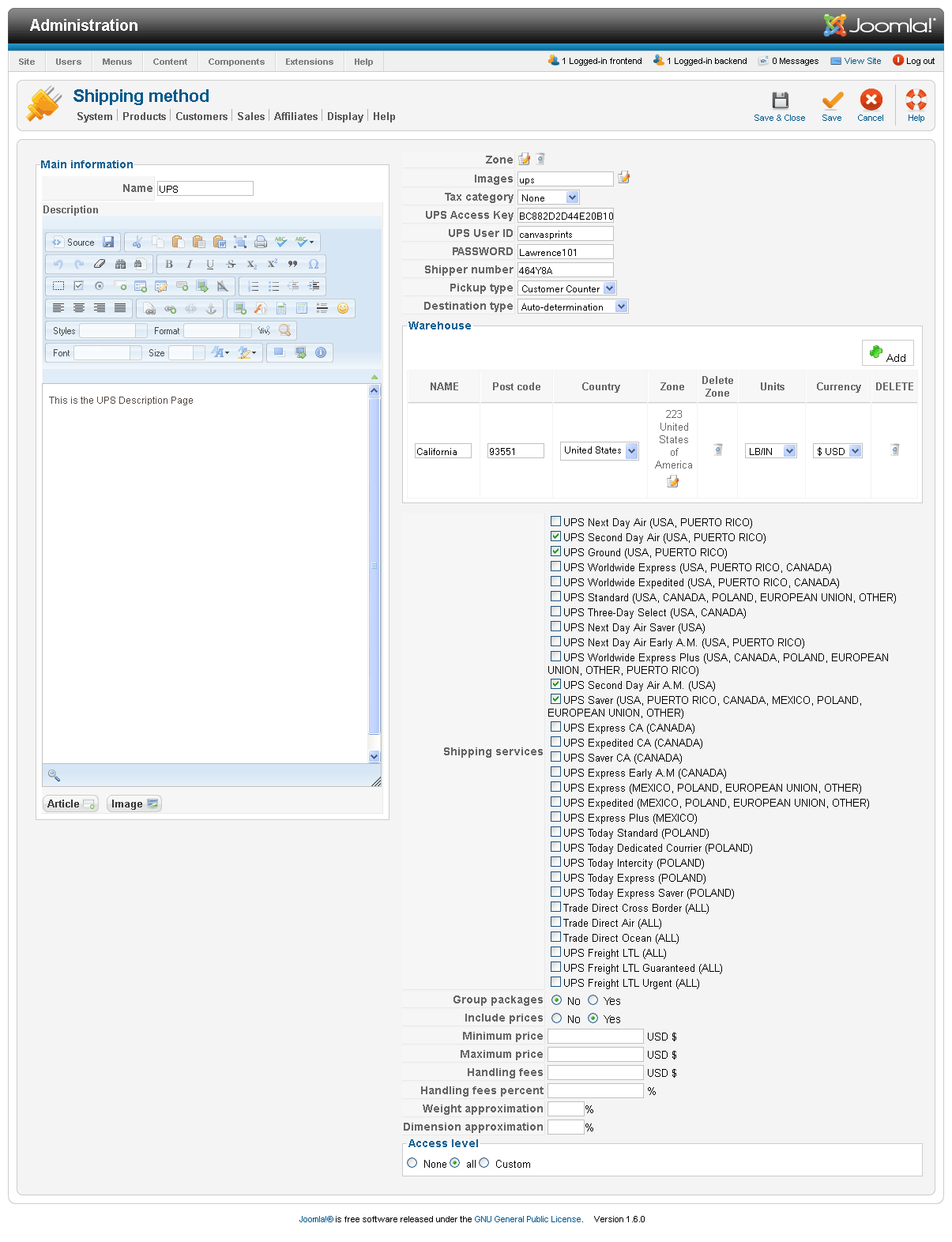
Please Log in or Create an account to join the conversation.
15 years 1 week ago #27630
by davids
Replied by davids on topic Re: Error while sending XML to UPS. Error code: 111030
Number 2
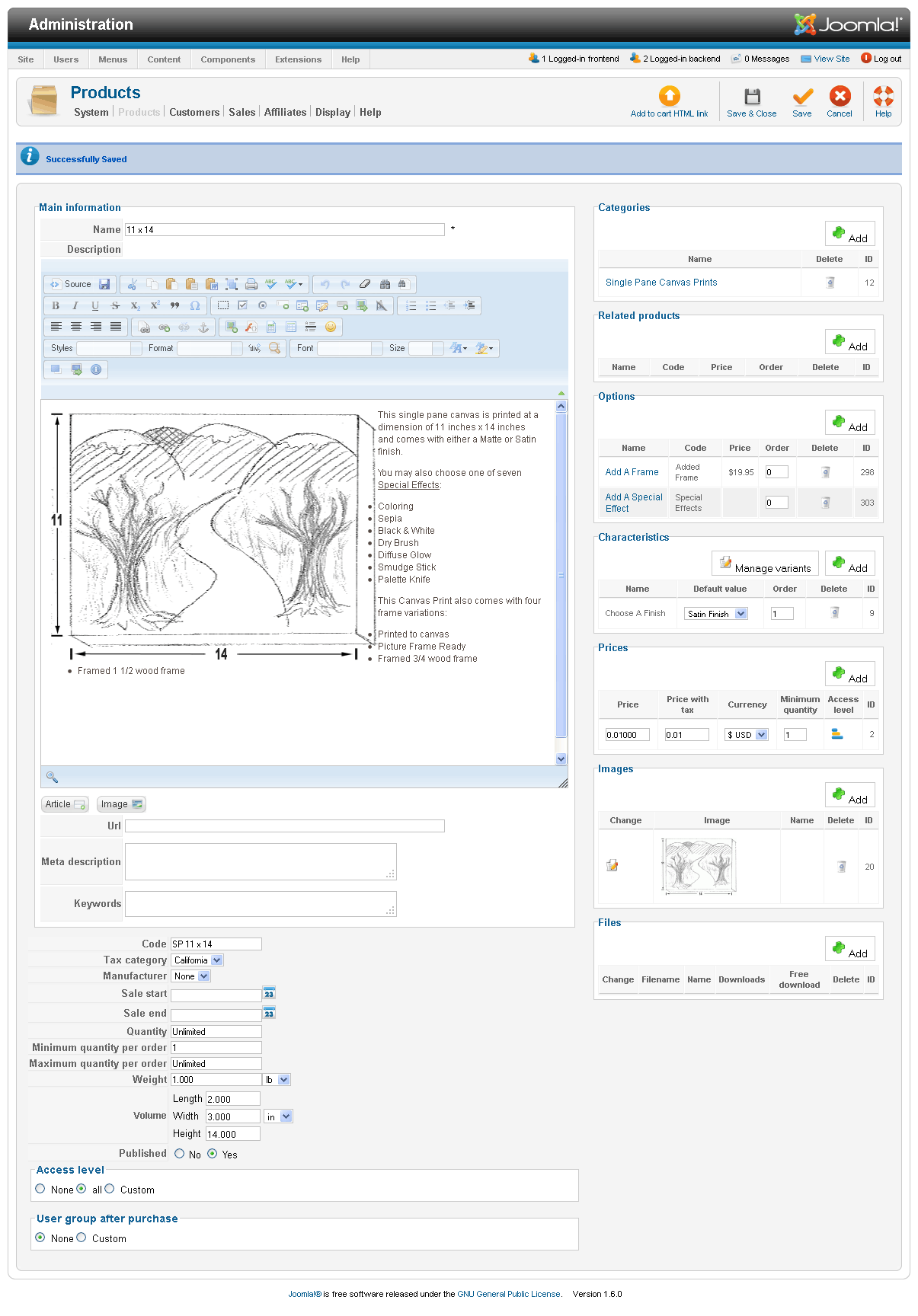
Please Log in or Create an account to join the conversation.
15 years 1 week ago #27631
by nicolas
Replied by nicolas on topic Re: Error while sending XML to UPS. Error code: 111030
Please make sure that the first weight unit in the "weight units" option of the configuration is lb.
Please Log in or Create an account to join the conversation.
15 years 1 week ago #27632
by davids
Replied by davids on topic Re: Error while sending XML to UPS. Error code: 111030
Error message.
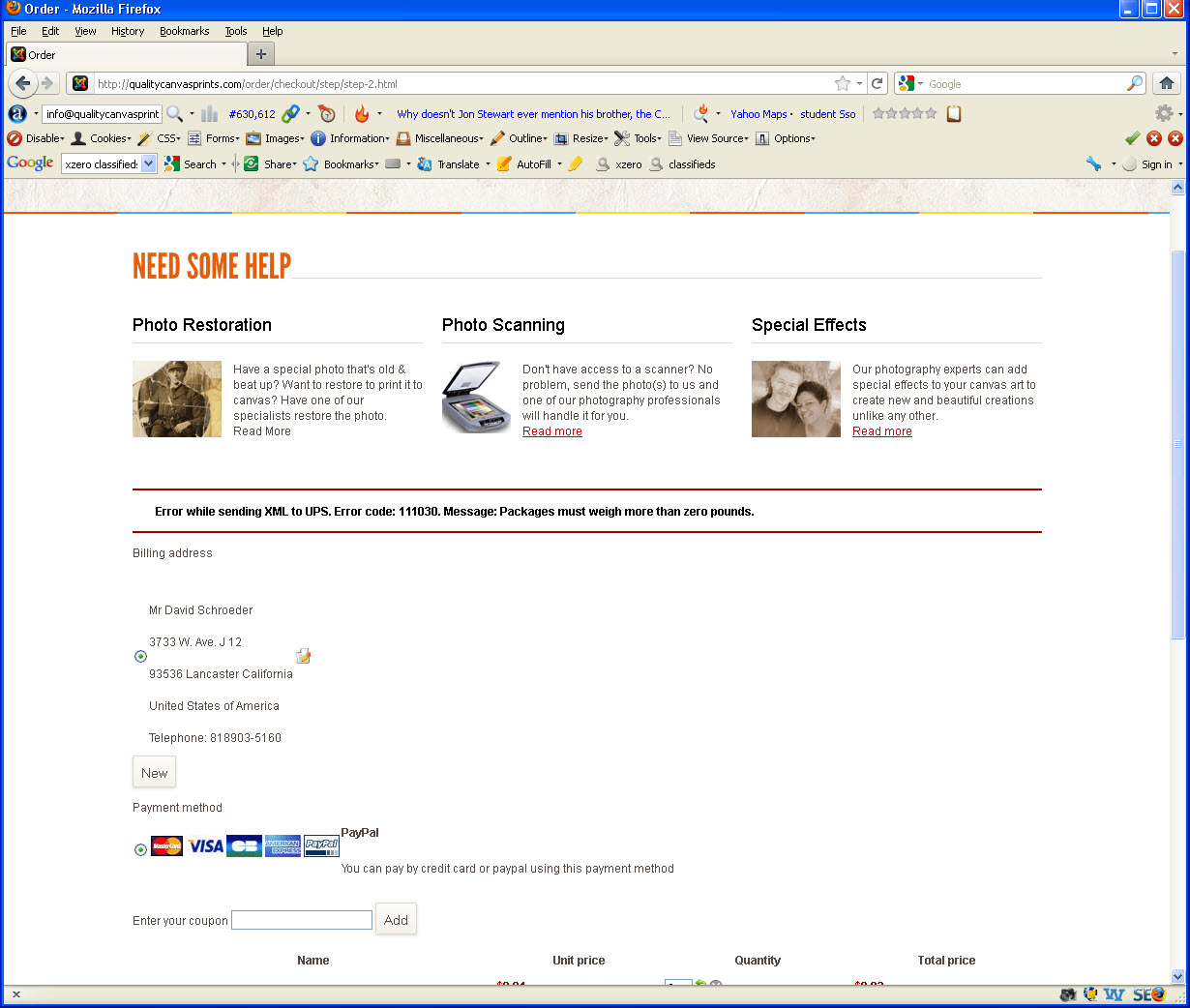
Please Log in or Create an account to join the conversation.
15 years 1 week ago #27633
by davids
Replied by davids on topic Re: Error while sending XML to UPS. Error code: 111030
Yes it is all in pounds (lb).
Please Log in or Create an account to join the conversation.
15 years 1 week ago #27634
by nicolas
Replied by nicolas on topic Re: Error while sending XML to UPS. Error code: 111030
I just tried on your website and I don't have the problem:
Shipping method
UPS Ground $32.28
This is the UPS Description Page
No estimated delivery date
No delivery hour
UPS Second Day Air $56.10
This is the UPS Description Page
Estimated delivery date: 2 days after shipping it
No delivery hour
Please make sure that you have a weight set for the product you have in your cart.
Shipping method
UPS Ground $32.28
This is the UPS Description Page
No estimated delivery date
No delivery hour
UPS Second Day Air $56.10
This is the UPS Description Page
Estimated delivery date: 2 days after shipping it
No delivery hour
Please make sure that you have a weight set for the product you have in your cart.
Please Log in or Create an account to join the conversation.
15 years 1 week ago #27637
by davids
Replied by davids on topic Re: Error while sending XML to UPS. Error code: 111030
I'm not getting it. I still get the same error. I tried a different address. I also noticed that my email template changed from not having VAT in it to having VAT in it.
Please Log in or Create an account to join the conversation.
15 years 1 week ago #27648
by nicolas
Replied by nicolas on topic Re: Error while sending XML to UPS. Error code: 111030
As I said, the problem comes from the products in your cart.
It's working fine for me and I used the product to which you gave me the link in your email. I kept the address that you already had put in the account you provided.
It's working fine for me and I used the product to which you gave me the link in your email. I kept the address that you already had put in the account you provided.
Please Log in or Create an account to join the conversation.
15 years 1 week ago #27712
by davids
Replied by davids on topic Re: Error while sending XML to UPS. Error code: 111030
Well it seems that this works in Internet Explorer but not firefox. When I go through the process in IE, it appears to work, when I go the through the process in Firefox I get the error message. How do I resolve that? 
Please Log in or Create an account to join the conversation.
15 years 1 week ago #27713
by nicolas
Replied by nicolas on topic Re: Error while sending XML to UPS. Error code: 111030
I just tried on firefox and it works too.
Please Log in or Create an account to join the conversation.

Less
More
- Posts: 44
- Thank you received: 0
14 years 11 months ago #29523
by michaelbuttitta
Michael Buttitta
Hot Picks USA
Replied by michaelbuttitta on topic Re: Error while sending XML to UPS. Error code: 111030
Hi Nicolas,
I am setting up UPS and I am getting this error as well now.
"Error while sending XML to UPS. Error code: 111030. Message: Packages must weigh more than zero pounds."
I have this error for any products 1oz or less, but I have other individual products that are 5oz and this error doesn't come up (I'm assuming the programming rounds up anything under a pound to 1 pound?)
I'm not sure what to do. I can't set these items to more weight because if people order a large group of them (it happens a lot) then the weight is very unbalanced for what they are buying. Any idea why this is happening? I entered products in, in the same way so I don;t think it's a data entry error...
I did try to add 16 1oz items to the cart... even 36 1oz items and still get the same result. I know the cart takes measurements down to a single gram? This seems odd...
I am setting up UPS and I am getting this error as well now.
"Error while sending XML to UPS. Error code: 111030. Message: Packages must weigh more than zero pounds."
I have this error for any products 1oz or less, but I have other individual products that are 5oz and this error doesn't come up (I'm assuming the programming rounds up anything under a pound to 1 pound?)
I'm not sure what to do. I can't set these items to more weight because if people order a large group of them (it happens a lot) then the weight is very unbalanced for what they are buying. Any idea why this is happening? I entered products in, in the same way so I don;t think it's a data entry error...
I did try to add 16 1oz items to the cart... even 36 1oz items and still get the same result. I know the cart takes measurements down to a single gram? This seems odd...
Michael Buttitta
Hot Picks USA
Please Log in or Create an account to join the conversation.
14 years 11 months ago #29524
by nicolas
Replied by nicolas on topic Re: Error while sending XML to UPS. Error code: 111030
Hi,
Please make sure that the main weight unit (the first one in the field) of the configuration is oz and not something else to avoid conversions and thus increase the rounding issue.
Please make sure that the main weight unit (the first one in the field) of the configuration is oz and not something else to avoid conversions and thus increase the rounding issue.
Please Log in or Create an account to join the conversation.
Less
More
- Posts: 44
- Thank you received: 0
14 years 11 months ago #29527
by michaelbuttitta
Michael Buttitta
Hot Picks USA
Replied by michaelbuttitta on topic Re: Error while sending XML to UPS. Error code: 111030
Yes, it's definitely something to do with the weight between 1.5 oz (and I didn't try 1.6-1.9 oz) and 1.9 oz. As soon as I set the item to 2 oz per item, all of a sudden UPS starts providing pricing and stops throwing the XML error.
Oddly enough, no matter what qty I use at 1oz... 2, 4, 8, 12, etc it doesn't do anything to bump the weight up enough to make the order OK, so qty doesn't seem to affect weight. i find that odd and concerning.
Another note, by default I have a rule that it's a $10 minimum to use UPS and each item is $5.99, so if I add one item, I only get a fixed USPS flat rate custom shipping option of $5.50. So by adding 2 items to the cart, it puts the total order to $12.98 and the weight to double one item. So at 1oz for 2 items, it's 2 oz and won't work. Yet when I put the weight to 2oz at 2 items it's 4 oz and UPS accepts it. But if I add any quantity of 1oz items it balks at it.
Oddly enough, no matter what qty I use at 1oz... 2, 4, 8, 12, etc it doesn't do anything to bump the weight up enough to make the order OK, so qty doesn't seem to affect weight. i find that odd and concerning.
Another note, by default I have a rule that it's a $10 minimum to use UPS and each item is $5.99, so if I add one item, I only get a fixed USPS flat rate custom shipping option of $5.50. So by adding 2 items to the cart, it puts the total order to $12.98 and the weight to double one item. So at 1oz for 2 items, it's 2 oz and won't work. Yet when I put the weight to 2oz at 2 items it's 4 oz and UPS accepts it. But if I add any quantity of 1oz items it balks at it.
Michael Buttitta
Hot Picks USA
Please Log in or Create an account to join the conversation.
14 years 11 months ago #29529
by davids
Replied by davids on topic Re: Error while sending XML to UPS. Error code: 111030
Here is the scoop. I dealt with this for about 3 weeks before I finally figured it out. 1. UPS bumps you up to 1 lbs. regardless of how many oz's you have it set to. If you want to ship oz's, get the usps plug in. Works pretty well.
1. Go into your ups plugin and select YES on Group packages
2. Go to your products and change the weight setting to .5 LBS
3. Add dimensions. 10 inches x 4 inches x 10 inches. What ever the actual dimension is.
I had to test a configuration with just one item and no options. I kept testing until I found a setting that worked. Once you get it to work, then add an option and if you get the error, fix the option with #2 & #3 above. Doing this should work.
1. Go into your ups plugin and select YES on Group packages
2. Go to your products and change the weight setting to .5 LBS
3. Add dimensions. 10 inches x 4 inches x 10 inches. What ever the actual dimension is.
I had to test a configuration with just one item and no options. I kept testing until I found a setting that worked. Once you get it to work, then add an option and if you get the error, fix the option with #2 & #3 above. Doing this should work.
Please Log in or Create an account to join the conversation.
Less
More
- Posts: 44
- Thank you received: 0
14 years 11 months ago #29530
by michaelbuttitta
Michael Buttitta
Hot Picks USA
Replied by michaelbuttitta on topic Re: Error while sending XML to UPS. Error code: 111030
Hi David,
The problem is my items are small and none are really even an ounce. They are guitar picks. I want to use UPS for customers who want packages quicker than USPS and are willing to pay for it. The size for each item is like 6" x 3.5" x .25" so they are tiny and light, but $5.99 each. Its not uncommon for customers to order 10 Packs so setting them to half a pound each isn't realistic. I'm planning on offering USPS but I'd really like UPS to work as well...
The problem is my items are small and none are really even an ounce. They are guitar picks. I want to use UPS for customers who want packages quicker than USPS and are willing to pay for it. The size for each item is like 6" x 3.5" x .25" so they are tiny and light, but $5.99 each. Its not uncommon for customers to order 10 Packs so setting them to half a pound each isn't realistic. I'm planning on offering USPS but I'd really like UPS to work as well...
Michael Buttitta
Hot Picks USA
Please Log in or Create an account to join the conversation.
14 years 11 months ago #29536
by nicolas
Replied by nicolas on topic Re: Error while sending XML to UPS. Error code: 111030
The thing is that you need to use the same weight unit everywhere.
In UPS, you set it to use lb. So you should have the main weight unit as lb and the products weight as lb too. That way, no conversion will occur at all and you should not have a problem.
In UPS, you set it to use lb. So you should have the main weight unit as lb and the products weight as lb too. That way, no conversion will occur at all and you should not have a problem.
Please Log in or Create an account to join the conversation.
Time to create page: 0.133 seconds