

- Posts: 7
- Thank you received: 0
Display all products in a category
14 years 11 months ago #28570
by ckmandla
Display all products in a category was created by ckmandla
Hi, Am new to Joomla and Hikashop, so please bear with me.
Have searched the forum, tutuorials and tinkered for awhile now but cannot work out how to display all products in a category. Is there a tute that gives step by step instructions?? Have managed to display an individual item on the front end due to your "Your first test sale" tute, but have not been able to display a whole category full of products from a sub menu in a drop down menu.
Am finding Hikashop great - even for newbies, but is there another tutorial besides the "Your first test sale" that can help me?
ALSO, Have played around with the card module, but cannot get an image of a shopping cart to come up on the front end?
Can check out what I mean on www.2ndgouniforms.com.au/dev
Looking forward to a reply.
Regards,
Kim
Have searched the forum, tutuorials and tinkered for awhile now but cannot work out how to display all products in a category. Is there a tute that gives step by step instructions?? Have managed to display an individual item on the front end due to your "Your first test sale" tute, but have not been able to display a whole category full of products from a sub menu in a drop down menu.
Am finding Hikashop great - even for newbies, but is there another tutorial besides the "Your first test sale" that can help me?
ALSO, Have played around with the card module, but cannot get an image of a shopping cart to come up on the front end?
Can check out what I mean on www.2ndgouniforms.com.au/dev
Looking forward to a reply.
Regards,
Kim
Please Log in or Create an account to join the conversation.

14 years 11 months ago #28586
by nicolas
Replied by nicolas on topic Re: Display all products in a category
Here is a tutorial to display a listing of products on the front end of your website :
www.hikashop.com/en/support/documentatio...d.html#products_menu
By default there is no image in the cart module.
You can add it with CSS as explained on that post:
www.hikashop.com/support/forum/4-how-to/...ge.html?lang=en#7761
www.hikashop.com/en/support/documentatio...d.html#products_menu
By default there is no image in the cart module.
You can add it with CSS as explained on that post:
www.hikashop.com/support/forum/4-how-to/...ge.html?lang=en#7761
Please Log in or Create an account to join the conversation.
14 years 11 months ago #28770
by ckmandla
Replied by ckmandla on topic Re: Display all products in a category
Thanks for that. I logged into cpanel and found the file
mod_hikashop_cart.xml. (couldn't find one that had CSS in it.) Is this the one I edit? AND does it matter where I place your suggested code?
Regards,
Kim
mod_hikashop_cart.xml. (couldn't find one that had CSS in it.) Is this the one I edit? AND does it matter where I place your suggested code?
Regards,
Kim
Please Log in or Create an account to join the conversation.
14 years 11 months ago #28772
by nicolas
Replied by nicolas on topic Re: Display all products in a category
That's the xml file of the module. It's not a CSS file.
The CSS of HikaShop can be edited via the interface available in the tab Display of the configuration. You don't need to directly edit files via FTP.
You can place the code anywhere in the front end css file. I would suggest either at the top or at the bottom...
The CSS of HikaShop can be edited via the interface available in the tab Display of the configuration. You don't need to directly edit files via FTP.
You can place the code anywhere in the front end css file. I would suggest either at the top or at the bottom...
Please Log in or Create an account to join the conversation.
14 years 11 months ago #28852
by ckmandla
Replied by ckmandla on topic Re: Display all products in a category
Hi Nicolas,
Did as you suggested, but nothing happened!!?? I have attached a screen shot showing the code I entered. Please help.
Regards,
Kim
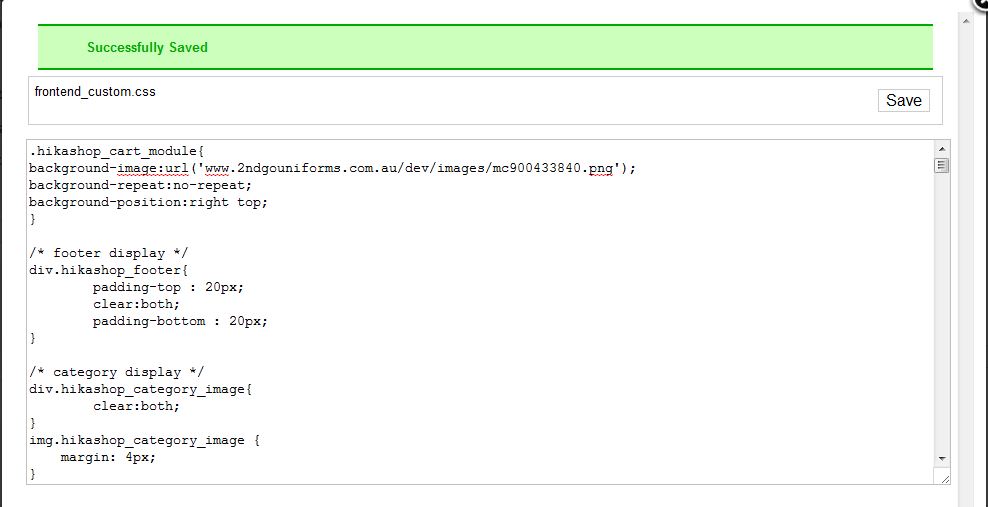
Did as you suggested, but nothing happened!!?? I have attached a screen shot showing the code I entered. Please help.
Regards,
Kim
Please Log in or Create an account to join the conversation.
14 years 11 months ago #28882
by nicolas
Replied by nicolas on topic Re: Display all products in a category
Make sure that the custom front end CSS file is selected and not the default one and save the configuration. Also, make sure that you refreshed the cache of your browser as you wouldn't see the change otherwise.
Please Log in or Create an account to join the conversation.
14 years 11 months ago #28931
by ckmandla
Replied by ckmandla on topic Re: Display all products in a category
Hi Nicolas,
Done and done! Still nothing showing up - www.2ndgouniforms.com.au/dev I cut and copied your code. Did I enter something wrong?
Kim
Done and done! Still nothing showing up - www.2ndgouniforms.com.au/dev I cut and copied your code. Did I enter something wrong?
Kim
Please Log in or Create an account to join the conversation.
14 years 11 months ago #28946
by nicolas
Replied by nicolas on topic Re: Display all products in a category
I can see that the CSS was added to your pages.
The problem is that you didn't add the http:// in the image URL. Because of that, the URL of your image becomes www.2ndgouniforms.com.au/dev/media/com_h...ages/mc900433840.png instead of www.2ndgouniforms.com.au/dev/images/mc900433840.png
The problem is that you didn't add the http:// in the image URL. Because of that, the URL of your image becomes www.2ndgouniforms.com.au/dev/media/com_h...ages/mc900433840.png instead of www.2ndgouniforms.com.au/dev/images/mc900433840.png
Please Log in or Create an account to join the conversation.
14 years 11 months ago #28949
by ckmandla
Replied by ckmandla on topic Re: Display all products in a category
Hi Nicolas,
Yes!!!!! You did it! Thank you, thank you. One headache gone!! YAHOO
Kim
Yes!!!!! You did it! Thank you, thank you. One headache gone!! YAHOO
Kim
Please Log in or Create an account to join the conversation.
Time to create page: 0.255 seconds