
- Posts: 6
- Thank you received: 0
Step Address - How to Show Required Message
- alphascorpii
-
 Topic Author
- Offline
Less
More
14 years 10 months ago - 14 years 10 months ago #29943
by alphascorpii
Step Address - How to Show Required Message was created by alphascorpii
My problem is as follows.
In the purchase process, I follow all the steps, up to that of the address (billing and shipping)
As you can see in the picture attached, the example user has not uploaded any address.
If no data is loaded and you click continue, the system redirects back to the same page without showing any error alerts, lightbox or any notice that says that you will probably be required to enter at least one address.
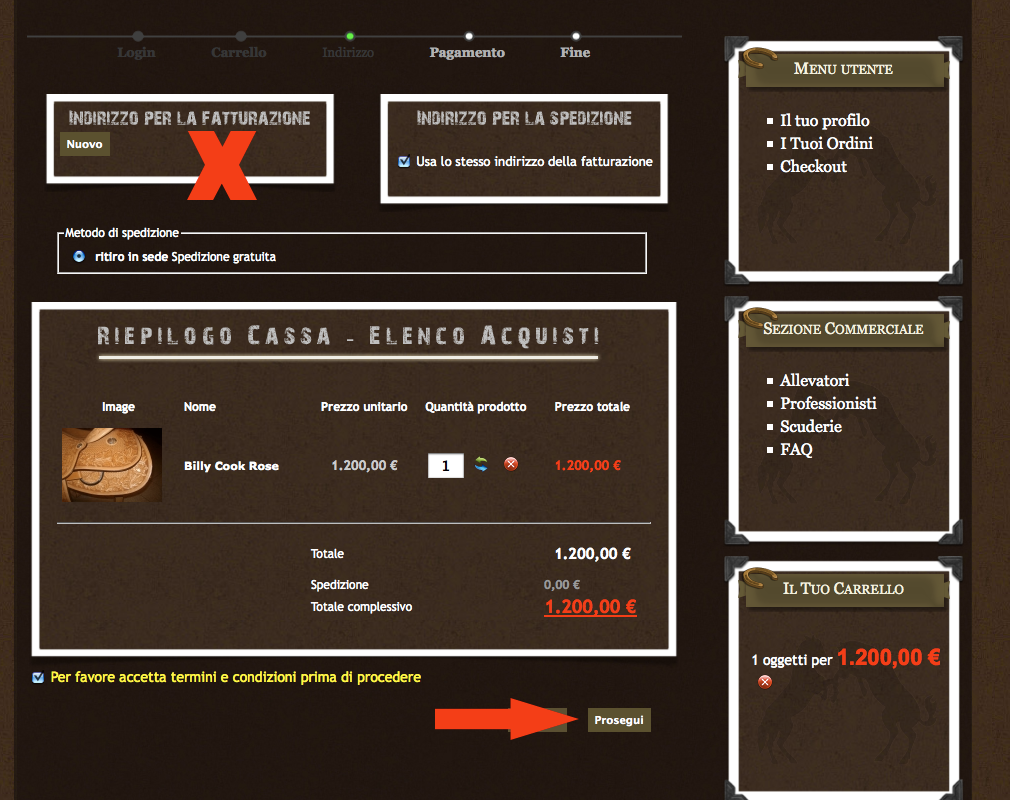
How can I fix it?
Thanks
In the purchase process, I follow all the steps, up to that of the address (billing and shipping)
As you can see in the picture attached, the example user has not uploaded any address.
If no data is loaded and you click continue, the system redirects back to the same page without showing any error alerts, lightbox or any notice that says that you will probably be required to enter at least one address.
How can I fix it?
Thanks
Last edit: 14 years 10 months ago by alphascorpii.
Please Log in or Create an account to join the conversation.

14 years 10 months ago #29964
by nicolas
Replied by nicolas on topic Re: Step Address - How to Show Required Message
There is a message displayed by HikaShop.
If you don't see it, it means that your template does not have the jdoc include for joomla messages:
www.hikashop.com/fr/support/documentatio...issues.html#messages
If you don't see it, it means that your template does not have the jdoc include for joomla messages:
www.hikashop.com/fr/support/documentatio...issues.html#messages
Please Log in or Create an account to join the conversation.
- alphascorpii
-
Topic Author
- Offline
Less
More
- Posts: 6
- Thank you received: 0
14 years 10 months ago - 14 years 10 months ago #29965
by alphascorpii
Replied by alphascorpii on topic Re: Step Address - How to Show Required Message
So....
as suggested by the guide, I added the <jdoc:include type="message" /> before this <jdoc:include type="component" /> in the template index.php file,.........and now it appears the error message.
Thanks nicolas
as suggested by the guide, I added the <jdoc:include type="message" /> before this <jdoc:include type="component" /> in the template index.php file,.........and now it appears the error message.
Thanks nicolas
Last edit: 14 years 10 months ago by alphascorpii. Reason: adjust the tetx
Please Log in or Create an account to join the conversation.
Time to create page: 0.182 seconds