
- Posts: 38
- Thank you received: 0
Styling "select" state for menu items (categories)
14 years 11 months ago - 14 years 11 months ago #29945
by sdebaun
Styling "select" state for menu items (categories) was created by sdebaun
Any suggestions for creating a select state for category menu items?
I have a nicely functioning menu showing my product categories and I would like to "highlight" the item that corresponds to the category being viewed.
I don't see any "hooks" being generated by the code, I was wondering if you had any suggestions on how to implement this.
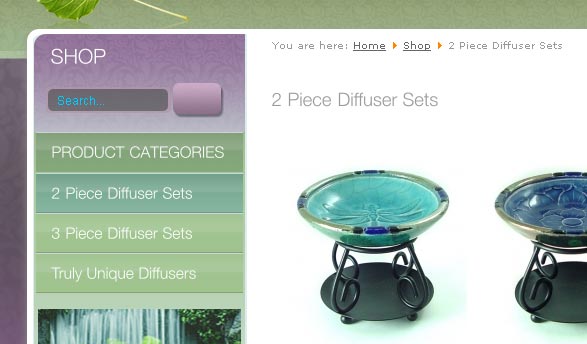
This image shows a selected category, but no select state to identify the category chosen

This is my rollover, and hopefully select state as well
Thanks again
I have a nicely functioning menu showing my product categories and I would like to "highlight" the item that corresponds to the category being viewed.
I don't see any "hooks" being generated by the code, I was wondering if you had any suggestions on how to implement this.
This image shows a selected category, but no select state to identify the category chosen
This is my rollover, and hopefully select state as well
Thanks again
Last edit: 14 years 11 months ago by sdebaun.
Please Log in or Create an account to join the conversation.
14 years 11 months ago #29946
by sdebaun
Replied by sdebaun on topic Re: Styling "select" state for menu items (categories)
First image should have been
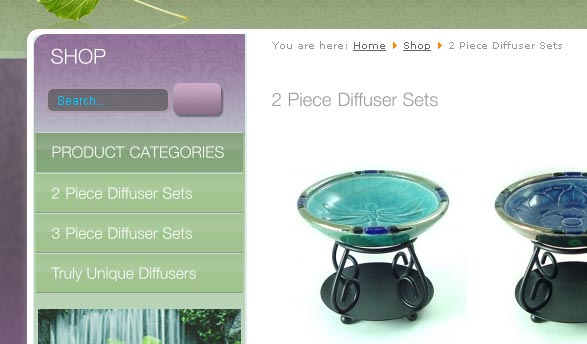
I'm sure you get the idea
I'm sure you get the idea
Please Log in or Create an account to join the conversation.

14 years 11 months ago #29967
by nicolas
Replied by nicolas on topic Re: Styling "select" state for menu items (categories)
Hi,
Menus items are entirely controlled by joomla so there is no control on that on HikaShop's end.
I don't know if it would be possible and how as I don't know much about template design for joomla menus so I'm afraid I can't help you.
Menus items are entirely controlled by joomla so there is no control on that on HikaShop's end.
I don't know if it would be possible and how as I don't know much about template design for joomla menus so I'm afraid I can't help you.
Please Log in or Create an account to join the conversation.
14 years 11 months ago #29976
by sdebaun
Replied by sdebaun on topic Re: Styling "select" state for menu items (categories)
Thanks again , but that doesn't exactly seem right, since the menu in question is being written directly by a hikashop file. View > category > listing_list.php I have verified that this is indeed the file that creates the category menu... in list format anyways.
An excerpt from the file in question:
...
foreach($this->rows as $row){
$link = hikashop_completeLink('category&task=listing&cid='.$row->category_id.'&name='.$row->alias.$this->menu_id);
?>
<li class="hikashop_category_list_item" <?php echo $width; ?>>
<a href="<?php echo $link; ?>" >
<?php echo $row->category_name; ?>
</a>
</li>
<?php
}
It's kinda weird, styling a width. Joomla will usually add an "current active" class to a menu item in the selected state.
And the code being generated follows (this is my category menu):
...
div class="hikashop_subcategories_listing">
<div class="hikashop_subcategories">
<ul class="hikashop_category_list">
<li class="hikashop_category_list_item" style="width:100%;">
<a href="/index.php/2011-11-13-06-55-33/category/12-2-piece-diffuser-sets">
</li>
<li class="hikashop_category_list_item" style="width:100%;">
<a href="/index.php/2011-11-13-06-55-33/category/13-3-piece-diffuser-sets">
</li>
<li class="hikashop_category_list_item" style="width:100%;">
<a href="/index.php/2011-11-13-06-55-33/category/14-truly-unique-diffusers">
</li>
</ul>
</div>
An active class should be added to the active item
On my main menu, Joomla does this (see item 103 below)
...
<div id="menu">
<ul class="menu">
<li class="item-118">
<a href="/index.php/checkout">Checkout</a>
</li>
<li class="item-104">
<a href="/index.php/2011-11-13-06-56-34">Contact</a>
</li>
<li class="item-102">
<a href="/index.php/about">About</a>
</li>
<li class="item-103 current active">
<a href="/index.php/2011-11-13-06-55-33">Shop</a>
</li>
<li class="item-101">
<a href="/">Home</a>
</li>
</ul>
</div>
That "current active" class makes styling it really simple
Now I noticed that there were several ways of generating a category menu, this one is actually a Joomla menu, but all the links are generated by HikaShop...
Again, any suggestions would be appreciated.
PS, the demo shop does seem to accomplish a selected state, which method was used? ( There are a couple ways to make a category menu right?)
Cheers!
An excerpt from the file in question:
...
foreach($this->rows as $row){
$link = hikashop_completeLink('category&task=listing&cid='.$row->category_id.'&name='.$row->alias.$this->menu_id);
?>
<li class="hikashop_category_list_item" <?php echo $width; ?>>
<a href="<?php echo $link; ?>" >
<?php echo $row->category_name; ?>
</a>
</li>
<?php
}
It's kinda weird, styling a width. Joomla will usually add an "current active" class to a menu item in the selected state.
And the code being generated follows (this is my category menu):
...
div class="hikashop_subcategories_listing">
<div class="hikashop_subcategories">
<ul class="hikashop_category_list">
<li class="hikashop_category_list_item" style="width:100%;">
<a href="/index.php/2011-11-13-06-55-33/category/12-2-piece-diffuser-sets">
</li>
<li class="hikashop_category_list_item" style="width:100%;">
<a href="/index.php/2011-11-13-06-55-33/category/13-3-piece-diffuser-sets">
</li>
<li class="hikashop_category_list_item" style="width:100%;">
<a href="/index.php/2011-11-13-06-55-33/category/14-truly-unique-diffusers">
</li>
</ul>
</div>
An active class should be added to the active item
On my main menu, Joomla does this (see item 103 below)
...
<div id="menu">
<ul class="menu">
<li class="item-118">
<a href="/index.php/checkout">Checkout</a>
</li>
<li class="item-104">
<a href="/index.php/2011-11-13-06-56-34">Contact</a>
</li>
<li class="item-102">
<a href="/index.php/about">About</a>
</li>
<li class="item-103 current active">
<a href="/index.php/2011-11-13-06-55-33">Shop</a>
</li>
<li class="item-101">
<a href="/">Home</a>
</li>
</ul>
</div>
That "current active" class makes styling it really simple
Now I noticed that there were several ways of generating a category menu, this one is actually a Joomla menu, but all the links are generated by HikaShop...
Again, any suggestions would be appreciated.
PS, the demo shop does seem to accomplish a selected state, which method was used? ( There are a couple ways to make a category menu right?)
Cheers!
Please Log in or Create an account to join the conversation.
14 years 11 months ago #29981
by sdebaun
Replied by sdebaun on topic Re: Styling "select" state for menu items (categories)
Actually the demo succeeds in showing the proper active state... except when the sliding product module at top is used... that doesn't seem to update the proper category on the menu.
I thought of an easy solution for my question though( I think. Just need a little help.
If I could pass a variable (or rather, capture one already in use) based on a given category being selected, that should be an easy way to implement a custom css style for a selected category. Better yet, a category id would be perfect. (no spaces in the name...)
I'm just not sure what variables exist that I could use. My theory is to grab it and echo it as a class onto my body tag. Then use css to style a given menu item based on that
Can you recommend to me what variable exists to do so? Then I could do something like the following-
#shop .category_id1234 #category-menu .hikashop_category_list_item a{
background-image: url(../images/cat-menu-bg-selected.gif);
color: #FFF;
}
I thought of an easy solution for my question though( I think. Just need a little help.
If I could pass a variable (or rather, capture one already in use) based on a given category being selected, that should be an easy way to implement a custom css style for a selected category. Better yet, a category id would be perfect. (no spaces in the name...)
I'm just not sure what variables exist that I could use. My theory is to grab it and echo it as a class onto my body tag. Then use css to style a given menu item based on that
Can you recommend to me what variable exists to do so? Then I could do something like the following-
#shop .category_id1234 #category-menu .hikashop_category_list_item a{
background-image: url(../images/cat-menu-bg-selected.gif);
color: #FFF;
}
Please Log in or Create an account to join the conversation.
14 years 11 months ago #29996
by nicolas
Replied by nicolas on topic Re: Styling "select" state for menu items (categories)
Ok, so if your 'menus' are displayed by HikaShop, they are not menus but a HikaShop categories listing module, which is indeed displayed by HikaShop. And we can help you on that 
It's normal that the width is set directly in PHP. That's because you can select the number of columns of your listing. So that parameter needs to be dynamic because it will vary based on the number of columns. As you have 1 column for that listing, the width is set to 100%.
There is indeed no mechanism to have the current/active category selected for the layout you're using. That would be a nice addition though.
You need to change the code:
?>
<li class="hikashop_category_list_item" <?php echo $width; ?>>
to:
$class = '';
if(JRequest::getString('option',HIKASHOP_COMPONENT) && JRequest::getString('ctrl','category') && $cid = JRequest::getInt('cid',0) && $cid == $row->category_id){
$class=' current active';
}
?>
<li class="hikashop_category_list_item<?php echo $class; ?>" <?php echo $width; ?>>
in that file and that should add the classes like for joomla menus.
It's normal that the width is set directly in PHP. That's because you can select the number of columns of your listing. So that parameter needs to be dynamic because it will vary based on the number of columns. As you have 1 column for that listing, the width is set to 100%.
There is indeed no mechanism to have the current/active category selected for the layout you're using. That would be a nice addition though.
You need to change the code:
?>
<li class="hikashop_category_list_item" <?php echo $width; ?>>
to:
$class = '';
if(JRequest::getString('option',HIKASHOP_COMPONENT) && JRequest::getString('ctrl','category') && $cid = JRequest::getInt('cid',0) && $cid == $row->category_id){
$class=' current active';
}
?>
<li class="hikashop_category_list_item<?php echo $class; ?>" <?php echo $width; ?>>
in that file and that should add the classes like for joomla menus.
Please Log in or Create an account to join the conversation.
14 years 11 months ago #30065
by sdebaun
Replied by sdebaun on topic Re: Styling "select" state for menu items (categories)
Thanks Nicolas-
I inserted the code, but it seems $class is returning empty
here's the code:
foreach($this->rows as $row){
$link = hikashop_completeLink('category&task=listing&cid='.$row->category_id.'&name='.$row->alias.$this->menu_id);
$class = '';
if(JRequest::getString('option',HIKASHOP_COMPONENT) && JRequest::getString('ctrl','category') && $cid = JRequest::getInt('cid',0) && $cid == $row->category_id){
$class=' current active';
}
?>
<li class="hikashop_category_list_item<?php echo $class; ?>" <?php echo $width; ?>>
I inserted the code, but it seems $class is returning empty
here's the code:
foreach($this->rows as $row){
$link = hikashop_completeLink('category&task=listing&cid='.$row->category_id.'&name='.$row->alias.$this->menu_id);
$class = '';
if(JRequest::getString('option',HIKASHOP_COMPONENT) && JRequest::getString('ctrl','category') && $cid = JRequest::getInt('cid',0) && $cid == $row->category_id){
$class=' current active';
}
?>
<li class="hikashop_category_list_item<?php echo $class; ?>" <?php echo $width; ?>>
Please Log in or Create an account to join the conversation.
14 years 11 months ago #30078
by nicolas
Replied by nicolas on topic Re: Styling "select" state for menu items (categories)
Indeed. It should be:
if(JRequest::getString('option',HIKASHOP_COMPONENT) && JRequest::getString('ctrl','category') && JRequest::getInt('cid',0) == $row->category_id){
instead of:
if(JRequest::getString('option',HIKASHOP_COMPONENT) && JRequest::getString('ctrl','category') && $cid = JRequest::getInt('cid',0) && $cid == $row->category_id){
if(JRequest::getString('option',HIKASHOP_COMPONENT) && JRequest::getString('ctrl','category') && JRequest::getInt('cid',0) == $row->category_id){
instead of:
if(JRequest::getString('option',HIKASHOP_COMPONENT) && JRequest::getString('ctrl','category') && $cid = JRequest::getInt('cid',0) && $cid == $row->category_id){
Please Log in or Create an account to join the conversation.
14 years 11 months ago #30083
by sdebaun
Replied by sdebaun on topic Re: Styling "select" state for menu items (categories)
That did it, much thanks!
Please Log in or Create an account to join the conversation.
14 years 11 months ago #30090
by sdebaun
Replied by sdebaun on topic Re: Styling "select" state for menu items (categories)
Well, on further examination it actually works only partially... there is something weird happening on the product pages.
The active state does work for the category pages, and on ONE of my product pages, but none of the others :blink:
I have 6 products in a given category. From my category page, when I click one of the products the active class remains, but for the other 5 products, the active class disappears.... I have re-ordered the products in HikaShop admin and the same single product continues to show the active category menu but none of the others do.
The fact that this does work for one of the products and not the others is perplexing to me.
Any suggestions for that one? :side:
The active state does work for the category pages, and on ONE of my product pages, but none of the others :blink:
I have 6 products in a given category. From my category page, when I click one of the products the active class remains, but for the other 5 products, the active class disappears.... I have re-ordered the products in HikaShop admin and the same single product continues to show the active category menu but none of the others do.
The fact that this does work for one of the products and not the others is perplexing to me.
Any suggestions for that one? :side:
Please Log in or Create an account to join the conversation.
14 years 11 months ago - 14 years 11 months ago #30092
by nicolas
Replied by nicolas on topic Re: Styling "select" state for menu items (categories)
Yes, that modification does not work on other pages than the categories pages.
To have it working like on the demo website, the code will be a bit more complex:
$class = '';
if(JRequest::getString('option',HIKASHOP_COMPONENT)){
$app =& JFactory::getApplication();
if(JRequest::getInt('cid',0) == $row->category_id){
$class=' current active';
$app->setUserState(HIKASHOP_COMPONENT.'.last_category_selected',$row->category_id);
}elseif($app->getUserState(HIKASHOP_COMPONENT.'.last_category_selected')==$row->category_id){
$class=' current active';
}
}
?>
<li class="hikashop_category_list_item<?php echo $class; ?>">
To have it working like on the demo website, the code will be a bit more complex:
$class = '';
if(JRequest::getString('option',HIKASHOP_COMPONENT)){
$app =& JFactory::getApplication();
if(JRequest::getInt('cid',0) == $row->category_id){
$class=' current active';
$app->setUserState(HIKASHOP_COMPONENT.'.last_category_selected',$row->category_id);
}elseif($app->getUserState(HIKASHOP_COMPONENT.'.last_category_selected')==$row->category_id){
$class=' current active';
}
}
?>
<li class="hikashop_category_list_item<?php echo $class; ?>">
Last edit: 14 years 11 months ago by nicolas.
Please Log in or Create an account to join the conversation.
14 years 11 months ago - 14 years 11 months ago #30100
by sdebaun
Replied by sdebaun on topic Re: Styling "select" state for menu items (categories)
That almost did it!
If I'm on a category or item page, and click on the link of another category I end up with 2 active states! That lasts until I click on another category menu or an item link, at which time only the correct active state shows
Also, if I use my main menu to visit my contact page or home page, the previously selected active state remains, which is not quite right.
Sorry to be a pain.. :S
Is there a way to reset that so only one active item shows at a time, or none if I visit another page?
If I'm on a category or item page, and click on the link of another category I end up with 2 active states! That lasts until I click on another category menu or an item link, at which time only the correct active state shows
Also, if I use my main menu to visit my contact page or home page, the previously selected active state remains, which is not quite right.
Sorry to be a pain.. :S
Is there a way to reset that so only one active item shows at a time, or none if I visit another page?
Last edit: 14 years 11 months ago by sdebaun.
Please Log in or Create an account to join the conversation.
14 years 11 months ago #30114
by nicolas
Replied by nicolas on topic Re: Styling "select" state for menu items (categories)
That's also possible but again it complexifies the code.
Attached is the solution for that.
This attachment is hidden for guests.
Attached is the solution for that.
This attachment is hidden for guests.
Please log in or register to see it.
Please Log in or Create an account to join the conversation.
14 years 11 months ago #30176
by sdebaun
Replied by sdebaun on topic Re: Styling "select" state for menu items (categories)
Thanks again Nicolas, that does fix the issue of double select states on product or category pages.
It does leave me with a select state when I navigate away from my products and visit my contact page or home page, which show no products... it would be great if the category menu reset itself in those situations.
The active state is being "remembered" in those cases - the $class is not reset to clear. Or is it the $found variable? I'm not sure. Tried to alter the code, but the conditionality is beyond me.
Is there a simple way to clear those (if applicable)?
Thanks again for all your help
It does leave me with a select state when I navigate away from my products and visit my contact page or home page, which show no products... it would be great if the category menu reset itself in those situations.
The active state is being "remembered" in those cases - the $class is not reset to clear. Or is it the $found variable? I'm not sure. Tried to alter the code, but the conditionality is beyond me.
Is there a simple way to clear those (if applicable)?
Thanks again for all your help
Please Log in or Create an account to join the conversation.
14 years 11 months ago #30195
by sdebaun
Replied by sdebaun on topic Re: Styling "select" state for menu items (categories)
Well, I did find a partial solution, based on setting an id for my body based on my main menu.
I already control my body id using a parameter I pass from my main menu:
...
<?php
$menu =& JSite::getMenu();
$active = $menu->getActive();
$params = $menu->getParams( $active->id );
$class = $params->get( 'pageclass_sfx' );
?>
</head>
<body id ="<?php echo $class ? htmlspecialchars($class) : ''; ?>">
So if I do this for my style:
#shop #category-menu .current a {
background-image: url(../images/cat-menu-bg-selected.gif);
}
then I have effectively narrowed down my category menu select states only to my "shop" pages.
Yes!
The reason it's only partially perfect is because:
1. If I do visit my Shop page after viewing an item or category page, then the previously selected category menu item is highlighted, which it should not.
2. If I select an item from within the cart/checkout page itself, then the effective hierarchy becomes home > checkout > product, and while the product shows, the corresponding category menu item is not active. But that's a Joomla thing I believe, and while less than optimal is not a show stopper.
It still would be optimal if that $class or $found could forget the previously selection on page load if my main menu was used(
If you have another suggestions... on how to clear that $class
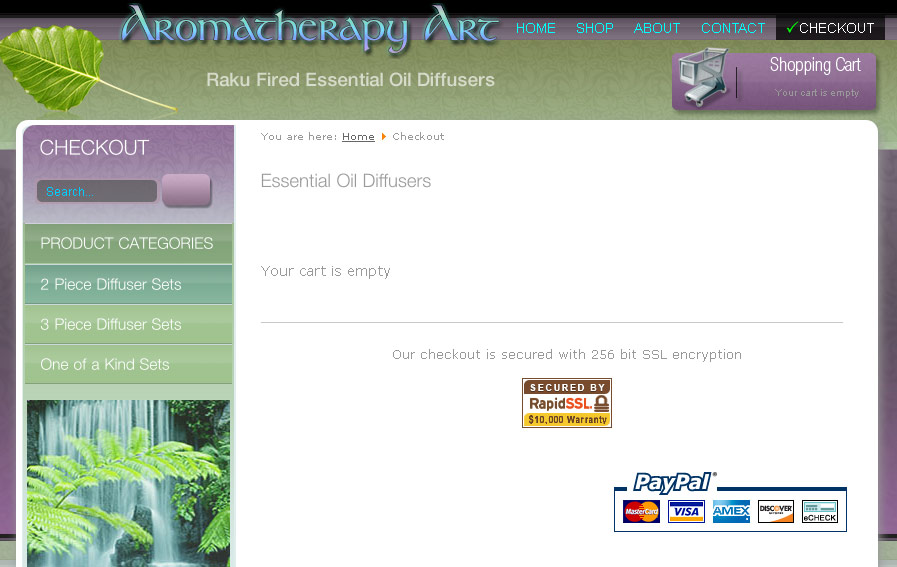
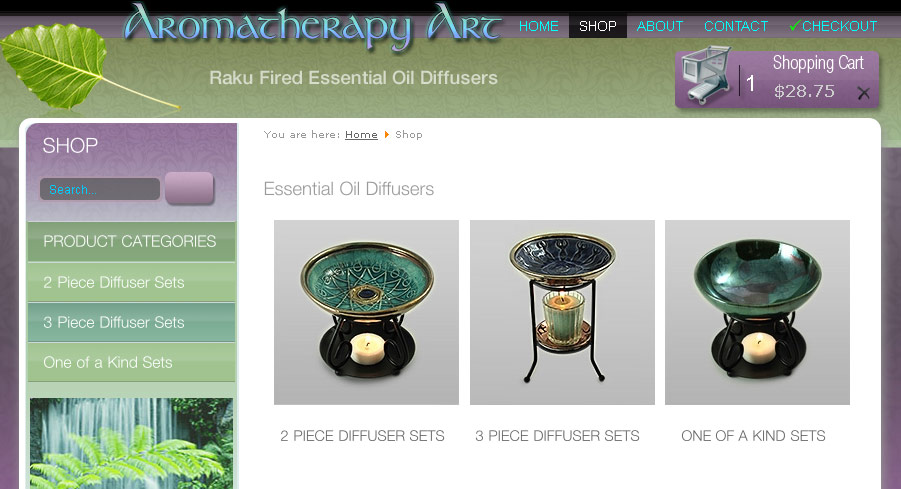
Image showing category menu in select state when viewing Shop page (No category selected - category menu is remembering the earlier selection before navigating to another main menu item page)
I already control my body id using a parameter I pass from my main menu:
...
<?php
$menu =& JSite::getMenu();
$active = $menu->getActive();
$params = $menu->getParams( $active->id );
$class = $params->get( 'pageclass_sfx' );
?>
</head>
<body id ="<?php echo $class ? htmlspecialchars($class) : ''; ?>">
So if I do this for my style:
#shop #category-menu .current a {
background-image: url(../images/cat-menu-bg-selected.gif);
}
then I have effectively narrowed down my category menu select states only to my "shop" pages.
Yes!
The reason it's only partially perfect is because:
1. If I do visit my Shop page after viewing an item or category page, then the previously selected category menu item is highlighted, which it should not.
2. If I select an item from within the cart/checkout page itself, then the effective hierarchy becomes home > checkout > product, and while the product shows, the corresponding category menu item is not active. But that's a Joomla thing I believe, and while less than optimal is not a show stopper.
It still would be optimal if that $class or $found could forget the previously selection on page load if my main menu was used(
If you have another suggestions... on how to clear that $class
Image showing category menu in select state when viewing Shop page (No category selected - category menu is remembering the earlier selection before navigating to another main menu item page)
Please Log in or Create an account to join the conversation.
14 years 11 months ago #30196
by nicolas
Replied by nicolas on topic Re: Styling "select" state for menu items (categories)
You can use that file instead for that.
This attachment is hidden for guests.
This attachment is hidden for guests.
Please log in or register to see it.
Please Log in or Create an account to join the conversation.
14 years 11 months ago #30198
by sdebaun
Replied by sdebaun on topic Re: Styling "select" state for menu items (categories)
No joy there, same result. $found still seems to be remembering the last state, despite setting it to nothing.
Despite setting $found =''; when it's called again with
$found = $app->getUserState(HIKASHOP_COMPONENT.'.last_category_selected
the ".last_category_selected" state seems to be persistent, making the preceding $found =''; irrelevant.
Would it be possible to do something like:
if(JRequest::getString('option',***NOT*** HIKASHOP_COMPONENT)){
$found = '';
?
Despite setting $found =''; when it's called again with
$found = $app->getUserState(HIKASHOP_COMPONENT.'.last_category_selected
the ".last_category_selected" state seems to be persistent, making the preceding $found =''; irrelevant.
Would it be possible to do something like:
if(JRequest::getString('option',***NOT*** HIKASHOP_COMPONENT)){
$found = '';
?
Please Log in or Create an account to join the conversation.
14 years 11 months ago #30200
by nicolas
Replied by nicolas on topic Re: Styling "select" state for menu items (categories)
Ah yes, the check should actually be:
if(JRequest::getString('option')==HIKASHOP_COMPONENT){
if(JRequest::getString('option')==HIKASHOP_COMPONENT){
Please Log in or Create an account to join the conversation.
14 years 11 months ago #30207
by sdebaun
Replied by sdebaun on topic Re: Styling "select" state for menu items (categories)
Almost.. :blush:
Well, that does solve the issue on non HikaShop pages like Home, About and Contact, but on the Checkout, and Shop page (no category selected - yet) the previous selected category is again "remembered" when visiting those pages because they are registering as hikashop components. Is there a way to be more selective, say not just any hikashop component, but a category or product view within the hikashop component?
Well, that does solve the issue on non HikaShop pages like Home, About and Contact, but on the Checkout, and Shop page (no category selected - yet) the previous selected category is again "remembered" when visiting those pages because they are registering as hikashop components. Is there a way to be more selective, say not just any hikashop component, but a category or product view within the hikashop component?
Please Log in or Create an account to join the conversation.
14 years 11 months ago #30208
by nicolas
Replied by nicolas on topic Re: Styling "select" state for menu items (categories)
Please try with that check instead then:
if(JRequest::getString('option')==HIKASHOP_COMPONENT && in_array(JRequest::getString('ctrl','category'),array('category','product'))){
if(JRequest::getString('option')==HIKASHOP_COMPONENT && in_array(JRequest::getString('ctrl','category'),array('category','product'))){
Please Log in or Create an account to join the conversation.
Time to create page: 0.599 seconds