
- Posts: 223
- Thank you received: 1
Manufacturer URL in pop-up window
- plumbingdeals
-
 Topic Author
- Offline
Less
More
14 years 11 months ago #30073
by plumbingdeals
Manufacturer URL in pop-up window was created by plumbingdeals
i know the html to use to have a link open in a pop-up, but can the link for Manufacturer URL be made to open in a pop up?
would this be done on the show.php page, and what would the code need to be?
thanks
would this be done on the show.php page, and what would the code need to be?
thanks
Please Log in or Create an account to join the conversation.

14 years 11 months ago - 14 years 11 months ago #30091
by nicolas
Replied by nicolas on topic Re: Manufacturer URL in pop-up window
Indeed the manufacturer URL could be made to open in a popup. It is displayed by the code:
echo JText::sprintf('MANUFACTURER_URL','<a href="'.$this->element->product_url.'" target="_blank">'.$this->element->product_url.'</a>');
in the file "show" of the "product" view that you can edit via Display->Views.
You could use that code instead:
JHTML::_('behavior.modal');
echo JText::sprintf('MANUFACTURER_URL','<a class="modal" rel="{handler: \'iframe\', size: {x: 450, y: 480}}" href="'.$this->element->product_url.'" >'.$this->element->product_url.'</a>');
echo JText::sprintf('MANUFACTURER_URL','<a href="'.$this->element->product_url.'" target="_blank">'.$this->element->product_url.'</a>');
in the file "show" of the "product" view that you can edit via Display->Views.
You could use that code instead:
JHTML::_('behavior.modal');
echo JText::sprintf('MANUFACTURER_URL','<a class="modal" rel="{handler: \'iframe\', size: {x: 450, y: 480}}" href="'.$this->element->product_url.'" >'.$this->element->product_url.'</a>');
Last edit: 14 years 11 months ago by nicolas.
Please Log in or Create an account to join the conversation.
- plumbingdeals
-
Topic Author
- Offline
Less
More
- Posts: 223
- Thank you received: 1
14 years 11 months ago #30135
by plumbingdeals
Replied by plumbingdeals on topic Re: Manufacturer URL in pop-up window
nicolas,
inserted code, but when i try and view product, receive this error msg:
"Parse error: syntax error, unexpected T_ECHO in /home/advplbg/testsite.decorativeplumbingonline.com/templates/jsn_epic_pro/html/com_hikashop/product/show.php on line 204"
thanks,
Walter
inserted code, but when i try and view product, receive this error msg:
"Parse error: syntax error, unexpected T_ECHO in /home/advplbg/testsite.decorativeplumbingonline.com/templates/jsn_epic_pro/html/com_hikashop/product/show.php on line 204"
thanks,
Walter
Please Log in or Create an account to join the conversation.
14 years 11 months ago #30158
by nicolas
Replied by nicolas on topic Re: Manufacturer URL in pop-up window
I forgot a semi colon in the code. It should be:
JHTML::_('behavior.modal');
and not
JHTML::_('behavior.modal')
JHTML::_('behavior.modal');
and not
JHTML::_('behavior.modal')
Please Log in or Create an account to join the conversation.
- plumbingdeals
-
Topic Author
- Offline
Less
More
- Posts: 223
- Thank you received: 1
14 years 11 months ago - 14 years 11 months ago #30174
by plumbingdeals
Replied by plumbingdeals on topic Re: Manufacturer URL in pop-up window
still not there...
made the change, now page loads, but url show twice, and is not clickable....see image
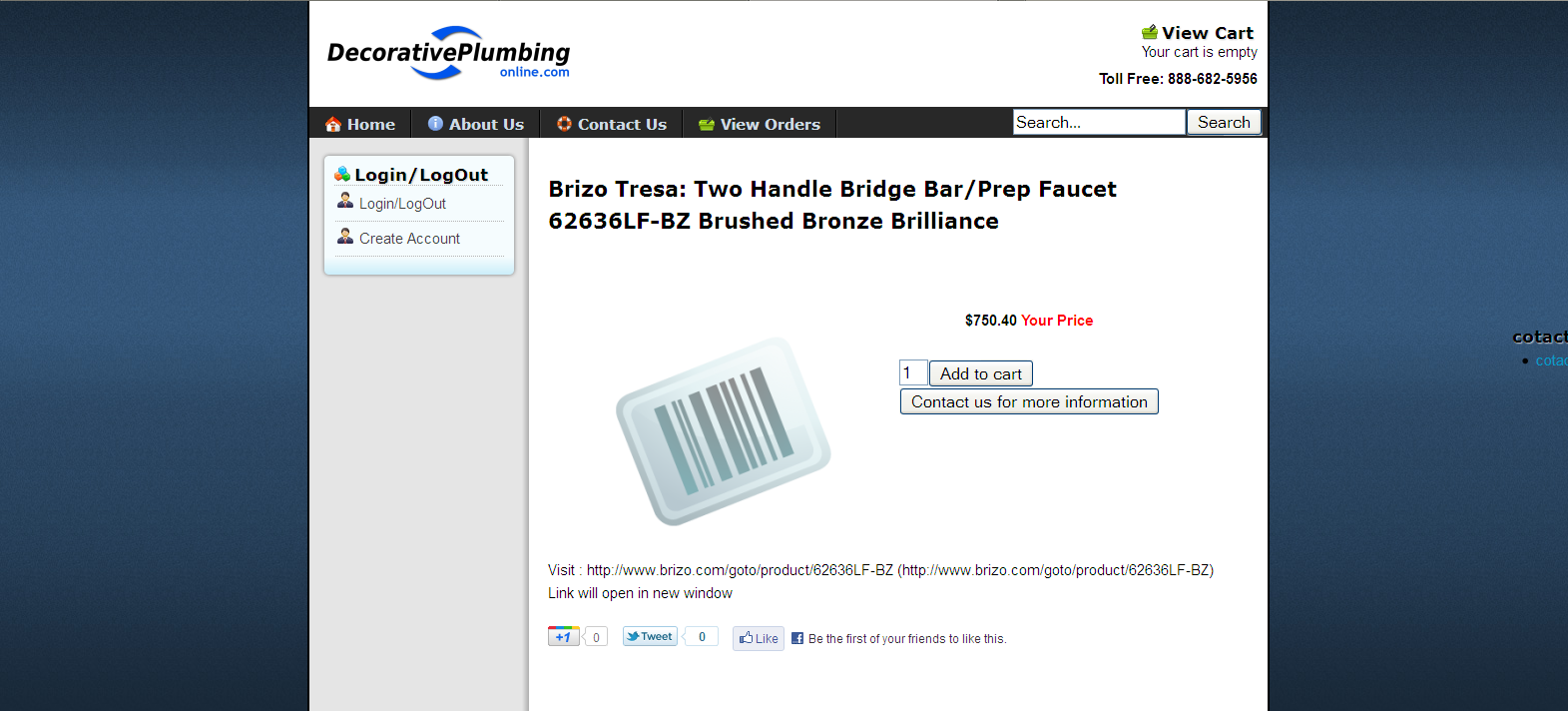
here is url for page testpage
made the change, now page loads, but url show twice, and is not clickable....see image
here is url for page testpage
Last edit: 14 years 11 months ago by plumbingdeals.
Please Log in or Create an account to join the conversation.
14 years 11 months ago #30177
by nicolas
Replied by nicolas on topic Re: Manufacturer URL in pop-up window
It's definitely not good to do that at 3am 
The second line should be:
echo JText::sprintf('MANUFACTURER_URL','<a class="modal" rel="{handler: 'iframe', size: {x: 450, y: 480}}" href="'.$this->element->product_url.'" >'.$this->element->product_url.'</a>');
and not:
echo JText::sprintf('MANUFACTURER_URL','<a class="modal" rel="{handler: 'iframe', size: {x: 450, y: 480}} href="'.$this->element->product_url.'" >'.$this->element->product_url.'</a>');
The second line should be:
echo JText::sprintf('MANUFACTURER_URL','<a class="modal" rel="{handler: 'iframe', size: {x: 450, y: 480}}" href="'.$this->element->product_url.'" >'.$this->element->product_url.'</a>');
and not:
echo JText::sprintf('MANUFACTURER_URL','<a class="modal" rel="{handler: 'iframe', size: {x: 450, y: 480}} href="'.$this->element->product_url.'" >'.$this->element->product_url.'</a>');
Please Log in or Create an account to join the conversation.
- plumbingdeals
-
Topic Author
- Offline
Less
More
- Posts: 223
- Thank you received: 1
14 years 11 months ago #30179
by plumbingdeals
Replied by plumbingdeals on topic Re: Manufacturer URL in pop-up window
so i'm not the only one who works on websites when i should be sleeping
meanwhile, now result is:
Parse error: syntax error, unexpected T_STRING in /home/advplbg/testsite.decorativeplumbingonline.com/templates/jsn_epic_pro/html/com_hikashop/product/show.php on line 204
meanwhile, now result is:
Parse error: syntax error, unexpected T_STRING in /home/advplbg/testsite.decorativeplumbingonline.com/templates/jsn_epic_pro/html/com_hikashop/product/show.php on line 204
Please Log in or Create an account to join the conversation.
14 years 11 months ago #30180
by nicolas
Replied by nicolas on topic Re: Manufacturer URL in pop-up window
Ah yes, it should be: \'iframe\' instead of 'iframe' on that line.
Please Log in or Create an account to join the conversation.
- plumbingdeals
-
Topic Author
- Offline
Less
More
- Posts: 223
- Thank you received: 1
14 years 11 months ago #30187
by plumbingdeals
Replied by plumbingdeals on topic Re: Manufacturer URL in pop-up window
there we go!
you are the best! I made a minor tweak to change size, but otherwise it is perfect!
final result can be seen here:
here is url for page testpage
you are the best! I made a minor tweak to change size, but otherwise it is perfect!
final result can be seen here:
here is url for page testpage
Please Log in or Create an account to join the conversation.
Less
More
- Posts: 102
- Thank you received: 0
14 years 11 months ago #30192
by MinnieMouse
Replied by MinnieMouse on topic Re: Manufacturer URL in pop-up window
can i get in on this??
i would like to show my products in a native popup instead of using a plugin (what i was doing)
so that when you click to see options just a little box appears with the price and quantity and add to cart.
i have already formatted the product page for this.
here is what i did for the call to it
<?php JHTML::_('behavior.modal');
?>
<div id="options"><a href="<?php echo $link;?>" class="modal" rel="{handler: 'iframe', size: {x: 450, y: 480}}">
<?php
echo 'Choose Options';
?>
</a>
</div>
the problem is it opens a page with the whole site template around it and not just the content of that particular product. is ther a way to do this?
thanks, liz
i would like to show my products in a native popup instead of using a plugin (what i was doing)
so that when you click to see options just a little box appears with the price and quantity and add to cart.
i have already formatted the product page for this.
here is what i did for the call to it
<?php JHTML::_('behavior.modal');
?>
<div id="options"><a href="<?php echo $link;?>" class="modal" rel="{handler: 'iframe', size: {x: 450, y: 480}}">
<?php
echo 'Choose Options';
?>
</a>
</div>
the problem is it opens a page with the whole site template around it and not just the content of that particular product. is ther a way to do this?
thanks, liz
Please Log in or Create an account to join the conversation.
14 years 11 months ago #30193
by nicolas
Replied by nicolas on topic Re: Manufacturer URL in pop-up window
You should add &tmpl=component in the URL.
So the line:
$link = hikashop_completeLink('product&task=show&cid='.$this->row->product_id.'&name='.$this->row->alias.$this->itemid.$this->category_pathway);
should be:
$link = hikashop_completeLink('product&task=show&cid='.$this->row->product_id.'&name='.$this->row->alias.$this->itemid.$this->category_pathway.'&tmpl=component');
So the line:
$link = hikashop_completeLink('product&task=show&cid='.$this->row->product_id.'&name='.$this->row->alias.$this->itemid.$this->category_pathway);
should be:
$link = hikashop_completeLink('product&task=show&cid='.$this->row->product_id.'&name='.$this->row->alias.$this->itemid.$this->category_pathway.'&tmpl=component');
Please Log in or Create an account to join the conversation.
Less
More
- Posts: 102
- Thank you received: 0
14 years 11 months ago - 14 years 11 months ago #30194
by MinnieMouse
Replied by MinnieMouse on topic Re: Manufacturer URL in pop-up window
so when i used the plugin and i did this, when you clicked submit it closed that iframe. this doesnt do that. where do i / what do i do with the submit button to cause the window to close on submit?
and preferably take you to the cart page in the main window?
and preferably take you to the cart page in the main window?
Last edit: 14 years 11 months ago by MinnieMouse.
Please Log in or Create an account to join the conversation.
14 years 11 months ago #30205
by nicolas
Replied by nicolas on topic Re: Manufacturer URL in pop-up window
You will have to change the line:
$js = 'window.location = \''.urldecode($url).'\';';
to:
$js = 'window.parent.location = \''.urldecode($url).'\';';
in the file administrator/components/com_hikashop/helpers/cart.php
so that it's the main page which is refreshed.
You could also do that modification with a hikashop_cart_js_render template override as explained in the developer documentation but it's more complicated.
$js = 'window.location = \''.urldecode($url).'\';';
to:
$js = 'window.parent.location = \''.urldecode($url).'\';';
in the file administrator/components/com_hikashop/helpers/cart.php
so that it's the main page which is refreshed.
You could also do that modification with a hikashop_cart_js_render template override as explained in the developer documentation but it's more complicated.
Please Log in or Create an account to join the conversation.
Less
More
- Posts: 102
- Thank you received: 0
14 years 11 months ago #30218
by MinnieMouse
Replied by MinnieMouse on topic Re: Manufacturer URL in pop-up window
okay so those instructions are not that complete for this do i?
templates/YOUR_TEMPLATE/html/hikashop_cart_js_render.php with the code from cart.php but with your alteration from below? do i replace the whole file or just the function in that section of cart.php?
templates/YOUR_TEMPLATE/html/hikashop_cart_js_render.php with the code from cart.php but with your alteration from below? do i replace the whole file or just the function in that section of cart.php?
Please Log in or Create an account to join the conversation.
14 years 11 months ago #30227
by nicolas
Replied by nicolas on topic Re: Manufacturer URL in pop-up window
If you don't know PHP, you should stick with the simple modification I gave. That should already solve your problem.
Please Log in or Create an account to join the conversation.
Less
More
- Posts: 102
- Thank you received: 0
14 years 11 months ago #30229
by MinnieMouse
Replied by MinnieMouse on topic Re: Manufacturer URL in pop-up window
okay i just did it the initial way without the override and it doesn't work. things are added to the cart but the popup doesnt close.
Please Log in or Create an account to join the conversation.
14 years 11 months ago #30233
by nicolas
Replied by nicolas on topic Re: Manufacturer URL in pop-up window
Could you give a link so that we can see what you did ?
Please Log in or Create an account to join the conversation.
Less
More
- Posts: 102
- Thank you received: 0
14 years 11 months ago #30254
by MinnieMouse
Replied by MinnieMouse on topic Re: Manufacturer URL in pop-up window
sorry, didnt get notified that you wrote back.
www.dnbsandbox.com/markethall/pasta-shop...ping/product/listing
click any item to choose options and the product->show page opens then submit it to the cart and you will see it--well, not happening
www.dnbsandbox.com/markethall/pasta-shop...ping/product/listing
click any item to choose options and the product->show page opens then submit it to the cart and you will see it--well, not happening
Please Log in or Create an account to join the conversation.
14 years 11 months ago #30302
by nicolas
Replied by nicolas on topic Re: Manufacturer URL in pop-up window
Please turn off the option "Use AJAX when possible for add to cart buttons" in the configuration and try again.
Please Log in or Create an account to join the conversation.
Less
More
- Posts: 102
- Thank you received: 0
14 years 11 months ago - 14 years 11 months ago #30343
by MinnieMouse
Replied by MinnieMouse on topic Re: Manufacturer URL in pop-up window
thank you that did it!!
[EDIT] sorry, almost did it. now the ajax that controls the variation name doesnt work. so if you pick a variation/characteristic... it should change the title.. and then put the right one in the cart. now it doesnt do that.
L
[EDIT] sorry, almost did it. now the ajax that controls the variation name doesnt work. so if you pick a variation/characteristic... it should change the title.. and then put the right one in the cart. now it doesnt do that.
L
Last edit: 14 years 11 months ago by MinnieMouse.
Please Log in or Create an account to join the conversation.
Time to create page: 0.212 seconds