
- Posts: 164
- Thank you received: 0
check out order - address
- Rollerskate
-
 Topic Author
- Offline
Less
More
14 years 11 months ago #30370
by Rollerskate
check out order - address was created by Rollerskate
I seem to have messed up my checkout process order. When I attempt to checkout a cart on my site and hit "next" it doesn't give me the address fields. The click and drag things for the advanced work flow are a bit confusing, at least to me.
Please help
www.therollerskate.com/photos/all-photos...ct/1-orange-hawkweed
Please help
www.therollerskate.com/photos/all-photos...ct/1-orange-hawkweed
Please Log in or Create an account to join the conversation.

14 years 11 months ago #30393
by nicolas
Replied by nicolas on topic Re: check out order - address
What is your checkout workflow ?
Could you do a screenshot maybe ?
Make sure that if you use the "address" view, you also have the "login" view as they work together.
Could you do a screenshot maybe ?
Make sure that if you use the "address" view, you also have the "login" view as they work together.
Please Log in or Create an account to join the conversation.
- Rollerskate
-
Topic Author
- Offline
Less
More
- Posts: 164
- Thank you received: 0
14 years 11 months ago #30450
by Rollerskate
Replied by Rollerskate on topic Re: check out order - address
Ok, I put "Login" back in, as I stupidly removed it.
However, the reason I removed it was because it says "register" when filling out that form. And I purchased this version of Hikashop so that people wouldn't have to register.
So... I suppose my issue is just with the wording and which fields are being required, like the phone number. Is there a way I can change those?
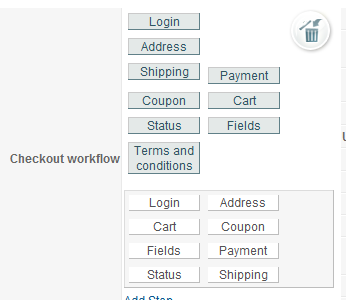
However, the reason I removed it was because it says "register" when filling out that form. And I purchased this version of Hikashop so that people wouldn't have to register.
So... I suppose my issue is just with the wording and which fields are being required, like the phone number. Is there a way I can change those?
Please Log in or Create an account to join the conversation.
14 years 11 months ago #30452
by nicolas
Replied by nicolas on topic Re: check out order - address
Sure, the wording can easily be changed. You just need to override your translation file:
www.hikashop.com/en/download/languages.html#modify
www.hikashop.com/en/download/languages.html#modify
Please Log in or Create an account to join the conversation.
- Rollerskate
-
Topic Author
- Offline
Less
More
- Posts: 164
- Thank you received: 0
14 years 11 months ago #30460
by Rollerskate
Replied by Rollerskate on topic Re: check out order - address
Awesome, that WAS super easy!
Ok, so, now, here's a more complicated question.
My fields for the shipping address are all on the left, leaving a lot of space on the right for...whatever.
Is there a way I could move the payment and shipping options over there?
Ok, so, now, here's a more complicated question.
My fields for the shipping address are all on the left, leaving a lot of space on the right for...whatever.
Is there a way I could move the payment and shipping options over there?
Please Log in or Create an account to join the conversation.
14 years 11 months ago #30462
by nicolas
Replied by nicolas on topic Re: check out order - address
Just change the order of your views in the checkout workflow option of the configuration.
Please Log in or Create an account to join the conversation.
- Rollerskate
-
Topic Author
- Offline
Less
More
- Posts: 164
- Thank you received: 0
14 years 11 months ago #30469
by Rollerskate
Replied by Rollerskate on topic Re: check out order - address
Hm, I tried that, and it didn't seem to work.
Please Log in or Create an account to join the conversation.
14 years 11 months ago #30483
by nicolas
Replied by nicolas on topic Re: check out order - address
If you have a hard time figuring out the interface for that, you can turn off the option "Advanced checkout workflow edition" and that will display the old interface for the checkout workflow thzat you can modify by following the documentation:
www.hikashop.com/en/support/documentatio...config.html#checkout
www.hikashop.com/en/support/documentatio...config.html#checkout
Please Log in or Create an account to join the conversation.

14 years 11 months ago #30499
by DaveSkye
Replied by DaveSkye on topic Re: check out order - address
Hey
I am trying to adjust the look of the registration form. How can I change the length of the Counties and Region dropdown box?? See attached pic.
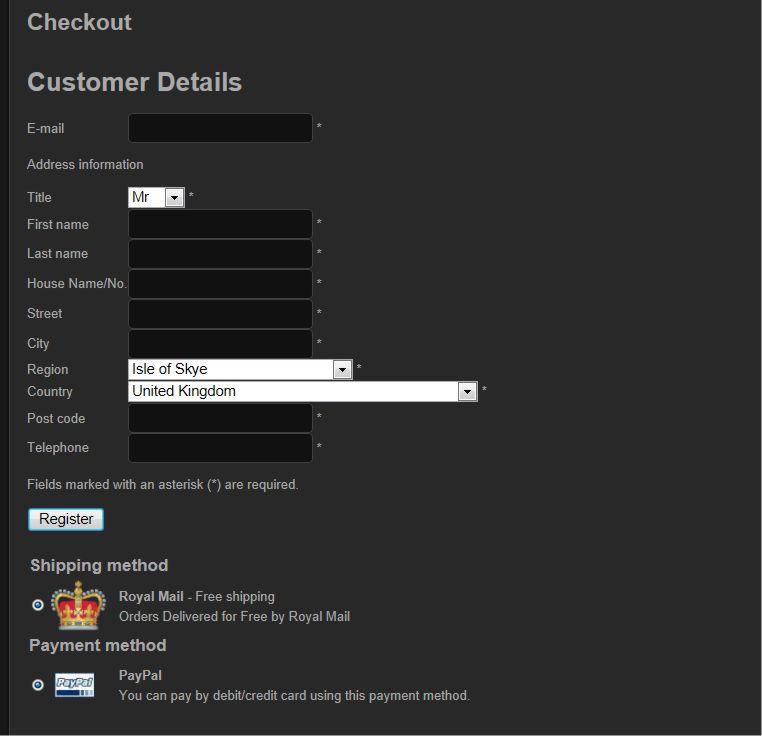
I am trying to adjust the look of the registration form. How can I change the length of the Counties and Region dropdown box?? See attached pic.
Please Log in or Create an account to join the conversation.
14 years 11 months ago #30500
by DaveSkye
Replied by DaveSkye on topic Re: check out order - address
Sorry - Posted this in the wrong place!! - Still looking for anwers though!
Please Log in or Create an account to join the conversation.
- Rollerskate
-
Topic Author
- Offline
Less
More
- Posts: 164
- Thank you received: 0
14 years 11 months ago #30501
by Rollerskate
Replied by Rollerskate on topic Re: check out order - address
Well, just an idea, but those boxes are usually as long as the longest thing in it. Maybe you got a really long named country way down there somewhere.
Please Log in or Create an account to join the conversation.
14 years 11 months ago #30518
by nicolas
Replied by nicolas on topic Re: check out order - address
You can just add the CSS below (in the config under the tab display via the CSS edition interface) to reduce the width of the dropdown:
#address_country{ width: 150px }
#address_state{ width: 150px }
#address_country{ width: 150px }
#address_state{ width: 150px }
Please Log in or Create an account to join the conversation.
Time to create page: 0.368 seconds