

- Posts: 11
- Thank you received: 0
Characteristic name in additional dropdown
14 years 10 months ago #30474
by fotor
Characteristic name in additional dropdown was created by fotor
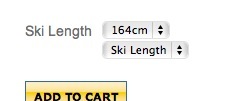
I have size characteristics set up in a dropdown working correctly but there is an additional dropdown with the characteristic name just below. I have tried changing all the display settings to get rid of this to no avail. There is only one characteristic set in the product so I don't know where it is coming from.
Thanks for any help.
Thanks for any help.
Please Log in or Create an account to join the conversation.

14 years 10 months ago #30488
by nicolas
Replied by nicolas on topic Re: Characteristic name in additional dropdown
Could you give the URL of that page ? That way we would be able to tell you from where it comes.
Please Log in or Create an account to join the conversation.
14 years 10 months ago #30491
by fotor
Replied by fotor on topic Re: Characteristic name in additional dropdown
nicolas wrote:
Sure, still a work in progress but thanks for looking.
snoday.ca/hikashop-menu-for-module-169/p...gory_pathway-12.html
Could you give the URL of that page ? That way we would be able to tell you from where it comes.
Sure, still a work in progress but thanks for looking.
snoday.ca/hikashop-menu-for-module-169/p...gory_pathway-12.html
Please Log in or Create an account to join the conversation.
14 years 10 months ago #30492
by nicolas
Replied by nicolas on topic Re: Characteristic name in additional dropdown
It seems that some data is off with the characteristics of that product. Please do that and it should solve the problem:
1. Delete all the variants of the product on the listing of variants that you can access via the button "manage variants" on the product edition screen.
2. Delete the characteristics of the product.
3. Save the product.
4. Add the characteristics again.
5. The system will regenerate all the variants automatically and you should be able to see the dropdowns properly on the front end.
1. Delete all the variants of the product on the listing of variants that you can access via the button "manage variants" on the product edition screen.
2. Delete the characteristics of the product.
3. Save the product.
4. Add the characteristics again.
5. The system will regenerate all the variants automatically and you should be able to see the dropdowns properly on the front end.
Please Log in or Create an account to join the conversation.
14 years 10 months ago #30496
by fotor
Replied by fotor on topic Re: Characteristic name in additional dropdown
That seems to work. Thanks very much!
Unfortunately, when I delete all the variants, the product itself is also deleted so that means I have to build it again. But likely the only way, I guess...
Unfortunately, when I delete all the variants, the product itself is also deleted so that means I have to build it again. But likely the only way, I guess...
Please Log in or Create an account to join the conversation.
14 years 10 months ago #30515
by nicolas
Replied by nicolas on topic Re: Characteristic name in additional dropdown
That should not be the case but anyway, as you said, it doesn't change much.
Please Log in or Create an account to join the conversation.
Time to create page: 0.210 seconds