

- Posts: 26
- Thank you received: 0
Image size in Product page
14 years 10 months ago #30765
by bal3nsd
Image size in Product page was created by bal3nsd
Hello again 
I've been searching the forum for a solution to resizing the image on the product page. I read post that were similar but not exactly what I was looking for.
How do I adjust the image size for a Product page. They seem to come out in thumbnail size.
JK
I've been searching the forum for a solution to resizing the image on the product page. I read post that were similar but not exactly what I was looking for.
How do I adjust the image size for a Product page. They seem to come out in thumbnail size.
JK
Please Log in or Create an account to join the conversation.

14 years 10 months ago #30784
by nicolas
Replied by nicolas on topic Re: Image size in Product page
Hi,
You can do like that:
www.hikashop.com/en/support/forum/4-how-...ct-images.html#30656
By default, the image on the product page and the products listing is the same size but you can change the size of both as explained in that thread.
You can do like that:
www.hikashop.com/en/support/forum/4-how-...ct-images.html#30656
By default, the image on the product page and the products listing is the same size but you can change the size of both as explained in that thread.
Please Log in or Create an account to join the conversation.
14 years 10 months ago #30813
by bal3nsd
Replied by bal3nsd on topic Re: Image size in Product page
thanks, but I would like to keep the same size thumbnail for the listing, but when someone chooses that item then it goes to the product page, I'd like to have the Main Image larger. I was able to set the size of the "child" images to the size I wanted but have difficulties with Main Image. While looking thru documentation I came up this:
For the product page : #hikashop_main_image img {width: XXXpx !important; height: YYYpx !important; }
I've tried pasting this within the "frontend_default.css" but did not work. I am new to this, so i thank you in advance with your patience. Can you direct me to which flle I insert this code?
JK
For the product page : #hikashop_main_image img {width: XXXpx !important; height: YYYpx !important; }
I've tried pasting this within the "frontend_default.css" but did not work. I am new to this, so i thank you in advance with your patience. Can you direct me to which flle I insert this code?
JK
Please Log in or Create an account to join the conversation.
14 years 10 months ago #30839
by nicolas
Replied by nicolas on topic Re: Image size in Product page
You should not use any CSS.
By default the listings images use the same thumbnails size options. However, you can go in the menu Display->Content menus/modules and set a different size for the images of the listing in each one of your menus/modules and it will then be independent of the thumbnails size you set in the configuration.
By default the listings images use the same thumbnails size options. However, you can go in the menu Display->Content menus/modules and set a different size for the images of the listing in each one of your menus/modules and it will then be independent of the thumbnails size you set in the configuration.
Please Log in or Create an account to join the conversation.
14 years 10 months ago #31138
by bal3nsd
Replied by bal3nsd on topic Re: Image size in Product page
Thanks! Was able to get it the way I wanted! Appreciate all your help.
JK
JK
Please Log in or Create an account to join the conversation.

14 years 7 months ago #39650
by Biird
Replied by Biird on topic Re: Image size in Product page
I want to enlarge the image on the product page without loosing the tumbnailsize in the product-overvieuw/listing.
I understand i could enlarge the size of all thumnails trough System-> Configurations -> Files.
And then give a maximum size in the display -> contentmenu/module so on that places the images would be small again..
Am i getting this?
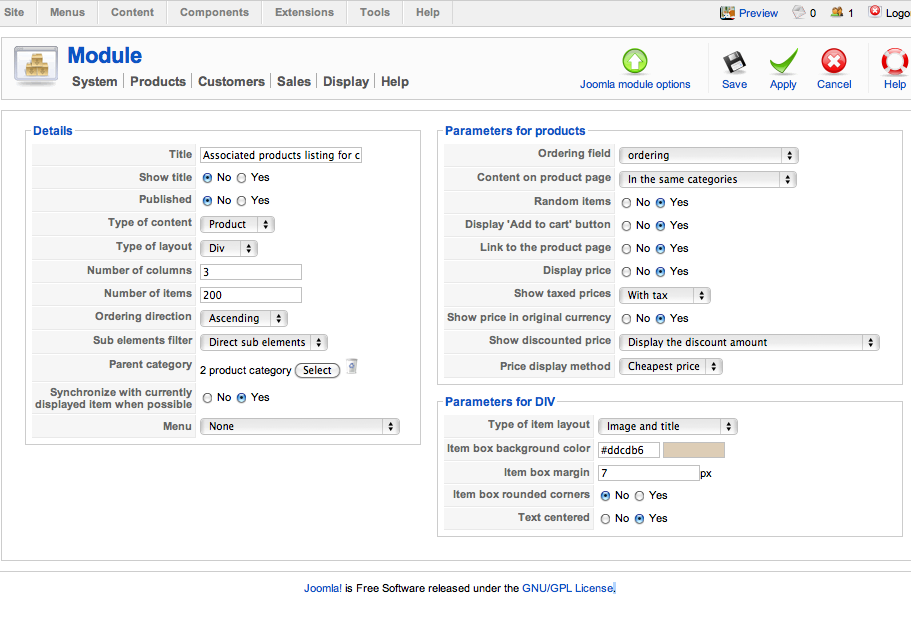
Now my question.. i have no place in the content module or menu to do this? :S
(see screenshot)
Can you help me out? (And maybe make one short 'How To' for everyone who is struggling with this over and over again :blush: )
I understand i could enlarge the size of all thumnails trough System-> Configurations -> Files.
And then give a maximum size in the display -> contentmenu/module so on that places the images would be small again..
Am i getting this?
Now my question.. i have no place in the content module or menu to do this? :S
(see screenshot)
Can you help me out? (And maybe make one short 'How To' for everyone who is struggling with this over and over again :blush: )
Please Log in or Create an account to join the conversation.
14 years 7 months ago #39833
by nicolas
Replied by nicolas on topic Re: Image size in Product page
Hi,
Please use the latest version of HikaShop. With it, in the Files tab of the configuration, you can setup the size for thumbnails and for the image on the product page.
Please use the latest version of HikaShop. With it, in the Files tab of the configuration, you can setup the size for thumbnails and for the image on the product page.
Please Log in or Create an account to join the conversation.
Time to create page: 0.224 seconds